

If you’re not getting Google reviews, the issue is usually simple: you’re not asking in a set way, at the right time, with a direct link.
I’d boil the whole article down to this:
That matters because 98% of people read online reviews before choosing a local business, and same-day review requests can get about 38% response, while a request sent two weeks later may get only 2%. In other words: the gap usually isn’t service quality. It’s a weak or missing process.
I also see the same problems over and over:
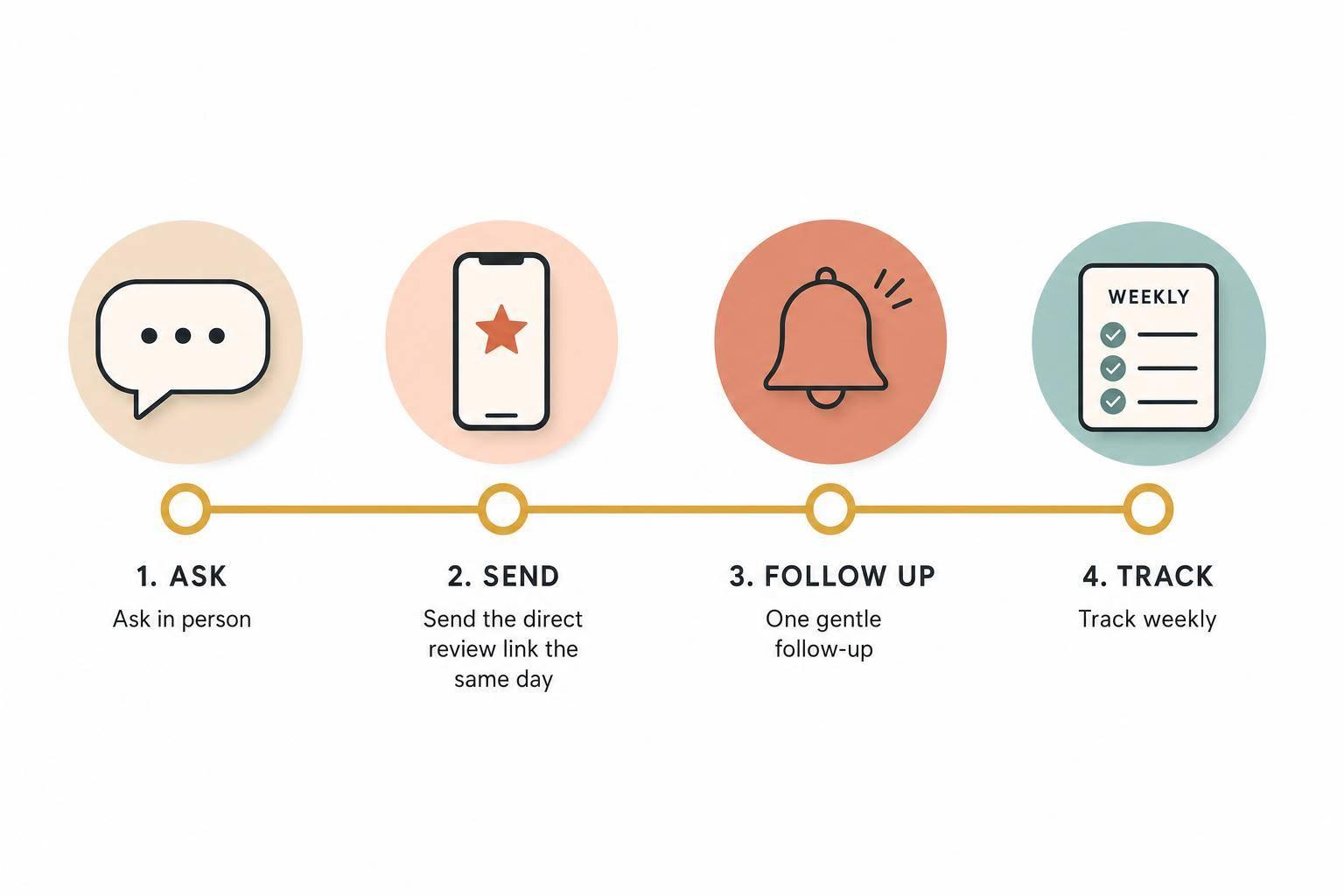
The fix is not to work harder. It’s to make the ask part of the job: ask, send link, follow up once, repeat weekly.
That’s the full idea in plain English. The rest of the article just shows how to put that into your day-to-day routine.
The drop-off usually happens after the customer experience is over. That’s where things start slipping. The ask never turns into a repeatable system.
Most of the time, the problem isn’t that customers don’t want to leave a review. It’s much simpler than that: the process is shaky. There’s no set moment to ask, no steady follow-up, and no easy link to click.
If the ask isn’t immediate and simple, people move on. Life gets busy. They forget. On top of that, many customers think writing a review will take 5 to 10 minutes, when in many cases it takes about 30 seconds [2].
Weak review requests tend to fail for two plain reasons:
That delay matters. So do extra steps. If a customer has to look up the business on their own, 40–50% quit before finishing [2]. That’s a big leak for something so small.
A weak ask usually shows up in one of three ways: a casual mention at the end of a job, a review link hidden somewhere on the website, or a follow-up email that lands days later, long after the moment has passed.
Each one adds friction.
The verbal mention sounds fine in the moment, but there’s nothing to back it up. The website link makes the customer hunt for it. The delayed email arrives after the emotional high point of the service is gone. And once that feeling fades, action usually fades with it.
Every extra click, delay, or vague instruction makes the process weaker. It’s like carrying water in a bucket with holes in it.
The fastest way to spot the issue is to walk through your request flow step by step. These questions make the weak points pretty obvious:
Any “no” is the break in the system. Once you see where it breaks, you know what to fix.
There’s one simple system that works again and again: ask in person, send the link the same day, and follow up once [1][9][3][4].
The key part is when you ask. The channel matters, sure, but timing does most of the heavy lifting.
Ask right at handoff or the moment the customer confirms they’re happy. That timing makes a huge difference. Same-day review requests get a 38% response rate, compared to only 2% when the request is sent two weeks later [8].
The timing shifts a bit depending on the business, but the rule stays the same: ask at handoff.
| Business Type | Best Moment to Ask |
|---|---|
| Home Services / Trades | At the final walkthrough, when the customer says "looks great" |
| Retail / Salon | When a compliment is offered or at handoff |
| Restaurant / Café | When dropping the check or handing back the payment card |
| Professional Services | Right after completion or payment |
After you’ve confirmed satisfaction in person, send a text or email with a direct link within 1–4 hours [1][9]. If no review comes in after 3–5 days, send exactly one follow-up reminder [3][4][9].
Once you’ve nailed the timing, stick with the same script every time.
Keep it short. Keep it natural. Don’t make it sound like a legal notice or a sales pitch.
Here are ready-to-use scripts for common situations:
In person (home services): "Alright [Name], you're all set. One quick favor: we're a small shop and Google reviews are how people find us. If you've got 30 seconds, would you mind leaving us one? I'll text you a link right now so it's easy." [10][11]
Text (standard follow-up): "Hi [Name], it's [Your Name] from [Business]. Thanks again for the work today! If you have 30 seconds, a quick Google review really helps our small business: [Link]. No worries if not!" [10][11]
Email (B2B or longer projects): "Subject: Quick favor, [Name]. We wrapped up the [Project] at [Property] yesterday. We're trying to grow our commercial side and Google reviews are how facility managers find us. If you've got two minutes, would you leave a quick review? A sentence on how the project went is plenty. [Link]" [10]
One thing to avoid: phrases like "only if you had a great experience" or "only leave a review if you were happy". That kind of conditional ask is treated as deceptive under the FTC's Consumer Reviews Rule [10][5].
Make the path dead simple. Use a direct Google review URL that opens the review dialog box in one tap. Businesses that include a direct review link in their requests see 68% higher completion rates [1][3][6].
To get that link, open your Google Business Profile dashboard and click "Ask for reviews." Copy the URL and save it in your text templates, CRM, and phone shortcuts so any staff member can send it in seconds [4][12].
You should also use that same link in physical places customers already touch, like:
Turn the link into a QR code and add one clear line: "Happy with our work? Scan to leave a quick Google review." [8][3][6] That small move can pay off fast. A Memphis pizza shop printed QR codes on takeout packaging and nearly tripled reviews in 60 days [13].
Use the same link in every ask, every follow-up, and every printed touchpoint.
Once this is in place, the next move is to assign ownership and check results each week.
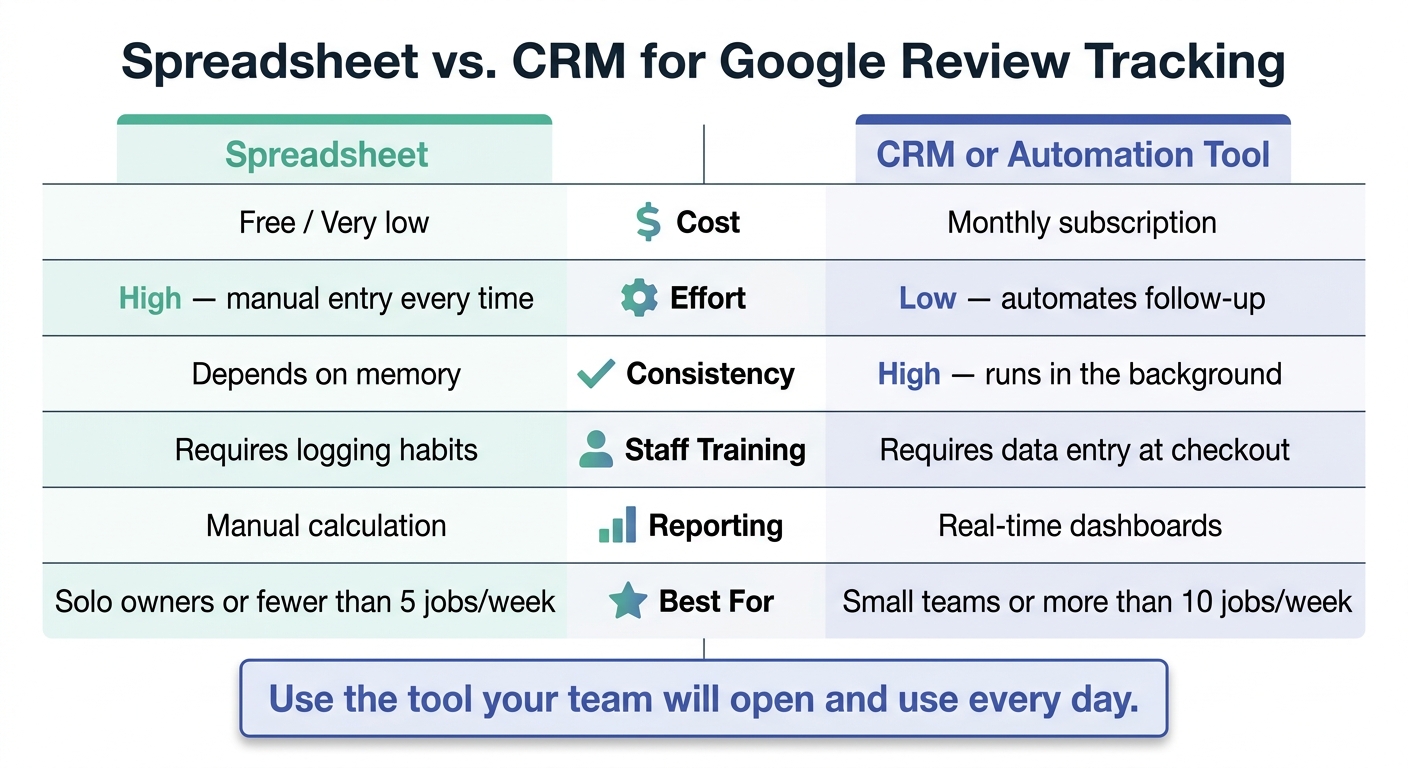
Spreadsheet vs. CRM for Google Review Tracking: Which Is Right for You?
Once the ask is built in, turn it into a weekly habit. This only works when one person clearly owns it each week.
Split the work into three lanes so nothing gets missed.
The owner or manager handles the one-time setup: set the weekly target. A good goal is 2–3 new reviews per week. It’s small enough to hit on a steady basis, but still enough to move your review count over time [8][7].
The staff member who finishes the job handles the verbal ask. That means asking at the handoff moment, right when the customer says they’re happy. Then confirm the customer’s preferred contact method and send the review link before leaving the job site or closing out the sale.
The admin or office team logs the request and sends one reminder if no review comes in after 3–5 days [1][7].
Then track every ask so you can see what’s happening, not just what you hope is happening.
You don’t need anything fancy. A five-field log is enough:
Set aside a couple of minutes every Monday morning to open your Google Business Profile, count new reviews from the prior week, and write that number down. That weekly count tells you if the process is being followed. If the number drops, first check whether the team stopped asking or whether the timing changed [14][7].
Track review count every week so you can spot drops fast.
Both can work. The better fit comes down to how many jobs you handle and how many people are involved.
| Feature | Spreadsheet | CRM or Automation Tool |
|---|---|---|
| Cost | Free / Very low | Monthly subscription |
| Effort | High - manual entry every time | Low - automates follow-up |
| Consistency | Depends on memory | High - runs in the background |
| Staff Training | Requires logging habits | Requires data entry at checkout |
| Reporting | Manual calculation | Real-time dashboards |
| Best For | Solo owners or fewer than 5 jobs per week | Small teams or more than 10 jobs per week |
Use the tool your team will open and use every day. That’s the part that counts.
Pick the simplest setup your team will stick with every week.
If your weekly system is already in place, what’s left is consistency. Your customers aren’t the issue. The issue is the missing ask.
Most businesses don’t have a review request built into their process. They leave reviews to chance. So the gap usually isn’t customer satisfaction. It’s the lack of a system.
The fix isn’t more hustle. It’s a repeatable ask.
Pick one trigger point. Write one short template that uses the customer’s first name and includes a direct review link. Then use a link that opens the review box in one tap. Track every ask so the process stays steady week after week.
Ask in person, send the link, and follow up once. Simple ask. Direct link. Weekly repetition. Pick your trigger, send the link, and ask every week.
Usually, the problem isn’t intent. People do plan to leave a review. Then the day moves on, something else pops up, and the moment slips away.
That’s why verbal promises aren’t enough. Make it easy: send a direct review link by text or email within 24 hours. The whole process should take under 30 seconds. If they still don’t respond, send one polite follow-up reminder and leave it there.
Yes - ask every happy customer for a review.
That’s how you make your review profile look more like your actual customer satisfaction, instead of being shaped by the loudest people - whether they’re thrilled or upset.
A simple way to make this stick:
The fastest way is to sign in to your Google Business Profile and search for your business on Google. In the management panel, click Ask for reviews or Get more reviews to generate a link you can copy and share.
You can also make the link by hand. Find your Place ID with Google’s Place ID Finder, then add it to the review link format. Before you send it out, test the link on a mobile device first.
Discover strategies to elevate your business.


