

There is no magic review number. If you want to rank in Google’s Map Pack, I’d look at the top 3 businesses in my area and use their review counts, ratings, and review pace as the target.
Here’s the short version:
A simple way to set a goal:
| What matters | What to do |
|---|---|
| Review count | Match local competitors, not national averages |
| Star rating | Stay at 4.5+ if possible |
| Review pace | Keep new reviews coming each month |
| Review replies | Reply to every review |
| Other ranking signals | Check category, distance, NAP, and profile setup |
If I already have as many reviews as nearby competitors and still miss the Map Pack, the problem is probably not the total review count.
There’s no magic review count that puts you in the Map Pack. What matters more is which review signals Google sees and how they line up with your profile.
Google ranks local businesses based on relevance, distance, and prominence. Reviews mostly shape prominence - in plain English, how established and trusted your business looks online. So yes, review count plays a part. But Google also looks at freshness, wording, star rating, and whether you reply.
Google looks through review text for service terms and location terms. When reviews mention a specific service or city, they can strengthen relevance. They can also trigger bold review snippets under a Map Pack listing when the wording matches the search [9][2].
The main signals to watch are:
A business with more reviews can still rank below a competitor that’s closer to the searcher, uses a more precise primary category, or has a stronger Google Business Profile overall.
"More reviews nudge you up a little, but the effect is small and gets swamped by proximity and relevance. Plenty of businesses rank #1 with a handful of reviews because they are simply the closest, best-matched option." - Jerod Johnson, Get Found Guy [1]
Once you get to about 250 reviews, freshness and response rate often matter more than raw volume [8].
If reviews still aren’t enough, the next move is to compare your profile with local competitors.
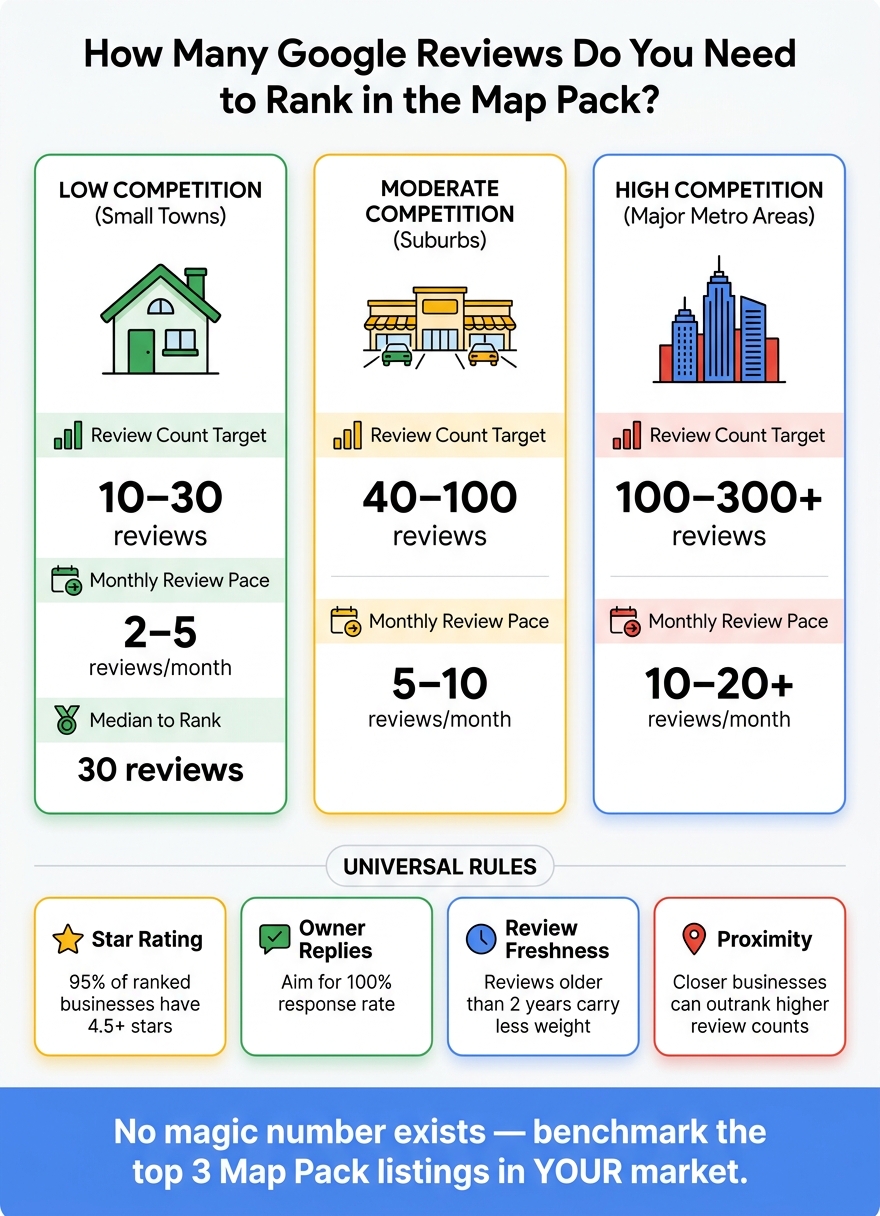
Google Map Pack Review Benchmarks by Market Type
The next step is turning that idea into a local goal.
Skip national averages. Your target should come from the businesses already ranking above you in your market.
"The number that matters isn't absolute, it's relative to whoever is currently outranking you." - Kevin Reed, Product and Automation Specialist, Flento [4]
Market size and trade category both shape the review count you’ll need. In a June 2026 study of 453 businesses, the median review count to rank in a small town was 30, compared with 96 in a large suburb [1].
Use these ranges as a starting point before you look at your own search results:
| Market Type | Review Count Target | Monthly Review Pace |
|---|---|---|
| Low competition (small towns) | 10–30 reviews [1][12] | 2–5 reviews/month [4] |
| Moderate competition (suburbs) | 40–100 reviews [4][12] | 5–10 reviews/month [4] |
| High competition (major metro areas) | 100–300+ reviews [6][5] | 10–20+ reviews/month [4] |
These numbers are benchmarks, not promises. What matters most is what’s ranking in your ZIP code right now. In that same data set, 95% of ranked businesses kept a star rating of 4.5 or higher [1].
Open an incognito browser window and search your main keyword, like "plumber near me" or "family dentist in Dallas, TX", from your business’s ZIP code. Write down the review count, star rating, and date of the most recent review for each of the top 3 listings. Then find the median review count across those three profiles.
Match that median. If you want a stronger goal, aim 20% above it [4].
Then check how many reviews each competitor got in the last 90 days by sorting reviews by newest first. Divide that number by three to get their monthly review pace. That number matters more than many business owners think. Recent reviews often carry more weight than a big lifetime total [3][4].
Take your review gap and divide it by six. That gives you a six-month monthly goal. The point isn’t to chase some random total. It’s to outpace the competitors you want to pass.
If you’re starting from zero, don’t go straight after the top player. First, close the gap with the weakest business in the current top 3. Across most trades, that weakest listing has a median of just 20 reviews [1]. That’s a much more doable place to start.
If your profile still sits behind the top 3 after that, the gap is probably coming from other ranking factors.
If you’ve caught up to your competitors on review count and you’re still not showing up in the Map Pack on a steady basis, reviews probably aren’t the main problem.
Reviews matter. But they’re only one piece of Local Pack visibility.
So if you’ve hit the same review range as nearby competitors and you still miss the Map Pack, look at the other signals below.
Start with your primary category field. Pick the most specific primary category for your main service. A broad category like "Home Improvement" can hurt rankings. You want the closest match to what you actually do.
Proximity is another factor that reviews can’t beat. A competitor with fewer reviews but an address closer to the searcher will often rank above you for searches in that area [1][13].
The four checks that usually matter most are:
Before you spend more time asking for reviews, check the top 3 Map Pack listings.
Open an incognito browser window. Search for your main service and city. Then compare your business with the top 3 results using the table below.
| Status Check Item | Your Business | Competitor Average | Status (Gap?) |
|---|---|---|---|
| Last 10 Reviews Date Range | [Insert Dates] | [Insert Dates] | |
| Primary Category | [Insert Category] | [Insert Category] | |
| Profile Completeness | [Insert %] | [Insert %] | |
| NAP Consistency | [Insert Status] | [Insert Status] |
If your primary category doesn’t match what the top 3 are using, fix that first.
If your last 10 reviews are all older than 90 days, your gap is velocity, not volume. Recent reviews can outweigh a bigger but stale total [7].
Aim for a 100% complete profile.
Then work on the weakest signal first. That’s usually where the easiest win is hiding.
Use a spreadsheet or GBP tracker to log:
That gives you a simple way to see whether you’re gaining or losing ground on the signals that matter most.
There’s no magic review number. The better move is to compare your review count with the businesses already outranking you in your market. Start by benchmarking the top three Map Pack listings for your main search terms.
Reviews matter, but they’re only one ranking signal. If you already have more reviews than nearby competitors and still aren’t ranking, check other parts of the puzzle: your Google Business Profile, primary category, NAP consistency, and website authority. Once your review count matches or beats nearby competitors, put more attention on profile quality and local authority.
Search for your main service plus your city, note the review counts and ratings of the top three Map Pack results, and set a monthly pace that closes the gap in 6–12 months [11][4]. Aim for parity first, then push to 10% to 20% above the strongest competitor. Consistent new reviews beat a one-time surge. That’s the simplest path to better Map Pack visibility over time.
There’s no fixed timeline here. In most cases, reviews affect Map Pack rankings more through steady review velocity than through any one review on its own.
Google sees recent reviews as a signal that your business is active and relevant. Older reviews still count, but they tend to matter less as time passes. That’s why a business that earns new reviews on a regular basis can outrank a competitor with more total reviews but no recent feedback.
Yes. Bad reviews can hurt Map Pack visibility.
There isn't a single cutoff that applies to every business. But in competitive searches, companies with an average rating below 4.0 often have a harder time showing up well, even if they have lots of reviews.
A higher star rating sends a strong prominence signal. So a business with fewer reviews but better ratings can outrank one with more reviews and lower scores.
Replying to negative reviews can also help. It shows people you're paying attention, helps protect trust signals, and can soften some of the damage from poor feedback.
If your review count is already high, stop chasing a bigger total. Put your attention on review velocity and consistency instead. A steady stream of new reviews sends a stronger signal than a huge backlog that hasn’t changed in months.
Take a look at your top three competitors and track how many reviews they get each month. Then aim to match that pace or come in a little ahead.
At the same time, keep your local SEO basics in good shape. That means:
A strong review flow works best when the rest of your local presence is dialed in too.
Discover strategies to elevate your business.


