


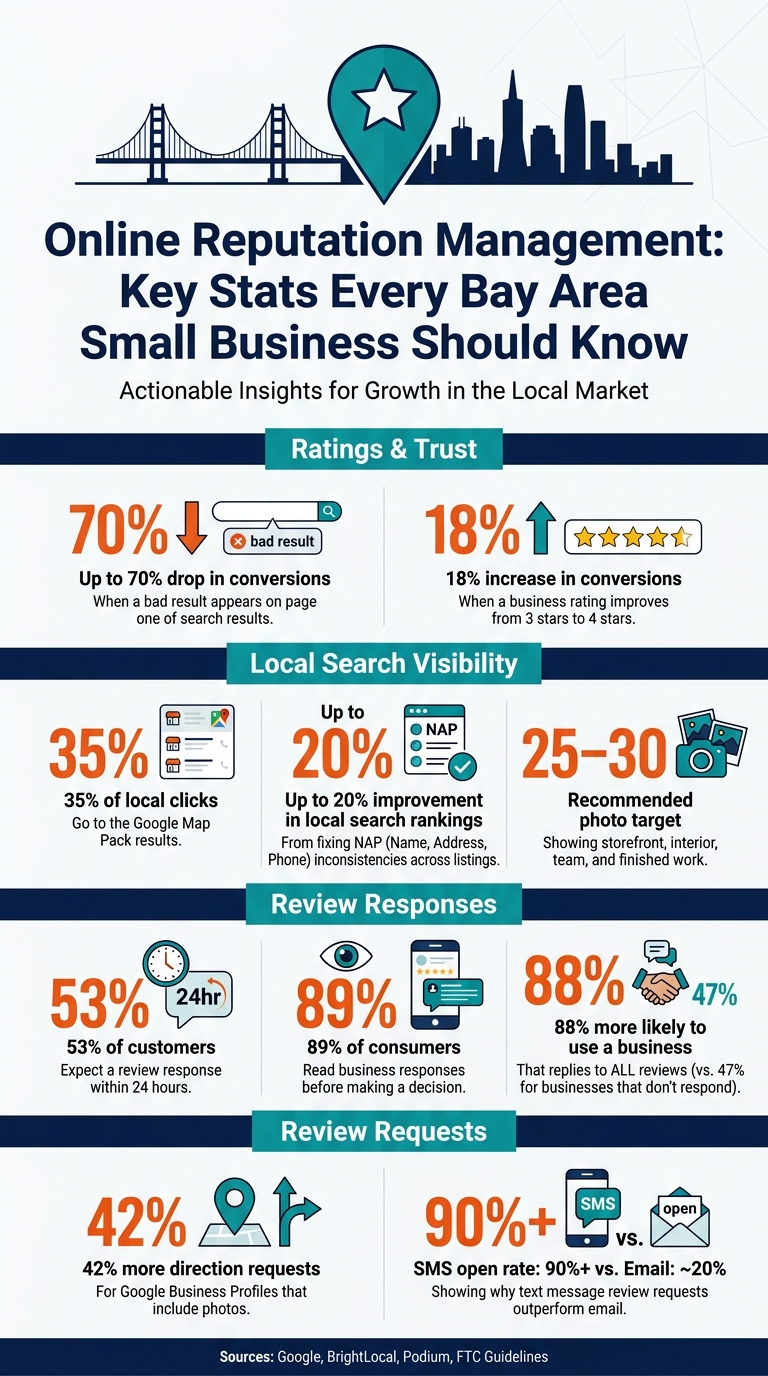
Your online reputation can win or lose the call before you ever speak to a customer. If a bad result shows on page one, conversions can drop by up to 70%. And if your rating moves from 3 stars to 4 stars, conversions can increase by 18%.
If I had to boil this guide down to a few steps, it would be this:
Here’s the big picture in plain English: review signals affect local rankings, the Google Map Pack gets about 35% of local clicks, and 53% of customers expect a review response within 24 hours. That means this work affects both how often people find you and whether they trust you enough to call.
A few points stand out from the article:
I’d sum up the article this way: keep your listings correct, make review replies part of your week, and treat reputation like a simple business habit instead of a one-time fix.
Online Reputation Management: Key Stats Every Bay Area Small Business Should Know
Managing your reputation is a key part of a comprehensive SEO strategy for small businesses looking to dominate local search results.
Start with the places buyers check first: search results, map listings, and review sites. Search for your business the same way a customer would: your business name, then your service plus your neighborhood. Look through the first two pages and note your Map Pack position, any rating gap between you and nearby competitors, and any old or off-base results.
In a crowded Bay Area market, even small listing mistakes can send someone to the next option. Google’s AI review summaries can also show up in the Map Pack, so it’s worth checking which reviews those summaries pull from [6][4].
Review your Google Business Profile, Yelp, and Facebook listings for the basics: business name, address, phone number, hours, categories, photos, Q&A, and reviews. Then go a step deeper based on your field. That could mean checking sites like OpenTable, Angi, Thumbtack, HomeAdvisor, or Healthgrades.
On each platform, look for four specific problems:
A duplicate listing means two entries for the same business on the same platform. That can split your review count and confuse both customers and search engines.
Also check your Google Business Profile Q&A section. If customers have asked questions and no one answered them, that’s a public gap. If there aren’t any questions yet, add your own FAQs so common concerns are answered up front. Write down every issue so you can fix the ones with the biggest effect first.
Track everything in a spreadsheet, with one row per platform and one column per metric. That makes it easier to see what needs to be corrected, answered, or updated first. Here’s what to log and why it matters:
| Audit Category | What to Record | Why It Matters |
|---|---|---|
| NAP Accuracy | Name, Address, Phone - exactly | Even "St." vs. "Street" can reduce search engine trust [7][4] |
| Review Health | Star rating, total count, date of most recent review | Helps you see whether your business looks active and trustworthy |
| Review Velocity | Number of new reviews per month | A stale review profile can make a business look inactive [6] |
| Response Rate | % of reviews with an owner reply | 89% of consumers read business responses before deciding [2] |
| Sentiment Themes | Top 3 praise topics, top 3 complaint topics | Shows patterns in how the business is running, not just how people feel about it [7][3] |
| Visual Content | Photo count, quality, recency | Profiles with photos get 42% more direction requests [4] |
Flag any reviews from the last 90 days that still haven’t received a response as your first priority [1]. When people see lots of unanswered feedback - good or bad - it can make the business look inactive. After that, start with the profiles customers are most likely to see first.
After the audit, claim your main listings. Start with the profiles people are most likely to see first, and use the issues from your audit to clean them up. In a crowded Bay Area market, one bad hour or old address can push a lead to another business fast. Head to business.google.com to claim your Google Business Profile, then do the same on Yelp and Facebook. If a listing already exists with bad info, claim it first and update it. Do not make a duplicate listing. It can split reviews and confuse customers [8].
Verification might happen by postcard, phone or text, email, or video, depending on the platform.
Make sure your Name, Address, and Phone number match everywhere: Google, Yelp, Facebook, and your website footer. When citations don’t line up, local search performance can slip. Cleaning up those mismatches can improve local search rankings by up to 20% [9].
Your primary category is one of the main ranking fields on Google Business Profile. Pick the most specific primary category you can. Then list only the Bay Area cities and neighborhoods you can serve well. If you cast too wide a net, your profile can feel off to both Google and local searchers.
Hours need the same level of care. Update them any time something changes, and set special hours for holidays before the holiday hits. Bad hours hurt trust and can lead to poor reviews.
Add current photos. Listings with photos get more clicks and more direction requests [4]. A good target is 25–30 current photos that show your storefront, interior, team, and finished work [8]. That kind of photo set helps people feel like the business is active and legit before they ever call.
"A 3.2-star profile with no photos and outdated hours signals to a sophisticated local buyer that your business might be the same way." - JohnPaul Williams II, J Williams Designs [4]
Your tone should match across your core profiles too. Fill out attributes like wheelchair access, outdoor seating, or LGBTQ+ friendly so people can filter fast and see if you fit what they need [8].
Once your profiles are clean and up to date, turn review requests into a weekly habit.
Once your profiles are accurate, reviews become the day-to-day signal that keeps trust high. The goal isn't a fancy process. It's a simple routine your team can stick with during a normal workday.
Use one inbox or dashboard to pull in reviews from Google, Yelp, and Facebook so nothing gets missed. Tools like Birdeye, Podium, or HubSpark can help keep that in one place. Then give one person clear ownership of it, whether that's the manager, a shift lead, or the owner. A 5-minute daily check, plus a 15-minute weekly review and a 30-minute monthly audit, is usually enough to keep things moving [2][5].
Reply to every review, even if the reply is short. For negative reviews, respond within 4 to 24 hours. For positive reviews, aim for 24 to 48 hours [9][11][12]. That effort pays off: 88% of consumers are more likely to use a business that replies to all reviews, compared with 47% for businesses that do not respond [11][12].
When a bad review shows up, keep your reply calm and brief. Acknowledge the issue, apologize without making excuses, and give the customer a direct way to take the matter offline: "We're sorry this happened. Please call us at [phone] or email [address] so we can make it right." That's enough. Don't argue in public. A public reply tells future customers that you're paying attention and willing to own problems.
"A well-handled negative review is one of the strongest trust signals you have. It demonstrates a real business that owns its mistakes." - Salman Habib Chaudhry [6]
If a review looks fake or doesn't line up with a real customer or order, take a screenshot, report it through the platform's flagging tool, and post a calm reply saying you can't match the review to a customer or order. Then stop there. A public argument almost never helps.
The best time to ask for a review is right after a customer says something positive. It can be as simple as: "If you're happy with the service, a quick Google review helps a small spot like ours."
For follow-ups, SMS beats email by a wide margin. Text messages get open rates above 90%, while email sits around 20% [2][6]. A QR code on a receipt or at the checkout counter that links straight to your Google review form removes almost all friction [11][10]. Never offer a discount or gift in exchange for a review. That breaks FTC guidelines and platform policies, and it can get your profile penalized [11][6].
Each platform plays a different role. Google drives Maps visibility. Yelp matters most for people who like to research before they buy. Facebook adds social proof. Even so, your response rules should stay the same across all three. Yelp is the one big exception when it comes to asking: don't directly ask customers for Yelp reviews. That can cause reviews to get filtered or your profile to be flagged. Keep the profile up to date there and let reviews come in on their own.
A steady flow of new reviews matters more than one big burst. Think of it like going to the gym: one intense day doesn't do much, but a simple routine done every week starts to show. That same steady flow should feed into the weekly and monthly workflow that follows.
Now that your profiles are accurate and your review requests are running, keep the momentum going with a simple weekly routine.
Think of reputation as a weekly job, not a set-it-and-forget-it project. The next move is simple: check reviews, reply fast, and keep your listings up to date on a set schedule.
Spend 5 minutes a day checking for new reviews and handling urgent issues within 24 hours. Then block off 15 to 20 minutes each week to reply to positive reviews and make sure you didn't miss feedback on Google, Yelp, or Facebook. Once a month, do a 30 to 60 minute audit. Check that your business name, address, and phone number match everywhere, swap in a photo or two, and look at whether review volume and tone are getting better.
The heart of this guide comes down to three habits: know what customers see when they search for you, keep your profiles accurate and complete, and ask for reviews after every positive interaction.
This doesn't call for a marketing hire or a big budget. It just takes owner or staff time, a steady routine, and sticking with it.
Duplicate business listings can split your reviews and authority. That can confuse potential customers and hurt your search rankings.
Start by auditing your listings. Search using your current business details, old phone numbers, former addresses, and different versions of your business name.
As you go, track each listing in a spreadsheet, including:
For Google, report or manage duplicate listings through your Google Business Profile dashboard.
If you think a review is fake, start by saving proof. Take screenshots, look at the reviewer’s profile, and compare the details with your customer records.
From there, keep your cool. Don’t argue. Don’t fire back in the heat of the moment.
If the review seems to come from a real customer, post a short, professional reply. But if it includes hate speech, harassment, or sensitive personal information, don’t respond right away. Report it to the platform and wait.
When you file the report, be specific. Point to the exact policy violation, like spam or conflict of interest. That gives your report a better chance of being reviewed properly.
There’s no magic number here. What matters most is a steady, natural stream of reviews that helps you stay competitive.
For most local service businesses, 5 to 15 new reviews per month is a solid target you can keep up over time. A simple way to gauge it: check your top three local competitors every quarter and aim to match them or do a bit better.
The big idea is simple: steady growth beats sudden spikes. A regular flow of new reviews looks more natural and does a better job of showing that your business is active and trusted.
Discover strategies to elevate your business.


