Short answer: Yes, but only if it violates Google's policies. Negative reviews that are truthful and within guidelines cannot be removed, even if they harm your business. Here's what you need to know:
In 2026, Google's AI tools are stricter than ever, swiftly removing fake or policy-violating reviews. However, genuine reviews - positive or negative - are protected, so focus on managing your online reputation effectively. Learn how to report reviews, gather evidence, and respond professionally to protect your business.
Google makes it clear: a negative review isn’t grounds for removal simply because it’s unpleasant. In its Transparency Report, Google explains, "We won't remove content simply because a user or business dislikes it - we rely on our content policies and applicable local laws to guide removal decisions." [4] For business owners in the Bay Area and beyond, this is an important distinction to grasp. Not every bad review qualifies for removal, and understanding the rules is key.
Google will take down reviews that break its policies. This includes content that is fake, fabricated, or stems from a conflict of interest - like reviews written by employees, owners, or competitors. Reviews that manipulate ratings, such as those incentivized by discounts or gifts, also fall under this category.
Other violations include harassment, threats, hate speech targeting protected groups, and off-topic rants about politics or social issues unrelated to the business. Privacy violations, such as sharing a staff member’s personal information, are also flagged. In 2025, Google reported removing or blocking over 292 million reviews that violated these policies [3][4].
"Our advanced systems and expert analysts blocked or removed over 292 million policy-violating reviews, while publishing more than 1 billion helpful reviews." - Bibek Samantaray, Group Product Manager, User Generated Content, Google [3]
Additionally, Google has tightened its policies around certain practices. Reviews posted from in-store kiosks, those written under pressure, or those mentioning staff names at a merchant’s request are now treated as violations as of 2026 [1].
Not every unpleasant review qualifies for removal. If a genuine customer had a bad experience and shared it - no matter how harsh the tone or exaggerated the details - Google won’t intervene. Even a simple 1-star rating without accompanying text is protected, as it represents a subjective opinion. Importantly, Google does not mediate disputes over the accuracy of claims in reviews. The bar for removal is a clear violation of policy, not dissatisfaction from the business owner.
"The key takeaway is this: you're not disputing the opinion. You are disputing the review's right to exist on the platform based on Google's own policies." - LevelField [5]
By understanding these boundaries, business owners can better focus on practical steps for managing their online reputation, which will be explored in later sections.
Here’s a quick breakdown of reviews that can - and cannot - be removed based on Google’s policies:
| Review Type | Removable? | Valid Removal Reason |
|---|---|---|
| Posted by a former employee | Yes | Conflict of Interest |
| Written by a direct competitor | Yes | Conflict of Interest / Spam |
| Contains threats, slurs, or hate speech | Yes | Harassment / Hate Speech |
| Political or social rant unrelated to the business | Yes | Off-Topic Content |
| Written in exchange for a discount or free item | Yes | Rating Manipulation |
| Left on a shared in-store kiosk | Yes | Rating Manipulation |
| Harsh but honest opinion from a real customer | No | None (Protected Feedback) |
| 1-star rating with no text from a real customer | No | None (Subjective Opinion) |
| Factual disagreement about service quality | No | None (Google doesn't arbitrate truth) |
How to Report & Remove a Google Review: Step-by-Step Guide
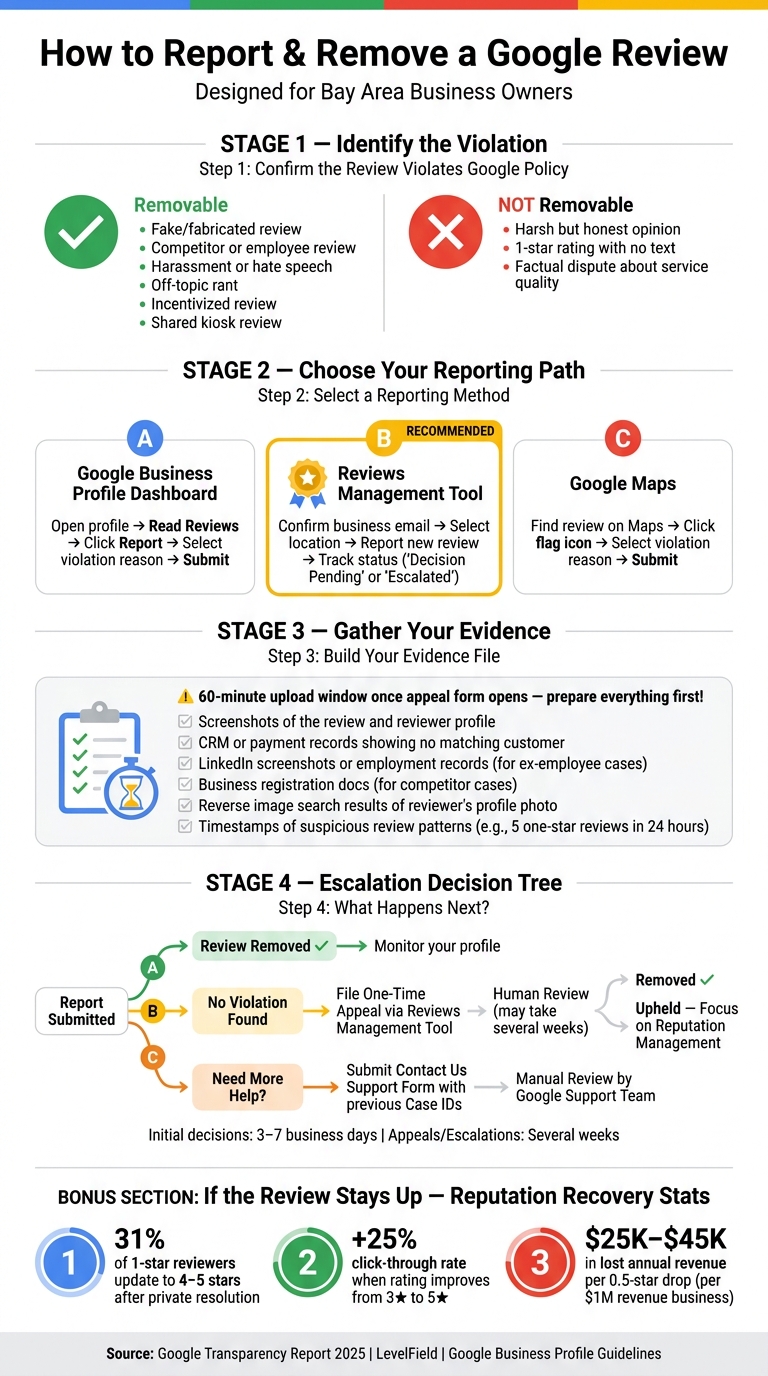
Once you've identified reviews that might qualify for removal, it's time to formally report them. You can do this in one of three ways: via your Google Business Profile dashboard, the Reviews Management Tool, or Google Maps. Among these, the Reviews Management Tool stands out because it allows you to track the status of your report instead of leaving you in the dark.
To flag a review directly from your Business Profile, follow these steps:
Accuracy is key here. Selecting the most fitting violation category increases the likelihood of the review being removed.
For a more transparent process, use the Reviews Management Tool. This tool provides updates like "Decision pending" or "Escalated", which can be helpful. Here's how to use it:
Sometimes, Google's automated system might miss clear violations of their policies. If you receive a "no policy violation" response, you can file a one-time appeal through the Reviews Management Tool. Go to "Check the status of a review I reported previously", and your case will be reviewed by a human. This step can make a big difference, especially for cases that are not straightforward.
A couple of things to keep in mind:
Initial reviews typically take 3 to 7 business days, but appeals or escalated cases may take several weeks [5][6].
Understanding these steps is crucial for protecting your business's reputation, especially in competitive areas like the Bay Area.
The type of evidence required depends on the reporting method you choose. Here's a quick overview:
| Reporting Path | Evidence Needed | Likely Outcome |
|---|---|---|
| Standard Flag (Business Profile or Maps) | Violation category | Automated review; borderline cases may need an appeal |
| Reviews Management Tool | Violation category | Best for tracking progress; allows one-time appeal |
| One-Time Appeal | Screenshots, CRM records, employment history, or business documents | Human review with detailed evidence |
| Support Escalation (Contact Us form) | Policy explanation + previous case IDs | Manual review by Google Business Profile support team |
One important detail: once you open the appeal evidence form, you only have 60 minutes to upload all your supporting documents before the session times out [6]. To avoid issues, gather everything you need - like screenshots of the reviewer's profile, CRM search results, LinkedIn records, or business registration documents - before starting the process.
Getting a handle on these steps will help you build a strong case for review removal, laying the groundwork for the next phase.
When requesting a review removal, think of your appeal as a legal argument rather than a personal complaint. Google's reviewers need clear proof that the review violates their policies. As LevelField Blog explains:
"You're not debating the customer's opinion. You're proving to Google that the review itself violates their terms and harms the credibility of their platform." [5]
This mindset helps you align your reporting process with the creation of a solid evidence file.
Start by showing that the reviewer was never your customer. For instance, include a statement like, "Our CRM and payment records for the past 12 months show no matching customer." [5] This kind of documentation strengthens your case and supports earlier reporting steps.
Additionally, include screenshots of the review, the reviewer's profile, and any suspicious patterns - such as multiple one-star reviews across unrelated businesses. If you suspect coordinated attacks, document examples like five one-star reviews from new accounts within a 24-hour window. [5]
When dealing with potential conflicts of interest, back up your claims with clear documentation. For example, if the review is from a former employee or competitor, include LinkedIn screenshots, termination dates, or ownership records of competing businesses [2]. Clearly state the termination date and indicate that supporting records are available.
Another useful tactic is running a reverse image search on the reviewer's profile photo. This can reveal if the image is stolen or a stock photo, which may point to impersonation [2]. Also, review the profile's activity - accounts with no local reviews, generic profile photos, or reviews from distant regions often belong to paid review networks.
Keep your appeal objective and grounded in policy. Instead of accusing the reviewer of dishonesty, use language like: "This review violates the Conflict of Interest policy. The reviewer is a former employee terminated on [Date]." [5] A factual, unemotional tone that directly references Google's policies increases the likelihood of your case being taken seriously and escalated.
If Google decides not to remove a review, don’t worry - you still have ways to protect your reputation. While removal isn’t always an option, focusing on how you respond and manage your reputation can make a big difference.
When responding to a negative review, keep in mind that your reply isn’t just for the reviewer - it’s for the dozens of potential customers who will see it later [7]. To ensure your response is clear and professional, wait at least an hour before replying. Byron Wade, Founder, emphasizes the importance of this pause:
"The 12-hour cooling-off was the difference between defensiveness and clarity." [7]
Keep your response concise - around 60 to 90 words. A strong reply should include these elements:
If you can’t find any record of the reviewer as a customer, be honest but professional. For example:
"We've looked through our records and are unable to find a transaction matching your experience. We'd like to help - please contact us at [contact info]." [8]
When a negative review stays up, the best way to counter it is by generating positive reviews. Boosting your rating from 3 stars to 5 stars can increase your Google Business Profile click-through rate by 25% [9]. Encourage satisfied customers to leave reviews by providing a direct Google link or an in-store QR code. Experiment with the timing of your requests - right after service, a day later, or even a week later - to see what works best for your audience [9]. Additionally, responding to reviews actively can lead to 12–20% more new reviews each month [7].
Avoid offering discounts or freebies in exchange for review changes, as this violates both Google’s policies and FTC regulations [7][9].
Use patterns in negative feedback as opportunities to improve. For example, if multiple reviews mention long wait times, it’s a sign to refine your processes. Interestingly, about 31% of 1-star reviewers update their ratings to 4 or 5 stars after resolving their issues privately [7]. By addressing concerns and staying proactive, you can maintain a strong online reputation - even when a negative review remains visible.
Reputation management has become a critical focus for businesses in the Bay Area, especially as Google's review ecosystem grows more unpredictable and impactful. With the region's intense competition, a strong online presence can make or break a business. Consider this: 88% of consumers read Google reviews before deciding to engage with a local business, and 73% of all online reviews globally are hosted on Google [10]. For small businesses in cities like San Francisco, Oakland, or San Jose, your Google Business Profile often serves as your first - and sometimes only - chance to make an impression. These numbers highlight just how much enforcement changes in Google's review policies can influence the local market.
The pace and intensity of enforcement have shifted dramatically by 2026. In 2025 alone, hundreds of millions of reviews were removed as part of Google's crackdown on fake content, with fake reviews on Google Maps increasing by 21% year-over-year [10]. Businesses in high-demand sectors, such as home services and contracting, have been hit particularly hard. Google has implemented stricter rules in regions with a history of spam, like the Bay Area, leading to mass suspensions. For example, on April 27 and May 3–4, 2026, thousands of listings and entire account portfolios were wiped out in suspension waves [12].
Google's focus has shifted from sheer review quantity to data integrity and trustworthiness. A business with 50 verified, high-quality reviews now has a better chance of ranking higher than one with 200 questionable reviews [11][13]. This means that businesses relying on outdated or dubious practices are at risk of automated review removals - or worse, full profile suspensions [1].
"In 2026, visibility on Google isn't just earned through optimization. It's maintained through trust. If your data, account, or access raises even a small concern, the system responds immediately." - Khurram Shahzad, CEO, Digilatics [12]
The consequences of triggering Google's enforcement protocols are immediate and far-reaching. It's not just about losing ratings anymore. Google now flags profiles with public warning banners when fake reviews are removed, and 73% of consumers view these banners as a major deterrent to trust [10]. Worse, a single violation can lead to the suspension of every profile tied to the same Google account under the Wave 2 suspensions [12]. For Bay Area businesses managing multiple locations or service areas, this isn't just a reputational issue - it threatens their entire online presence.
In this environment, reputation management isn't just about maintaining a high rating; it's about ensuring your business stays visible and operational in the digital landscape.
Google only removes reviews that break its content policies - things like spam, fake accounts, conflicts of interest, review gating, or pressuring customers on-site. If a review is simply negative but truthful, it’s here to stay. Instead of waiting for an unlikely removal, it’s smarter to focus on crafting a strong response strategy.
Here’s the game plan: clearly document any review violations, use the Reviews Management Tool to file your report, and keep track of its status. If your report is denied, you get one chance to appeal. For the appeal, go beyond your initial complaint and provide detailed evidence like transaction records, screenshots, and timestamps. This extra effort not only reinforces your case but also strengthens your ability to manage your online reputation overall.
For reviews that stick around, the best countermeasure is to consistently gather authentic, positive feedback from your customers. Data shows that 74% of consumers prioritize recent reviews when making decisions[14]. A steady flow of new reviews can help offset the damage from a single negative one. Why does this matter? A study found that just a 0.5-star drop for a business generating $1 million in revenue could lead to $25,000–$45,000 in lost yearly income[2].
"The businesses that recover fastest from this update are the ones that already had a post-service follow-up system in place. When the review ask is built into the customer journey, compliance is straightforward." - Tanner Medina, Co-Founder and Chief Growth Officer, Launchcodex [10]
Beyond reporting reviews, maintaining your reputation requires keeping your review process fresh and compliant. Start by auditing your current system. Based on the guidelines mentioned earlier, make adjustments to avoid pitfalls. For example, stop using template language that asks customers to name staff members, eliminate shared review kiosks, and ensure follow-up requests are sent to all customers - not just the happy ones. These changes are critical. They can mean the difference between maintaining a strong profile and triggering automated systems that could harm your business.
Sufficient proof requires clear and detailed documentation that shows the reviewer had no interaction with your business. This could include items like:
Make sure your evidence is thorough and directly backs up your claim, leaving no room for doubt.
If you report a bad review that breaches Google’s policies, your profile won’t be suspended. However, this could result in the review being removed. On the other hand, actions like review manipulation or violating Google’s policies could lead to restrictions or even suspension of your Google Business Profile, especially with tighter enforcement expected in 2026.
If a reviewer escalates their actions to threats of a lawsuit or doxxing your staff, it’s crucial to act swiftly. Start by preserving all evidence - take screenshots of the review, the reviewer’s profile, and any related messages. This documentation can be essential later.
For legal threats, consult with an attorney to evaluate whether the claims involve defamation or malicious intent. If the situation involves doxxing, contact law enforcement immediately to ensure the safety of your team. Additionally, if the review violates Google’s policies (e.g., harassment or hate speech), flag it directly with Google for removal.
Discover strategies to elevate your business.