

Fake reviews on Google can harm your business's reputation and revenue. Google's stricter policies (2024–2026) now use advanced AI to detect and penalize fake reviews, including public warnings or review freezes. Here’s how you can protect your business:
With 91% of consumers relying on reviews, managing fake feedback is critical. Follow these steps to maintain trust and safeguard your online presence.
Let’s dive deeper into how Google defines and enforces its policies against fake reviews. Fake engagement refers to any review that doesn’t reflect a real customer experience. This includes reviews written in exchange for money or discounts, as well as those created using multiple accounts or emulators to manipulate ratings [1][11]. The policy also targets reviews from individuals with conflicts of interest - such as current or former employees, contractors, or competitors posting negative reviews to harm a rival business [1][11].
Review gating - asking only happy customers for reviews - is strictly prohibited [1]. Google expects businesses to seek feedback from all customers, ensuring a fair and honest representation.
"Contributions to Google Maps should reflect a genuine experience at a place or business. Fake engagement is not allowed and will be removed" [1].
Recognizing the different types of fake or biased reviews is essential. Fake reviews often come from individuals who haven’t interacted with your business, are paid to post, or use multiple accounts to spam your profile. Biased reviews, on the other hand, typically come from former employees or competitors, violating Google’s conflict of interest rules [1]. It’s important to note that authentic negative reviews - no matter how harsh - are usually from real customers sharing genuine experiences. Google won’t remove these just because you don’t agree with them [5].
| Feature | Genuine Review | Fake or Biased Review |
|---|---|---|
| Source | Real customers with actual experience | Non-customers, multiple accounts, or emulators |
| Motivation | Honest, voluntary feedback | Incentives (money, discounts) or sabotage |
| Affiliation | Neutral third party | Current/former employees or competitors |
| Content | Specific and relevant details | Vague, off-topic, or politically charged rants |
Between 2024 and 2026, Google has ramped up its enforcement efforts. Profiles violating fake review policies now display public warning banners, notifying users that fake reviews have been removed [6][13]. In more severe cases, your profile could face a temporary freeze, preventing new reviews for weeks or months, or Google might unpublish your entire review history during an investigation [6][13].
In 2023 alone, Google removed over 170 million fake reviews - a 45% improvement in detection accuracy compared to the previous year [16]. The company now employs AI-powered systems that can audit review patterns from years ago, meaning past violations could still lead to penalties today [15].
To safeguard your profile and reputation, it’s important to follow Google’s guidelines. Only verified business owners can respond to reviews or appeal removal decisions [3][12]. While you’re encouraged to ask customers for honest feedback via email, receipts, or follow-up messages, it’s crucial to ask all customers equally - avoiding selective solicitation [1][14]. Offering incentives for positive reviews is a direct violation of Google’s policies [1][6].
If you suspect a review is fraudulent, you can report it using the Reviews Management Tool under categories like "Spam" or "Conflict of Interest" [5][12]. Google allows you to appeal up to 10 reviews at a time [2][5]. However, don’t report a review simply because you dislike it or disagree with the customer’s opinion - Google won’t mediate disputes between businesses and customers [5]. If your appeal is denied, you have one opportunity to submit a follow-up appeal with additional documentation [5][2].

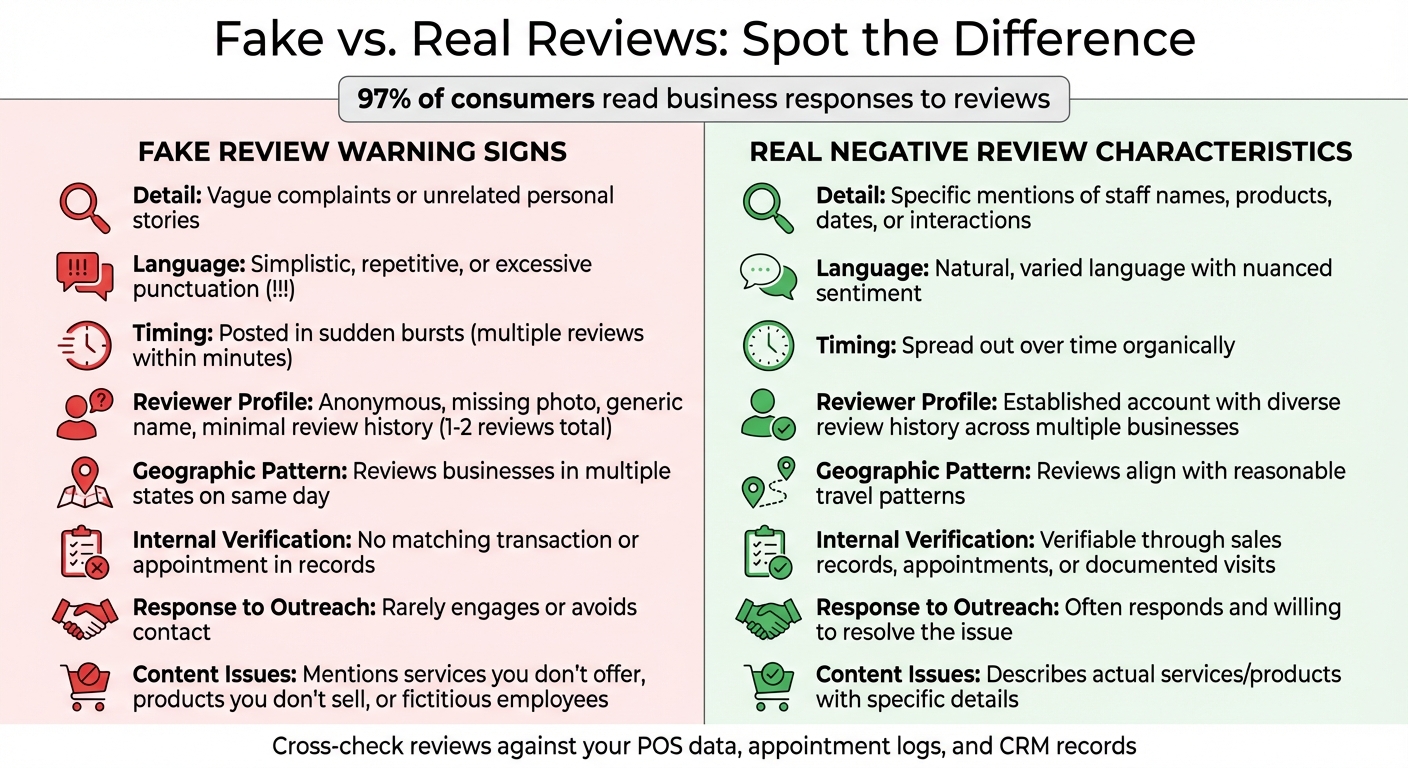
How to Identify Fake vs Genuine Google Reviews - Visual Comparison Guide
Detecting fake reviews on your Google Business Profile requires a keen eye for certain red flags in reviewer profiles. Look for warning signs like missing profile photos, overly generic names, or accounts with only one or two reviews. For instance, if someone reviews businesses in multiple states on the same day, it could indicate they're part of a professional spam operation [4].
The content of the review itself can also be telling. Fake reviews often lack specific details about your products, services, or staff. Instead, they may rely on vague complaints or irrelevant personal stories. Watch out for overly simplistic language or an abundance of exclamation points, which are often used to simulate strong emotions. To verify the authenticity of a review, cross-check the details with your internal records - such as point-of-sale data or appointment logs - to confirm whether the interaction actually occurred. Let’s explore some common signs that can help you distinguish fake reviews from genuine feedback.
Certain patterns can reveal the inauthentic nature of a review. For example, geographic inconsistencies - like a reviewer posting feedback for businesses in far-apart locations within a short period - might suggest they're a paid reviewer [4]. Similarly, keep an eye out for accounts that repeatedly leave 1-star reviews for your business while giving glowing 5-star reviews to a competitor. This could indicate malicious intent.
Other red flags include reviews mentioning services you don’t offer, products you don’t sell, or even fictitious employees. Genuine customers are typically open to resolving issues when you reach out, whereas fake reviewers often avoid engagement altogether.
Review bombing is a more aggressive tactic, where your profile is flooded with negative reviews in a short span of time. For example, Joy Hawkins from Sterling Sky reported that her agency received three negative reviews within five minutes, one from a user blatantly named "spam." She successfully used this timing pattern as evidence to have the reviews removed [8]. If your profile suddenly jumps from zero to 50 reviews in a single week without any real-world explanation, it’s likely a coordinated attack. Document clusters of reviews, especially isolated 1-star ratings received within minutes, to strengthen your case for removal requests.
| Feature | Fake Review | Real Negative Review |
|---|---|---|
| Detail | Vague complaints or unrelated personal stories | Specific mentions of staff, products, dates, or interactions |
| Language | Simplistic, repetitive, or excessive punctuation | Natural, varied language with nuanced sentiment |
| Timing | Posted in sudden bursts | Spread out over time |
| Reviewer Profile | Anonymous or minimal review history | Established account with diverse review history |
| Internal Verification | No matching transaction or appointment | Verifiable through sales, appointments, or visits |
| Response to Outreach | Rarely engages | Often responds to resolve the issue |
For more tips and tools to safeguard your online reputation, small business owners can check out Humble Help. They offer straightforward guidance and practical support tailored to local service-based businesses.
Responding to fake reviews is more than damage control - it's about reputation. Here's why: 97% of people reading reviews also pay attention to how businesses reply[17]. Your response isn't just for the person who left the review; it's for every potential customer who sees it. Businesses that actively engage with reviews are perceived as 1.7 times more trustworthy, and customers tend to spend 50% more with companies that respond[17]. A thoughtful reply demonstrates that you value feedback and handle situations with professionalism.
"Your responses to Google reviews are just as powerful as the reviews themselves"[17].
With that in mind, let's look at some practical templates for handling fake reviews.
When you can't verify the reviewer's claims in your records, keep your reply short and factual. Here's an example:
"We take all reviews seriously, but we have no record of your transaction. Please contact us at [phone/email]."
This lets readers know there might be an issue with the review, without sounding confrontational[9]. If the review mentions services you don’t offer, clarify politely:
"It seems there may be some confusion. Please reach out to us for clarification."
Always sign off with your name or initials to add a personal and authentic touch[17][3].
It's also important to take a moment to calm down before replying. While 40% of consumers expect a response within 24 hours[17], a calm and measured reply is far better than a hasty one.
If your responses don't resolve the situation, it might be time to escalate the issue.
Knowing when to disengage is just as important as knowing how to respond. If the reviewer is clearly trolling, refuses to engage constructively, or continues to post hostile comments even after you've offered to resolve things privately, it's best to stop replying[18][3]. Public back-and-forth can draw more attention to the fake review, which is counterproductive.
Take this example: In January 2018, Joy Hawkins, owner of Sterling Sky, dealt with three fake 1-star reviews posted within five minutes. One of the usernames even included "spam." Instead of responding further, she gathered evidence of suspicious activity and escalated the issue to Google Business Profile chat support. All three reviews were successfully removed[8].
For reviews containing defamatory claims, harassment, or threats, escalate immediately. Use Google's Reviews Management Tool to report the issue, or consider legal action, such as sending a cease-and-desist letter[18][5].
Managing fake reviews can be challenging, but thoughtful responses and knowing when to escalate can protect your reputation. If you're a small business owner looking for additional support, check out Humble Help (https://humblehelp.studio) for tools and guidance tailored to your needs.
Google will only remove reviews if they violate its policies - not simply because they’re negative [2][20]. To determine if a review breaks the rules, compare it against Google’s Prohibited & Restricted Content guidelines. Violations often include spam, fake content, harassment, or reviews stemming from conflicts of interest, such as those written by competitors or former employees [1][20].
You can report questionable reviews through your Google Business Profile dashboard, Google Maps, or the Reviews Management Tool. This tool also allows you to track the status of your report and file appeals if necessary [19]. When submitting a report, you’ll need to select the type of violation, and Google usually provides an initial response within three business days [20].
"Google's priority is to maintain honest and authentic feedback on its platform, so any user who spots suspicious activity has the right to flag it."
– SurgePoint [19]
While waiting for Google to review your report, it’s a good idea to respond professionally to the review in question. This shows transparency and reassures potential customers - especially since around 81% of people rely on Google to evaluate local businesses [19][20].
If your initial report doesn’t resolve the issue, consider the following escalation options.
If Google denies your report with a response like "Report reviewed – no policy violation", you can appeal the decision. To strengthen your appeal, include specific references to Google’s policies and provide solid evidence, such as screenshots, internal records, or inconsistencies in the reviewer’s profile [2][5][20]. Unlike the automated systems used for initial reviews, appeals are reviewed by human moderators who can take context into account [20]. This process typically takes 7 to 10 business days [20].
Using the Reviews Management Tool, you can appeal up to 10 reviews at a time [2][5]. However, avoid submitting duplicate appeals, as this could delay the process [2][6].
For serious issues like defamation, libel, or doxxing (the sharing of personal information), legal action may be necessary [20][10]. In such cases, you might need a court order to compel Google to remove the content. If a specific user repeatedly posts fake reviews, you can report their entire profile through the Google Maps app by selecting their name and tapping "Report" [2][5].
If your business experiences review bombing - where multiple fake reviews are posted in a short period - standard reporting might not be enough. Start by documenting the attack. Take screenshots and note timestamps, as reviews can be edited or deleted. Look for patterns, such as repeated language or suspicious profiles, and report these through the Reviews Management Tool [19][20].
Use the tool to monitor your case status. If it shows "Escalated – check your email for updates", it means Google is either reviewing the appeal or has reached a final decision [2].
Businesses with Google Ads or Workspace accounts can sometimes escalate issues further through their dedicated account representative [10]. Additionally, you can contact Google Business Profile support directly via chat or email for unresolved problems [10]. In some cases, Google may impose restrictions on profiles that violate its "Fake Engagement" policies. For example, they might block new reviews or add a public warning indicating that fake reviews were recently removed [6].
The strongest defense against fake reviews is a steady stream of honest feedback from your actual customers. Timing is everything - ask for reviews right after a positive interaction, like when a service is completed or a product is delivered, while the experience is still fresh in their minds [21][22].
Make leaving a review as easy as possible. Share direct links to your Google Business Profile or use QR codes on receipts, menus, or signage to guide customers to the review page [7][21][24]. Train your team to casually encourage reviews with simple, natural phrases like, "We’re so glad we could help! If you have a moment, leaving a quick Google review helps others know what to expect" [24]. Data shows that email review requests typically achieve a 15% response rate, SMS requests reach 20%, and combining both can boost responses to 26% [24]. Plus, since 85% of consumers ignore reviews older than three months, maintaining a regular flow of feedback is far more effective than gathering a large number of reviews all at once [23].
"A spotless 5.0 can feel like a showroom no one's allowed to touch. An authentic 4.2–4.8 range... signals real operations serving real people."
– OWDT [21]
Encourage customers to include photos of their experiences, whether it’s a completed home project or a beautifully plated meal. Visual evidence builds trust quickly [24]. Also, make it a habit to respond to every review, whether it’s glowing or critical. This not only shows that you value feedback but is also linked to up to 49% more revenue for businesses [23].
Once you’ve established a system for gathering authentic reviews, consistent monitoring ensures they remain credible.
Set up a regular schedule to check your Google Business Profile - at least weekly - to spot any unusual activity early. Look out for sudden spikes in reviews or vague, generic comments that might hint at fake feedback [25][26]. Cross-check reviews against your internal records, such as appointment logs, CRM data, or payment systems, to confirm the reviewer was a real customer. If a review mentions a visit or transaction you can’t verify, use this as evidence when requesting its removal [20].
Keep track of suspicious reviews in a simple log, like a spreadsheet. Include details such as the review URL, the reviewer’s name, the posting date, the policy violation, and any notes from your internal records. This documentation becomes essential if you need to escalate the issue or file multiple appeals [25]. Before reporting any review, always respond professionally. As Tim Clarke, Senior Reputation Manager at Thrive Local, points out:
"One of the telltale signs customers look for when identifying fake reviews is when the review seems too good to be true or lacks correct details" [26].
These internal processes work even better when combined with specialized tools for managing reviews.
To streamline your review management efforts, take advantage of tools designed to simplify the process. Google’s Reviews Management Tool is free and allows you to track reported reviews, file appeals, and manage feedback across multiple locations [2][5][27]. For more robust support, services like Humble Help offer features like Google Business Profile optimization, review monitoring, and CRM integration to help you identify and address fake reviews more effectively. Their free Business CRM even lets you verify if reviewers are in your customer database, and their AI Marketing Coach provides step-by-step guidance to enhance your review strategy.
Other platforms, such as Semrush Local, Local Falcon, and Moz Local, offer additional features like AI-generated review responses, sentiment analysis, and tools for auditing reviews across multiple locations [4][22][24]. Whether you need a simple CRM for cross-referencing or a full-service solution for managing removals and optimizing your profile, choose tools that align with your business needs [20].
Tackling fake reviews on Google is an ongoing process that plays a crucial role in safeguarding your business's reputation. Start by familiarizing yourself with Google's review policies. This helps you identify which reviews can be flagged for removal - like spam, conflicts of interest, or harassment - and which cannot, such as negative opinions or factual disagreements. These policies, along with recognizing warning signs, are your first line of defense against unnatural feedback [9][10].
When you come across questionable reviews, take a deliberate and professional approach. Respond courteously to show you value customer feedback. Use the Reviews Management Tool to report any violations and monitor the status of your case [2][5]. If your request is denied, you can file a single appeal, ensuring you include any supporting evidence [2][5].
A strong, long-term strategy involves consistently gathering authentic reviews and monitoring your online presence. With 63% of consumers avoiding businesses rated below 4.0 stars and 91% reading reviews before making a decision, maintaining a steady flow of genuine feedback is essential [10]. To encourage this, consider practical tactics like adding QR codes to receipts, including direct review links in emails, or training your team to naturally request reviews after positive interactions [3][7].
Make weekly review monitoring a habit, and supplement it with tools like Google Alerts or the free Humble Help Business CRM to cross-check reviewers against your customer database. Remember, a one-star increase in your rating can lead to a 5–9% boost in revenue [10].
The strategies outlined here emphasize the importance of being proactive, professional, and persistent in managing your online reputation. By combining these efforts, you create a strong foundation of trust and credibility, ensuring your business thrives in the digital landscape. Your reputation is a valuable asset - protecting it is always worth the investment.
Spotting fake reviews can feel tricky, but there are some key red flags to watch for. Be cautious of reviewers you don’t recognize, profiles that only have one review (especially if it’s about your business), or reviews filled with overly generic or exaggerated phrases. These can often signal something isn’t quite right.
Also, look out for inconsistencies - like dates or locations that don’t make sense, or details that don’t match the services you actually offer.
On the other hand, genuine reviews usually come from well-established profiles that have multiple, detailed reviews about specific experiences. If something feels off, trust your gut - it’s worth taking a closer look.
If Google rejects your report, you have the option to file a one-time appeal using the Business Profile review removal tool. Make sure to provide clear, detailed evidence that demonstrates how the review goes against Google’s policies. After submitting your appeal, expect a review period of about 7–10 business days. Resist the urge to submit multiple appeals, as this can slow things down. Instead, concentrate on presenting solid documentation to strengthen your case.
If you want more authentic reviews, encourage satisfied customers to share their feedback on your Google Business Profile. Keep the process simple - ask them directly, send a friendly email, or provide a straightforward review link. Stay within Google’s guidelines by avoiding incentives, filtering reviews, or asking exclusively for positive feedback. Instead, prioritize delivering excellent service that motivates customers to leave reviews on their own.
Discover strategies to elevate your business.


