

Video content is one of the best ways to stand out in the competitive Bay Area market. It grabs attention, improves your search rankings, and helps local customers connect with your business. The best part? You don’t need expensive gear or hours of editing. With just your smartphone and a few simple tricks, you can create professional-looking videos quickly.
Here’s a quick breakdown of the six tips covered in this guide:
Start small: film a quick clip of your storefront, team, or a local landmark this week. Post it to your social media or Google Business Profile, and you’re already ahead. These tips make it easy to create videos that engage Bay Area customers without overcomplicating the process.
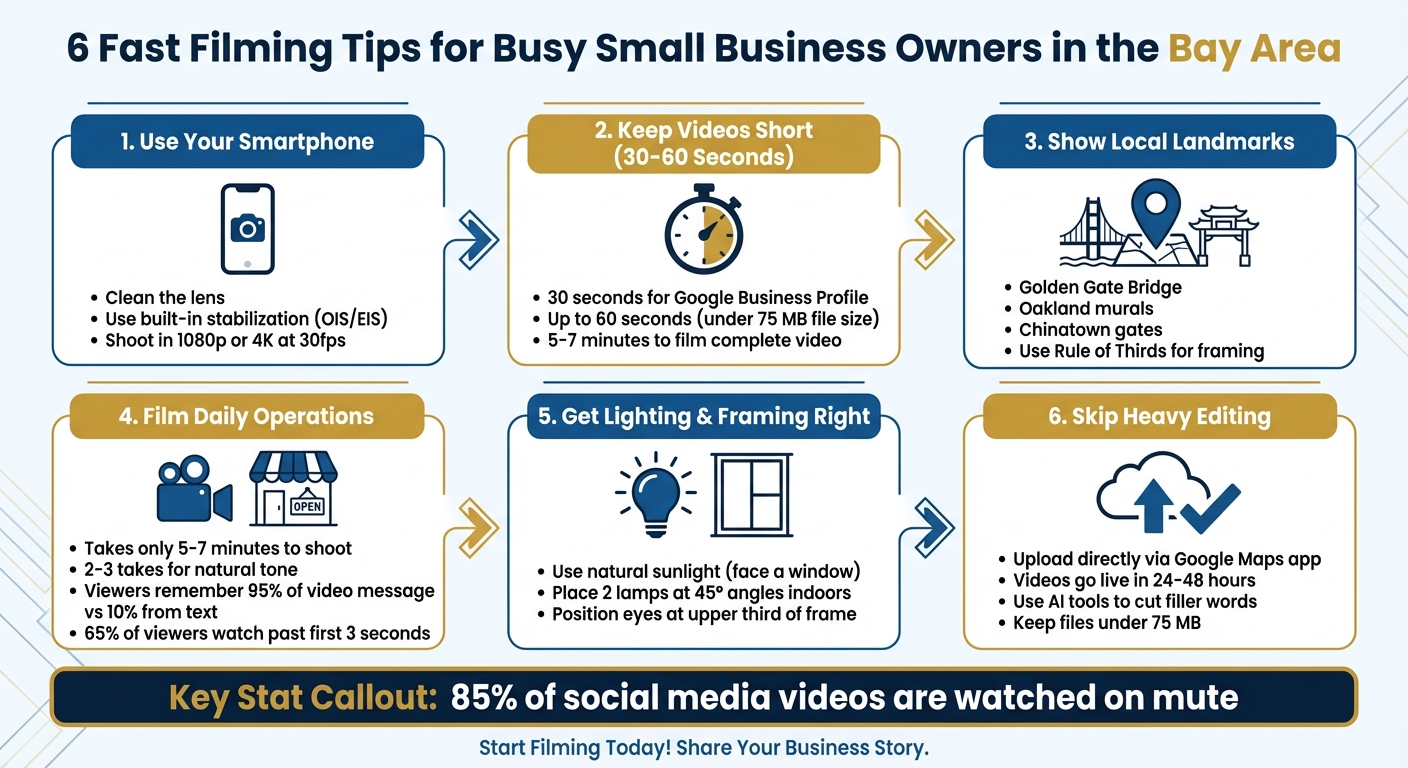
6 Fast Filming Tips for Small Business Owners
Today’s smartphones can shoot stunning 4K videos, thanks to advanced AI features and built-in stabilization (OIS/EIS). This means you can achieve smooth, professional-looking footage without needing extra equipment.
Start with the basics: clean your lens, switch to airplane mode to avoid interruptions, and lock your focus and exposure by tapping on the screen. Turning on gridlines will help you frame your shot perfectly.
For handheld filming, hold your phone with both hands and use a "ninja walk" - take slow, heel-to-toe steps with knees slightly bent - to keep your movements steady. As Michael Spranger from Fallen Leaf Films explains:
"Cellphones have come a long way... and come standard with amazing camera optics, cinematic tools such as stabilization and are compact and lightweight."
These straightforward steps let you focus on capturing great footage rather than constantly fiddling with settings.
Stable footage means less work in post-production. Shoot at 1080p or 4K at 30fps for standard videos, or bump it up to 60fps for action-packed scenes. Once ready, your video can go straight to platforms like Google Business Profile without much tweaking.
Vertical videos are ideal for Instagram Reels, TikTok, and YouTube Shorts. Since 85% of social media videos are watched on mute [3], make sure your visuals stand out and include captions to keep your message clear.
Google allows 30-second videos for Business Profiles, but you can often upload clips up to 60 seconds as long as the file size stays under 75 MB [6][8][10]. This time frame is ideal for busy professionals in the Bay Area, offering just enough time to grab attention without losing the audience.
Once your video meets the technical requirements, focus on creating content that connects with local viewers. Short videos are perfect for respecting your audience's time, especially during hectic moments. If your message isn't clear right away, viewers will move on [5]. A concise, 30-second clip introducing your San Francisco café or Oakland repair shop will always outperform a lengthy, two-minute walkthrough. Slava Blazer from Slava Blazer Photography emphasizes:
"A short, focused clip that respects a viewer's time will nearly always outperform a longer piece that takes too long to get moving." [5]
Creating a video doesn't have to be complicated. In just 5-7 minutes, you can film a complete piece by following a simple six-step script: start with a greeting, introduce yourself and your role, highlight one primary and one secondary service, identify a problem you solve, and end with a clear call to action like, "Call us today" [7]. Record it twice to ensure a natural delivery. This quick process fits perfectly into a broader video strategy.
These short videos autoplay on Google Maps and local search results, making them excellent for grabbing attention [6][8]. Since many viewers watch without sound, focus on visuals that tell the story effectively. Use a resolution of 720p or higher, and compress the file to stay within the 75 MB limit [8][10]. After uploading, Google typically reviews the video within 24-48 hours before it goes live [8][9]. By sticking to these guidelines, you can create videos that not only meet Google's standards but also enhance your local visibility effortlessly.
Highlighting Bay Area landmarks in your video content is an effective way to showcase your local roots while keeping things simple and time-efficient.
Using iconic Bay Area backdrops like the Golden Gate Bridge, Oakland murals, or the Chinatown gates instantly signals your connection to the region. A short clip of a San Jose café with the Financial District skyline in the background or a Berkeley shop featuring Telegraph Avenue signage can resonate deeply with local viewers. These familiar visuals help establish trust and make your content feel grounded in the community.
You don’t need to go far to make an impact. By filming near well-known landmarks, you can create engaging content without spending extra time traveling. For instance, a quick 30-second clip of your storefront alongside the Salesforce Tower or the Painted Ladies can be enough to grab attention. Just use your smartphone to capture these recognizable spots and tie them to your business.
To make your shots more visually appealing, apply the Rule of Thirds - position your landmark along a 3×3 grid for balanced framing. If you’re filming at locations like Crissy Field or the Ferry Building, embrace natural elements like fog or wind to add an authentic Bay Area touch. These small adjustments can elevate your video without requiring advanced equipment.
Incorporating local landmarks isn’t just about aesthetics - it’s a smart move for improving search visibility. Showcasing spots like the Palace of Fine Arts or Mission District murals in the opening seconds of your video creates an eye-catching hook that grabs attention as users scroll through their feeds. Plus, it reinforces your presence in the community, which can help build trust and improve your Google Business Profile ranking.
A quick, authentic video showcasing your daily operations can build trust faster than a traditional ad.
Creating a one-minute operational video doesn’t take much time - just 5–7 minutes to shoot [7]. Set aside 30 minutes each week to plan what activities and locations to feature. Aim for 2–3 takes to keep the tone natural and conversational [7]. By dedicating 2–4 hours per week, you can batch-record enough clips to create a library of reusable content [11].
Make sure your video feels personal and relatable by filming in recognizable locations that highlight your business. For example, show your team preparing meals in your Oakland kitchen, a technician repairing equipment in a San Francisco apartment, or your staff opening up shop in San Jose. Videos are incredibly effective - viewers remember 95% of a message when it’s delivered through video, compared to just 10% from text [1]. Dennis Yu, CEO of Local Service Spotlight, emphasizes:
"Genuine clips of your team, your work, and your customers build both trust and SEO power" [11].
By focusing on familiar settings and real-life moments, you’ll make a stronger connection with your audience while keeping the filming process straightforward.
You don’t need fancy equipment - your smartphone and some natural light will do the trick [11]. Use the Rule of Thirds for balanced composition [2][7], and capture quick action shots that showcase your product or service [2]. Keeping it simple ensures your videos look polished yet authentic, meeting platform standards without overcomplicating things.
Tailor your videos to meet platform-specific guidelines for length and file size. Here’s a quick script to follow: “Welcome to [Business] in [City]; I’m [Name] and I [Role]; We [Core Service]; We also [Secondary Service]; If you have [Problem], we have [Solution]; [Call to Action]” [7]. With 65% of viewers watching past the first three seconds [1], make sure to start strong by showing your team in action right away. This approach not only grabs attention but also keeps your audience engaged.
Good lighting and framing can make your videos look polished without the need for fancy equipment or hours of editing.
Natural sunlight is your best friend when it comes to lighting. Facing a window allows the sunlight to illuminate your face beautifully, giving your video a professional look without extra effort [13][14]. If the sunlight feels too intense, a sheer curtain can help soften it [13][14]. Filming indoors? Try placing two lamps at a 45° angle on either side of your face to reduce shadows [13][14]. Emily Heaslip, a contributor at CO - by U.S. Chamber of Commerce, highlights this perfectly:
"Direct sunlight is the best possible lighting option, as it's both flattering and free" [13].
For an added touch, use a white poster board as a reflector to fill in any remaining shadows [13][14].
Getting the framing right is just as important as lighting. Follow the Rule of Thirds to position your eyes at the upper intersections of the frame - it creates a balanced and professional composition [13][2]. Before filming, wipe your smartphone lens with a microfiber cloth to avoid blurry footage. Then, tap the screen on your face to lock in the focus and exposure [4]. These small steps can make a big difference.
Your background matters too. Using real, everyday settings can help your videos feel more relatable. As Wistia explains:
"Using your actual office as a background communicates authenticity. Seeing people in their natural environment feels genuine and adds a sense of time and place to the scene" [13].
If you're filming outdoors in the Bay Area, take advantage of the natural fog in places like Outer Sunset or Marin Headlands. This fog acts like a giant diffuser, giving your video soft, flattering lighting [15]. These simple tweaks make it easy to upload quality videos directly to your Google Business Profile or social media platforms.
Streamlining your video process doesn't stop at quick filming. Skipping heavy editing can save you even more time. Forget spending hours perfecting every frame - raw, unpolished clips often connect better with local audiences anyway [11].
The simplest way? Use the Google Maps app on your phone. Head to your "Business" tab, tap "Add photo", and upload videos straight from your camera roll. Once submitted, your video will typically go live within 24–48 hours after Google's review [22,43].
If you still want to refine your videos without diving into manual editing, AI tools can handle the basics for you. These tools can automatically cut filler words like "um" and "uh", stabilize shaky footage, and add captions - all in just a few minutes [45,35]. As Salesforce puts it:
"Short-form videos can be planned, filmed, and posted in under an hour. With a few templates or artificial intelligence (AI) tools for editing, you can record, upload, and publish on your lunch break." [12]
Humble Help's free tools make this process even easier. The Analytics Dashboard lets you track which videos are driving traffic, while Milo AI Marketing Coach suggests what to film next. This takes the guesswork out of content creation and integrates seamlessly with your Google Business Profile and social media strategies.
Posting consistently across multiple platforms can amplify your local reach. Tools like Buffer (free for up to 10 posts, $5/month for unlimited) and MeetEdgar simplify scheduling, allowing you to post simultaneously to Google Business Profile, Instagram, TikTok, and LinkedIn [41,40]. Behdad Jamshidi, Founder of CJAM Marketing, highlights the value:
"Buffer + Google Business Profiles saves us time, enhances our SEO, and helps potential customers easily find us, increasing our bookings by as much as 30% - 50%." [16]
To make the most of your uploads, keep your video files under 75 MB using free tools like VEED [9]. Posting multiple videos can even unlock a dedicated "Videos" subtab on mobile, increasing your visibility for local audiences [22,44].
Using these six quick filming tips can help you strengthen your local online presence without spending a fortune or dedicating endless hours to editing. You don’t need fancy equipment or elaborate production - authenticity always wins over perfection. Bay Area audiences are drawn to the genuine stories and people behind a business, not glossy, overproduced ads.
Start small: film a short FAQ video or show your team in action this week. Take advantage of natural light, keep it brief (under a minute), and upload it directly to your Google Business Profile. Tools like Humble Help's Analytics Dashboard and Milo AI Marketing Coach can provide insights into what to film next and track which videos are bringing in traffic.
Every video you share helps expand your digital presence, boosts your local SEO, and makes your business stand out when nearby customers search for services. Even a five-minute filming session during your lunch break can make an impact. Don’t wait - grab your phone, hit record, and start connecting with Bay Area customers today.
Creating a 30–60 second business video? Here's how to make it count:
Start by introducing yourself and your business in a way that's approachable and memorable. Then, clearly explain what you offer - whether it's a product, a service, or a solution - and emphasize how it benefits your customers. Think about what sets you apart and share a quick, relatable story or an authentic detail about your brand to make it personal.
Finally, wrap it up with a strong call to action. Whether it’s visiting your website, stopping by your location, or reaching out directly, make it easy for your audience to take the next step. Keep your tone conversational and genuine - people connect with authenticity.
A tripod is a must-have if you want steady and smooth footage, even when using smartphones or cameras with built-in stabilization. When it comes to audio, investing in a clip-on or external microphone with noise isolation can make a big difference by delivering clearer sound. Together, these tools are straightforward to use and can instantly elevate the quality of your videos with very little effort.
For your Google Business Profile, create short, top-notch videos - preferably under 30 seconds. Focus on showcasing your business through store tours, service highlights, or customer testimonials. These videos not only build credibility but also help boost your local SEO efforts.
On Instagram and TikTok, the key is to produce lively, engaging videos. Think behind-the-scenes peeks, promotional offers, or jumping on trending challenges. Keep them under 60 seconds and optimize for vertical viewing. Both platforms reward entertaining, visually compelling content that sparks interaction and keeps viewers coming back for more.
Discover strategies to elevate your business.


