

Getting more customers to call your Bay Area business starts with optimizing your Google Business Profile. Here's the quick rundown:
These steps help you stand out in local searches and convert online interest into real-time customer calls. Let your profile do the heavy lifting for your Bay Area business.
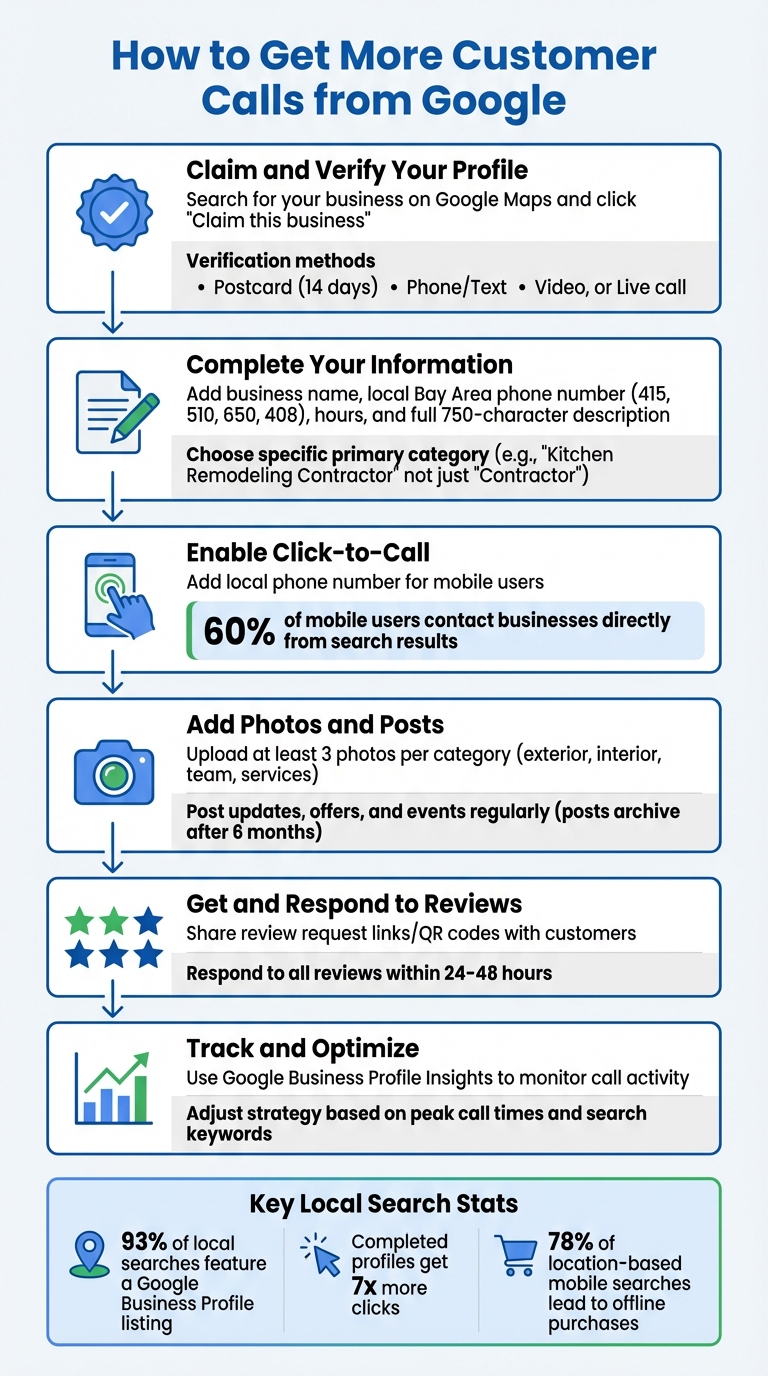
6 Steps to Get More Customer Calls from Google Business Profile
Start by claiming your Google Business Profile. Search for your business name and city on Google Maps. If your business shows up, click "Claim this business" and then "Manage now" [3][4]. If it doesn’t appear, you can add it at business.google.com/add by providing your business name, category, and address [3][4].
Google offers several ways to verify your business:
In some cases, if your website is verified through Google Search Console, you might get instant verification [2][4].
"When you verify your business on Google, you gain ownership of your Business Profile and can make sure your business info is accurate." - Google [2]
While waiting for your verification code, don’t edit your business name, address, or category - making changes will invalidate the code, and you’ll have to start over [2]. If someone else has already claimed your profile (like a former employee or agency), click the "Request Access" button to ask for control [3][4].
Once your profile is verified, make sure to fill in all the details to improve your visibility in local search results.
After verification, update every section of your profile to ensure accuracy and appeal.
Making your profile stand out isn’t just about accuracy - it’s about creating a connection with potential customers at every step.
Your phone number is one of the most important tools on your Google Business Profile. 60% of mobile users contact businesses directly from search results using the click-to-call feature [1]. This simple feature turns searches into direct customer calls.
Opt for a local Bay Area number (e.g., 415, 510, 650, or 408) instead of a toll-free option. Customers tend to trust local numbers more. Make sure your phone number is consistent everywhere - on your website, Google profile, and other directories. This small detail doesn’t just build trust with customers; it also helps Google’s ranking algorithm recognize your business.
"Avoid listing misleading hours that lead to unanswered calls." - Ringlii [1]
Keep your hours up to date, including holiday closures or special schedules. If you offer specific services at different times - like delivery slots or senior shopping hours - use the "More hours" feature to reflect this. Check your profile insights to see when most calls come in and ensure someone is available during those busy times.
Once your hours and contact details are solid, focus on grabbing attention visually.
Photos are powerful. Add at least three photos for each category - exterior shots from different angles, interior views that capture your atmosphere, team photos, and action shots of your services in progress. High-quality images can make your business more appealing and influence customer decisions.
Take advantage of Google posts to share updates, promotions, and events. Use "Offer" posts for limited-time deals - they automatically include a "View Offer" button to drive action. For general updates, create "Update" posts with buttons like "Book", "Order online", or "Learn more." Keep in mind that posts are archived after six months, so regular updates are key to staying visible and relevant.
While photos and posts catch the eye, customer reviews build trust and credibility.
Businesses with higher star ratings often see more clicks on their profiles. Reviews act as personal testimonials, making users more likely to hit that call button - your ultimate goal.
Encourage happy customers to leave reviews by sharing Google-generated review request links or QR codes. Respond to all reviews - thank those who leave positive feedback and address criticism professionally. This shows you care about your customers’ experiences.
"Customer reviews can give helpful feedback about your business. When you reply to their reviews, you show them that you value their feedback." - Google Help [7]
Make it a habit to gather fresh reviews. Feedback from the last few months carries more weight with potential customers than older reviews. Aim to respond within 24-48 hours to show you’re engaged and attentive to your community.
Take control of your Google Business Profile with free tools designed to streamline data management and offer actionable insights. These resources work hand-in-hand with your profile updates to help attract more customer calls.
The Milo AI Marketing Coach by Humble Help provides clear, step-by-step guidance for refining your Google Business Profile [8]. Instead of relying on guesswork, this tool offers specific tips for improving local SEO for small businesses, updating photos, and adjusting business hours to align with peak call times. Tailored for Bay Area business owners, Milo AI also flags common issues like verification problems, conflicting addresses, or incomplete details that might prevent customers from reaching you.
"Marketing shouldn't be confusing or expensive - so we give you the tools to grow, and real human support whenever you need extra help." – Humble Help [8]
Humble Help goes beyond Milo AI with additional free tools to make managing customer interactions easier. The Free Business CRM keeps track of all incoming calls, while the Free Analytics Dashboard highlights which profile updates are driving those calls. These tools ensure you can focus your energy on what truly makes a difference.
To keep tabs on your call data, head to the "Performance" section of your Google Business Profile on desktop or access it via Google Maps on your mobile device (tap "Performance" and then "See More"). You can filter this data for up to six months, giving you a detailed look at your call activity [9][11]. Google tracks every tap on the "Call" button from your profile, making it easier to assess how many potential leads you’re attracting.
However, keep in mind that Google only tracks click-to-call actions made in-app. Calls made manually by desktop users aren’t included in these insights [9][10]. Because of this, some experts believe that your actual call volume could be almost twice what’s shown in the data [10].
"Marketing is all about measuring your performance. Check your Google Business Profile performance insights and see how you're doing every month." – Sherry Bonelli, Owner, Early Bird Digital Marketing [9]
With this information, you can fine-tune your profile and adjust your business strategies for better results.
Once you’ve analyzed your performance data, use it to make specific updates to your profile and operations. For example, if you notice clear patterns in call volume, you can adjust staffing levels or use an AI receptionist during peak times [1]. If your profile views are high but call clicks are lagging, consider improving your photos, responding to more reviews, or updating your service list to build credibility [1].
Pay close attention to the "Searches" metric. It can help you identify keywords that are driving traffic, allowing you to refine your categories and business description to align with what customers are searching for [9][10][12]. Also, calculate the value of your calls by applying your conversion rate to your average customer value. For instance, if 30% of callers convert and your average customer is worth $500, each call is worth $150 [1]. This kind of analysis helps you justify investments in your profile and gives you a clear picture of your return on investment. These strategic updates ensure that your profile improvements lead to more customer calls and better results overall.
Boosting customer calls from Google doesn't have to be complicated. Start by claiming and verifying your Google Business Profile, filling out every section completely, and making sure your phone number is clickable on mobile devices. Keep your profile fresh with updated photos, reviews, and posts to stay appealing and relevant.
These small but impactful actions can significantly influence customer behavior. Consider this: 93% of local searches feature a Google Business Profile listing, and profiles that are fully completed get 7 times more clicks than those that aren't [13]. In competitive areas like San Francisco, San Jose, and Oakland, these optimizations can be the deciding factor between a customer calling you or your competitor.
Take advantage of free tools like Milo AI Marketing Coach by Humble Help for tailored advice, and use Google's insights to track call activity. If you notice trends, like peak call times, align your staffing accordingly or consider using an AI receptionist to ensure every high-intent call is captured.
Keep in mind that 78% of location-based mobile searches lead to an offline purchase [13]. Your Google Business Profile is often the first - and sometimes only - impression potential customers get before deciding to call. Make sure your information is accurate, your visuals are polished, and your engagement remains consistent.
Google Business Profile verification typically takes 3 to 5 days. Sometimes, the process may be completed instantly, while in other cases, it could take up to 5 business days for a thorough review. The timeline often depends on factors like how accurate and complete your submitted information is.
High views but few calls on your Google Business Profile usually indicate a disconnect between visibility and user engagement. Start by double-checking that your phone number is correct, clickable, and easy to spot. Adding a clear and persuasive call-to-action (CTA) can also encourage users to take the next step.
Keep in mind that many views might result from users searching for information rather than ready-to-act inquiries. To bridge this gap, adjust your profile to target transactional intent - this means crafting content that aligns with what users need when they're ready to make a decision. This small shift can turn passive views into active calls.
Using a call tracking number on your Google Business Profile isn’t the best idea. It can make your business more vulnerable to scams. Google might reach out to verify your details through automated calls or texts, but these are legitimate and closely monitored. Be wary of unexpected calls, especially if they claim urgent problems and come from numbers you don’t recognize. Stick to Google’s built-in verification processes for better accuracy and security.
Discover strategies to elevate your business.


