

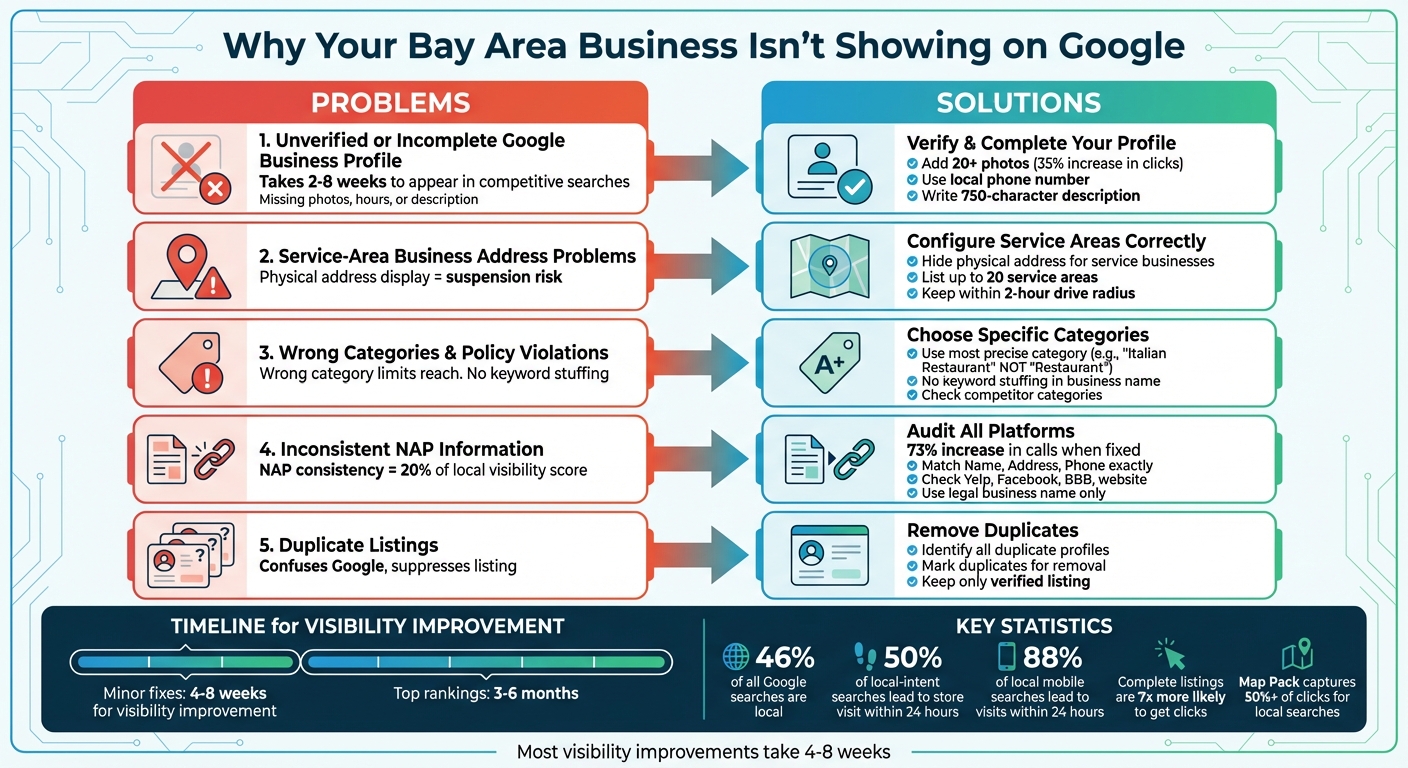
If your business isn’t appearing on Google in the Bay Area, the issue likely falls into one of these categories:
Fix it by:
Visibility improvements take time - typically 4-8 weeks for minor fixes and up to 6 months for top rankings.
5 Common Reasons Bay Area Businesses Don't Show on Google and How to Fix Them
If your business isn’t appearing on Google, there’s likely a specific issue at play. Most of these problems fall into a few common categories and, with the right steps, can usually be resolved.
Here’s a closer look at some of the most frequent reasons businesses in the Bay Area struggle with Google visibility.
An unverified Google Business Profile is treated as a suggestion rather than a legitimate listing. This means Google won’t display it in map results because it can’t confirm your business actually operates at the claimed address [2]. Verification - whether through postcard, phone, email, or Search Console - is essential to get your business visible to searchers.
"An unverified Google Business Profile is a suggestion, not a listing." - OmnifySEO [2]
Even if your profile is verified, incomplete information can hold you back. Google prioritizes listings that include details like holiday hours, services, and attributes. Additionally, new profiles might take 2 to 8 weeks to appear in competitive local searches as Google evaluates engagement signals [2].
Your service area settings could also be impacting your visibility.
If you’re a service-area business, it’s essential to correctly configure your service area. For businesses that don’t serve customers at a fixed location, displaying a physical address - such as a virtual office or P.O. box - can result in profile suspension [2][3].
The categories you select for your business also play a big role in how visible you are.
Choosing the wrong category can limit your reach. For example, selecting "Restaurant" instead of something more specific like "Italian Restaurant" might prevent your business from appearing in searches that match your services [2]. Look at what categories competitors are using and pick the one that best describes your offerings.
"Specificity is not a limitation. It is an advantage. Choose the category that most precisely describes what you do." - OmnifySEO [2]
Another issue to watch out for is duplicate listings. If multiple profiles exist for the same address, Google’s algorithm may suppress your listing. Additionally, keyword stuffing in your business name - like adding unnecessary terms - violates Google’s policies and can lead to suspension [2][3].
Consistency across online platforms is also critical.
Google relies on consistent information about your business - name, address, and phone number (NAP) - across your website, Yelp, Facebook, and other directories. Even small discrepancies, like using "Street" in one place and "St" in another, can make your business appear unreliable to Google [2][4].
"Inconsistency signals unreliability." - OmnifySEO [2]
This is especially important in the Bay Area, where Yelp is a key citation source. If your data isn’t consistent across platforms, Google’s confidence in your listing drops, potentially pushing you out of the Map Pack.
Now that you’ve pinpointed the challenges holding your business back, let’s tackle them head-on. Most visibility issues can be addressed with a few focused actions. Here’s how to get your Bay Area business noticed on Google.
The first step is claiming and verifying your Google Business Profile. Unverified listings are hidden by Google, so this is crucial. Verification methods include postcard, phone, email, or Search Console - choose the one that works best for you.
Once verified, complete your profile thoroughly. Use your exact legal business name - no extra keywords like "best" or "affordable" - as adding these could lead to suspension [8]. Select the most specific primary category that describes your business. For instance, if you own an Italian restaurant, choose "Italian Restaurant" rather than the broader "Restaurant" [4].
Add up to 20 high-quality photos to your profile. Businesses with 20+ photos can see a 35% increase in clicks [4]. Include professional images of your storefront, interior, team, and behind-the-scenes moments. Bay Area customers often want to connect visually before reaching out.
Write a 750-character business description that highlights your main services, the Bay Area neighborhoods you serve (like SOMA, Mission District, or East Bay), what sets you apart, and a clear call-to-action [4]. Also, use a local phone number - many Bay Area residents prefer local businesses over national chains [4].
| Business Type | Address Visibility | Service Area |
|---|---|---|
| Service-area | Must be hidden | Required (up to 20 areas) |
| Hybrid | Visible | Optional/Recommended |
| Storefront | Visible | Not applicable |
For service-area businesses (like plumbers or cleaning services), hide your physical address and specify your service areas by city or postal code [5]. You can list up to 20 areas, but keep them within a 2-hour drive from your base [5]. Lastly, ensure your location details are precise on the map.
After optimizing your profile, double-check your address settings. Your address and map pin are separate elements: the address is text, while the pin represents coordinates. If Google misinterprets your address, your pin might default to the city center instead of your actual location, damaging your local rankings [7].
To avoid this, enter only the street number and name in "Address line 1", and move suite/unit/floor details to "Address line 2" [7][1].
"Suite numbers are unit identifiers. They exist within buildings. They aren't street-level geographic data, and Google's geocoding process doesn't use them to identify rooftop locations." - Claudia Tomina, SEO Professional [7]
Claudia Tomina, an SEO expert, shared an example from March 2026 where a Houston business profile was incorrectly pinned to the city center due to a suite number being entered in "Address line 1." Although the address displayed correctly, the misplaced pin caused the business to rank only for downtown searches instead of its actual location [7].
If your pin remains incorrect after editing your address, manually adjust it. Go to "Edit profile" > "Location" > "Business location", then click "Adjust" and drag the pin to the exact rooftop of your building [1]. While most edits update within 10 minutes, some may take up to 30 days for review [1]. Keep in mind that changing your address after verification often requires re-verification [6][7].
Inconsistent Name, Address, and Phone number (NAP) details across platforms can signal unreliability to Google. NAP consistency contributes to 20% of your local visibility score, and businesses that fix inconsistencies often see a 73% increase in inbound calls from Google [8].
Audit your presence across directories like Yelp, Facebook, Better Business Bureau, industry-specific sites, and your own website. Ensure all NAP details match exactly - small discrepancies like "Street" vs. "St" or outdated phone numbers can hurt your rankings [2][4].
Stick to your legal business name on every platform - don’t add keywords [8].
Consistency across platforms builds trust with Google, which is essential for appearing in the Map Pack. This feature captures over 50% of clicks for local searches [8].
The Bay Area is known for its competitive market, where smartphones and voice search dominate consumer behavior. To stand out, businesses must prioritize local SEO strategies that cater to this tech-savvy audience.
Once your profile is optimized, local SEO tactics can further boost your visibility. Encourage customers to leave reviews that mention your services and location - this can significantly improve your local rankings. Did you know that nearly 50% of local-intent searches lead to a store visit within 24 hours? Details like these can make a big difference [10].
Incorporate neighborhood-specific keywords and reference local landmarks to strengthen your geographic relevance [9]. Embedding a Google Map on your contact page is another effective way to provide context. Additionally, implementing Local Business schema markup can help search engines display key details like your star ratings directly in search results [10].
"The essence of succeeding in the Bay Area with local SEO lies in understanding and implementing key strategies such as optimizing your Google My Business profile, leveraging local keywords, and actively managing your online reputation." – Gary Gilkison, Riverbase Cloud [9]
Free tools can simplify the process of identifying and resolving visibility issues. For example, Humble Help's Milo AI Marketing Coach offers step-by-step instructions to address gaps, while their free Analytics Dashboard consolidates your performance metrics in one place. These tools are designed to take the guesswork out of SEO for small business owners.
For tracking your rankings, RankChecker.AI provides a free grid report showing your position across various Bay Area neighborhoods - no email required [17]. Another great option is MapScan, which generates AI-powered heatmaps to visualize how you rank against competitors. Trusted by over 80,000 businesses, it’s a valuable resource [16]. Meanwhile, Localo (rated 4.9/5) offers a 14-day free trial with features like a Local Rank Checker and Schema Generator, all accessible directly in your browser [15].
You can also use Google Search Console to identify keywords that have lost clicks. Adding UTM parameters to your Google Business Profile links lets you track local traffic more effectively in Google Analytics [18].
"A loss of ranking in Google Maps can feel mysterious, but visibility drops usually have identifiable triggers." – Elizabeth Rule, Sterling Sky [18]
If your business operates in multiple locations, specific strategies can ensure each branch is accurately represented. Start by creating a verified profile and unique landing page for each location. Use consistent naming and avoid adding unnecessary keywords [9] [11] [14].
Keep service areas manageable - limit them to a maximum of 20 locations and ensure they're within a two-hour driving distance from your main base. This helps maintain relevance and comply with guidelines [12] [13].
Finally, monitor each location's map pin. Pins that fall outside Google's defined city boundaries may struggle to rank for "city + service" keywords, even if the address appears correct [18].
Boosting your visibility on Google is a continuous effort, but the results can be well worth it.
Did you know that complete business listings are 7 times more likely to get clicks than incomplete ones [19]? That means it's essential to fill out every field in your Google Business Profile. From your business category to open dates and even app links, leave no detail unaddressed.
Consistency is key, especially when it comes to your NAP (Name, Address, Phone). Make sure these details are identical across all your listings. Why? Because 46% of all Google searches are local [20]. Consistent and accurate information not only helps customers find you but also signals to Google that your business is reliable.
Stay active with your profile by publishing Google Posts at least twice a month. Share updates, special offers, or even showcase glowing customer reviews. This regular activity shows Google that your business is engaged and relevant [19]. On top of that, develop a review strategy - whether through email follow-ups or SMS - to encourage customers to leave feedback. Positive reviews are critical, especially since 88% of local mobile searches lead to visits within 24 hours [20].
Patience is part of the process. Local ranking improvements typically take 4-8 weeks, and climbing into the top three positions of the Local Pack could take 3-6 months [20]. But with consistent efforts, you’ll see progress.
If you’re feeling overwhelmed or need extra support, tools like Humble Help’s Milo AI Marketing Coach and free Analytics Dashboard can provide step-by-step guidance and track your performance.
As Rankhare wisely points out:
"Inaccurate or missing information confuses both Google and potential customers. Make sure your NAP (Name, Address, Phone) and hours are consistent across your website and every directory listing you control." – Rankhare [21]
If you suspect your Google Business Profile might be suspended, there are a few ways to check. Start by seeing if your business shows up on Google Maps or in search results - if it doesn’t, that’s a red flag. Next, log into your account and look for any suspension notices or error messages. Sometimes, suspensions happen because of verification problems, so double-check your profile’s verification status to confirm whether it’s active or flagged.
If your map pin lands in the wrong spot even though the address is correct, it’s likely tied to issues with Google’s geocoding process. Things like low geocoding confidence, discrepancies in proximity, or missing suite numbers can throw off the pin placement. To improve accuracy, double-check that your address is formatted correctly and provides all necessary details. This helps Google refine its geocoding and get your pin in the right place.
Struggling to see your business rank in the Bay Area? It could come down to a few common issues. For starters, an incomplete Google Business Profile can hold you back. Neglecting local SEO or having inaccurate location details across platforms can also hurt your visibility.
To turn things around, make sure your profile is fully optimized. That means double-checking details like your business category, hours of operation, and contact information. Don’t stop there - focus on local SEO by incorporating relevant keywords and ensuring your location data is consistent everywhere your business appears online.
Discover strategies to elevate your business.


