

Verifying your Google Business Profile (GBP) is key to managing how your business appears on Google Search and Maps. But common issues - like delayed postcards, rejected addresses, failed phone or video verifications, and suspensions - can block your visibility and impact customer engagement. Here's what you need to know:
For service-area businesses (e.g., plumbers or electricians), hiding your address and defining a realistic service area is crucial to avoid violations. If your profile is suspended, audit your listing, remove any violations, and submit an appeal with supporting documents.
Quick Fixes:
Managing GBP verification can be tricky, but following these steps will help ensure your business stays visible and competitive in local search results.
Small businesses often face challenges with Google Business Profile (GBP) verification, causing delays of 2–4 weeks or, in some cases, blocking profile visibility altogether [1][2]. Knowing these common problems can help you address them quickly and get your local search presence back on track.
Verification postcards frequently arrive late or go missing due to USPS issues or incorrect addresses. High demand and postal disruptions can add to the problem. While Google typically states it takes up to 5 business days for postcards to arrive, many businesses report waiting two weeks or more. If your postcard hasn’t shown up after 14 days, you can request a new one through your GBP dashboard - up to three times. To avoid delivery issues, make sure your mailbox is clearly marked with your business name so postal carriers don’t skip it. If available, consider switching to faster verification methods like phone or video. Additionally, if your website is already verified in Google Search Console, you can use instant verification by linking the same Google account.
Using a PO box, virtual office, or coworking space as your business address is a common reason for rejection. Google requires a verifiable physical location to prevent spam and fake listings. To resolve this, use a physical address that matches your legal documents, business licenses, and website footer. If you operate a service-area business without a storefront, you can hide your address in GBP settings while still providing a real location for verification. Consistency is key - ensure your business name, address, and phone number (NAP) match across your website, directories, and public records to avoid complications.
Video verification can be tricky, with a failure rate of about 50%, according to forum reports [5][3]. Many submissions are rejected without clear explanations. Common reasons include poor video quality, missing exterior signage with your business name, lack of interior footage showing operations, absence of nearby landmarks, or insufficient proof of business ownership. To improve your chances, record your video during daylight hours, starting with clear exterior signage and then showing interior operations. Include street signs or landmarks to confirm your location. Always preview your video before submitting to ensure it meets Google’s requirements. If your submission is rejected, carefully review the feedback and make necessary adjustments before trying again. A strong submission can speed up the verification process and enhance your local search visibility.
Phone verification isn’t foolproof either. Sometimes, codes fail to arrive even when a business is ready and waiting. This can happen due to unverified phone numbers, incorrect formats, system errors, or account flags. Reports suggest a failure rate of over 20% [6][3]. To increase your chances of success, ensure your phone number is in the correct U.S. format (+1-XXX-XXX-XXXX). If codes don’t arrive, try switching between call and SMS options or using a landline. Persistent issues may require alternative methods like postcard or video verification. You can also try using a branded domain email or adjusting your IP address to resolve blocks. These steps can help you navigate phone verification challenges more effectively.
Over-optimizing your profile can do more harm than good. Adding keywords to your business name or frequently switching categories can trigger suspensions [1][4]. Suspensions come in two forms: soft suspensions, where your profile stays visible but with limitations, and hard suspensions, where your profile is removed from search results entirely. To avoid this, use your exact legal business name without extra keywords, limit category changes to essential updates, and keep your information consistent across all platforms. If your profile is suspended, you can appeal through GBP support by submitting documents like business licenses or utility bills that match public records. Google has improved its rejection feedback and appeal process, so avoid making rapid changes during an appeal to prevent further delays.
Service-area businesses (SABs) - like plumbers, electricians, HVAC technicians, and carpet cleaners - often run into unique challenges when verifying their Google Business Profile (GBP). Since these businesses serve customers at their locations instead of operating from a fixed storefront, using non-customer-facing addresses can quickly lead to profile suspension. Why? Google considers such addresses misleading, as they don't allow customers to walk in during regular business hours.
For example, a plumber in the Bay Area once listed a coworking space as their address to boost local rankings. When reviewers found no walk-in access, the profile was suspended. The issue was resolved by removing the coworking address, switching to a proper service-area setup, and submitting an appeal with supporting documents like a business license and photos of a branded vehicle. Addressing these challenges requires specific steps to align your profile with Google's rules.
If you work from home or don’t have a customer-facing location, hiding your physical address in your GBP is a must. Here’s how to handle it:
Avoid listing multiple "locations" that are really just service areas, as this can trigger Google's spam filters.
When it comes to verification, SABs often can’t rely on postcard verification. Instead, you’ll likely need to complete video or phone verification. For video verification, make sure to:
The video must be continuous, steady, and well-lit, with no edits.
If your profile has been suspended due to an address violation, act quickly. Start by auditing your listing:
Gather supporting documents such as a business license, utility bill, or lease agreement, along with photos of branded vehicles and signage. Then, submit an appeal through Google’s support system, explaining the steps you’ve taken to fix the issue. If Google requests additional proof, provide clear, high-quality scans or photos without delay.
To keep your profile in good standing:
If managing verification feels overwhelming or your profile is hard-suspended (meaning it’s completely invisible), you might want to work with a local-focused agency like Humble Help. They specialize in setting up compliant service-area business profiles and can handle the documentation and appeals process, saving you time and helping you avoid weeks of lost leads.
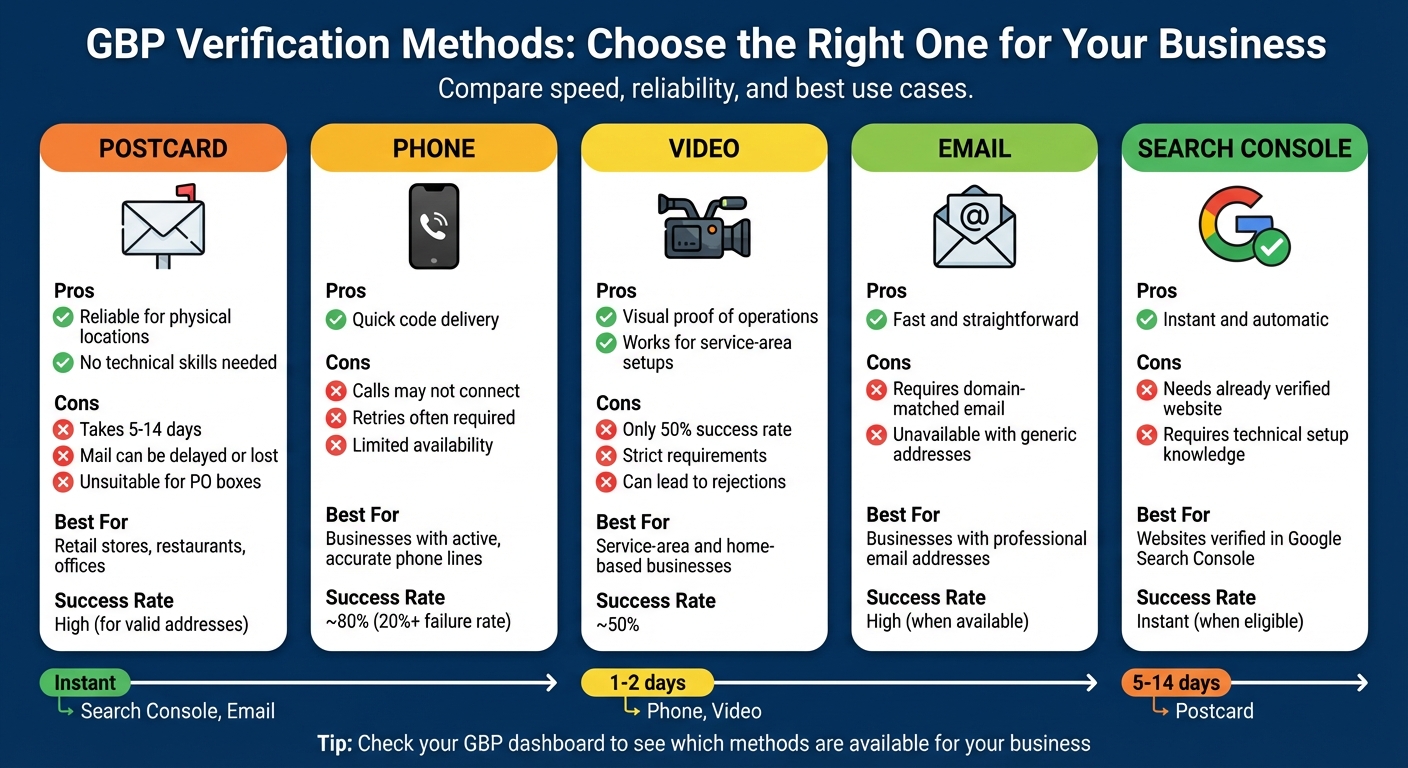
Google Business Profile Verification Methods Comparison Chart
Google determines which verification methods are available to you based on your business type, location, and risk profile. To see your options, check your Google Business Profile (GBP) dashboard.
Postcard verification is a common choice for businesses with physical storefronts, but it can take anywhere from 5 to 14 days to receive the postcard. Phone verification delivers a code via call or SMS, though many users report issues with receiving the code, sometimes requiring multiple attempts [3]. Video verification has become more user-friendly thanks to Google’s tutorials and preview tools, but it still has only about a 50% success rate [5]. If you choose this method, you’ll need to film a continuous, well-lit video showing your signage, interior operations (like a cash register or kitchen), and nearby landmarks.
If your website is already verified in Google Search Console, you might qualify for instant verification. This process is automatic and doesn’t require additional steps. Another option is email verification, but it’s only available if you have a professional email address that matches your website domain [7].
Here’s a closer look at the pros, cons, and best use cases for each method.
| Method | Pros | Cons | Best For |
|---|---|---|---|
| Postcard | Reliable for physical locations; no technical skills needed | Delivery takes 5–14 days; mail can be delayed or lost; unsuitable for PO boxes | Retail stores, restaurants, and offices |
| Phone | Quick code delivery | Calls may not connect; retries often required; limited availability | Businesses with active, accurate phone lines |
| Video | Offers visual proof of operations; works for service-area setups | Only 50% success rate; strict requirements can lead to rejections | Service-area and home-based businesses |
| Fast and straightforward | Requires a domain-matched email; unavailable with generic email addresses | Businesses with professional email addresses | |
| Search Console | Instant and automatic | Needs an already verified website and some technical setup knowledge | Websites verified in Google Search Console |
Once your Google Business Profile (GBP) is verified, keeping it in good standing requires consistent and accurate information. While you don’t need to monitor it constantly, adopting a few steady practices can help you avoid future suspensions. A common issue arises from inconsistent details across platforms or making too many changes too quickly. Ensuring consistency is your best defense.
Your business name, address, and phone number - commonly called NAP - must match exactly across your website, Google Business Profile, social media accounts, and any online directories where your business is listed. Even small discrepancies, like using "St." instead of "Street" or omitting a suite number, can cause Google to question the authenticity of your listing. This is especially important for industries like home services or legal practices, which often face stricter scrutiny.
Start by auditing your online listings on platforms like Google Maps, Yelp, and Facebook. Compare each listing to your official records and correct any inconsistencies. Focus first on authoritative sources such as your website and Google Business Profile before tackling smaller directories.
If you need to make legitimate updates - like changing your address or business name - do so carefully. Make one major change at a time, starting with your website and key citations, so Google sees consistent evidence. Gather supporting documents, such as updated business licenses, photos of new signage, or lease agreements, to prepare for verification requests. Timing these changes during slower business periods can also help minimize disruptions. Businesses that keep their NAP data stable and avoid frequent edits tend to face fewer verification challenges in the long run.
Regular audits, combined with automated tools, can help you spot and address issues early.
Many small business owners miss early signs of verification or policy problems because they don’t check their profiles regularly. Make it a habit to log in to your Google Business Profile dashboard at least once a week. This allows you to catch alerts, verification prompts, or suggested edits before they impact your visibility. Linking tools like Google Analytics and Google Search Console to the same account managing your profile can also improve monitoring and build trust with Google.
Free tools, such as Humble Help's Milo AI Marketing Coach, can simplify GBP management. Milo helps monitor your NAP, business hours, and categories, sending alerts if risky changes are detected. It tracks key metrics like calls, map views, and search impressions, flagging sudden drops that might indicate verification issues or soft suspensions. Milo also provides step-by-step guides for verification, re-verification, and appeals, along with advice on gathering required documentation, such as photos of signage, interior shots, and licenses. Additionally, Humble Help’s free Analytics Dashboard offers a clear overview of your profile’s performance, making it easier to identify and resolve potential problems.
Enable email notifications and mobile app alerts to ensure you don’t miss important messages from Google. Regularly review metrics like search impressions, calls, website clicks, and direction requests - sudden drops in these areas can indicate visibility or trust issues. Keeping your profile active by uploading photos and responding promptly to reviews also signals to Google that your business is legitimate and trustworthy. These efforts go a long way toward maintaining a stable and verified profile over time.
To successfully verify your Google Business Profile, you need a real, physical business location and consistent details - business name, address, and phone number - across your website, GBP, and directories like Yelp and Facebook. Avoid using PO boxes or virtual offices, as these often result in rejections or suspensions.
If verification doesn't go through, start by identifying the root problem. Check the error message in your dashboard, fix any policy violations (like keyword-stuffed names, incorrect categories, or mismatched addresses), and gather supporting documents. Examples of helpful documents include photos of your storefront signage, a business license, or utility bills. If the issue persists, try Google's verification troubleshooter or reach out to their support team with your documentation.
Choose the quickest verification method available. Instant, phone, or email verification are the fastest options, while video and postcard verification serve as backups. Video verification typically takes about 1–5 business days and requires a continuous recording that shows your exterior signage, interior workspace, and proof of operations. For service-area businesses, make sure to hide your home address and accurately define your service areas to avoid potential suspensions. Once verified, keep your profile secure by updating it regularly with accurate information.
After verification, focus on maintaining your profile's integrity. Avoid making major changes unnecessarily, ensure your details remain consistent, and stay active by posting updates and responding to reviews. These practices not only resolve common GBP verification issues but also boost your visibility in local search results. If managing your profile feels overwhelming, consider trusted digital marketing services like Humble Help to handle your GBP management and keep your business information consistent.
Key Points:
To make the postcard verification process for your Google Business Profile quicker, ensure your business address is correct and matches exactly what’s in your profile. Request the postcard without delay, and once it arrives, enter the verification code right away.
If your postcard doesn’t show up within the expected time frame, don’t worry - you can request another one. Keeping your contact details verified and your profile information current can also help prevent unnecessary delays. For small businesses that could use some extra help, reaching out to experts can simplify the process.
If your video verification gets rejected, the first step is to double-check the video against Google's guidelines. Make sure the visuals are clear, the framing is correct, and all required elements are included. If anything is missing or unclear, make the necessary tweaks and resubmit.
Still running into problems? Reaching out to Google support might be your best bet. For small businesses that need extra support, services like Humble Help can offer hands-on assistance to tackle verification issues effectively.
Service-area businesses need to keep their profile details accurate and aligned with their real operations to avoid suspensions. Steer clear of using virtual offices or fake addresses - Google insists on a genuine, verifiable location to qualify. Make it a habit to regularly review and update your profile to ensure it meets Google's guidelines.
Being honest and clear about your business information not only helps you stay compliant but also strengthens trust with potential customers looking for your services.
Discover strategies to elevate your business.


