

When homeowners need urgent services like plumbing or HVAC repair, they turn to Google. Businesses that appear in the top three Local Map Pack results are more likely to get calls. To secure one of these spots, you need an optimized Google Business Profile (GBP). Here’s what you need to know:
A well-maintained GBP builds trust and boosts visibility, helping home service businesses attract more calls and appointments.
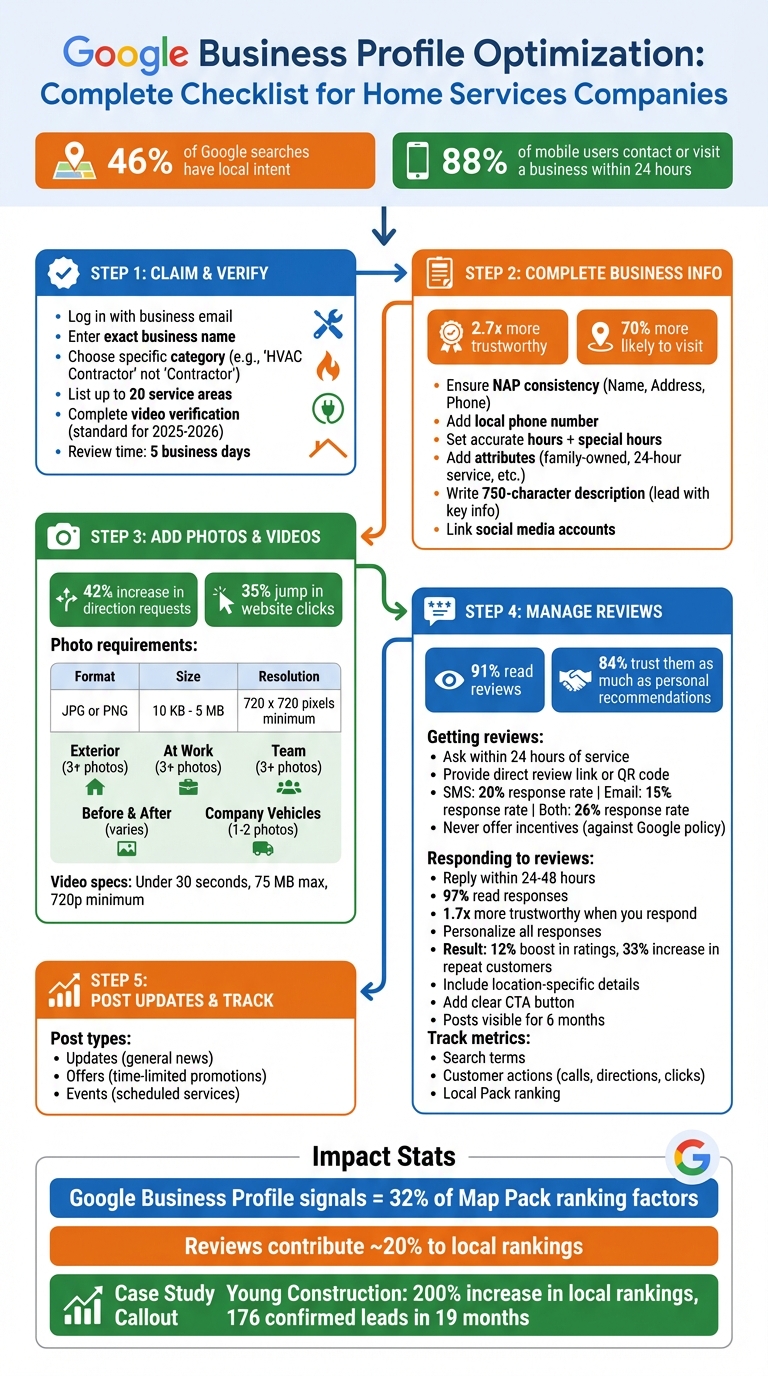
Complete Google Business Profile Optimization Checklist for Home Services
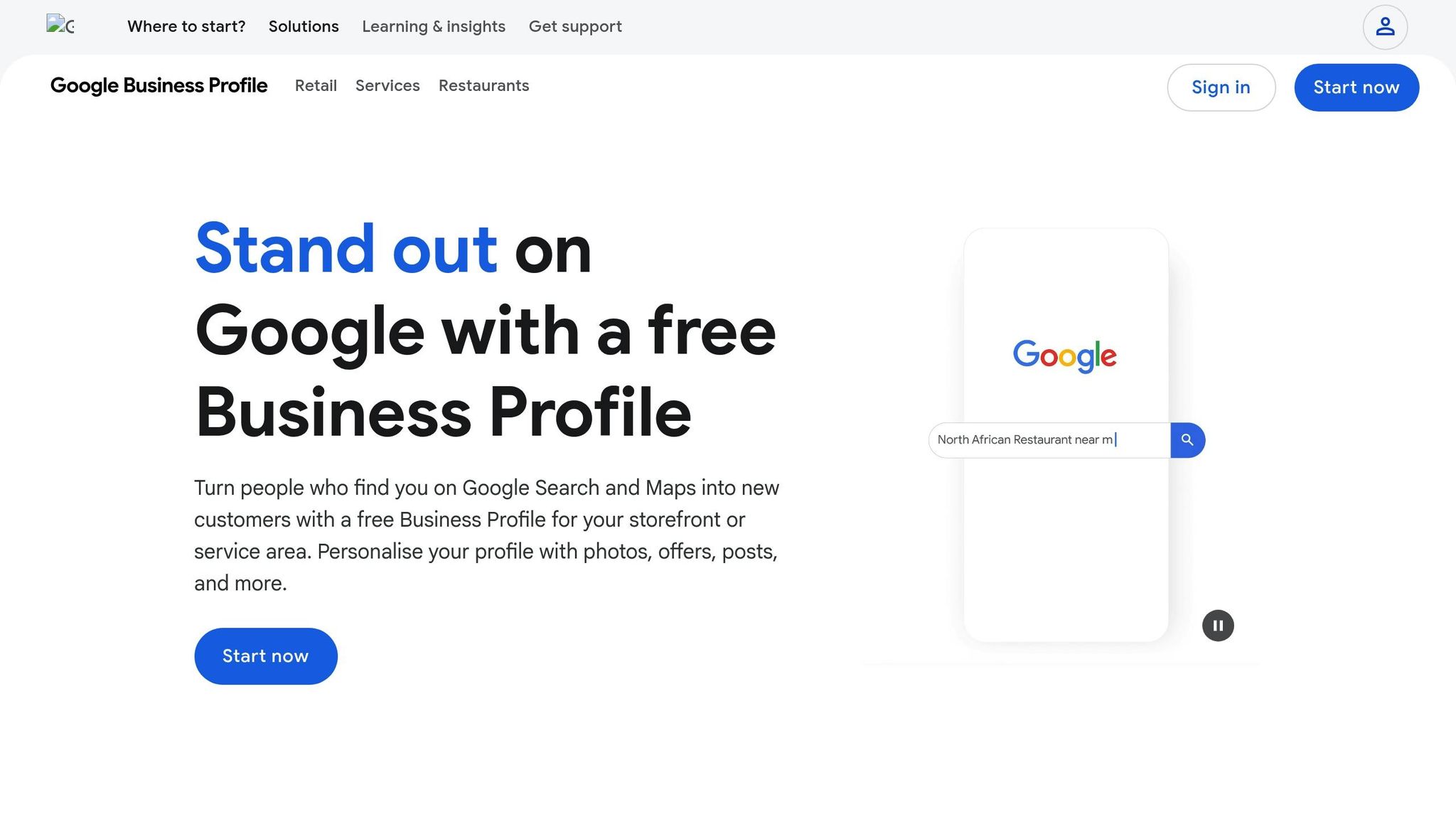
Now that you understand why your Google Business Profile (GBP) matters, let’s dive into how to claim and verify it. This is your first step toward managing your local presence effectively.
Start by logging into a Google Account tied to your business email domain. Then, head to the Google Business Profile creation page. Enter your business name exactly as it appears on official documents, like licenses or invoices. Accuracy here is key. Choose your primary category carefully - opt for something specific, like "HVAC Contractor", "Electrician", or "Plumber", instead of broad categories.
If your business doesn’t have a physical location for customers to visit, select "No" when Google asks about it. Instead of displaying a street address, you can list up to 20 service areas, such as cities, zip codes, or regions, within a 2-hour drive of your base. This approach keeps your home address private while still making your business visible in local searches.
To build trust and improve local search rankings, include a local phone number and your website URL. Once everything is set, proceed to verification - this step unlocks full control of your profile.
The verification method Google assigns depends on your business details, and you won’t be able to choose manually. Common methods include video recording, phone or SMS, email, live video call, or postcard. For most home service providers in 2025 and 2026, video verification has become the standard, especially for new profiles or address updates.
If you’re required to complete video verification, preparation is crucial. The video must be a single, continuous, unedited take recorded directly through the Google Business Profile interface - you can’t upload a pre-recorded video. During the recording, you’ll need to show proof of your business’s existence, like branded tools, equipment, or a vehicle with your logo. You’ll also need to demonstrate proof of management, such as a business license, utility bill, or invoice matching the business name on your profile. For example, you could record yourself unlocking a branded service van or showing a utility bill with your business name and address.
"Think of this online profile as free marketing. You are able to list your business on the map of the most popular search engine in the world, and it cost you nothing." - Leigh Landeche, Home Services Marketing Specialist
Google typically reviews video verifications within five business days. If your video is rejected - perhaps because the business name wasn’t clearly visible or proof of authorization was missing - Google will explain the issue so you can re-record and submit a new one. Once approved, your profile will display a "Verified" status or a blue checkmark, confirming you now have full control over your listing.
Once your business is verified, it's time to fill out every section of your profile with accurate and consistent details. A fully completed profile makes customers 2.7 times more likely to see your business as trustworthy and 70% more likely to visit [6].
Start by ensuring your business name matches your official branding to the letter. Google has strict rules here - taglines, phone numbers, or service descriptions in the name field are not allowed and could result in suspension [5][9]. If your branding includes legal designators (like LLC or Inc.), only include them if they’re part of your public-facing materials.
Your Name, Address, and Phone number (NAP) must be consistent across all platforms. Use a local phone number that you control, and if necessary, you can add up to two extra phone numbers [5][9]. When listing your address, stick to USPS Publication 28 standards - this means using a consistent format like "Suite 109" instead of alternating with "Ste" or "#109" [1].
Set your hours of operation accurately and take advantage of the "More hours" feature to specify times for things like senior hours, emergency services, or other special offerings [5][9]. Adding your opening date can also help establish credibility [6][9]. Under attributes, select options that reflect your business, such as "family-owned", "free estimates", "24-hour emergency service", or "wheelchair accessible" [6][3].
For tracking traffic and leads, consider adding UTM parameters to your website URL. These parameters allow you to monitor activity from your Google Business Profile directly in Google Analytics 4 [1]. Additionally, link your social media accounts - one link per platform - for sites like Facebook, Instagram, TikTok, LinkedIn, Pinterest, X, and YouTube [9].
Choosing the right primary category is crucial - it should describe what your business is, not what it offers. For example, select "Plumber" or "HVAC Contractor" rather than a broad term like "Contractor." You can add up to nine secondary categories, but stick to 2–4 highly relevant ones to keep your profile focused and relevant [5][9].
"Select categories that complete the statement: 'This business IS a' rather than 'this business HAS a.'" - Google Business Profile Help [5]
If you’re a service-area business (SAB) - meaning you go to your customers instead of them coming to you - hide your physical address and define up to 20 service areas. These can include cities, zip codes, or regions, but keep your coverage within a 2-hour drive of your base [5][1]. For hybrid businesses (like an auto repair shop that also provides roadside assistance), your address should stay visible since you serve customers both at your location and off-site [4][1].
To stay competitive, research the primary categories used by top-ranking businesses in your area. Also, ensure the services listed on your Google profile align with those promoted on your website.
Now that your core details and service areas are set, it’s time to create a standout business description. This 750-character section is your chance to showcase your mission, history, and what makes you different. Since only the first few lines appear in search results, make sure to lead with the most important details - your business name, primary service, and location should all be mentioned in the opening sentences.
Use this space to highlight what sets you apart, such as years of experience, family ownership, 24/7 availability, or certifications. Avoid promotional phrases like "best prices" or "50% off", and don’t include URLs, HTML, or pricing details - these are against Google’s guidelines and could result in suspension [5][9]. Write in a way that connects with your audience and finish with a clear call to action, like "Contact us today to schedule a consultation."
"The business description gives you a chance to allow your business' personality to shine. The information you convey, and how you convey it should resonate with your target audience." - Claire Carlile, BrightLocal [10]
Edits to your description usually show up within 10 minutes, though in some cases, Google may take up to 30 days for a full review. If you’re unsure where to start, pull inspiration from your website’s "About Us" page or try Google’s built-in AI suggestions - just double-check for accuracy and compliance. Once your business information is complete, you’ll be ready to enhance your profile with visual content.
When you’ve nailed down the basics of your business details, adding photos and videos is the next step to building trust and boosting local visibility. Visual content helps potential customers feel confident about your services before they even reach out. Businesses that include photos on their profiles see a 42% increase in requests for directions on Google Maps and a 35% jump in click-through rates to their websites [2]. For home service businesses, where trust is critical, the right visuals can make a huge difference.
Start with the essentials: a square logo and a high-quality cover photo. If you don’t have a storefront, consider using an image of a branded company vehicle. Beyond that, upload a mix of pictures and videos that showcase your work and team, such as:
Including photos of your team interacting with customers or performing services adds a personal touch. Short videos (under 30 seconds) can further enhance your profile. These might include customer testimonials, quick service demos, or behind-the-scenes clips. Since videos can auto-play in search results, they’re a great way to grab attention [11].
| Photo Category | Recommended Minimum | Purpose for Home Services |
|---|---|---|
| Exterior | 3+ Photos | Verifies your physical business location. |
| At Work | 3+ Photos | Highlights your expertise in action. |
| Team | 3+ Photos | Builds trust by showing the people behind your business. |
| Before & After | Varies | Offers visual proof of your work quality. |
| Company Vehicles | 1-2 Photos | Confirms legitimacy and helps customers recognize your team. |
Stick to JPG or PNG formats, with file sizes between 10 KB and 5 MB, and aim for a resolution of 720 x 720 pixels [11]. Videos should be no longer than 30 seconds, under 75 MB, and at least 720p quality [11]. Avoid using stock photos - Google prohibits them, and they could lead to your images being flagged or rejected [11][12]. Regularly updating images signals activity and keeps your profile fresh [13].
These visuals don’t just look good - they play a vital role in improving your local search rankings. High-quality photos and videos send a clear signal to Google that your profile is active and relevant [13]. Profiles with more clicks, views, and interactions often rank higher in the Local Finder or Map Pack, especially when factors like reviews and proximity are evenly matched [13].
"A GBP that is richly populated with relevant, high-quality photos and videos tends to get more clicks, more views, and more interaction from users." - Ross Cohen, GetPhound [13]
Photos and videos also help Google better understand your services. For example, images of specific tools, finished projects, or your team at work provide “contextual clues” that tie your business to relevant search queries [13]. Authenticity is key - use clear, well-lit images that represent your actual work [11]. Customer-uploaded photos can also act as powerful social proof, often carrying more weight than polished, professional images [13]. While you can’t remove customer photos unless they violate Google’s policies, you can flag inappropriate ones for review [13].
Be sure to optimize your photos with descriptive filenames like “bathroom-remodel-before.jpg” instead of generic names like “IMG1234.jpg.” Once uploaded, photos usually appear within 24–48 hours, but only after your Business Profile is verified [11]. With your visuals in place, you’ll be ready to focus on gathering customer reviews to further build trust.
Customer reviews play a huge role in building trust and improving local search rankings. In fact, 91% of consumers read reviews, and 84% trust them as much as personal recommendations [18]. For home service businesses, where trust is everything, reviews can be a game-changer for attracting new customers. Google also factors reviews into its "prominence" signals - alongside relevance and distance - when ranking businesses locally [22]. Businesses with recent, positive reviews often outshine competitors, even when other factors are similar. Managing your reviews effectively is just as important as keeping your business information accurate, ensuring your Google Business Profile (GBP) acts as a reliable, round-the-clock digital storefront.
Timing is everything when it comes to asking for reviews. The best moment to request one is right after a successful service or within 24 hours of completing the job - when customer satisfaction is at its peak [14][16][18]. Make it easy for them by providing a direct Google review link or a QR code on invoices, receipts, or service cards [14][17]. Train your team - whether field technicians or front-desk staff - to ask for reviews naturally during these positive moments. A simple script like, "If you're happy with our work, we’d appreciate a quick review using this link," can go a long way.
Follow-ups are another effective tool. SMS messages tend to see a 20% response rate, while emails average around 15%. Using both can push your overall response rate to 26% [16]. Take Green Valley Plumbing in Austin, Texas, as an example: In early 2025, they began sending personalized review requests with direct links and follow-up thank-you emails. Within three months, their positive reviews increased by 30%, helping them secure a top-three spot in local plumbing search results [18].
However, steer clear of offering incentives like discounts or gifts in exchange for reviews - Google prohibits this and could suspend your profile if you violate their rules [15]. Also, avoid "review gating", which means only asking satisfied customers for feedback. Instead, encourage all customers to share their honest experiences. If they include photos of the completed project, even better - this adds credibility for future clients [16]. Once the reviews start rolling in, responding promptly and thoughtfully is key to maintaining trust.
Replying to reviews is just as crucial as collecting them. A whopping 97% of people who read reviews also check how businesses respond, and companies that reply are seen as 1.7 times more trustworthy [19]. Try to respond within 24 to 48 hours, as 40% of consumers expect a reply within a day [19]. Quick responses show that you value feedback and can even positively impact your local search rankings.
For positive reviews, show genuine appreciation and reference specific details. Use the reviewer’s name, mention the service provided, and highlight any staff they praised. Personalizing your response - like signing off with a name or initials (e.g., "- Sarah, Manager") - adds a human touch and subtly improves your search visibility [20]. For example:
"Thanks, John - happy to help with your remodel. If you need plumbing services in Austin again, we’re here. - Sarah, Manager."
Negative reviews require a professional and empathetic approach. Acknowledge the customer’s experience, offer a brief explanation if necessary, and provide a direct contact for further discussion offline [19][20]. Avoid using SEO keywords in negative responses, as this can unintentionally increase the review's visibility. A good response might look like this:
"Sorry to hear about your experience, Mike. Please call (555) 123-4567 so we can resolve this. - Sarah, Manager."
As Erika DeVerter from GPO puts it:
"Treat negative reviews as opportunities: acknowledge the issue, offer resolution, and improve." [21]
Avoid generic, copy-paste replies - personalization is essential. Businesses that thoughtfully respond to reviews often see a 12% boost in star ratings and a 33% increase in repeat customers [20]. If you come across fake or spam reviews, flag them for removal through Google’s reporting process [21]. By maintaining a steady flow of reviews and crafting thoughtful responses, you’ll strengthen trust and improve your local search visibility.
Keeping your Google Business Profile updated is key to maintaining visibility and staying competitive. Once you've polished your profile's visuals, the next step is to stay active with consistent updates. Did you know that Google Posts remain visible for six months before being archived? Regular posts not only show potential customers that your business is active but also signal to Google that you're engaged and reliable. Businesses, especially in home services, that consistently update their profiles, monitor performance, and use free tools can gain a real edge in local search results.
Google Business Profile offers three main types of posts: Updates (general news or tips), Offers (time-limited promotions), and Events (scheduled services or activities). Using high-quality images is a must - they can increase direction requests and website clicks. To ensure your visuals look great on any device, stick to a 4:3 aspect ratio, ideally 1200 x 900 pixels or 720 x 540 pixels.
When crafting your post, lead with the most important information because only the first few sentences are visible before the "More" link. Keep your text short and impactful - 150 to 300 characters work best for mobile users. Adding location-specific details, like city names or neighborhoods (e.g., "Now offering emergency plumbing in downtown Austin"), helps Google connect your business to local searches. Tailor your posts to seasonal needs, like promoting furnace tune-ups in the fall or AC maintenance in spring for HVAC services.
Always include a clear call-to-action (CTA) button, such as "Book", "Call Now", or "Learn More." These buttons encourage immediate action and are more effective than simply listing a phone number. As Ben Fisher from Steady Demand puts it:
"Remember, a Post is your opportunity to talk directly to your customers, so speak semantically and use a 'real-world' conversational tone in your copy."
For better tracking, add UTM parameters to your post links to measure conversions in Google Analytics.
Free tools can make managing your profile easier, even if you're not tech-savvy. For example, Humble Help offers resources like the Milo AI Marketing Coach for tailored recommendations, a Profile Scorecard to highlight areas for improvement, an Analytics Dashboard for tracking performance, and a Content Topic Planner with a 30-day calendar. These tools simplify your posting strategy and help you stay on top of your goals for generating local leads.
Posting actively is just the start - you need to track how your profile performs to refine your approach. Google Business Profile Insights provides data on how customers find and engage with your listing. Reviewing the search terms that bring visitors to your profile can reveal what services they're most interested in. You can also monitor customer actions like calls, direction requests, and clicks to see which updates are working best.
Keep an eye on how your profile ranks in the Local Pack, as this map section is a high-visibility spot for local businesses. Regularly tracking metrics - whether weekly or bi-weekly - can help you spot trends and adjust quickly. For example, you might notice that posts with better-quality images or specific location details drive more engagement. Considering that 88% of people searching for local businesses on their phones either call or visit within 24 hours, even small tweaks to your profile can lead to noticeable increases in jobs and revenue.
Your Google Business Profile is often the first place homeowners look when they need immediate help. Think about it - when someone searches for "emergency plumber near me" or "AC repair", they’re ready to hire on the spot. Having an optimized profile ensures your business appears right when these high-intent customers are searching. Companies with complete profiles consistently see more clicks than those with incomplete ones. In fact, 88% of people searching for local businesses on mobile devices either call or visit within 24 hours [7].
But it’s not just about being visible. A strong, well-maintained profile builds the trust that turns searches into sales. When potential customers see detailed service descriptions, authentic photos, and recent reviews mentioning specific services like "emergency AC repair", they’re more likely to feel comfortable hiring you. As Hook Agency puts it: "Ranking opens the door. Trust closes the deal" [8]. Additionally, Google Business Profile signals account for about 32% of the Map Pack ranking factors, with reviews contributing roughly 20%. This makes your profile a critical tool for generating local leads [8].
Young Construction, a roofing company, is a great example of this in action. Partnering with Hook Agency between 2025 and early 2026, they aligned their Google Business Profile with their website and clearly defined their service areas. The outcome? A 200% increase in local first-page rankings and 176 confirmed leads from 333 calls and form submissions over 19 months [8].
With these insights, you’re now equipped to position your business in front of ready-to-hire customers.
To make the most of your Google Business Profile, start by taking these steps:
Set aside time each week to post updates and review performance metrics. If this feels like too much to manage, there are tools available to simplify the process. For instance, Humble Help (https://humblehelp.studio) offers resources tailored for small and local businesses. Their tools include an AI Marketing Coach, Profile Scorecard, Analytics Dashboard, and Content Topic Planner to keep your profile active and effective.
Google Business Profile verification can often be completed in under 10 minutes if you choose a quick method like video verification. This is one of the fastest options available for most users.
If your Google Business Profile gets suspended, the first step is to figure out what caused the issue. Check for any mistakes or violations in your profile, correct them, and collect any necessary documents to verify your business. Once you're ready, submit an appeal through Google's reinstatement process.
Keep an eye on the progress of your appeal, and be prepared to respond quickly if Google asks for more information. To prevent future problems, make sure your profile follows all of Google’s guidelines. Staying compliant can save you a lot of headaches down the road.
You can monitor calls from your Google Business Profile through call history or call tracking numbers.
Discover strategies to elevate your business.


