


When people ask Siri or ChatGPT for a local business, they get one clear answer. To make sure your Bay Area business is that answer, focus on these steps:
AI-driven tools like ChatGPT, Siri, and Alexa rely on verified, consistent, and detailed information to recommend businesses. By following these steps, you can increase your chances of being the go-to choice for local searches.
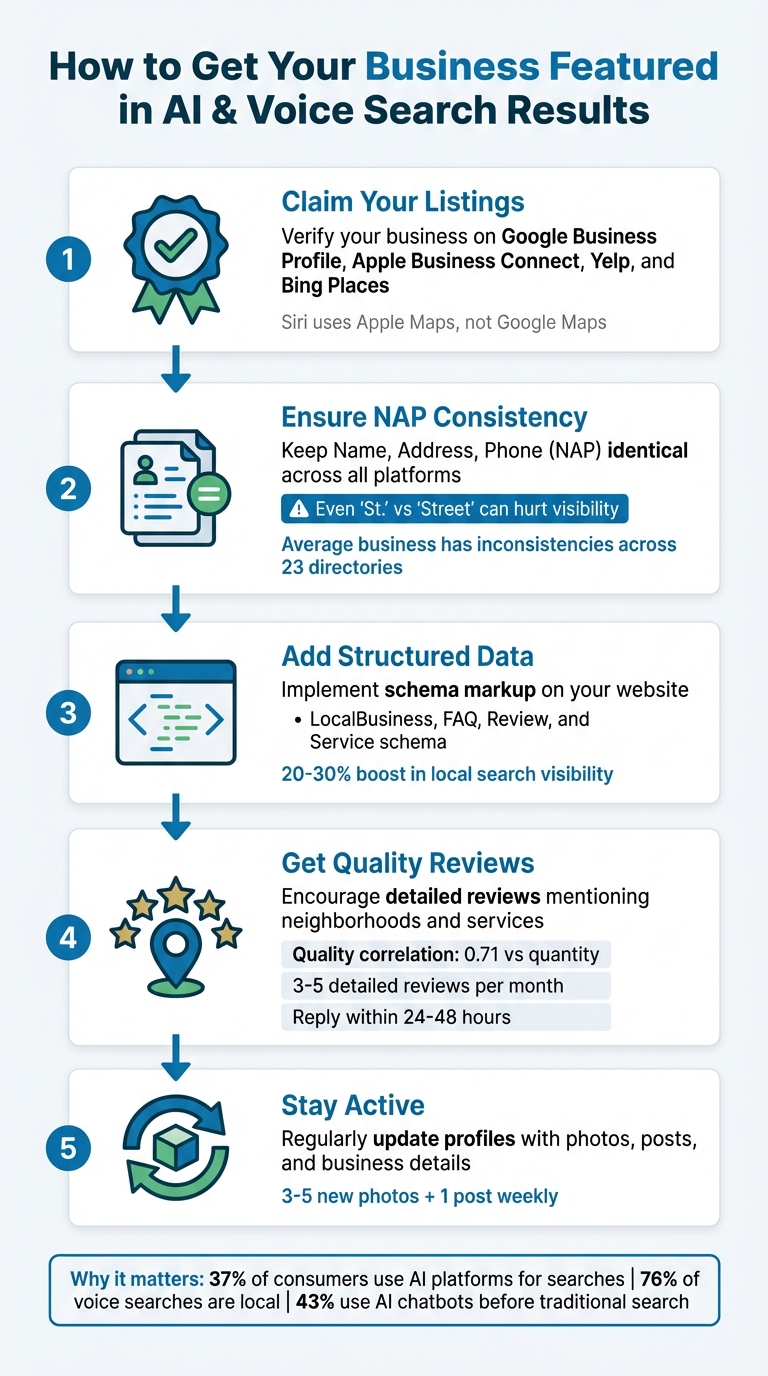
5 Steps to Optimize Your Bay Area Business for AI Search and Voice Assistants
With the rise of AI-driven tools like ChatGPT and Google's AI Overviews, your Google Business Profile (GBP) has become a critical data hub for voice and AI assistants. When these systems recommend local businesses, they rely on verified information from trusted sources like your GBP.
"AI doesn't just rank results, it synthesizes information from sources it trusts, meaning your GBP needs to provide clear, accurate details it can cite when answering questions." – Lead Oracle AI [2]
Unlike your website, which you control but isn't subject to strict verification, Google confirms your GBP ownership and holds it to high data quality standards. Fully optimized profiles can see up to 42% more direction requests and 35% more website clicks compared to incomplete ones [6].
To get started, visit business.google.com, search for your business, and claim or create your listing [4][5].
Verification options include phone, email, instant verification through Search Console, video, or document uploads [4][5]. A verified profile not only signals authenticity to AI systems but also boosts your chances of being featured in local recommendations.
Important Note: Siri doesn’t pull data from Google Maps. Instead, it uses Apple Business Connect. To appear in Siri’s results, make sure to claim and optimize your listing there as well [1].
"Siri does not use Google Maps - ever. Even if your Google Business Profile is flawless, Siri won't see it. To exist in Siri's world, claim and optimize your listing through Apple Business Connect." – Debbie Anderson, Founder, Beacon4ai [1]
Consistency is key - ensure your business name, address, and phone number (NAP) match across all platforms, including GBP, Apple Maps, and your website. Any inconsistencies can create verification issues and lower your AI confidence score [3][1].
Once verified, focus on filling out your profile completely to build trust with AI systems.
After verification, take the time to complete every available field in your profile. Start with your primary category - be as specific as possible. For example, choose "HVAC Contractor" instead of the broader "Contractor." This helps AI better match your business to user searches [2][3].
You can also add up to five secondary categories if relevant. When writing your business description, keep it natural and concise. Place key details in the first 100 characters to ensure they’re visible. For instance:
"Emergency plumbing repairs for San Francisco and Oakland - same-day service available 7 days a week."
If your business operates without a physical storefront, hide your address and specify the service areas you cover, like "San Francisco, Oakland, Berkeley", instead of using a vague radius [5][6]. This improves local relevance in AI-driven searches.
To keep your profile fresh, update it regularly. Add 3–5 new photos and publish at least one post weekly. These updates signal activity and relevance to AI algorithms [2][5][6].
Don’t overlook attributes like wheelchair accessibility, emergency services, or parking availability. These details help AI answer specific questions like, "Does this location have parking?" [2].
The Q&A section of your profile is a direct line to AI systems. When tools like ChatGPT or Google's AI Overviews answer questions about your business, they often pull from this section first [8].
"The Q&A section of your GBP listing is a direct pipeline to Google's AI systems. Populate it proactively. Do not wait for customers to ask questions." – Lead Oracle AI [8]
Be proactive - seed your Q&A section with 10–15 common customer questions. Use conversational, natural language for these entries. For example:
Keep answers concise, aiming for 40–80 words. This provides enough detail for AI systems to cite while staying focused. Address customer intent directly by including specifics about cost, availability, turnaround times, or service areas. This approach appeals to users ready to take action [9].
To identify questions, review your Google Search Console for common queries like "who", "what", "where", and "how." Customer reviews can also reveal implicit questions you can turn into Q&A entries. If your profile is new, check competitors’ Q&A sections for inspiration.
Once you've optimized your Google Business Profile (GBP), the next step is to strengthen your online presence with structured data on your website. While your GBP provides AI tools with basic details, structured data offers a more detailed, machine-readable format that AI systems can interpret without ambiguity. This ensures your business information is clear and accessible.
Structured data, often referred to as schema markup, is a standardized code embedded in your website's HTML. It communicates essential details like your business identity, location, and services in a way that AI systems can easily process. For example, when someone asks Siri, "Where's the nearest dentist open on Sunday?" or queries ChatGPT for the "best Italian restaurant near me", structured data ensures your business is part of the results.
"AI search engines are becoming the new local directory. When someone asks ChatGPT for 'the best Italian restaurant near me,' your local schema determines whether you're in that conversation." – Yue Zhu, Product Manager, Seenos.ai [10]
Adding structured data can lead to tangible benefits. Businesses that implement LocalBusiness schema correctly often see a 20–30% boost in local search visibility, while star ratings can increase click-through rates by up to 35% [10]. By complementing your GBP with schema markup, you transition from being just another option to a verified entity that AI platforms can trust.
The LocalBusiness schema is the foundation for physical businesses. It defines critical details like your Name, Address, and Phone (NAP), as well as your operating hours and geographic coordinates. To implement this, use the JSON‑LD format, which is widely supported by Google and AI search engines.
Here are some key tips for using LocalBusiness schema effectively:
LocalBusiness tag, choose a subtype like Dentist, Restaurant, HVACBusiness, or LegalService. For example, a law firm in the Bay Area could use Attorney, while a clinic in Oakland might use MedicalClinic. This precision helps AI systems categorize your business more accurately.GeoCoordinates property. This is especially important in densely populated areas like San Francisco or San Jose, where accuracy matters.@id: Create a permanent URL for your business (e.g., https://yourbusiness.com/#business) to establish a unique identity in the Knowledge Graph.sameAs links: Connect your website to authoritative profiles like LinkedIn, Facebook, and other directories to reinforce your online identity.For service-based businesses without a physical storefront, like mobile locksmiths or plumbers, use the areaServed property to define the regions you cover (e.g., "San Francisco, Oakland, Berkeley"). If you operate multiple locations, create a dedicated page for each, complete with its own LocalBusiness schema and NAP data.
Before finalizing, validate your code using tools like Google's Rich Results Test or the Schema.org Validator. This ensures there are no syntax errors that could prevent AI from reading your data.
After setting up LocalBusiness schema, you can enhance your site further by adding Service, FAQ, and Review schema. These additional layers provide more specific information about your offerings and answer common customer questions, making it easier for AI systems to understand and recommend your business.
Service schema along with the makesOffer property to list your services. Include a name and description for each, such as "Emergency AC Repair" or "Legal Consultation", to clearly convey your offerings.AggregateRating schema to showcase star ratings based on customer feedback found directly on your website. Avoid marking up third-party reviews from platforms like Google or Yelp, as this violates guidelines and could lead to penalties.Here’s a real-world example: In early 2026, a professional services firm added Service and FAQ schema to its location pages, which increased its Perplexity citations for "best in" prompts from 8% to 21%. Similarly, a bilingual clinic implemented LocalBusiness and FAQ schema alongside localized content, leading to Copilot citations replacing traditional directory listings and an 18% rise in appointment calls.
| Schema Type | Purpose for AI & Voice Search |
|---|---|
| Service | Highlights specific offerings like "Emergency AC Repair." |
| FAQPage | Displays Q&A in search results and answers voice assistant queries. |
| AggregateRating | Shows star ratings in search results, building trust and clicks. |
| GeoCoordinates | Helps map systems confirm your exact location. |
| OpeningHours | Powers "Open Now" filters with standard and holiday hours. |
Customer reviews do more than just build trust - they also serve as critical data for AI systems like ChatGPT and Siri. These tools analyze reviews to determine which businesses to recommend, focusing on details like specific services, location mentions, and overall positive sentiment across platforms [11][13].
"Reviews act like training data for local AI: they tell Google not just whether people like your business, but what you actually do, where you do it, and how consistently you deliver." – Jeff Schwerdt, CEO, Reviewly.ai [11]
When it comes to reviews, quality outweighs quantity. Research shows that review quality has a much stronger correlation (0.71) with AI search visibility compared to review quantity [13]. For example, a Bay Area business with 50 detailed, location-specific reviews can outrank a competitor with 500 generic five-star ratings [13].
Recency also plays a key role. Reviews from the past 30 days carry extra weight because they indicate that your business is active and meeting expectations. In fact, 73% of consumers only trust reviews written within the last month [11][17].
The best reviews for AI visibility are those that include specific neighborhoods and services. For instance, a review saying "best sourdough in North Beach" or "emergency seismic retrofitting in Oakland" helps AI systems categorize your business more effectively [11][13]. Timing matters - ask for reviews within 24–48 hours after providing a service [16]. Encourage customers to include local details by framing your request with phrases like, "Your feedback helps San Francisco families find a trusted plumber" [17].
Make it easy for customers to leave reviews by using multiple channels. For example:
Instead of chasing large volumes, aim for 3–5 detailed reviews each month [13]. AI tools like ChatGPT rely on "review consensus", meaning they look for consistent feedback across platforms to decide which businesses to recommend [17]. Maintain strong profiles on key platforms like Google, Yelp, and industry-specific directories, as these sources are often used for real-time data [14][15].
Finally, boost your credibility by responding to every review.
Once you've collected quality reviews, engaging with them is just as important. Responding to reviews not only improves customer service but also enhances your rankings. Google reviews, for example, account for about 15% of Local Pack rankings [17], and businesses that consistently reply to reviews see an average revenue increase of 35% [18].
Your responses also add valuable text that search engines can crawl. For example, replying with "Thanks for choosing us for your kitchen renovation in San Jose" reinforces essential keywords [16]. Research shows that top-ranking businesses often write review responses averaging about 140 words [17].
Make it a goal to respond to all reviews - positive and negative - within 24–48 hours [18][19]. For negative reviews, use the HEAR framework:
Thoughtful responses can build more trust with AI systems than a perfect five-star rating.
Lastly, ensure your review presence is strong across key platforms like Google and Apple Maps [14]. With 43% of consumers now using AI chatbots to research local services before turning to traditional search engines [12], having a solid multi-platform strategy is essential to staying visible and relevant in AI-driven recommendations.
AI tools thrive on consistency. They don’t rely on just one source of information - they cross-check data across multiple platforms. In fact, over 70% of local ranking signals come from this cross-platform verification rather than a single profile [7]. To earn the trust of AI systems, your business information needs to be consistent across authoritative sources.
"AI does not trust a single source. It cross-references your business information across multiple authoritative sources and asks: does this business consistently exist...?" – Adrian Willis, Founder, LinkJuce SEO Digital Marketing [20]
Think about it: when someone asks Siri for the best coffee shop in Palo Alto or ChatGPT for a reliable electrician in Oakland, these systems don’t just look at one directory. They scan dozens of platforms to confirm which businesses are active, legitimate, and trustworthy. This consistency builds your credibility and positions your business for AI-driven recommendations.
Start by listing your business on major platforms like Apple Business Connect, Google Business Profile, Yelp, and Bing Places. Then, expand to more specialized directories. For example:
In addition, authoritative databases like Wikidata, local chambers of commerce, and industry-specific directories add another layer of verification. Even LinkedIn and Facebook can help confirm your business’s legitimacy [7].
Local mentions are equally important. Being listed on Bay Area chamber of commerce sites, neighborhood business associations, or even mentioned in local news articles creates authoritative backlinks. These backlinks are another signal AI systems use to verify your business [20]. Aim to secure consistent listings on at least 10 authoritative platforms [7].
These efforts, combined with optimizing your Google Business Profile (GBP) and using structured data, create a unified and credible online presence.
Once your business is listed, consistency is key. Your Name, Address, and Phone number (NAP) need to match exactly across all platforms. AI systems assign "confidence scores" to businesses, and even small discrepancies - like using "St." on one site and "Street" on another - can hurt your score and make your business less likely to appear in search results [1][20].
"Every inconsistency - even 'St' versus 'Street' or a different phone format - reduces the AI's confidence that all of these references describe the same business." – Adrian Willis, Founder of LinkJuce SEO Digital Marketing [20]
Pick one format for your NAP and stick to it everywhere - on your website, Google Business Profile, Apple Business Connect, Yelp, social media, and every directory listing. For example, don’t alternate between "(415) 555-1234" and "415-555-1234" for your phone number.
Here’s a surprising stat: the average small business has NAP inconsistencies across 23 directories when they first audit their listings [21]. Fixing these inconsistencies can lead to a noticeable boost in local search rankings - typically 2-4 positions - within 4-6 weeks [21]. Tools like BrightLocal or Whitespark can help identify and fix these mismatches, or you can manually update your top 10-15 listings.
A consistent and cohesive online identity not only improves your local search rankings but also makes your business more appealing to AI systems, complementing your GBP and website efforts.
AI-driven search is no longer a distant future - it's happening now. With 8.4 billion voice assistants in use worldwide and 37% of consumers turning to AI platforms like ChatGPT or Gemini for their searches as of January 2026, your business needs to be visible where these systems are looking [1][23].
At its core, success in this space depends on four key actions: claiming your critical listings, ensuring NAP (Name, Address, Phone number) consistency, adding schema markup, and earning localized, high-quality reviews [1][22]. These aren't just nice-to-haves - they're the trust signals AI platforms rely on to decide which businesses to recommend.
Also, keep in mind that each AI assistant taps into different sources. To maximize your presence, you need to optimize your business across all these platforms [1][22]. Think of it as ensuring your business is listed in every library where these systems search for answers.
The time to act is now.
Armed with these insights, it's time to take practical steps. Start small - choose one or two strategies to tackle this week. For instance, if you haven't yet claimed your Apple Business Connect listing, make that your priority. It's the only way to access the 86.5 million Siri users in the U.S. [1]. Alternatively, conduct a quick audit of your NAP details across major listings and correct any inconsistencies.
Businesses that appear in searches on platforms like Siri and ChatGPT achieve this through consistent, focused optimization. Considering that 76% of voice searches are local in nature and nearly 90% of mobile local searches result in same-day calls or visits, the potential here is massive [1][24]. Don’t let it pass you by.
Discover strategies to elevate your business.


