If I don’t check what AI says about my business, I can lose leads before anyone visits my site.
Here’s the short version: AI tools like ChatGPT, Gemini, Perplexity, and Copilot already shape local buying decisions. But their answers often rely on scattered listings, reviews, and third-party sites. That means my business can show up with the wrong phone number, old hours, missing services, or not show up at all.
A few numbers stand out:
What I need to do is simple:
The main point is simple: AI does not read my business the way I want unless the same facts appear across the web. If my listings conflict, AI may guess. And when AI guesses wrong, I can miss calls, bookings, and sales.
That’s why I’d treat AI visibility like a comprehensive SEO strategy: not as a side issue, but as a direct lead source.
AI Visibility Stats Every Small Business Owner Must Know
A bad AI answer can cost you a lead before anyone even visits your site. In some cases, AI leaves a business out of local results altogether. In others, it gives just enough bad info to send people to the wrong place.
When you look into it, the problems are usually pretty specific: missing listings, wrong contact info, and poor recommendations.
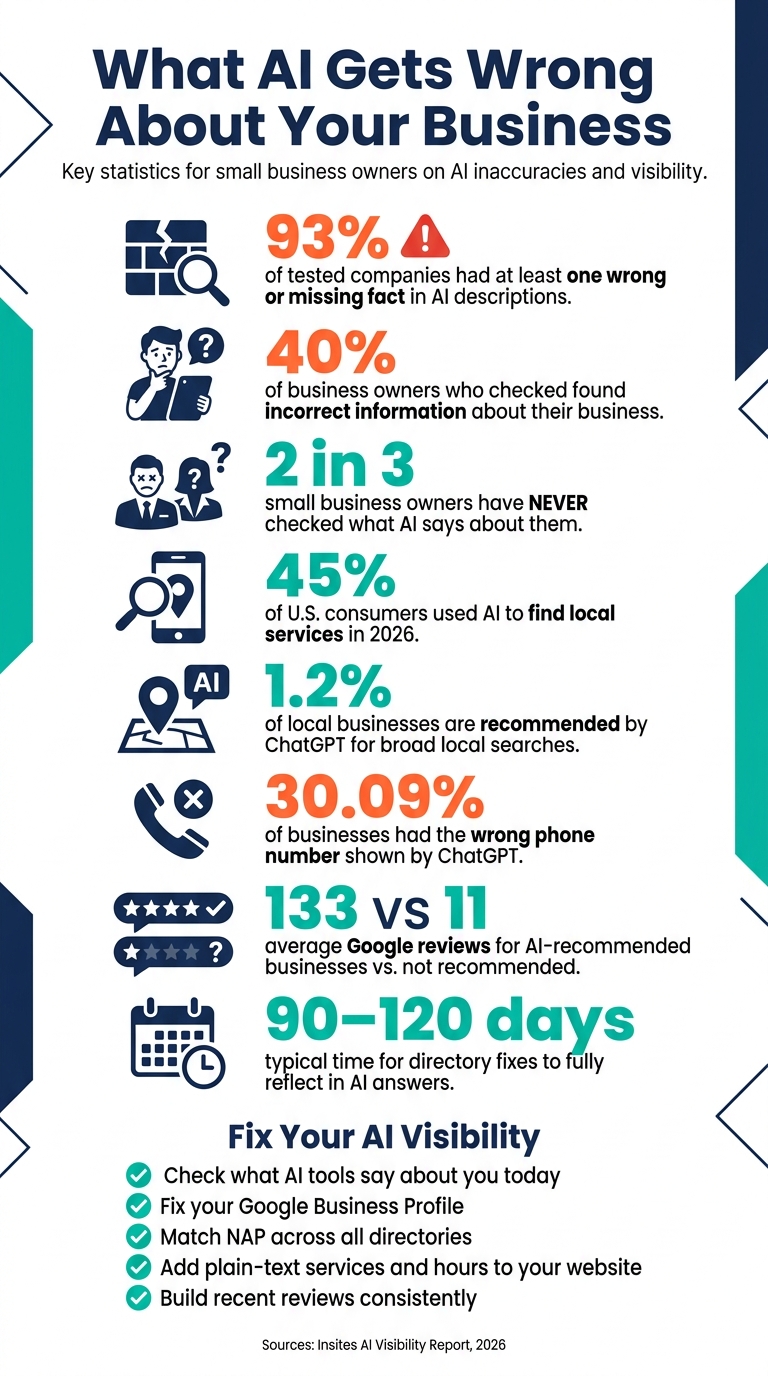
According to the Insites AI Visibility Report, ChatGPT showed the wrong phone number for 30.09% of businesses, the wrong website for 15.59%, and returned a completely wrong match for 1.68% of searches [4]. For a local business, that can mean missed calls, bad directions, and lost bookings.
More than 40% of businesses are never recommended by ChatGPT in buyer-intent searches, the kind of search where someone asks for a plumber near me [4]. In May 2026, a bakery owner in Austin found that ChatGPT left out her nine-year-old business and recommended a competitor that had been closed for six months [2].
That sounds wild, but it happens for a simple reason: AI pulls from scattered signals, not one clean source of truth.
Small businesses tend to face more of this risk than large brands. Half of the small businesses tested got at least one invented fact, compared with 32% of large companies [1]. If your web presence is smaller, AI has less material to work with and more chances to guess.
So where does AI get this stuff from in the first place?
It pulls answers together from many sources, and a business's own website may make up only 5% to 10% of the information used [1]. The rest often comes from directories, review sites, and third-party mentions.
When those sources don't match, AI has to pick one. An old directory listing with the wrong address or an outdated phone number can beat the version you wanted customers to see.
"AI visibility is built on corroboration, not optimisation. Businesses that are known, well-regarded and recommended tend to be the ones with more evidence backing them up everywhere at once." - Andrew Waite, CEO, Insites [4]
There's another snag here. Updates to your website can take months to show up in AI answers, and content buried in images, PDFs, or dynamic widgets may never get read at all [1][6].
AI pulls local business details from a few main places. When those sources line up, the answer gets more confident. In most cases, the strongest signals come from your business profile, your website, and outside mentions that say the same thing.
Your Google Business Profile is one of the main places AI checks for core business facts like your name, category, hours, phone number, and service area [9]. Other platforms, like Yelp, Apple Business Connect, Bing Places, and the Better Business Bureau, help back up those details. If your NAP is the same across those sources, AI is more likely to trust it. If those details clash, AI can pull the wrong version.
Review count matters too. Businesses recommended by AI had 133.4 Google reviews on average, compared with 10.7 for businesses that were not recommended [4]. That gap is hard to ignore. More reviews can act like a trust signal for both people and AI.
Yelp also showed up as a major source. It received 28% more citations than Google Business Profiles, which makes it a high-priority listing to fix and keep up to date [8].
Those same signals do more than confirm your business details. They also affect whether AI recommends your business in the first place.
Your website is still the top source in AI answers. It appeared in 72.3% of awareness and reputation queries. But when someone asked for a recommendation, that number dropped to 50.7%. At the same time, review sites climbed from 1.8% to 11.51% [3].
That shift tells you a lot. Your website helps AI understand what you do. Reviews and other outside mentions help it decide if you're worth recommending.
Beyond review platforms, AI also looks at local press mentions, chamber of commerce listings, and trade association pages [3]. These outside mentions tend to carry extra weight because they don't come from your own marketing.
AI leans on different sources based on the type of question:
| Source Type | Awareness/Reputation Queries | Recommendation Queries |
|---|---|---|
| Own Website | 72.3% | 50.7% |
| Directories/Listings | 38.85% | 35.25% |
| Trades/Industry Sites (Angi, etc.) | 10.07% | 23.02% |
| Review Sites | 1.8% | 11.51% |
| News Sites | 0.72% | 3.6% |
Source: Insites AI Visibility Report [3]
One simple fix goes a long way: put your hours, service details, location pages, and About page in plain text. AI often skips text buried inside images, PDFs, and widgets, so it may miss those details or fill in the blanks on its own. Next comes the bigger issue: whether all of those sources say the same thing everywhere.
Once you know AI can get things wrong, the next move is simple: check what it says about your business right now.
AI answers come from public signals. So before you fix anything, you need to see what those signals are producing today.
Check ChatGPT, Perplexity, Gemini, Claude, and Google AI Overviews. In each one, ask the same four questions:
This gives you a fast read on the most common mistakes.
Turn off memory and personalization before testing. If you don't, the tool may shape its answer around your past chats, which means you won't get the same result a new customer would see.
Record each answer verbatim. That way, you can track wrong facts, missing details, and changes over time.
It also helps to ask: "Who is the best [your service] in [your city]?" If competitors appear and you don't, that's a visibility gap. And that's a clue. It tells you which source signals may need attention first.
Start with the sources AI leans on most: Google Business Profile, then your website, then major directories.
Your Google Business Profile is the most-quoted structured record for local business facts like hours, phone number, and service categories [5]. Check the collected info panel inside the GBP editor, because third-party sources can overwrite your details.
"A third-party data source can overwrite your hours, and then an AI engine reads the overwritten version. Fix the profile, then fix what fed it." - Hyder Shah, Founder, Foundgrove [5]
After GBP, move to your website. Make sure your services, location, and contact details appear in plain text. Don't hide them in images, PDFs, or booking widgets. Then check that your name, address, and phone number match exactly across Yelp, Apple Business Connect, Bing Places, and the BBB.
Here’s a quick reference for common issues and what to do next:
| Error Type | Likely Cause | Fix |
|---|---|---|
| Wrong phone number or hours | Stale GBP data or an old directory listing | Update GBP and check the collected info panel [5] |
| Missing services | Services listed in images or widgets only | Add a plain-text service list to your website |
| Not recommended by AI | Low review count or poor recency | Start a focused review collection effort |
| Invented pricing or tiers | No clear pricing on your website | Add one direct sentence per service with the actual details |
Once the core sources match, check them again every month. That's how you keep the answer current instead of letting old data creep back in.
Fixes can take weeks to appear. And sometimes old listings come back and pull things off course again. That's why monthly checks matter.
For a free starting point, Vyzz.io offers a 90-second audit across multiple AI assistants [1], and Insites provides a free AI visibility check that surfaces citation breakdowns [3]. You can also do a manual monthly check using the free versions of ChatGPT, Perplexity, Gemini, and Claude.
Use these tools to confirm your listings before you move to the highest-impact fixes. Then use the audit to sort the fastest fixes first.
AI pulls from more than one public source, so start with the places people trust most. And when you decide what to fix, sort by impact, not effort.
| Action | Impact on AI Answers | Typical Timeframe |
|---|---|---|
| Fix Google Business Profile and contact page | High | Immediate (1–7 days) |
| Convert service descriptions to plain text on your website | High | Immediate (1 day) |
| Standardize NAP across major directories | Medium | 2–4 weeks |
| Earn recent reviews across multiple platforms | Very high | Ongoing (3–6 months) |
| Run a monthly AI check | Essential | 15 mins/month |
For the ongoing part, monthly is the right pace for most small businesses.
There’s usually a delay, too. Changes to your GBP and website can take weeks to show up, and fixing mismatches across the web often takes 90 to 120 days, with meaningful movement showing up within six months [7].
Follow this order first. Then check in each month.
AI tools already influence where local money goes. 45% of U.S. consumers used AI to find local services in 2026, up from just 6% the year before [7]. And ChatGPT recommends only about 1.2% of local businesses when people ask broad category questions [7]. On top of that, more than two-thirds of small business owners have never checked what AI says about their business [1].
The good news is that the fix is pretty simple. AI reads the signals on your Google Business Profile, website service pages, directory listings, and reviews. If those sources are accurate, aligned, and up to date, AI answers tend to get better. If they’re old or they conflict with each other, AI may get details wrong - or leave your business out altogether. That can turn possible calls and leads into missed calls and missed leads.
Start with the audit. Then fix your GBP and contact page. After that, clean up your website copy. The rest tends to fall into place.
If AI leaves you out, the lead is gone before it ever shows up in your analytics.
Open ChatGPT, Perplexity, and Google Gemini in separate private browsing windows to cut down on personalization. Then ask each tool direct questions about your business name, location, services, contact details, and hours.
Go a step further and ask category-based questions too. For example, ask who they recommend for your type of service in your city.
Record the answers. Then note anything that's missing, out of date, or wrong. Run the same audit every month so you can spot changes before they turn into bigger problems.
AI assistants can get details wrong because they pull information from all over the web instead of one controlled source.
That creates a simple problem: if your website, directory listings, reviews, or third-party mentions are missing, out of date, or inconsistent, the AI may lean on stronger signals from somewhere else.
One of the biggest trouble spots is NAP data: Name, Address, Phone. When those details conflict across the web, confidence drops. And when confidence drops, the assistant may give inaccurate answers or skip your business in recommendations.
After you fix the underlying sources, AI answers often start to shift in about 2–4 weeks. In many cases, you can see measurable movement around the 30-day mark.
More steady updates across AI assistants usually take 60–90 days. If the issue involves broader narrative patterns or details tied to training data, the timeline can stretch to a quarter or more. So the right expectation is weeks to a few months, not days.
Discover strategies to elevate your business.