


Negative Google reviews can damage your business, especially in competitive areas like the Bay Area. But how you respond can turn things around. Here’s what you need to know:
To tackle negative reviews effectively:
Templates for different scenarios are included, from valid complaints to suspected fake reviews. By addressing feedback constructively, you can protect your reputation and even strengthen customer trust.
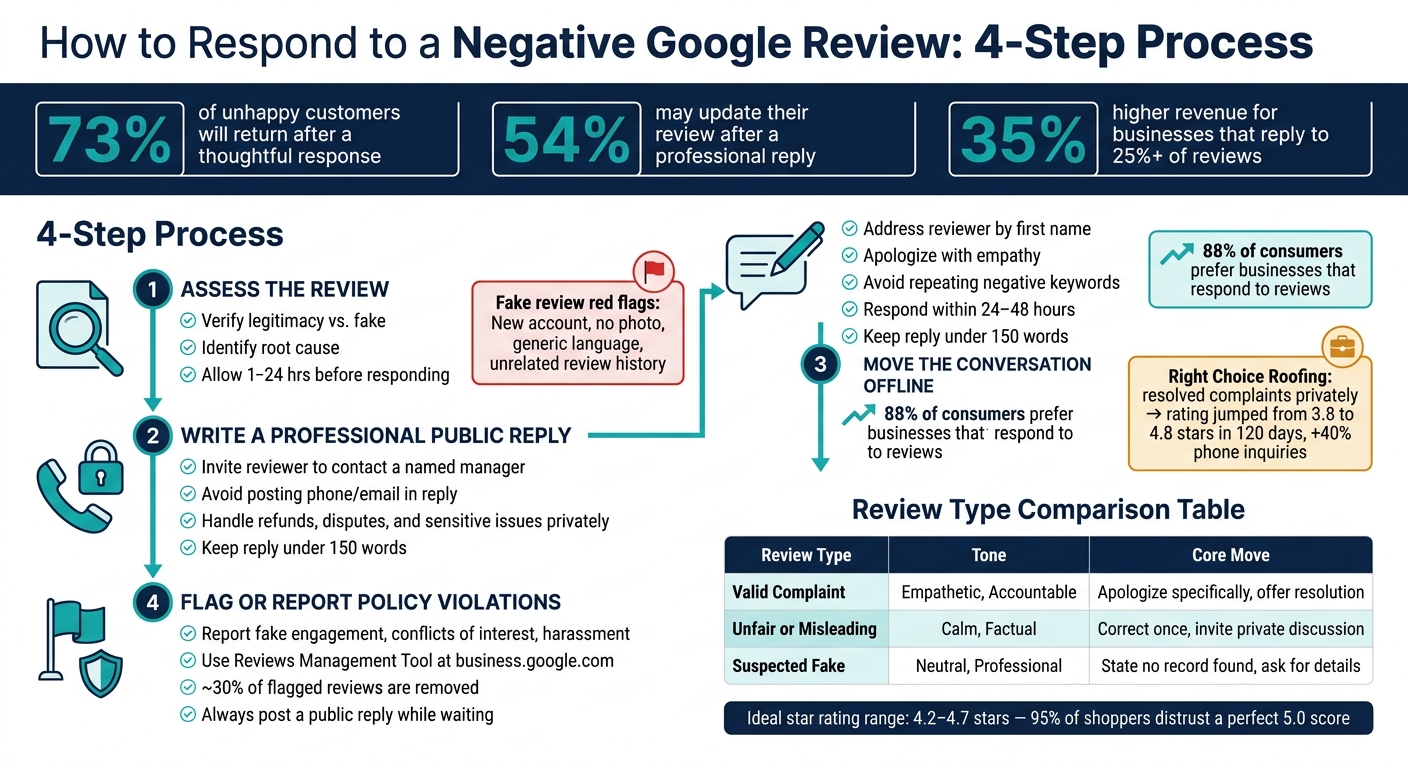
How to Respond to a Negative Google Review: 4-Step Process
Take a moment before jumping into action. Giving yourself 1 to 24 hours can help turn an impulsive reaction into a well-thought-out reply.
Start by verifying the reviewer’s details against your CRM, POS, or appointment logs. If you can’t find a match, it could indicate a fake review. Next, examine the reviewer’s Google profile for signs of authenticity, such as account age, profile photo, review history, and whether their comments align with your records.
Red flags for fake reviews include:
Fake reviews are more common than you might think - Google removed over 240 million policy-violating reviews in 2024 [5]. If you’re still unsure, perform a reverse image search on the reviewer’s profile photo. A stock image is a strong indicator of a fraudulent account [6].
Once you’ve confirmed the review’s authenticity, shift focus to understanding the issue behind it.
If the review is genuine, dig into the details to uncover what went wrong. Check service logs, speak with your team, and review call recordings or order histories. The goal is to separate the emotional tone of the review from the factual issue at hand.
For instance, a service failure - like delivering the wrong order or a technician arriving late - is a clear operational issue your business should address. On the other hand, a preference-based complaint - such as dissatisfaction with pricing - requires a more nuanced approach. Knowing the difference will guide how you frame your response.
Negative reviews can also highlight broader patterns. If multiple reviews in the past month mention long wait times, it’s likely a scheduling issue that needs attention - not just a public relations challenge. This deeper understanding helps you craft a response that feels thoughtful and constructive.
Once you’ve confirmed the review’s legitimacy and pinpointed the core issue, it’s time to plan your reply. Keep your response concise - under 150 words - to avoid sounding defensive. Avoid echoing the reviewer’s negative language, as Google may index those keywords and associate them with your profile [4].
"A bad reply, by the way, is worse than no reply at all." - Revvy [8]
Once you've thoroughly understood the review's context (Step 1), it's time to craft your response. This step is crucial, yet it's where many Bay Area business owners falter - either by over-explaining, sounding defensive, or resorting to generic replies that fail to address the specifics of the review. A well-thought-out reply can not only soften the impact of a negative review but also rebuild trust with the reviewer and reassure future customers reading it.
Begin by addressing the reviewer by their first name. This small detail makes your response feel personal and thoughtful, rather than a canned reply. Then, reference the specific issue they mentioned - whether it's a long wait time, an incorrect order, or a misunderstanding about pricing. Avoid vague or generic openers and focus on the details of their experience.
One key tip: steer clear of repeating any negative language from the review. For instance, if the reviewer describes your service as "terrible", don't echo that term in your response. Instead, use a neutral phrase like "the delay you experienced" or "the issue with your order." Why? Google can index those negative words and associate them with your business profile, which is the last thing you want.
A heartfelt apology can work wonders. Studies show that 73% of unhappy customers are willing to give a business another chance if they receive a thoughtful response, and 54% may even update their rating [2]. This is a valuable opportunity to recover a dissatisfied customer and boost your overall rating.
To make your apology effective, validate the customer's feelings without sounding dismissive. Avoid phrases like "I'm sorry you feel that way," which can come across as insincere. Instead, use direct and empathetic language like "I apologize that your experience didn't meet the standard we strive for." This approach acknowledges the gap between expectations and reality without creating legal concerns.
"Nobody expects perfection. They just want to know that when things go wrong, someone real is paying attention." - Vigneshwaran SE, Zoho Publish [7]
If the complaint is valid, take ownership. A short, honest explanation (e.g., "We were short-staffed that evening") adds a human touch to your reply. However, avoid lengthy justifications - they often come across as excuses. Customers can tell when you're explaining versus deflecting.
Whenever possible, include a specific action your business has taken or plans to take to address the issue. For example, instead of saying "we've addressed this with our team," you could say "we've added a second host for weekend dinner service." Specific solutions are more credible and reassuring, showing potential customers that you're proactive about preventing similar problems in the future.
Timeliness matters. Aim to respond within 24–48 hours to demonstrate accountability and limit potential harm [12]. In the competitive Bay Area market, a quick response builds trust with both the reviewer and future customers. Research shows that 88% of consumers prefer businesses that respond to their reviews, and businesses that reply to at least 25% of their reviews see 35% higher revenue than those that don't [3][15].
"The audience for your response is the next 50 people who search your business name and read that thread." - David Ledlin, TrustReviews [3]
Before posting your reply, take a moment to read it aloud. If it sounds defensive or overly formal, revise it. Your goal is to sound approachable and genuine - like a real person, not a corporate policy statement.
Once you've crafted a professional public response, the next step is to shift the discussion to a private channel where real resolutions can take place. Your public reply serves as a signal of accountability to anyone reading it, but resolving complaints - whether through refunds, redos, or detailed explanations - requires a private setting. Handling these matters publicly often leads to unproductive back-and-forth exchanges and draws unnecessary attention to the issue. Here's how to guide the reviewer toward a private conversation.
A good offline invitation is clear and personal, not vague. Instead of saying something generic like "please contact us", provide specifics. For example, you might write: "Please reach out to [Manager Name] using the contact information on our profile. We’d love to resolve this with you."
One important note: avoid including phone numbers or email addresses directly in your Google reply. Google’s spam filters can sometimes remove responses that include this kind of information. Instead, use phrases like "contact us directly" or "send us a DM." Make sure your Google Business Profile has up-to-date contact details so customers can easily find them [4].
When dealing with more complicated issues, moving the conversation offline ensures a smoother resolution process.
Some complaints - like refund requests, service disputes, or anything involving personal information - aren’t suitable for public discussion. These types of issues are best addressed in private, where you can have a candid conversation and protect both parties' privacy [11][3].
Keep in mind that your response isn’t just for the unhappy reviewer. It's also for the 89% of consumers who read business responses before deciding whether to trust you [4]. A calm and professional invitation to continue the conversation privately demonstrates far more credibility than a long, defensive public reply ever could.
"A well-handled negative review can be among the most persuasive content on your profile. It signals how you behave under pressure." - David Ledlin, TrustReviews [3]
A great example of this in action is the February 2026 case of Right Choice Roofing Specialist. After their rating fell to 3.8 stars due to three 1-star reviews, they resolved two complaints privately and encouraged satisfied clients to leave updated reviews. Within 120 days, their rating rebounded to 4.8 stars, and phone inquiries jumped by 40% compared to pre-crisis levels [11].
Building on our earlier step-by-step guide, here are practical templates designed for handling various negative review situations. Keep in mind that Google's NLP systems may flag profiles that repeatedly use identical responses, so tailoring your replies with slight adjustments is essential [10]. These templates are crafted to help you respond effectively while maintaining professionalism.
This template is for situations where the complaint is legitimate, and a genuine mistake has occurred.
Template: "Hi [Reviewer's Name], thank you for sharing your feedback. I’m truly sorry that your experience fell short of our standards regarding [specific issue]. This isn’t the level of service we aim to provide. We’d like the chance to make things right - please reach out to [Manager's Name] using the contact details on our profile, and we’ll work to resolve this promptly. - [Your Name], [Title]"
The key here is addressing the specific problem mentioned in the review. Acknowledging the issue directly shows you’ve read the feedback and care about resolving it.
This template is for reviews that contain inaccurate or exaggerated claims. The goal is to calmly correct the record while focusing on future readers rather than the reviewer.
Template: "Hi [Reviewer's Name], thank you for sharing your thoughts. To clarify, our return policy allows exchanges within 30 days with a receipt. We’re sorry if there was any misunderstanding and would like to learn more about your concerns. Please contact [Manager's Name] directly through our profile so we can address this together. - [Your Name], [Title]"
Stick to one or two sentences for the correction. As Jake Randall of Endorsa explains, "Your response is not really for the person who left the review. It is for the hundreds of potential customers who will read it later." [13] A concise, well-crafted reply can shift the perception of the situation entirely [9].
If the reviewer cannot be matched to any transaction or interaction in your records, this template helps you address the situation professionally without making direct accusations.
Template: "Hi [Reviewer's Name], we take all feedback seriously, but we couldn’t find any record of an appointment or transaction matching this review. We’d like to ensure every concern is addressed properly. Please reach out to us through our profile with any booking or order details so we can investigate further. - [Your Name], [Title]"
This response demonstrates professionalism and thoroughness, which reassures future readers. At the same time, flag the review for Google to investigate. About 30% of flagged reviews are removed [8], but it’s crucial to post your public reply while waiting for the outcome.
| Review Type | Tone | Core Move |
|---|---|---|
| Valid Complaint | Empathetic, accountable | Apologize specifically, offer a resolution |
| Unfair or Misleading | Calm, factual | Correct once, invite private discussion |
| Suspected Fake | Neutral, professional | State no record found, ask for details |
These templates and strategies align with the broader goal of proactive and thoughtful customer engagement, ensuring you maintain credibility and build trust with your audience.
Once you've taken the conversation offline, the next step is understanding when and how to escalate a review that violates Google's policies. It's important to note that you should only report reviews that clearly breach these guidelines. As Google Support explains, "Google does not intervene in business-customer disputes." [16] This means a review will only be removed if it explicitly breaks Google's rules - not just because it reflects poorly on your business or includes harsh criticism.
Google's policies outline specific types of reviews that can be removed. These include:
If you believe a review falls under one of these categories, you have valid grounds to report it. This process can be a key tool for business owners, especially in competitive markets like the Bay Area, to maintain their reputation.
To report a review, use the Reviews Management Tool at business.google.com. Here’s how:
Before submitting, take screenshots of the review, the reviewer’s profile, and their review history as evidence. [16] Google typically takes several days to evaluate reports, though it can take up to 30 days in some cases. You can track the status of your report - such as "Decision pending", "Report reviewed – no policy violation", or "Content removed" - within the Reviews Management Tool. [16] [14]
If your initial report is denied, you can submit one appeal within 60 minutes, including additional supporting documents like a business license or tax certificate. [16] [18]
While the report is being reviewed, your public response to the review remains a vital part of managing your reputation.
Even while waiting for Google to review your report, it’s crucial to engage publicly with the review. This shows accountability and reassures potential customers. Since many online shoppers rely on reviews to make decisions, leaving a negative review unaddressed for too long can harm your business's image.
"Writing a professional review response while you wait for the removal shows prospects that you are proactive, level-headed, and dedicated to the truth." - Inez Ward, Reputation Management Expert [20]
If Google ultimately denies your report, your public reply serves as your only opportunity to address the situation. A thoughtful and professional response can demonstrate your commitment to transparency without directly accusing the reviewer. [19]
Negative Google reviews can actually add to your credibility. When handled the right way, a negative review transforms into a valuable asset. The steps in this guide - evaluating the review, crafting a professional public response, taking the conversation offline, and knowing when to report violations - offer a practical framework to safeguard your Bay Area business's reputation.
But the real opportunity lies beyond just responding. Think of every complaint as free business insight. Look for patterns in feedback, like comments about long wait times, staff interactions, or product issues, and use this information to improve your operations. For instance, Vertbaudet took negative feedback about sizing to refine its product design, which led to a 12% sales boost among visitors who read those reviews [21]. Their proactive approach turned criticism into better outcomes.
Here’s an important stat: 89% of consumers read business responses before making a purchase [4]. As David Ledlin from TrustReviews explains:
"A well-handled negative review can be among the most persuasive content on your profile. It signals how you behave under pressure." - David Ledlin, TrustReviews [3]
To build even more trust, encourage customers to update their reviews after resolving their concerns - 54% are willing to do so after a positive resolution [2]. Over time, this can have a noticeable impact on your overall star rating.
Interestingly, aiming for a perfect 5.0 rating isn’t necessary. 95% of shoppers become suspicious of fake reviews when they see a flawless score [1]. A profile with a 4.2 to 4.7-star rating, combined with thoughtful responses, feels more authentic and trustworthy. For Bay Area businesses, these strategies don’t just protect your reputation - they also help foster customer trust and loyalty in a competitive market.
Responding to negative reviews can play a role in improving your Google ranking - though indirectly. While responses themselves aren't a direct ranking factor, they demonstrate that your business is active and engaged, something Google values for local search results. Thoughtful replies can also encourage more user interaction, improve click-through rates (CTR), and add fresh, keyword-rich content to your profile. To make the most impact, ensure your responses are timely, professional, and tailored to each review.
If you suspect a review might be fake, start by taking timestamped screenshots of the review, the reviewer's profile, and any relevant records (like your CRM or POS) to verify that no match exists. Craft a calm and professional public response, explaining that you couldn’t find any record of the customer and inviting them to reach out privately to resolve the matter. Afterward, flag the review in your Google Business Profile and submit your collected evidence to Google support for further investigation.
When seeking a review update, make sure you've completely resolved the issue and left the customer feeling content with the outcome. Approach them with a polite, personalized follow-up message that avoids any sense of pressure. If they choose not to update their review, respect their decision and maintain a professional demeanor. Remember, your effort to address their concerns can still leave a positive impression on others.
Discover strategies to elevate your business.


