


Your website is more than just a digital presence - it’s a tool to attract and convert customers. In the competitive Bay Area market, where tech-savvy users expect fast, mobile-friendly, and locally relevant websites, many businesses fall short. Here’s what you need to know to make your site work harder for you:
Want to improve? Start small: optimize mobile speed, refine your Google Business Profile, or simplify your contact forms. Even minor adjustments can lead to significant increases in leads and sales.
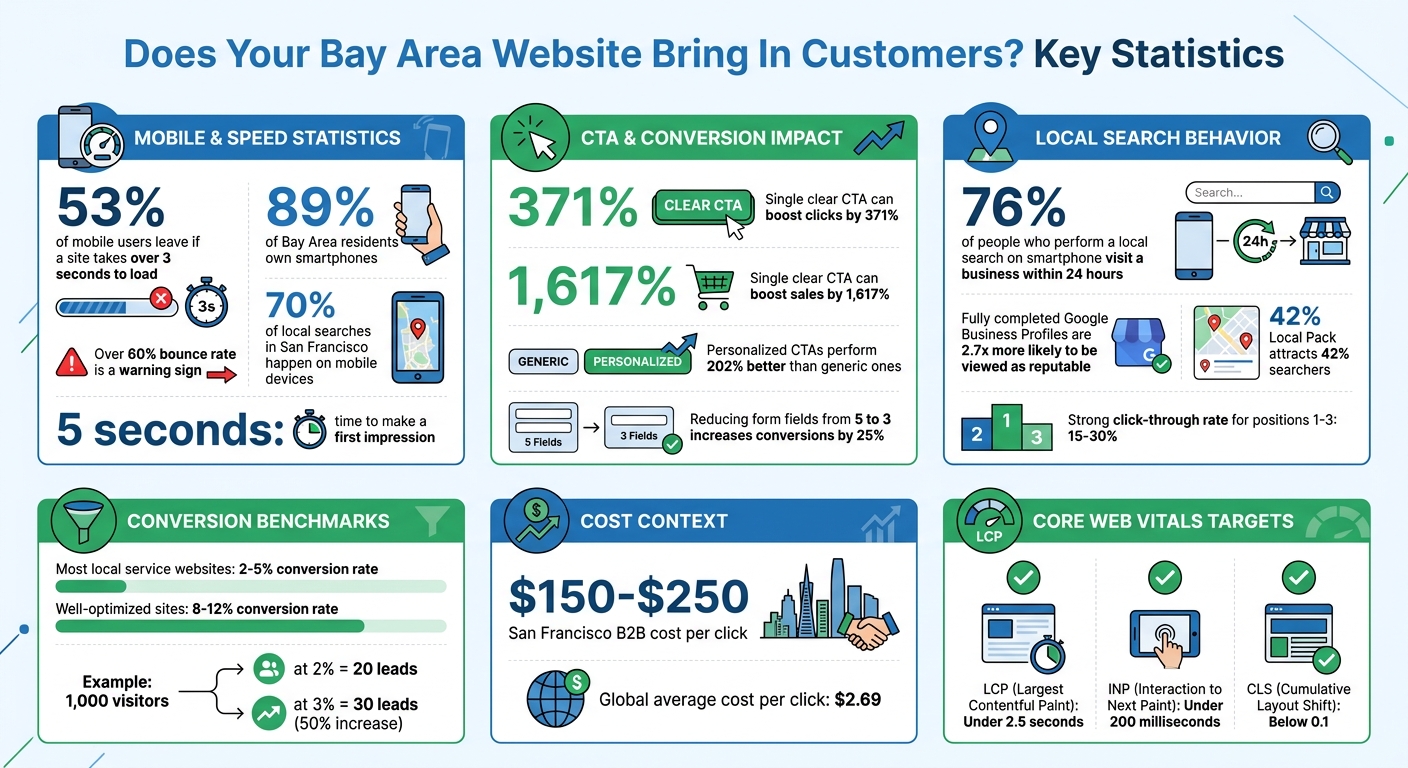
Bay Area Website Performance Statistics and Conversion Benchmarks
Imagine you're searching for "emergency plumber SoMa" or "payroll services Mission District" on your phone, and the page takes forever to load. What do you do? You leave. That’s exactly what’s happening when your website is slow. In a region where 89% of people own smartphones [3], a sluggish site isn’t just an inconvenience - it’s driving potential customers straight to your competitors.
Your homepage has about 5 seconds to make an impression. If the headline is something vague like "Welcome to Our Business" instead of clearly stating "Emergency Plumber in San Francisco SoMa", visitors won’t stick around to figure it out. A bounce rate over 60% is a glaring sign [1] that your site isn’t engaging users fast enough.
"A high bounce rate is like a customer walking into your store, looking around for a second, and immediately leaving." - Phil Fisk, CEO, Core6 Marketing [1]
Bay Area users, known for their tech-savviness, expect seamless digital experiences [3]. Outdated designs and poorly optimized mobile layouts make your site feel clunky, especially when competitors are investing in sleek, mobile-first designs. These issues not only frustrate users but also make your calls-to-action less effective, further limiting your ability to convert visitors into customers.
Getting traffic to your site is only part of the equation. If visitors don’t know what to do next, they’ll leave just as quickly. Buttons labeled "Submit" or "Next" aren’t helpful, and burying your contact form at the bottom of the page makes it even worse. A single, clear call-to-action (CTA) can work wonders, boosting clicks by up to 371% and sales by as much as 1,617% [4].
Too many CTAs on one screen - like "Call Now", "Get a Quote", "Schedule Consultation", and "Learn More" - can overwhelm visitors, especially on mobile devices. Decision paralysis sets in, and they end up doing nothing. On the flip side, personalized CTAs perform 202% better than generic ones [5]. For example, swapping "Contact Us" with something like "Get My Free Estimate" or "Schedule My Service Call" tells visitors exactly what they’ll gain. Even small tweaks, like reducing the number of form fields from five to three, can increase conversions by 25% [1].
Without clear, targeted messaging and well-placed CTAs, your website risks losing the interest of Bay Area customers who are ready to take action.
In the Bay Area’s competitive market, generic content just doesn’t cut it. If your website only mentions "the Bay Area" without addressing specific neighborhoods, you’re missing out on critical local search traffic. When someone searches for "B2B accountant Mission District" or "emergency plumber Castro", they’re looking for a business that understands their unique area - not a faceless, generic provider.
Bay Area residents take pride in their neighborhoods [3]. Using stock photos or generic images instead of showcasing real work done in places like Noe Valley or the Richmond District can make your business appear disconnected. And here’s the kicker: 76% of people who perform a local search on their smartphone visit a related business within 24 hours [6]. If your content doesn’t resonate locally, you’re losing out on these ready-to-buy customers.
The stakes are even higher when you consider the cost of advertising here. In San Francisco, the cost per click for B2B keywords can range from $150 to $250 - far above the global average of $2.69 [7]. If your generic content fails to convert these pricey clicks into leads, you’re essentially throwing money away while competitors with neighborhood-specific landing pages reap the rewards.
Tracking your website's performance starts with analyzing traffic and conversion rates. Tools like Google Analytics 4 (GA4) give you a clear view of where your visitors are coming from - whether it's organic search, social media, or direct visits - and what actions they take on your site. Pay close attention to conversion events, such as phone clicks, form submissions, or interactions with buttons like "Get Free Quote." These actions are key indicators of whether your site is effectively turning visitors into customers.
For reference, most local service websites convert at a rate of 2–5%. However, well-optimized sites can reach 8–12% [8]. The difference is huge. For example, if your site attracts 1,000 visitors per month and has a 2% conversion rate, you'll generate 20 leads. Increase that to 3%, and you’re looking at 30 leads - a 50% jump in potential business without additional ad spend [1].
"A website that gets 500 visitors and 25 phone calls beats a website that gets 5,000 visitors and 10 phone calls. Track phone clicks, form submissions, and quote requests above everything else."
– Samuel Godfrey, CEO and Founder, Luminous Digital Visions [8]
Another essential tool is Google Search Console (GSC), which helps you understand how Google views your site. Pay attention to metrics like "Total Clicks" (actual traffic), "Total Impressions" (how often your site appears in search results), and "Average Position" for local keywords. A strong click-through rate for positions 1–3 is typically between 15–30% [8]. If your site shows up in search but isn’t getting clicks, it’s time to revisit your page titles and descriptions. GSC can also help you identify "striking distance" keywords - those ranking in positions 4–10. A few strategic content updates could push these into the coveted top three spots [8].
Real-world example? In September 2025, an Aviso Studios client discovered through Google Analytics that their most-visited page was an outdated blog post without a call-to-action. By adding clear CTAs, they boosted conversions by 31% in just 30 days [9].
Next, let’s talk about how your site performs on mobile devices.
With over 70% of local searches in San Francisco happening on mobile devices [6], ensuring your site is mobile-friendly is non-negotiable. Even more critical, 53% of mobile users will leave a site if it loads slowly [1][6]. To meet these high expectations, use Google PageSpeed Insights to evaluate your Core Web Vitals - three key metrics Google uses to rank sites:
Focus on real user data from Google Search Console rather than relying solely on simulated tests. If your LCP is slow, compress large images and switch to formats like WebP. For INP issues, remove unused scripts or defer non-critical code like chat widgets. To fix CLS problems, define specific width and height attributes for images to prevent layout shifts [10].
Bay Area customers are tech-savvy and expect smooth, fast experiences [11]. Conduct weekly audits to identify and address new mobile performance issues before they impact your leads [8].
Local SEO is another critical piece of the performance puzzle. Consistency in NAP (Name, Address, Phone number) across your website, footer, contact page, and Google Business Profile (GBP) is crucial. Search engines can get confused if your site lists "123 Main St." while your Google listing says "123 Main Street." Regular local SEO audits can help ensure everything matches perfectly [2].
Your GBP isn't just a directory listing - it’s a powerful lead generator. Use GBP Insights to track customer actions like calls, website clicks, and requests for directions directly from search results [8][2]. This is especially important since 76% of people who perform a local search on their smartphone visit a related business within 24 hours [6]. If your NAP is inconsistent or your GBP is poorly optimized, you're missing out on these high-intent customers.
To simplify all this, tools like Humble Help's Free Analytics Dashboard consolidate traffic, visibility, and performance data into one place. Pair it with Milo AI Marketing Coach, which offers step-by-step guidance, and you'll have a clear, actionable view of your website's health - all without spending a dime.
If you're looking to refine your local SEO and boost conversions, focusing on these strategies can make a big difference.
Creating dedicated pages for specific neighborhoods (like SoMa, Mission, or Marina) is a smart way to capture high-intent local searches such as "emergency plumber Mission District" or "tax accountant in SoMa" [2].
But here's the key: these pages shouldn't just swap out neighborhood names. Instead, aim for 40–60% unique content that reflects the area's character. For example, a Marina page could discuss local parking challenges or landmarks like the Palace of Fine Arts, while a SoMa page might highlight high-rise building access or proximity to the Moscone Center.
Use "Service + Neighborhood" keywords, embed a Google Map, and add LocalBusiness schema with precise coordinates. These technical elements can help boost your local rankings and improve your chances of appearing in the Local Pack, which attracts 42% of local searchers [12][13][14].
"The real money is in high-intent searches that signal someone is ready to call, book, visit, or buy, like 'emergency plumber SOMA' or 'best Invisalign SF'."
– Ankord Media Team [2]
Your Google Business Profile (GBP) is often the first thing potential customers see. Fully completed profiles are 2.7 times more likely to be viewed as reputable [13]. Start by selecting the most accurate primary category, as this determines the searches you show up for [2]. Fill out every section, including services, hours, and attributes like "wheelchair accessible" or "online estimates." Upload high-quality photos of your team, location, and work examples to make your profile stand out [2].
Encourage customers to mention specific neighborhoods and services in their reviews. A review like "Great roof repair in the Sunset District" adds more local relevance than a generic one [2]. Respond to all reviews promptly, naturally incorporating service keywords and locations when appropriate [13]. Also, keep your hours updated - especially during holidays - to avoid frustrating potential customers [2].
Stay active on GBP by regularly posting updates. Populate the Q&A section with common questions (e.g., "Do you offer same-day service in the Mission?") to guide the conversation and enhance your relevance [13].
Given the high mobile usage in San Francisco, your calls-to-action (CTAs) should be easy to access. With 70% of searches happening on mobile, place click-to-call buttons prominently at the top of your pages and in your mobile menu [6]. This ensures that users can contact you quickly when they're ready.
Simplify your site navigation with a clear hierarchy, such as Locations > City > Neighborhood. This structure helps visitors find what they need faster [14]. High-intent landing pages should use H1 headers that combine service and location (e.g., "Emergency Plumbing in San Francisco") and include multiple contact options, like phone numbers, forms, and booking links [2]. These small adjustments can reduce bounce rates and improve conversion rates in a competitive market.
Boost trust on your site by including video testimonials, links to customer social media profiles, and ratings from trusted platforms. Using review schema markup to display star ratings directly in search results can also enhance credibility [11][14].
Tools like Humble Help's Free Analytics Dashboard and Milo AI Marketing Coach can help you track which CTAs perform best and guide you in making further tweaks.
You don’t need a hefty budget to make your website better. With the right free tools, you can gain insights into how customers find your business, what’s working, and where you might be losing potential leads.
Humble Help's Free Analytics Dashboard is a must-have for understanding your website's performance. It brings together traffic and visibility data, showing you how local customers discover your business and which marketing efforts are driving results [15][16]. For businesses in the Bay Area, this tool is especially useful for pinpointing which neighborhoods are engaging with your content the most.
Milo AI Marketing Coach offers tailored guidance specifically for small businesses. Unlike one-size-fits-all advice, Milo evaluates your unique situation and suggests actionable steps - like enhancing your Google Business Profile with photos that resonate in specific neighborhoods [15][17]. It takes the guesswork out of marketing by helping you focus on changes that will make the biggest difference.
Humble Help's Free Business CRM is another essential tool, designed to help you manage leads and track conversions effectively [15][16]. Many Bay Area businesses lose leads simply because they don’t have a system in place to follow up. This CRM ensures that as your website generates more leads, you’re turning those inquiries into paying customers. One Bay Area business that adopted this CRM in 2023 reported a 25% improvement in follow-up efficiency and a 15% increase in conversion rates within just three months.
"Marketing shouldn't be confusing or expensive - so we give you the tools to grow, and real human support whenever you need extra help."
– Humble Help Group [15]
In the fast-paced Bay Area market, your website needs to grab attention and convert visitors quickly. To stand out, ensure your site loads in under three seconds, functions seamlessly on mobile devices, and communicates your services and target areas clearly within the first five seconds. This approach caters to the tech-savvy audience in the region [1].
Start by conducting a conversion audit using tools like Google Analytics to pinpoint where visitors drop off. Pay special attention to high-traffic pages with bounce rates over 60%. Simplify your contact forms - reducing fields from five to three can increase conversions by up to 25% [1]. Additionally, a well-maintained Google Business Profile with accurate details, updated photos, and consistent posts can improve your visibility in local search results [11].
With these strategies in mind, here’s how you can take action right away.
Choose one improvement to tackle this week. For example:
These small adjustments can make a big difference. For instance, placing customer reviews near your forms can reduce abandonment rates by 15–20%, and minor tweaks to your site can boost conversions by up to 25% [1].
Take advantage of free tools to track your progress. The Humble Help Analytics Dashboard shows which neighborhoods are engaging with your business. The Milo AI Marketing Coach offers tailored recommendations, and the Free Business CRM ensures you follow up effectively with new leads.
When it comes to measuring how effectively your website generates leads, there are three metrics you should keep a close eye on: conversion rate, impressions, and revenue from organic search.
By focusing on these metrics, you can evaluate your site's performance and make smarter, data-backed decisions to improve results.
To monitor calls and form submissions in GA4, you'll need to set up custom events to track these interactions.
For calls, you can create an event that activates whenever users click on a phone number link. Alternatively, you can integrate a call tracking tool to capture detailed call data.
For form fills, configure an event to record successful submissions. This can be done by tracking visits to a "thank you" or success page, or by using Google Tag Manager to detect when the form is submitted.
These events will provide valuable insights into conversions within your GA4 reports.
Neighborhood pages are a smart way to strengthen your local SEO by providing content tailored to specific locations. These pages help your business show up more often in local search results, increasing visibility where it matters most. However, to get it right, the pages need to be well-optimized, relevant, and genuinely useful to users. If they're poorly done or come across as spammy, they can actually hurt your SEO efforts. The key is to focus on creating high-quality content that adds real value for your audience.
Discover strategies to elevate your business.


