


Want more views on your videos? Local SEO can help. In the Bay Area, where over 15,000 businesses compete for attention, using a comprehensive SEO strategy for small businesses ensures your videos reach the right audience. Here’s what you need to know:
Quick tips to get started:
With consistent effort, these steps can help your videos stand out in one of the most competitive markets in the U.S.
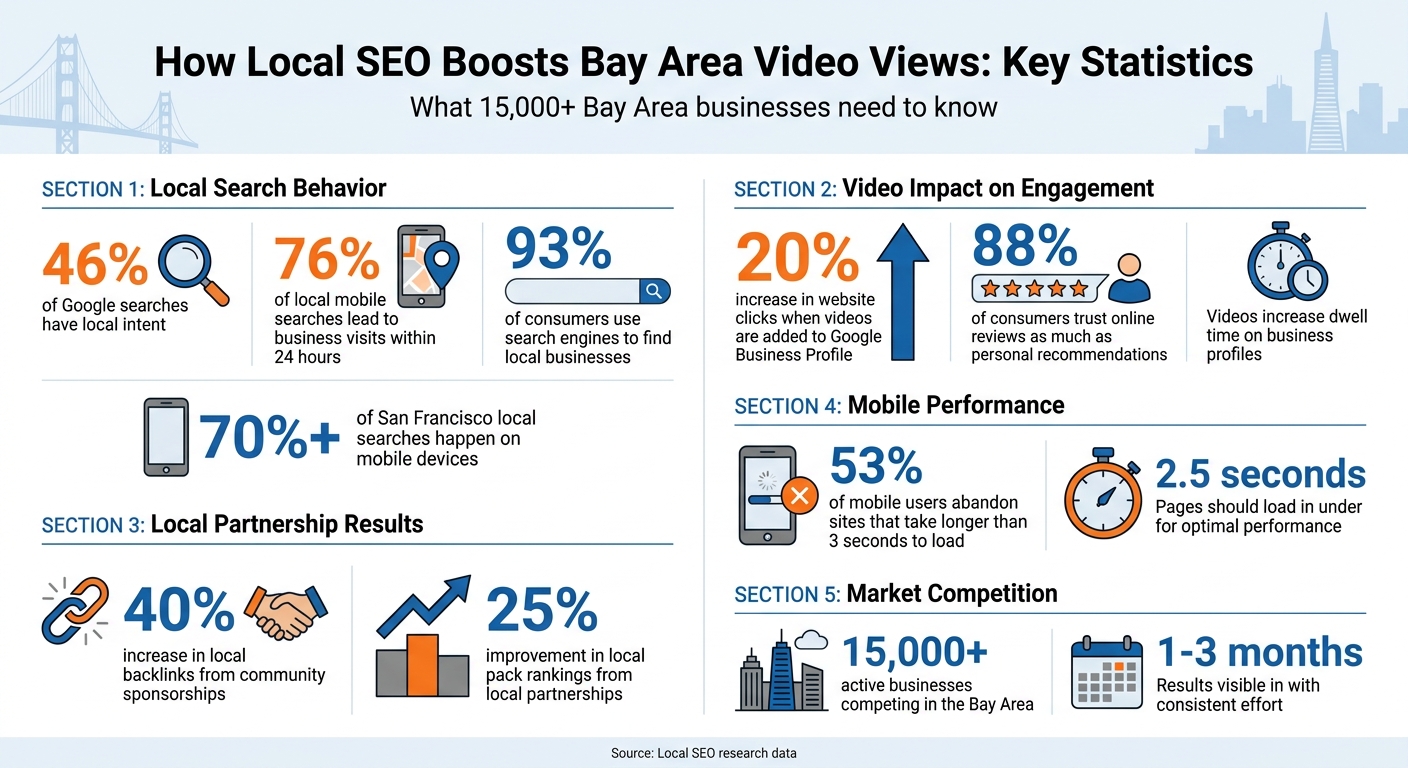
Local SEO Statistics for Bay Area Video Marketing Success
Your Google Business Profile (GBP) is a key player in local SEO [1]. Think of it as your online storefront - adding videos can make it pop. For example, if someone in the Marina searches for "plumber near me", your GBP might show up in the local Map Pack. Including a video in your profile could give you an edge over competitors who only feature static images.
Videos on your GBP don’t just make it visually appealing - they also boost dwell time, which tells search engines your content matters [1]. In competitive areas like San Francisco [1], engagement metrics like video views can further elevate your local visibility [4]. Businesses that add videos to their GBP often see a 20% uptick in website clicks [7].
So, how do you make your GBP videos work for you? Let’s break it down.

Start by uploading short, engaging videos - keep them under 30 seconds [7]. For instance:
These quick demos not only grab attention but also build trust with both users and search engines [4].
When writing video descriptions, focus on neighborhood-specific keywords. Instead of something generic like "best coffee in San Francisco", go hyper-local with phrases like "specialty coffee in the Castro District." This approach mirrors how Bay Area customers typically search [1]. Also, choose an accurate primary GBP category (e.g., "Plumbing" instead of "Contractor") and add secondary categories like "Sewer Repair" to make sure your videos show up in the right searches [4].
To stay ahead, post regular video updates [5]. San Francisco customers want quick, actionable results [4], so videos that highlight your storefront or work location can help people recognize you in busy neighborhoods.
Videos are great, but consistency in your business information is just as crucial. Your NAP (Name, Address, Phone number) should match across all platforms. Even small inconsistencies - like using "St." on one site and "Street" on another - can confuse search engines and hurt your Map Pack visibility [4].
"A single data inconsistency, such as a mismatched business name, address, or phone number (NAP), can erode trust and limit visibility just when nearby prospects are ready to act." - SanFranciscoSEO.ai [4]
To avoid this, create a master NAP document as your go-to reference. Regularly check your major listings - Google, Yelp, Apple Maps, and others - for accuracy. In the Bay Area, where most local searches happen on mobile devices [1], consistent NAP data ensures your videos connect with the right neighborhood signals, whether someone is searching in SoMa or North Beach [4]. This not only improves your local rankings but also boosts video engagement from your target audience.
To truly connect with Bay Area audiences, your videos should focus on specific neighborhoods. Highlighting local landmarks and events not only aligns with user intent but also fosters a sense of community. This isn’t just about improving rankings - it’s about building meaningful connections with the people who live and work in these areas [4][1].
Your video content should visually reflect the unique character of the neighborhood it targets. For example, a Mission District bakery could showcase the vibrant murals of Clarion Alley, while a North Beach restaurant might film near Washington Square Park. These iconic locations help viewers immediately recognize and connect with your business.
Local events offer a great opportunity for timely and engaging content. Consider filming during Fleet Week, Pride celebrations, or neighborhood street fairs. Videos tied to these events not only capture search surges but also demonstrate your involvement in the community [3]. Businesses that sponsor and feature local events in their videos often see a 40% boost in local backlinks and a 25% rise in local pack rankings [1].
For better search visibility, use keyword-rich file names that include specific locations. For instance, "marina-district-yoga-studio-tour.mp4" is far more effective than a generic name like "video1.mp4." Bay Area users often search with incredible precision, using terms like "coffee shop in the Castro" instead of broader phrases like "San Francisco coffee" [3].
While visuals establish a strong local connection, well-chosen keywords ensure your videos are discoverable. Your titles and descriptions should reflect the hyper-local search habits of Bay Area users. For example, instead of a generic title like "Best Plumbing Services", use something like "Emergency Plumber in Pacific Heights - Same Day Service" to match specific user queries [3].
Incorporate transactional phrases like "near me", "directions", or "hours in SoMa" to attract users who are ready to take action [3]. Address practical concerns directly, such as parking availability on Haight Street or accessibility options for a Richmond District location. To reach the Bay Area’s multilingual communities, include keyword variations in Spanish, Chinese, or Vietnamese [3].
Finally, link your videos to neighborhood-specific landing pages on your website. This not only enhances topical authority but also strengthens your local SEO strategy. By combining engaging visuals with precise, targeted titles, you can create a comprehensive approach that boosts both visibility and connection with your audience.
In the Bay Area's competitive market, trust is everything. 88% of consumers trust online reviews as much as personal recommendations, making video testimonials one of the most effective tools you can use [1]. When potential customers see real people from their own neighborhood sharing their experiences with your business, it creates a sense of authenticity that’s hard to replicate.
Video testimonials succeed because they show rather than just tell. Highlighting satisfied customers from Bay Area neighborhoods like SoMa, the Mission, or Marina does more than just connect with your audience - it also signals local relevance to search engines [1][4]. This approach not only boosts your Google Business Profile rankings but also resonates with viewers who recognize these areas.
In competitive markets like San Francisco, managing your reputation through reviews and testimonials is one of the key pillars of local SEO [4]. Embedding video testimonials on your website can increase dwell time - the amount of time visitors spend on your page - which signals to search engines that your content is valuable [1]. This trusted, engaging content lays the foundation for deeper community connections through local partnerships.
Once you’ve built trust through testimonials, local partnerships can help you expand your reach and credibility. Collaborating with local bloggers, influencers, and media outlets amplifies your video content and brings in high-authority backlinks. These relationships not only boost your SEO but also attract more views from Bay Area audiences, strengthening your local presence. Businesses that actively engage with their community through sponsorships and partnerships report an average 40% increase in local backlinks and a 25% improvement in local pack rankings [1].
To maximize impact, focus on San Francisco's core industries - technology, arts, and entrepreneurship - when choosing partners [1]. Guest appearances, podcasts, and co-hosted events are excellent ways to introduce your video content to fresh audiences. Sponsoring city events, whether it’s a tech meetup, an art festival, or a neighborhood cleanup, positions your brand as an active participant in the community [1]. By 2026, AI search engines like ChatGPT and Gemini are expected to prioritize content featuring expert insights and unique perspectives, which local partnerships naturally deliver [6].
Once you’ve built trust and established local partnerships, the next step is to make your local video SEO efforts more efficient. That’s where the right tools come in - they can save you time and help you get the most out of your strategy.
The good news? You don’t need to spend a fortune. While professional services can cost anywhere from $2,000 to over $10,000 per month, there are plenty of free tools available to help you manage your local SEO and video marketing efforts effectively [1].

Humble Help is a fantastic resource for small businesses in the Bay Area, offering free tools designed to simplify local SEO and video marketing. One standout feature is their free Business CRM, which ensures your business’s NAP (Name, Address, Phone) data stays consistent across all listings [2]. They also provide tools to easily add videos to your Google Business Profile, helping boost local engagement [1].
Humble Help is tailored for service-based businesses - whether you run a home services company, retail shop, restaurant, or professional service. Their Milo AI Marketing Coach provides step-by-step guidance on improving the three key areas of local SEO: proximity (how close you are to the searcher), relevance (how well your content matches user intent), and prominence (your online reputation) [2]. This AI tool even helps you find related local keywords and ensures your video content aligns with Bay Area-specific search behaviors [8].
In addition to these offerings, there are other free tools available that can help you manage and optimize your local SEO strategy.
Platforms like BrightLocal and Moz Local are great for tracking keyword rankings in specific geographic areas. They also allow you to monitor local search performance, which is especially useful in a competitive market like San Francisco, where over 15,000 active businesses vie for top search rankings [1]. Additionally, schema markup tools can add LocalBusiness and Place data to your website, helping search engines better understand your local context. This can increase your chances of appearing in rich snippets and on Google Maps [1].
Humble Help also offers a free Analytics Dashboard to track how your videos are discovered and engaged with by local audiences. Considering that over 70% of local searches in San Francisco come from mobile devices [1], optimizing for mobile is critical. For example, ensure your video content and web pages load in under three seconds - otherwise, you risk losing 53% of mobile users who abandon slow-loading sites [1].
With these tools in hand, you’ll be well-equipped to tackle local video SEO without breaking the bank.
If you're aiming to boost video views in the Bay Area, combining local SEO with video content is a smart move. Why? Because the Bay Area is one of the most competitive digital markets in the country, with over 15,000 active businesses vying for attention [1]. Standing out means targeting your local audience directly and strategically.
A few key steps can make a big difference. For starters, use Google Business Profile (GBP) videos and ensure your NAP (Name, Address, Phone number) data stays accurate across platforms. Highlighting well-known local spots like SoMa, the Mission, or North Beach in your videos can also resonate with viewers. Considering that 76% of people who search for something nearby visit a business within 24 hours [1], these efforts can translate into real-world visits and calls.
Don't overlook mobile optimization - it's huge in San Francisco, where over 70% of local searches happen on mobile devices [1]. Make sure your video pages load quickly (under 2.5 seconds) to keep users from bouncing away.
You don’t need a massive budget to compete with the top players. Free tools like Humble Help can simplify your local SEO tasks. Focus on the basics - think schema markup, neighborhood-specific keywords, and building genuine local partnerships. With consistent effort, you could start seeing results in as little as 1–3 months [1].
A good starting point? Create one neighborhood-focused video for your GBP and track the outcomes. With 93% of consumers relying on search engines to find local businesses [1], your next customer is already looking. The key is making sure they find you exactly when and where they need to.
To find the right neighborhood keywords, zero in on specific Bay Area spots that matter to your audience. Include the names of neighborhoods, districts, or well-known landmarks in your video titles, descriptions, and tags. This approach helps you connect with local viewers. Look into popular areas like San Francisco, Oakland, or Pleasanton, and consider using SEO tools or seeking advice from professionals to uncover high-traffic keywords that align with your audience's interests.
Yes, Google Business Profile videos can help improve YouTube rankings. When you optimize these videos for local SEO, they gain better visibility and attract more engagement on platforms like Google and YouTube. This strategy can expand your audience and get your content in front of more viewers.
To gauge how well your videos are performing with local SEO, keep an eye on a few key metrics. Track video views to see how many people are watching your content. Dive deeper by monitoring engagement metrics like likes, comments, and shares - these reveal how your audience is interacting with your videos. Finally, pay attention to your local search rankings to understand how your videos are influencing visibility in your target area. Together, these indicators provide a clear picture of your video's impact.
Discover strategies to elevate your business.


