


Your Google Business Profile (GBP) category could be the reason customers aren’t finding you on Google Maps. This single field directly impacts your visibility, rankings, and access to special profile features like booking buttons or menus. Whether you're a restaurant in San Francisco or a contractor in San Jose, choosing the wrong category - or too many unrelated ones - can seriously hurt your chances of appearing in local searches.
Here’s what you need to know:
Your GBP category is more than a label - it’s the foundation of your local search visibility. Get it right, and you’ll stand out in the competitive Bay Area market.
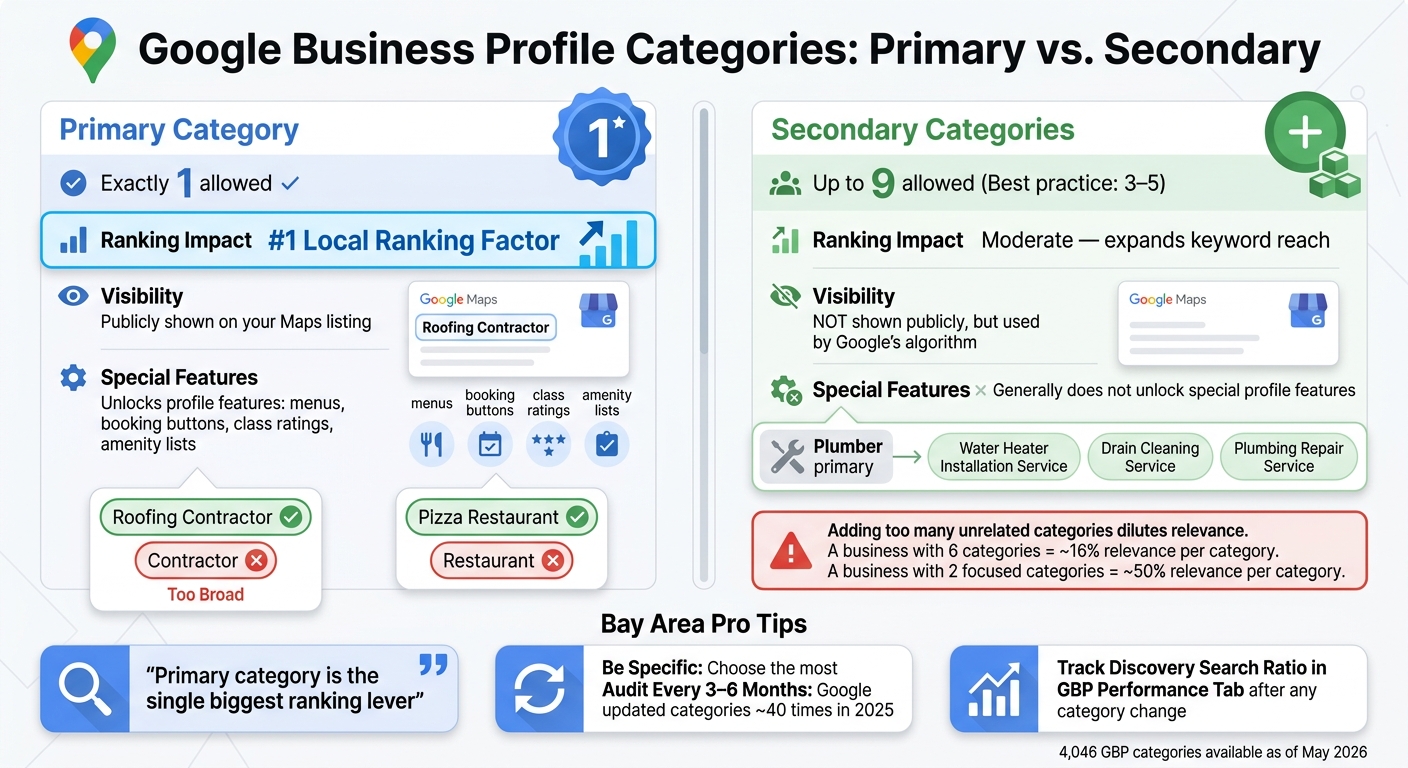
Google Business Profile Categories: Primary vs. Secondary - What Bay Area Businesses Need to Know
Your primary category is like your business's main identity card - it tells Google exactly what your business is about. For example, instead of broadly labeling a business as a "law firm", a personal injury attorney should select "Personal Injury Attorney" as their primary category. Similarly, a nail salon should avoid the generic "salon" label and opt for "Nail Salon." This level of precision matters because the primary category is considered the #1 local ranking factor in Google's algorithm [2].
On the other hand, secondary categories (you can choose up to nine) allow you to highlight additional services your business offers without changing its main identity. For instance, a plumber might use secondary categories like "Drainage Service" or "Water Heater Installation Service" to target specific customer needs. However, research suggests that focusing on 3–5 well-chosen secondary categories is more effective than overloading your profile with 8–9 loosely related ones [2]. In this case, more options don’t necessarily mean better results.
| Feature | Primary Category | Secondary Categories |
|---|---|---|
| Quantity allowed | Exactly 1 | Up to 9 |
| Ranking impact | Highest - #1 local ranking factor | Moderate - expands keyword reach |
| Public visibility | Shown on your listing in Maps | Not publicly shown but used by Google |
| Profile features unlocked | Yes - controls menus, booking buttons, etc. | Generally does not unlock special features |
Your choice of categories plays a direct role in how your business appears in search results.
Categories determine which searches can pull up your listing. For example, a business categorized as a "Pizza Restaurant" could appear in results for searches like "Italian restaurants", "pizza delivery", or even "restaurants nearby." Google automatically links related queries to your category [1]. But if you choose a broader label like "Restaurant", you risk losing the specificity that helps you stand out.
Looking ahead, Google's AI-generated place summaries (expected in 2026) will rely heavily on these category fields to answer conversational queries like "Who sells X near me?" [3]. As Digital Applied explains:
"Primary category is the single biggest ranking lever: Switching a law firm from Law Firm to Personal Injury Attorney can change Maps visibility more than any other on-profile edit." [3]
It’s worth noting that changing your categories might trigger a re-verification process [1][4]. These adjustments can significantly impact your visibility, especially in competitive areas like the Bay Area.
In the Bay Area, where competition is fierce and businesses often cluster in areas like SoMa, downtown San Jose, or Oakland's Temescal district, proximity alone won’t make you stand out. Instead, relevance - largely driven by your category choices - becomes the deciding factor.
For businesses with hybrid models, the challenge grows. Take a wellness studio in the Mission District offering yoga, acupuncture, and nutrition coaching. Google provides nearly 4,000 standardized category options [6], but not every niche is perfectly covered. Such businesses often face the tough decision of whether to maintain a single profile with multiple categories or create separate profiles for each service. The latter option requires distinct legal names, phone numbers, and addresses for each entity [5].
Mobile professionals, such as consultants or mobile mechanics, face another unique hurdle. These service-area businesses (SABs) must hide their home address and instead define their service regions by city or zip code. Displaying a residential address as a storefront is a common reason profiles get suspended [7].
"The easy rule: if customers don't visit you at that address, don't show it." - Tom Irving, Founder, Virens [7]
One of the biggest missteps businesses make is selecting a category that's overly broad. For example, a roofing contractor who opts for "Contractor" instead of "Roofing Contractor" is essentially invisible to people specifically searching for roof-related services.
"If you're a roofing contractor and you've set your category as 'Contractor' instead of 'Roofing Contractor,' Google is showing your competitors to potential customers instead of you." - Boulder SEO Marketing [8]
Here's the reality: 46% of all Google searches have local intent [9]. And businesses that land in the top three Map Pack results snag between 44% and 61% of clicks [9]. Choosing a vague category puts you at a serious disadvantage, keeping you out of those critical top-tier results. The solution? Always pick the most specific category that matches your main service, not just your broader industry.
Next, let’s break down why adding unrelated categories can backfire.
Some businesses think adding a bunch of secondary categories will broaden their reach, but it often does the opposite. For instance, a Mission District yoga studio that lists "Gym", "Nutritionist", and "Physical Therapist" on its profile isn't casting a wider net - it's confusing potential customers.
Google's algorithm rewards specialization. Think of it this way: a business with six categories is seen as about 16% relevant per category, while a competitor with just two well-matched categories appears 50% relevant for each [10]. That’s a big difference. Stick to secondary categories that reflect services you actually provide and want to rank for, rather than trying to cover every tangential aspect of your industry.
Finally, let’s look at why blindly following competitors can hurt more than help.
Checking out what competitors are doing is smart, but copying them without considering your own business can backfire. A competitor might rank well with a certain category setup because their services or customer base are different from yours.
"Choosing the wrong category is like telling Google you're a completely different type of business." - Olly Olly [10]
The key is specificity. Take, for example, a Bay Area real estate professional whose strength lies in advisory work. If they copy a competitor's "Real Estate Agency" category, they might start showing up in searches for property listings they don’t handle. A better strategy? Look for common patterns among the top three competitors, but only adopt categories that truly align with your services [8]. If a category describes a secondary offering, list it in your Services section instead. This way, customers can still find it without weakening your overall relevance.
Now that you know what to steer clear of, let’s focus on getting your categories right.
Before diving into the Google Business Profile (GBP) dashboard, take a moment to clearly define your business model. Google categorizes storefronts, service-area businesses, and hybrids differently, so your category choices should align with how your business operates.
For instance, a San Jose HVAC company that visits customers’ homes functions very differently from a Palo Alto boutique where customers drop in. The HVAC company should focus on service-specific categories like "HVAC Contractor", while the boutique should choose categories that reflect what potential customers would search for when planning an in-person visit. Your business model sets the stage - if it’s not accurate, even the best category selection won’t work effectively.
If your business includes distinct departments - such as a grocery store with an in-house bakery and deli - you can use secondary categories to highlight those areas. However, if a department operates independently (like a third-party café inside a gym), it’s better to create a separate Business Profile for that entity.
Once your business model is clear, it’s time to research and refine your category options.
Since Google doesn’t allow custom categories, your goal is to find the closest match from their predefined list. Navigate to Edit Profile > Business Category and type in relevant keywords to see suggested options.
For example, "Nail salon" is more specific than "Salon", and "Roofing contractor" is a better fit than the broader "Contractor." After selecting a category, check your profile for any new features that might appear. For example:
If these features show up, it’s a strong indicator that you’ve chosen the right category. Make sure to fill out these sections promptly to enhance your profile.
| Business Type | Primary Category | Secondary Categories | Features Unlocked |
|---|---|---|---|
| Restaurant | Pizza restaurant | Italian restaurant, Delivery restaurant | Online orders, reservations, menus |
| Health/Beauty | Nail salon | Waxing hair removal service | Booking buttons, service lists |
| Retail | Grocery store | Bakery, Deli | Local ranking for specific food items |
| Hotel | Hotel | Extended stay hotel | Class ratings, amenity lists |
Keep in mind that changing or adding a category might trigger a re-verification process from Google. This is completely normal - just be ready to confirm your business details if prompted.
Finally, make sure your selected categories align with your brand across all platforms.
Once your business model is defined and your categories are chosen, it’s crucial to maintain consistency across your online presence. Your GBP categories should align with your website, social media profiles, and any other directories where your business is listed.
For example, if your website emphasizes "custom wedding photography" but your GBP primary category is just "Photographer", there’s a clear disconnect. The closer your category aligns with your brand and service descriptions, the more cohesive your online presence will be. This consistency not only improves your local search relevance but also builds trust with customers encountering your business across various platforms.
Fine-tune your Google Business Profile (GBP) by selecting the right categories for your industry.
For contractors and trade professionals, the primary category should focus on the trade itself rather than a specific service. For instance, "Plumber" tends to perform better than "Drain Cleaning Service" as a primary category because it appeals to a broader audience. Secondary categories can then address more specific services.
In the Bay Area, electricians should consider adding "EV Charging Station Contractor" as a secondary category. With the region's high adoption of electric vehicles, this choice can help attract targeted leads that competitors might overlook.
| Trade | Primary Category | Recommended Secondary Categories |
|---|---|---|
| Plumbers | Plumber | Water Heater Installation Service, Drain Cleaning Service, Plumbing Repair Service, Gas Installation Service, Sewer Service |
| Electricians | Electrician | Electrical Installation Service, Lighting Contractor, Generator Installation Service, EV Charging Station Contractor |
| HVAC | HVAC Contractor | Air Conditioning Contractor, Heating Contractor, Furnace Repair Service, Air Duct Cleaning Service |
| General Contractors | General Contractor | Remodeling Contractor, Kitchen Remodeler, Bathroom Remodeler |
In addition to categories, use the Services section to list specific tasks like "faucet installation" or "leak detection." This level of detail helps Google match your profile with long-tail search queries, improving your visibility.
Food businesses often fall into the trap of choosing overly broad primary categories. For example, "Restaurant" is less effective than more specific options like "Thai Restaurant" or "Pizza Restaurant" for targeting the right audience.
"Specificity beats generality - choose the most specific accurate category available." - Shagbark Agency [2]
A coffee shop should select "Café" or "Coffee Shop" as its primary category rather than the generic "Food and Drink." Similarly, food trucks should use "Food Truck" as their primary category and add secondary categories like "Catering" and "Takeaway Restaurant" to capture additional opportunities, such as event-based or pre-order searches. Choosing a precise category can also unlock profile features like menu links, online ordering buttons, and reservation tools - features that broader categories don’t activate.
If your restaurant includes a distinct department, such as a bakery counter with its own entrance and hours, it might be worth creating a separate Business Profile for that department. This approach ensures that each part of your business is optimized for its specific audience.
Service providers in these industries benefit greatly from precise category definitions, which can unlock valuable profile features. For example, selecting "Cosmetic Dentist" instead of the broader "Dentist" enables tools like the Booking Button and Service Editor, letting patients schedule appointments directly through your profile - a feature that can significantly improve conversions.
"Specificity wins rankings. Specificity signals higher relevance to Google." - Eldar Cohen, Founder of Local Dominator [6]
Law firms and accounting practices also see better results with specific categories. For instance, "Family Law Attorney" often outperforms the more general "Lawyer" when targeting specialized client needs. If an exact category isn’t available, choose the closest match and use the Custom Services tool to detail your offerings. Google uses these service names to refine search results, helping connect you with the right audience.
Stay updated with Google’s category changes. Recent additions like "IV Therapy Service", "Nursing Practice", and "Energy Advisory Service" highlight the importance of conducting a category audit every three to six months. This ensures your profile remains aligned with the latest options, keeping it competitive and relevant.
Once you update your category, keep an eye on your Discovery search ratio - this shows how many views come from searches for services or categories (like "electrician San Jose") instead of direct searches for your business name. If this ratio increases, it suggests your category is aligning well with relevant searches. To track this, export data from the Performance tab in your GBP dashboard every month and analyze trends over a rolling 90-day period.
Another key metric to monitor is your view-to-action rate - the percentage of profile views that lead to actions like calls, directions, or website clicks. A solid benchmark is at least 5% across these actions. If your views are going up but actions stay stagnant, it might be a sign that your chosen category isn’t quite right.
Looking ahead to 2026, keep an eye on a newer metric: AI-Surface Attribution. This will show how many impressions come from AI-driven features like Google AI Overviews and Maps AI summary cards compared to the traditional local panel. With AI shaping more local search results, this data can help you understand how well your profile content is being used in these new formats [3].
Finally, use geo-grid scan tools to see how your category updates are affecting your positioning in the Map Pack.
Tools like Local Falcon, Places Scout, and Whitespark are great for running geo-grid scans. These scans let you compare Map Pack positions block-by-block across specific areas, like the Bay Area. To measure the impact of your updates, run a 30-day baseline scan before making changes and compare it with a post-update scan.
"Google does not experience your business in isolated parts. It sees a network of signals... If those signals support each other, rankings tend to strengthen." - Cody Yurk, Up North Media [12]
Another useful metric is your Share of Local Voice (SoLV), which indicates the percentage of local searches your profile appears in for specific keywords. This can help identify whether switching to a different category could position you in a less crowded, more advantageous lane.
In 2025 alone, Google updated its category list about 40 times [3], adding niche options like "E-bike charging station" and "Energy Advisory Service." To stay competitive, conduct a quarterly audit of your primary category and compare it to the most recent live category list. This way, you can adapt without constantly needing to make changes.
Consistency across platforms is also crucial. For instance, if your GBP lists you as a "Remodeling Contractor" but Yelp and Bing Places categorize you as a "General Contractor", these mismatched signals can dilute your local authority. Eldar Cohen, Founder of Local Dominator, emphasizes the importance of aligning your categories: "Choosing the right Google Business Profile categories is the single most impactful step you can take for local visibility in 2026." [6] Strengthen this impact by regularly auditing your categories across all platforms where your business is listed.
Your choice of Google Business Profile (GBP) category plays a huge role in determining your local visibility and access to key features. In fact, it’s the top factor influencing placement in the Google Local Pack [2]. Picking the wrong category can mean fewer calls, fewer direction requests, and more opportunities for competitors to win over your customers.
To get it right, focus on being specific, accurate, and consistent. Start by selecting a precise primary category that best answers the question: “This business IS a…?” Avoid categories that describe secondary services. For secondary categories, stick to 3–5 options that are highly relevant to what your business offers [2].
With 4,046 categories available as of May 9, 2026 [11], there’s likely one that’s a perfect fit for your business. Conduct regular category audits to ensure they align with your current services and brand identity. This ongoing attention can help you maintain a strong local search presence.
"Specificity beats generality – choose the most specific accurate category available." - Shagbark Agency [2]
The most successful businesses don’t just set their categories and forget them - they regularly review and refine their choices while keeping their profiles consistent across platforms.
Choosing the right primary category for your Google Business Profile (GBP) is all about precision. The category you select should clearly represent your core business and the main services you offer. For example, instead of a broad term like "Salon", go for something more specific like "Nail salon". This level of detail can significantly improve your visibility in local search results.
When deciding on a category, consider these key factors:
The goal is to ensure your profile is relevant and clear so Google can easily connect your business with the right searches. This approach not only boosts your visibility but also helps attract the customers most likely to convert.
When your business services go through major changes, make sure to update your secondary categories to reflect those updates. This helps keep your profile relevant and avoids any potential confusion for customers. To stay on top of things, it’s a good idea to review and adjust these categories every quarter. That way, your profile stays accurate and continues to perform well.
Changing the categories on your Google Business Profile might sometimes lead to a re-verification process. This is more likely if the updates involve major or sensitive categories. However, it's not a certainty. To avoid unnecessary interruptions, make sure any adjustments are essential and accurately reflect what your business offers.
Discover strategies to elevate your business.


