


Your Bay Area business website can attract more local customers with a few quick improvements. Here’s a summary of five actionable steps:
These steps help your business stand out in a competitive market, connecting you with high-intent local customers who are ready to take action. Start small - optimize your GBP or tweak your site speed - and track your results for continuous improvement.
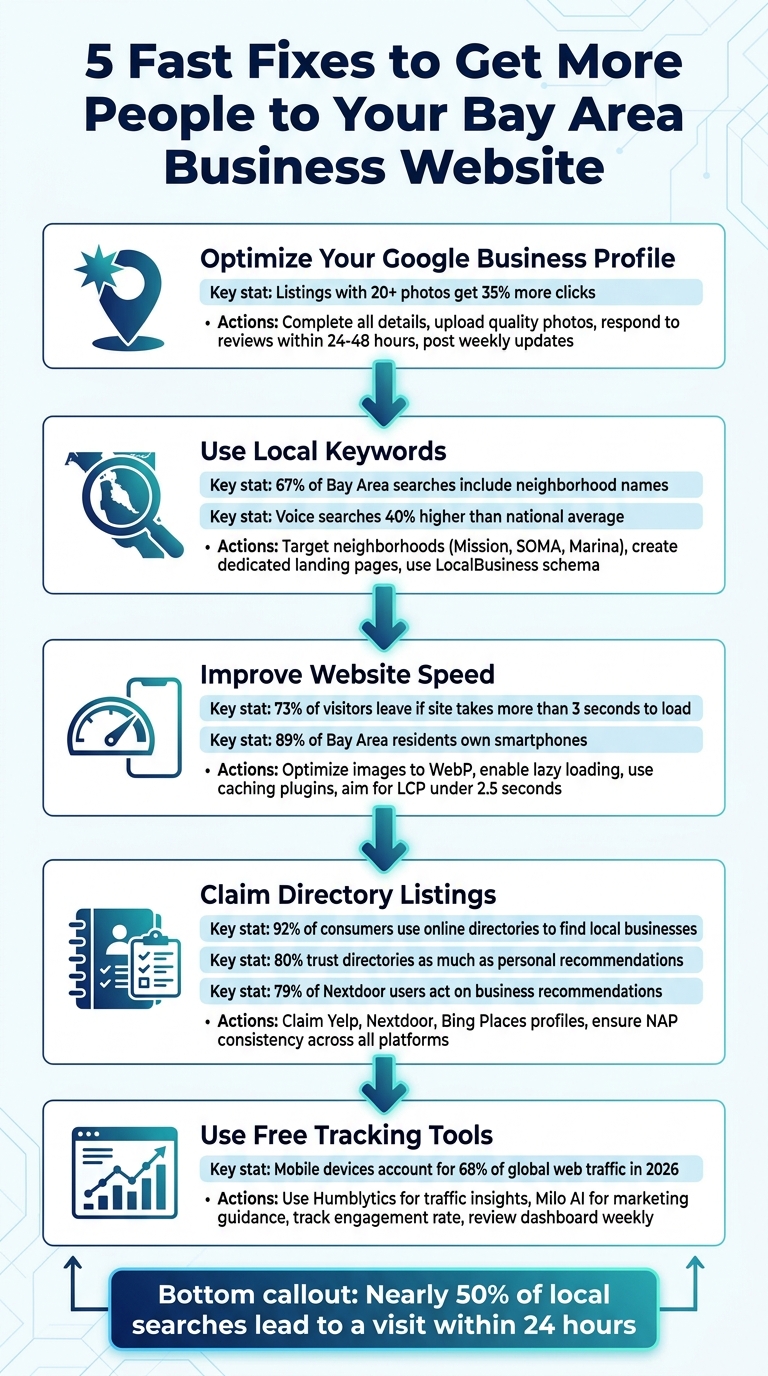
5 Fast Fixes to Increase Bay Area Business Website Traffic
Your Google Business Profile (GBP) is one of the most powerful tools for connecting with local customers [2]. Whether someone in San Francisco searches for "web designer near me" or "plumber in Oakland", Google pulls data directly from GBP listings to populate search results and Maps. If your profile isn’t complete and polished, you risk being overlooked by potential customers ready to take action.
Start by filling out every detail in your profile. Use your exact business name - no keyword stuffing - and include a local phone number with area codes like 415, 510, or 408. Make sure your hours are accurate and add a detailed, 750-character description. In this description, highlight the neighborhoods you serve, such as "SOMA", "Mission District", or "Castro", and include a clear call-to-action, like encouraging visitors to check out your website [1][3].
Don’t underestimate the power of photos. Listings with at least 20 high-quality images get 35% more clicks than those with fewer [1]. Upload photos of your storefront, team, completed projects, or interior spaces. Rename your image files with descriptive, local keywords like "san-jose-bakery-interior.jpg", and geotag them. These small details help Google recognize your business as a local authority [1].
Reviews matter - a lot. In areas like the Bay Area, where competition is fierce, responding to reviews within 24–48 hours can make a big difference. Quick responses show potential customers that you value feedback and stay engaged. Plus, it signals to Google that your profile is active, which can boost your ranking [1][2]. Ask happy customers for reviews right after a positive experience, using email or text to make it easy.
Lastly, keep your profile fresh. Post updates, promotions, or news weekly. Use the Questions and Answers section to address common inquiries, and pre-fill it with helpful information. If you offer services that require appointments, integrate booking tools directly into your profile. These regular updates and engagement signals tell Google that your business is active and relevant, which can improve your local search visibility [2][3]. A well-optimized GBP can drive more local traffic and bring in customers who are ready to act.
Once your Google Business Profile is set up, the next step is making sure your website speaks directly to local customers. This means using the same language and search terms your audience is typing into search engines. Instead of generic phrases like "web design" or "plumber", focus on keywords that combine your service with specific Bay Area locations. Think terms like "tax accountant San Francisco" or "emergency plumber SoMa" - these signal that the searcher is ready to take action.
Don't stop at city names. While "San Francisco" is a key term, 67% of Bay Area local searches include more precise location details like neighborhoods[1]. Target areas like the Mission District, Noe Valley, Marina, Richmond, Hayes Valley, or Sunset. Consider creating dedicated landing pages for each neighborhood you want to attract business from. These pages should feature unique, localized content - mention nearby landmarks, parking tips, or even local regulations. Avoid the trap of simply swapping out neighborhood names across identical pages; search engines will spot that as thin content.
Using keyword research tools can help you find the best terms for your audience. Google Keyword Planner can reveal search volumes, while Google Trends allows you to compare interest between cities like Oakland, San Jose, and San Francisco. Tools like SEMrush or Ahrefs can even show you which neighborhood-specific terms your competitors are ranking for. And don’t underestimate the value of direct feedback - ask your current customers which search terms led them to your business.
Another key point: voice searches in the Bay Area are 40% higher than the national average[1]. Optimize for conversational queries like "Where’s the best pizza near Union Square?" If your audience includes diverse communities, consider adding relevant Spanish, Chinese, or Vietnamese keywords for areas like the Mission, Chinatown, Richmond, or Tenderloin.
When incorporating location keywords, place them strategically in page titles, headers (H1, H2), and throughout your content. Use LocalBusiness schema markup with your exact coordinates to help Google confirm your location. Adding organic mentions of transit lines, landmarks, and other local details makes your content even more relevant. The goal isn’t to overload your site with keywords but to clearly show search engines - and potential customers - where you are and who you serve.
Website speed isn't just about providing a better user experience - it has a direct impact on how visible your site is to Bay Area customers. Google now prioritizes mobile performance in its rankings, and the stats are clear: 73% of visitors in 2026 will leave a site if it takes more than 3 seconds to load on mobile[4]. Considering that 89% of Bay Area residents own smartphones[1], a sluggish mobile site could cost you valuable business.
To check your site's performance, use tools like Google PageSpeed Insights. Pay attention to your Largest Contentful Paint (LCP) score, which measures how quickly your primary content loads. Aim for under 2.5 seconds. Images are often the biggest culprit, making up 50-70% of a site's weight[4]. To fix this, convert large image files to modern formats like WebP using tools like Squoosh.app or TinyPNG, and enable lazy loading (built into WordPress 5.5+). These steps are crucial for keeping Bay Area mobile users engaged.
Take Sarah, a restaurant owner in Richmond, as an example. In January 2026, she cut her mobile load times from 15.2 seconds to just 2.1 seconds by converting her images to WebP, enabling lazy loading, and adding a caching plugin. Her Google PageSpeed score jumped from 28 to 91, and her weekly online orders soared by 193%[4].
But optimizing images is just the beginning. Audit your third-party scripts - things like chat widgets, analytics tools, or animations can bog down your site without adding much value. If you're using WordPress, install a caching plugin like WP Rocket (starting at $49/year), or use Cloudflare's free CDN to serve your content from servers closer to your Bay Area audience[4]. Also, check your hosting provider's "Time to First Byte" (TTFB). If it's over 600ms, it's time to upgrade to faster hosting.
Another key to mobile performance is ensuring stable layouts. Nothing annoys users more than trying to click a button, only for the page to shift and register the wrong tap. To avoid this, define image dimensions and allocate space for elements that load later. This will help keep your Cumulative Layout Shift (CLS) score under 0.1[4]. Most of these fixes are quick to implement, and the payoff in traffic and conversions is well worth the effort.
Take a moment to check your business listings on platforms like Yelp, Nextdoor, and other local directories. Unclaimed or outdated profiles can show incorrect hours, wrong phone numbers, or broken website links. Considering that 92% of consumers use online directories to find local businesses and 80% trust them as much as personal recommendations [5], having accurate information is critical. If your details are wrong, you might lose potential customers before they even visit your site.
Once your online presence is polished, it’s time to verify your business on key directories. Claim profiles on platforms like Google Business Profile, Yelp, Bing Places, and the Better Business Bureau [5]. For Bay Area businesses, Yelp and Nextdoor are especially important [1][7]. Yelp is a major player in the region [1], and 79% of Nextdoor users act on business recommendations [7]. When setting up your profiles, make sure to fill out every field: business description, address, phone number, website, and hours of operation [5]. Also, use a local area code instead of toll-free numbers (like 800 or 877) to avoid being flagged as spam [6].
Consistency is key. Your business name, address, and phone number (NAP) should match exactly across all platforms [1]. Even small discrepancies, like writing "Street" in one listing and "St." in another, can confuse search engines and hurt your rankings. Adding photos or videos can also make your listings more engaging and appealing to potential customers.
Don’t stop at just setting up your profiles. Regular updates are essential - adjust your hours for holidays and respond to reviews quickly. This kind of active engagement not only shows search engines that your business is legitimate but can also drive more traffic to your website [5]. Keeping your local listings accurate and up-to-date strengthens your overall online presence and supports your broader marketing efforts.
When it comes to understanding your website traffic and making impactful changes, using the right tools can make all the difference. Humble Help offers a range of free tools specifically designed for small businesses to gain actionable insights with minimal hassle. For instance, the Humblytics Dashboard provides privacy-focused, cookieless tracking to help you see how visitors are finding your website and which marketing efforts are delivering real results. Unlike Google Analytics 4, which often demands a complicated setup and intrusive consent banners, Humblytics is ready to go immediately and complies with modern privacy standards. Pair these insights with practical advice from their marketing coach for even better results.
The Milo AI Marketing Coach offers step-by-step guidance on what to improve next. It also includes a free UTM Campaign Link Builder, which lets you track paid ads or social media campaigns from the start. This ensures you know exactly which efforts are driving traffic to your site.
To refine your tracking, exclude internal traffic by filtering out team IP addresses. This adjustment allows you to focus on genuine customer behavior. Go beyond basic pageviews by setting up conversion tracking for key actions like form submissions, phone calls, or newsletter signups. As Humblytics explains:
A well-defined goal acts as a filter. It helps you tune out all the distracting noise and focus only on the data that signals real progress toward what your business actually needs. [8]
Make it a habit to review your dashboard weekly. This helps you identify trends without getting bogged down by daily variations. Pay special attention to your engagement rate - the percentage of visitors who stay longer than 10 seconds, browse multiple pages, or take meaningful actions. For example, if your social media campaigns are driving traffic but engagement is low, it might be time to optimize your mobile landing pages. This is especially crucial as mobile devices are projected to account for about 68% of global web traffic by 2026 [8].
Lastly, take advantage of the free Business CRM to keep your leads organized and enroll in the 10-Day Mini Growth Course. These quick, five-minute lessons can help boost your visibility and give you the tools to prioritize improvements - all without spending a penny.
Boosting website traffic in the Bay Area doesn’t have to be overwhelming. This guide provides five practical steps to improve your local online presence: optimizing your Google Business Profile, targeting Bay Area-specific keywords, enhancing mobile speed, claiming local directory listings, and utilizing free tracking tools. With nearly 50% of local searches leading to a visit within 24 hours [2], even small changes today can bring real customers to your door tomorrow.
The secret to success? Staying consistent. A comprehensive SEO strategy isn’t a one-and-done task. Search algorithms change, competitors refine their strategies, and customer behaviors evolve. Regularly updating your online profiles, responding to reviews within 48 hours, ensuring NAP (Name, Address, Phone) consistency across platforms, and tracking your progress are all crucial steps. As Russ Shumaker puts it:
As with most things in life, consistency pays off: the more you encourage interaction, the stronger your local visibility [2].
Start small - maybe by claiming your Google Business Profile or adding a neighborhood-specific keyword to your homepage. Then, track your results with free tools like Humble Help's Analytics Dashboard or Milo AI Marketing Coach. These tools simplify the process, helping you focus on what works without shelling out $750 to $3,500+ per month for SEO services in the Bay Area [9].
Each improvement you make increases your chances of converting local searchers into real customers. With mobile "near me" searches on the rise and most Bay Area residents relying on their smartphones, the opportunity is right in front of you. By consistently applying these fixes, you’ll build a strong and lasting local presence.
Optimizing your Google Business Profile is one of the fastest ways to increase website traffic. This straightforward yet impactful strategy improves your visibility in local search results, helping nearby customers discover your business more easily. By focusing on this, you ensure your business shines when people search for your services in the area, giving your traffic a quick and effective lift.
To steer clear of duplicate content penalties, make sure each neighborhood page features unique, location-specific content. Incorporate distinct keywords relevant to the neighborhood, provide tailored service information, and write original descriptions. Boost local relevance by including trust signals like customer reviews, precise NAP (Name, Address, Phone Number) details, and credible local citations. This approach not only adds value for users but also strengthens SEO performance while staying aligned with search engine rules.
Using a call tracking platform like CallRail can make things much easier. It provides unique tracking numbers for your campaigns, allowing you to identify which ones are driving phone calls and generating leads. This helps you clearly measure the success of your local SEO and advertising efforts in bringing in phone inquiries and form submissions.
Discover strategies to elevate your business.


