

Your online presence is like a 24/7 representative for your business. A polished look online can help you attract more customers without overspending. Here’s how you can improve your digital image on a budget:
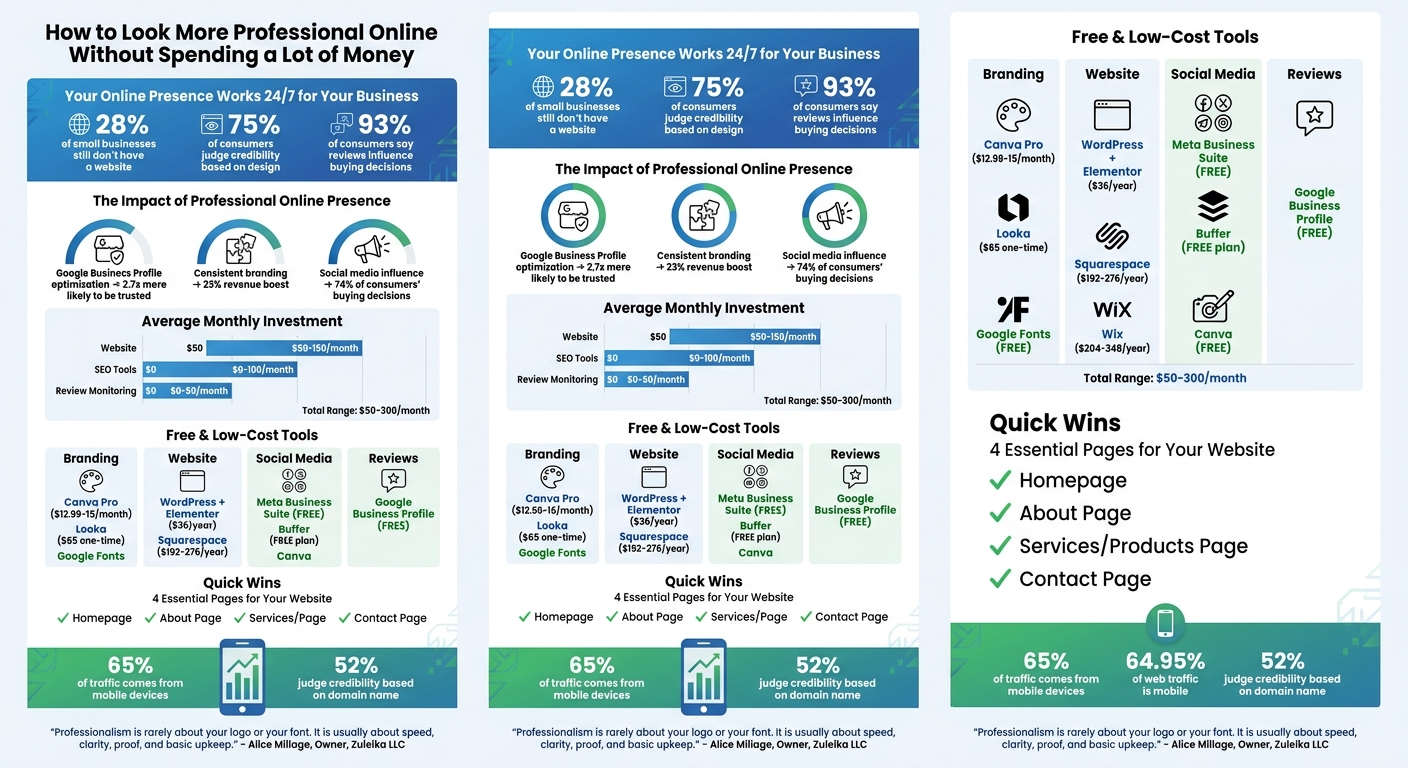
Budget-Friendly Online Professionalism: Key Stats and Cost Breakdown
Your Google Business Profile is free and acts as your online storefront in local search results [4][6]. Optimizing it is an easy way to present a polished image to potential customers. A well-maintained profile can make people 2.7 times more likely to see your business as trustworthy and 70% more likely to visit your location [3][5]. Despite this, many small businesses overlook key details, missing out on this no-cost chance to enhance their online presence.
Make sure your business name, address, and phone number (NAP) are consistent across your website and social media. Even small differences can confuse Google's algorithm. Choose a specific primary category - like "Emergency Plumber" instead of just "Plumber" - and add up to 10 secondary categories to cover all your services. Use the 750-character business description to clearly outline your services and location, but steer clear of promotional language like "best prices." Include attributes such as "Wi-Fi", "Outdoor seating", or "Online appointments" to help your business appear in filtered searches. If applicable, add your opening date - Google may showcase how long you've been in business. A local area code for your phone number can build trust with nearby customers, and don't forget to set holiday hours to avoid frustrating visitors.
Adding photos to your profile can make a huge difference. Businesses with photos get 42% more requests for directions and 35% more clicks to their website than those without [4][6]. Those with over 100 images see a staggering 2,717% increase in direction requests compared to profiles with fewer [11]. Include at least three exterior shots from different angles to help customers recognize your location, three interior images to highlight your atmosphere, three product or service photos, and three team pictures to add a personal touch [7][9]. For exterior shots, aim for golden hour to capture the best natural lighting [10][11]. Avoid stock photos or heavy filters - authenticity fosters trust [7][8][11]. Keep your profile fresh by adding new photos every month [11]. Once your visuals are in place, let customer reviews further strengthen your profile.
Online reviews carry weight - 93% of consumers say reviews influence their buying decisions, and 89% read how businesses respond before making a purchase [12]. Use your profile dashboard to generate a direct review link ("Get more reviews" or "Share review form") and share it via email, text, or QR codes [12][13]. Timing is key - ask for reviews within 24 hours of service, while the experience is still fresh [13]. SMS requests tend to have a 20% response rate, compared to 15% for email. Combining both can push response rates to 26% [13]. Never offer incentives like discounts or freebies for reviews - this violates Google's guidelines [14].
Respond to all reviews thoughtfully. For positive feedback, thank the customer by name and reference something specific from their visit. For negative reviews, stay calm and professional. Acknowledge the issue without being defensive, and offer a direct phone number to resolve the matter offline [12][14][6].
"A graceful, professional response to a negative review often impresses potential customers more than a stack of five-star reviews." - Ariel Digital Marketing [6]
Building a strong brand doesn’t have to drain your wallet. The secret lies in consistency. Consistent branding across all platforms can boost revenue by up to 23%, while businesses with a distinct color palette are 80% more recognizable than those without one [16]. Start with the basics and take advantage of free or low-cost tools to achieve a polished, professional look.
Platforms like Canva offer thousands of templates in their free version, with the Pro plan ($12.99–$15.00/month) adding features like a Brand Kit to store your logos, fonts, and colors in one place [15][16]. For logos, Hatchful by Shopify is completely free and watermark-free, while AI-powered tools like Looka can generate over 50 custom logo concepts in under a minute for a one-time fee of $65 [15]. To design cohesive color palettes, Coolors is a great free option. Stick to 2–3 primary colors and 1–2 neutral tones to keep your branding clean and minimize printing costs [15][16]. For fonts, Google Fonts provides thousands of commercial-use typefaces at no cost.
When creating a logo, save it in SVG or EPS format to ensure it scales perfectly for printing and digital use [15][16]. Test your logo on both light and dark backgrounds to confirm it’s easy to read in all contexts [15].
"Your logo will evolve as your business grows. Nike's original swoosh cost $35. Google's first logo was made in GIMP. What matters is starting with something clean and professional." - Gaurav Tiwari [15]
Consistency is key - apply these visual elements uniformly across all platforms to establish a cohesive brand identity.
Once you’ve created your visual assets, make sure they’re consistent everywhere. Using the same colors, fonts, and logos across your website, social media, and emails strengthens brand recognition. In fact, 68% of companies that enforce strict brand consistency report revenue growth of 10%–20% [16]. Create a simple one-page "Brand Guidelines" document outlining your hex color codes, font names, and logo usage rules. This ensures anyone working on your content - whether it’s you, a team member, or a freelancer - can stay on brand [16][17].
The most recognizable global brands often stick to just 1–2 colors in their logos to maintain clarity [16]. Follow their lead by keeping your designs simple. Use templates for social media posts and email signatures to ensure every piece of content looks professional, even when you’re short on time [17][18].
"For low-budget branding, it's better to be consistent and simple than creative but confusing." - Yahya, Author [17]
When free tools aren’t enough, investing in a freelance designer can make a big difference. Platforms like Fiverr offer logo designs starting at $5, with most professional options ranging from $75 to $150 [15]. If you want a variety of design ideas, 99designs runs contests starting at $299, where multiple designers compete to create your ideal look [15].
"Online freelance platforms are excellent places to find designers ready to create a simple, memorable logo and other basic brand elements." - Jessica Wong, Founder and CEO [18]
Start by testing your ideas with free tools like Canva or Hatchful. Once you’re confident in your direction, consider spending $25–$65 on AI tools like Looka or Brandmark to refine your concept [15]. Save freelance designers for specialized projects like custom illustrations, professional photography, or website redesigns as your budget grows [18].
Your website is often the first impression customers have of your business. With WordPress powering 43.4% of all websites by 2026 [19], and user-friendly platforms like Wix and Squarespace, creating a professional-looking site without coding skills is easier than ever. To keep costs low, focus on selecting an affordable platform, sticking to a straightforward design, and including the essential pages your customers expect. A polished website works hand-in-hand with your optimized Google Business Profile and other branding efforts to establish credibility.
Website builders bundle hosting, content management, and domain registration into one package. For instance, Squarespace costs $192–$276 annually (billed upfront), while Wix ranges from $204–$348 per year, both offering hosting and SSL security [22]. If you’re looking for more flexibility at a lower entry price, WordPress combined with Elementor starts at $36 per year, though it requires more setup [19]. Most platforms also offer free trials (usually 14 days), so you can test a few options before committing.
Custom domains, which add a professional touch, typically cost $10–$20 annually. Many builders include the first year for free with annual plans [22]. While free plans are available on platforms like Wix and HubSpot, they often come with a branded subdomain (e.g., yourname.wixsite.com) and display ads. Since 52% of customers judge a business’s credibility based on its domain name [19], investing in a custom domain is worth the small expense.
When it comes to web design, simplicity wins. Start with an industry-specific template to achieve a polished look quickly. Personalize the template with your branding - colors, fonts, and logo - but avoid overloading the design. Use white space generously to keep the layout uncluttered and establish a clear visual hierarchy with 2–3 header sizes and consistent fonts for body text.
With 64.95% of web traffic now coming from mobile devices [19], your site must be mobile-friendly. Test readability (use at least 16px font sizes) and ensure buttons are large enough (minimum 44×44 pixels). Compress images to improve loading times, as nearly half of visitors will leave a site that loads too slowly [19].
"Building a marketing website - and more importantly - building a high-quality marketing website is one of the most important things a small business owner can do to succeed." - Beatriz Caraballo, Web Designer [20]
A clean design not only looks professional but also sets the stage for essential pages that provide visitors with the information they need.
Your website should, at a minimum, include these four pages: Home, About, Services (or Products), and Contact [19][22].
Additionally, if your site collects user data through the contact form, include a Privacy Policy page to comply with legal requirements. For example, under the CCPA, fines for missing a Privacy Policy range from $2,500 to $7,500 per violation [22].
Before launching, double-check all links and test the contact form to make sure everything works as intended [19][22]. Finally, connect your site to a free Google Business Profile to improve local search visibility. This step helps the 99% of shoppers who go online to find local businesses discover yours [21][22]. By combining these pages with consistent branding, you’ll create a professional online presence that leaves a lasting impression.
Once you've polished your online profile and branding, it's time to take things up a notch with free social media tools. Why? Because social media influences the buying decisions of a whopping 74% of consumers [27]. That means your profiles need to shine. Free tools can help you create eye-catching graphics, maintain a consistent posting schedule, and write captions that connect with your audience. Here's how you can make the most of them.
If you're new to graphic design, Canva is a fantastic place to start. It offers over 2 million templates and assets on its free plan [24]. Its drag-and-drop interface makes designing a breeze. For more advanced editing, Adobe Express is another great option, packed with free templates and features [24]. Want to work on videos? CapCut lets you export in 4K without watermarks [23][26].
Other tools worth checking out include Snappa, which allows three free downloads per month [24], and VistaCreate, which provides 10GB of free storage and a brand kit to keep your branding consistent [24]. Need to remove backgrounds? Try Adobe Express or Pixlr. And don't forget to use platform-specific templates to ensure your graphics are perfectly sized for Instagram, Facebook, or LinkedIn [23][25]. Once your visuals are ready, it’s time to focus on posting regularly.
Consistency is key. Regular posting can double your engagement compared to sporadic updates [27]. Tools like Meta Business Suite make this easier by letting you schedule unlimited posts, Reels, and Stories for Facebook and Instagram up to 75 days in advance - for free [28][30]. For LinkedIn, the platform's built-in scheduler allows you to plan posts up to three months ahead [30]. Managing multiple platforms? Buffer offers a free plan covering three channels with 10 posts per channel monthly, while Metricool supports 50 posts per month for one brand [29].
Save time by batch-creating and scheduling your content in weekly two-hour sessions [27][30]. This strategy can free up 6–10 hours a week [27] and ensures your feed stays active even when life gets hectic. Aim to schedule posts 1–2 weeks in advance, keeping some evergreen content (like tips or FAQs) on hand for emergencies. Posting during peak times - 7–9 AM, 12–1 PM, and 7–9 PM - can increase visibility by up to 35% [27][30].
Concise captions are a must, especially since Instagram and LinkedIn cut off text after 125 and 210 characters, respectively [33]. Start with a strong hook that grabs attention and encourages readers to click "see more." Avoid vague phrases like "You won't believe this" or starting with "I." Instead, lead with a clear benefit or useful information [33].
"A good social media caption is kind of like art. It's hard to describe, but you know it when you see it." – Ed Balusek, Social Media Specialist, Thryv [31]
Break up large blocks of text with line breaks, especially on platforms like Instagram and LinkedIn [31]. Keep your brand voice consistent - whether it's friendly, professional, or humorous - to build trust over time [32]. End captions with a clear call-to-action, like "Download our free guide at the link in our bio" instead of a vague "Link in bio" [33]. Stick to 3–5 hashtags to keep things professional and avoid looking spammy [31][33]. If you're stuck, free AI caption generators can help, but always tweak the results to fit your style [33]. Together, clear captions, eye-catching visuals, and a consistent schedule can elevate your social media presence.
Creating a professional online presence doesn’t have to drain your wallet. Instead, it’s about clarity, consistency, and staying current. By focusing on these elements, you can establish a strong digital footprint that sets you apart from the competition. The strategies outlined in this guide - from optimizing profiles to refining your branding - help build trust and credibility without overspending.
"Professionalism is rarely about your logo or your font. It is usually about speed, clarity, proof, and basic upkeep." – Alice Millage, Owner, Zuleika LLC [2]
These foundational steps are the backbone of your digital strategy. Think of your online presence as a tireless representative working 24/7 [1]. A fast-loading site, cohesive branding, and consistent social media activity demonstrate reliability and professionalism. Small, budget-friendly updates like these make it easier for potential customers to choose you over your competitors.
Start with the essentials we discussed: secure your website with HTTPS, optimize images to improve loading times, and ensure your contact forms function properly [2]. From there, incorporate the free and affordable tools mentioned earlier to enhance your online presence. In today’s digital landscape, professionalism isn’t about flashy designs - it’s about immediately answering three critical questions for visitors: Who is this for? What do they get? What should they do next? [2]
On average, professional websites cost $50–$150/month, SEO tools range from $0–$100/month, and review monitoring services cost $0–$50/month [1]. These modest investments can yield something invaluable: the trust of customers who quickly view your business as credible and are motivated to call, book, or purchase instead of moving on to a competitor. Implement these straightforward updates today to solidify your professional online presence.
Your website is often the first impression potential customers have of your business, so make it count. Focus on speed, mobile-friendliness, and security. A fast-loading site keeps visitors engaged, while mobile optimization ensures it looks great on any device. Don’t overlook security - features like HTTPS show visitors their data is safe.
Next, make sure your site communicates clearly. Highlight your offers prominently and include trust signals like testimonials, certifications, or guarantees. These elements help build credibility and reassure visitors they’re in the right place.
A polished, professional look goes a long way in establishing trust. Start with a well-designed logo that reflects your brand. Use it consistently across your website, social media, and other platforms to create a unified presence. This attention to detail signals professionalism and makes your business more memorable.
By focusing on these essentials, you’ll enhance your online presence and make your business appear more reliable to potential customers.
To encourage Google reviews ethically, make it simple for customers by providing a direct Google link or a QR code they can quickly scan. Showing appreciation by responding to reviews not only highlights that you value their feedback but also motivates others to share their experiences. However, avoid offering rewards like discounts or freebies, as this goes against Google’s policies. Sticking to these guidelines ensures you gather honest reviews while enhancing your online reputation.
You don’t always need to invest in a paid domain to establish credibility online. While having a premium domain can enhance trust and strengthen your brand’s authority, there are plenty of ways to create a professional impression without it. A free subdomain or an affordable alternative can work just fine if you focus on the essentials: a clean, mobile-friendly website, consistent and clear branding, HTTPS security, and high-quality, relevant content. These elements play a big role in building trust with your audience.
Discover strategies to elevate your business.


