

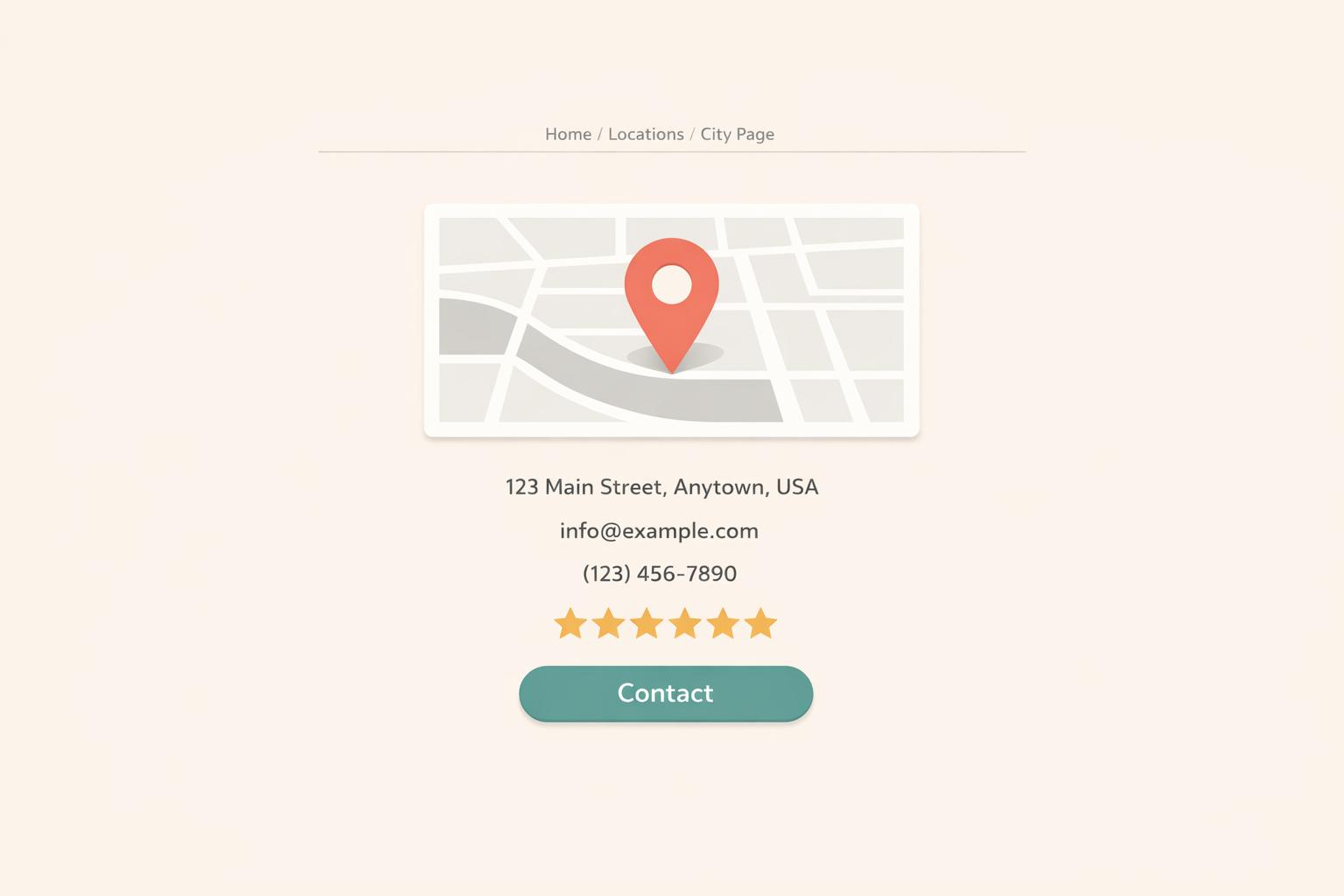
Want to rank higher in local search results and turn visitors into customers? Location-specific landing pages are the answer. These pages target specific cities or neighborhoods, helping businesses connect with local customers searching for services nearby. Here's why they matter and how to create them:
These pages not only improve visibility in local search results but also build trust with customers by showing you understand their community. Let’s dive into the details!
Step-by-Step Guide to Creating Location-Specific Landing Pages
Plan your target locations and URL structure carefully to optimize for local search and user experience.
It's important to distinguish between your physical location and your market area. As Moz explains:
"Location is where a business is located. Market is where a business's customers and competitors are located." [7]
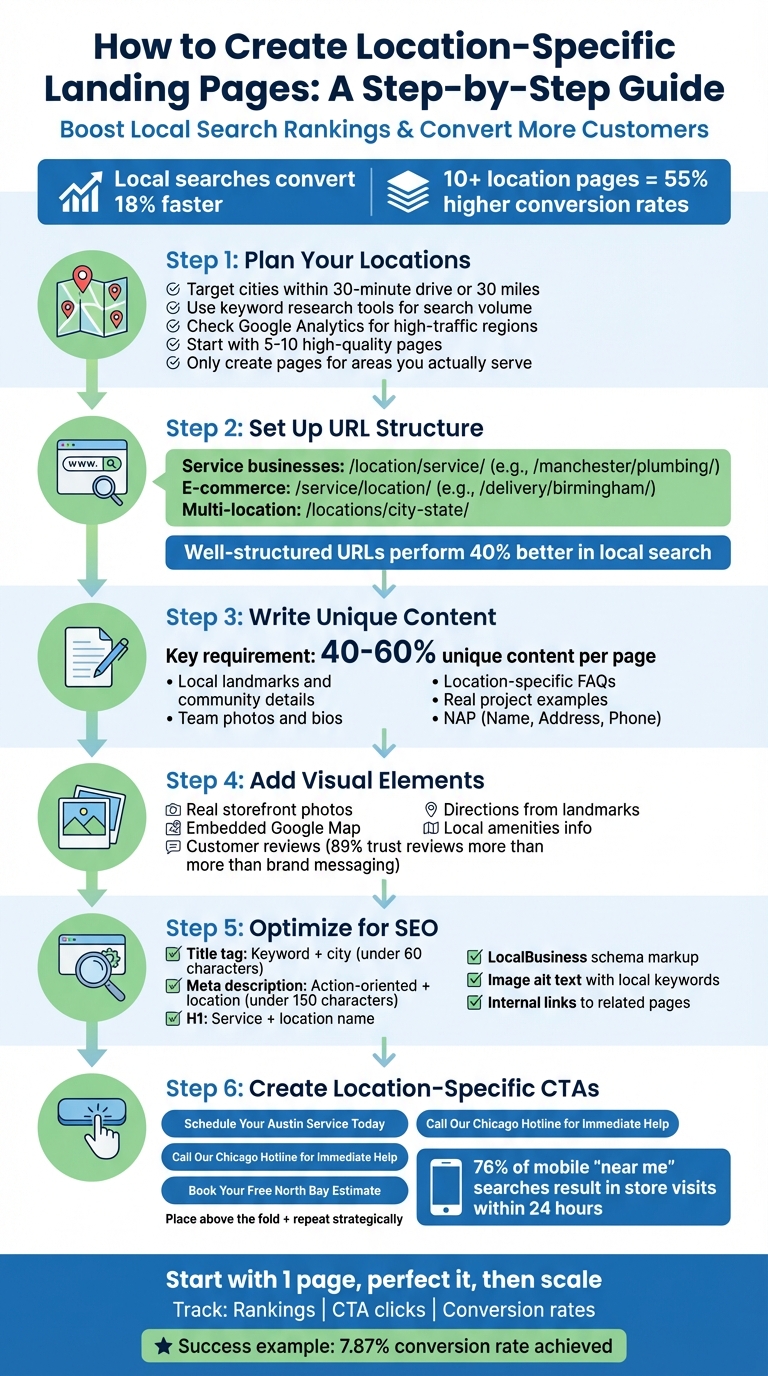
For service area businesses like plumbers or landscapers, focus on cities within a realistic travel range - typically about a 30-minute drive or 30 miles [4]. Use keyword research tools to gauge search volumes for phrases like "plumber in [city name]" or "landscaping services [city name]." This helps identify areas where people are actively searching for your services.
Dive into your Google Analytics reports to uncover regions that generate high traffic and conversions. To assess competition, search for your services on Google Maps in various cities. You can also engage with local communities on platforms like Nextdoor or Facebook to identify areas with high demand.
Start small by creating 5–10 high-quality pages for your most important cities. Expand gradually as you see results [4]. Only build pages for locations where you have a legitimate presence. For instance, a doctor with privileges at a specific hospital or a lawyer serving particular courts makes sense. Avoid creating pages for P.O. boxes, virtual offices, or areas you don't actually serve.
Your URL structure should align with how users search for services. For service businesses, a structure like /location/service/ works well (e.g., /manchester/plumbing/). E-commerce businesses might prefer /service/location/ (e.g., /delivery/birmingham/). Multi-location franchises often use /locations/city-state/ to maintain consistency across locations [8].
Keep URLs short and simple - ideally, just one folder deep (e.g., /locations/city). Research shows that websites with well-structured geographic URLs perform 40% better in local search compared to those with generic URL structures [8].
As Gombos Atila Robert, CEO of Jasmine Business Directory, notes:
"Your URL structure should mirror how customers think about your services." [8]
Use a consistent template for all your location pages. Each page should include:
Organize content using the inverted pyramid layout. Place the most critical information - such as location details and primary services - at the top. Follow this with local team information, testimonials, and broader company details.
Link your location pages internally to create a connected structure. For instance, a city page should link to nearby neighborhood pages. This helps users and search engines understand your service coverage. Avoid "orphan" pages by integrating them into your main site navigation or using an HTML sitemap to ensure they are crawlable [10].
Once your target locations and URL structure are in place, you can begin crafting tailored content for each page.
When creating location pages, focus on crafting unique, locally relevant content that aligns with your established layout while enhancing search visibility. Emily Brady, Sr. SEO Manager at Podium, puts it perfectly:
"The question isn't, 'How should I go about creating an awesome location page?', but rather, 'Am I giving customers enough unique value to even justify this page?'" [9]
Experts suggest that 40% to 60% of the content on each location page should be entirely unique. This isn't just about swapping out city names - it’s about offering meaningful, location-specific details that set each page apart. This approach not only avoids duplicate content issues but also ensures your pages provide real value to users and search engines alike [6].
Incorporate details that resonate with the local audience. Mention nearby landmarks, public transit options, or community involvement, like sponsorships of local sports teams. For example, a landscaping company could highlight plants suited to the local soil, while a contractor might explain city-specific building regulations or zoning codes.
Introduce your local team with photos and short bios to create a personal connection. If you’ve completed notable projects in the area, showcase them with real photos and customer stories. Adding location-specific FAQs can also be helpful, addressing practical questions like, "Where can I park?" or "Is public transport available nearby?"
These touches show customers you understand their community and meet their specific needs.
Visual elements can make your location pages more engaging and credible. Use real photos of your storefront or office, ensuring your logo is visible in a recognizable local setting. Embed a Google Map and include written directions from major nearby landmarks. Highlight amenities like free parking, EV charging stations, or pet-friendly spaces, as these details can influence a customer’s decision to visit.
Customer reviews are another powerful tool. Include testimonials from people who have visited that specific location, rather than generic reviews. This is crucial because 89% of people trust customer reviews more than brand messaging [10]. Since many customers are willing to leave a review when asked, make it a habit to request feedback from your local clients.
By combining visuals, testimonials, and local insights, you can build trust and authenticity for each location.
Consistency is key when it comes to your Name, Address, and Phone number (NAP). Ensure these details are accurate and match what’s listed on your Google Business Profile and other local directories. Prominently display updated hours of operation, and use LocalBusiness schema markup to boost your local SEO efforts.
Miriam Ellis, a Local SEO expert at Moz, offers a crucial reminder:
"The absolute rule of developing local landing pages is that the content is unique on each one. If you can't find something unique to write about, don't create the page." [4]
If you’re struggling to find distinctive content for a location, it might be better to hold off on creating a page until you can provide genuine value for that area.
Once your location pages are packed with solid local content, the next step is ensuring they rank well on search engines and turn visitors into paying customers. This involves fine-tuning technical SEO elements and crafting messages that resonate with local audiences.
With engaging local content in place, the focus shifts to using the right keywords to boost visibility. Start by pairing your core service terms with geographic modifiers - think city names, neighborhoods, or "near me" phrases. For instance, a plumber in Chicago might target keywords like "plumber Chicago", "emergency plumbing Lincoln Park", or "24/7 plumber near me." Tools like Semrush or Moz can help identify high-volume local search terms [11][12].
Amy Toman from Digital Law Marketing highlights why text is critical:
"Concentrate on text for local optimization. As Google's search experience refines over time, spotlighting the geographic area serviced should be a priority" [10].
Joy Hawkins from Sterling Sky reinforces this point:
"Text is not even close to being dead and is still the main driver of ranking on Google. I don't see that changing anytime soon" [10].
The key here is to weave local keywords naturally into your content. Avoid simply swapping out city names in a template - it can feel robotic and hurt user engagement.
Where you place your keywords is just as important as the keywords themselves. Your title tag should include both your primary keyword and city name within the first 60 characters. For example: "Plumbing Services in Chicago | 24/7 Emergency Repairs." Meanwhile, your meta description should be under 150 characters, action-oriented, and include the location to grab attention [11][13].
Here’s a quick reference for optimizing key on-page elements:
| On-Page Element | Best Practice for Location Pages |
|---|---|
| URL Slug | Include the primary keyword and city; keep it short (e.g., /plumber-chicago). |
| Title Tag | Use the primary keyword + city; keep it under 60 characters. |
| Meta Description | Actionable and includes the keyword; under 150 characters. |
| H1 Heading | Feature the service and location name (e.g., "Plumbing Services in Chicago"). |
| Image Alt Text | Use local keywords to describe images (e.g., "Front of Chicago plumbing office"). |
| Internal Links | Link to related local services or the main city hub page. |
Your H1 heading should prominently feature your primary location-specific keyword, such as "Plumbing Services in Chicago." Use H2 and H3 headings to break down details about specific services or neighborhoods [11]. For images, skip generic alt text and use descriptions that include local keywords.
Internal linking is another must. Link your main service pages to location-specific pages to help search engines understand your site's structure and establish geographic relevance [11][12]. Also, make sure your NAP (Name, Address, Phone number) details are included as crawlable text on every location page [13].
With your SEO foundation set, it’s time to focus on calls-to-action that actually drive conversions.
Optimized on-page SEO is only half the battle. To convert visitors, you need clear and localized calls-to-action (CTAs). Generic phrases like "Contact Us" won’t cut it. Instead, tailor your CTAs to the user’s location, such as "Schedule Your Austin Service Today" or "Call Our Chicago Hotline for Immediate Help." LSEO explains:
"When your CTA references the user's city directly, it feels more personal and urgent" [5].
Place your primary CTA prominently - above the fold - and repeat it strategically throughout the page, such as after describing a key service or near your contact information [11][2]. Since many local searches happen on mobile devices, ensure your CTAs are mobile-friendly. A large, easy-to-tap click-to-call button is essential [2][5].
Align your CTAs with local search intent by including terms like "emergency", "24/7", or "free estimate" alongside the location. For example, use phrases like "Book Your Free North Bay Gutter Cleaning Estimate" or "Get Emergency Plumbing in Dallas - Available 24/7." To avoid overwhelming visitors, stick to no more than five CTAs per page [6].
You can also boost conversions by placing CTAs next to customer reviews, leveraging the trust those testimonials create. Offering location-specific promotions - such as a "Dallas Winter Check-Up Special" - can further encourage immediate action.
Creating location pages manually for multiple cities or neighborhoods can feel like a daunting task. Thankfully, there are tools that simplify the process. These tools align with the optimization and content strategies discussed earlier, making it easier to scale your local presence.
For small or local businesses, Humble Help offers straightforward, free tools to manage location pages and track performance. Their resources include:
These tools are free to use, even if you don’t purchase additional services. If you'd rather delegate the work, Humble Help also provides services like local SEO, Google Business Profile optimization, and content creation. It’s a practical way to simplify ongoing management while keeping track of your performance.
There are also specialized platforms designed to assist with creating and optimizing location pages:
"GLP is one of those things. It just works... you get great looking pages that give you the best chance to rank and convert" [14].
For keyword research and tracking rankings by city or zip code, tools like Ahrefs, Semrush, and Moz are invaluable [18]. To maintain consistent NAP (Name, Address, Phone) data across directories like Bing Places, Apple Maps, and Yelp, platforms like Yext, BrightLocal, or Moz Local are effective [16][3].
Don’t overlook Google Business Profile, which is essential for managing your local presence. Linking it to your location pages can boost your chances of appearing in local pack rankings.
If you’re using WordPress, RankMath adds LocalBusiness schema markup, which helps search engines display rich snippets for your location pages. Also, use Google PageSpeed Insights regularly to ensure your pages load quickly on mobile devices. This is especially important since 76% of people conducting “near me” searches on their smartphones visit a related business within 24 hours [15].
Now that you've got your planning and content strategies in place, it’s time to bring those location pages to life.
When creating your location pages, keep three key principles in mind:
Start small: focus on one location page before scaling up. Pick a city or neighborhood where you already have traffic or are about to open a new branch. Publish the page two to three months before a grand opening to give it time to gain search visibility [1].
Track your results carefully. Keep an eye on keyword rankings, call-to-action (CTA) clicks, and conversion rates. For example, a quick-service restaurant that followed this method achieved a 7.87% conversion rate [1]. Once you’ve fine-tuned your template and content strategy, you can confidently roll out additional pages for other locations.
For extra guidance, tools like Humble Help offer resources like the Milo AI Marketing Coach, which provides step-by-step advice on content optimization and technical fixes as you scale.
Once your first page is polished and performing well, use this tested framework to grow your local presence steadily.
To make your landing pages effective, focus on areas where your customers are actively searching for what you offer. Start by researching location-specific keywords that match what potential customers are typing into search engines. For example, phrases like "plumber in San Jose" or "pizza delivery downtown Sacramento" can give you insight into local search behavior and help you tailor your content.
Next, prioritize locations where your business already operates or plans to expand. Pay special attention to areas with high search volume and strong relevance to your services or products. Tools like geo-analytics can be a game-changer here, helping you uncover untapped markets and refine your strategy.
By aligning your landing pages with local search habits and your business goals, you can boost your local SEO efforts and attract more of the right customers.
An effective location-specific landing page needs a few essential elements to grab the attention of local customers and keep them engaged. Start by prominently displaying your Name, Address, and Phone Number (NAP) details. This not only builds trust with potential customers but also helps search engines verify your location.
Next, focus on creating localized content that speaks directly to the needs and challenges of the area you serve. Highlight your services and use location-specific keywords in key areas like titles, meta descriptions, and headings to improve your visibility in search results.
To make your page even more user-friendly, include maps, directions, and local reviews. These features help visitors locate your business quickly and build confidence in your services. A well-structured, locally tailored page doesn’t just improve SEO - it also strengthens your connection with your audience and encourages more conversions.
To boost the search rankings of your location-specific landing pages, start by targeting local keywords that match what people in your area are actually searching for. Think about the terms and phrases locals would use and integrate them naturally into your content. Make the content stand out by including details that resonate with the specific community or highlight services tailored to that location.
Don’t overlook your NAP (Name, Address, Phone) details. They need to be accurate and consistent across your website and any other online platforms where your business appears. This consistency builds trust with both users and search engines. Also, ensure the page design is easy to navigate and reflects your brand while addressing the particular needs of each community.
Lastly, stick to SEO basics: structure your pages clearly, optimize meta tags, and make sure everything works smoothly on mobile devices. These steps make it easier for search engines to see your pages as relevant for local users, helping them stand out in local search results.
Discover strategies to elevate your business.


