


If you're working with a digital marketing agency in the Bay Area, you should see real progress by the end of the third month. Here's what your agency should have accomplished by day 90 to ensure your business gains traction in one of the most competitive markets:
If your agency hasn’t delivered these results, it’s time to reassess their approach. By month three, you deserve measurable improvements in local visibility, lead quality, and business growth.
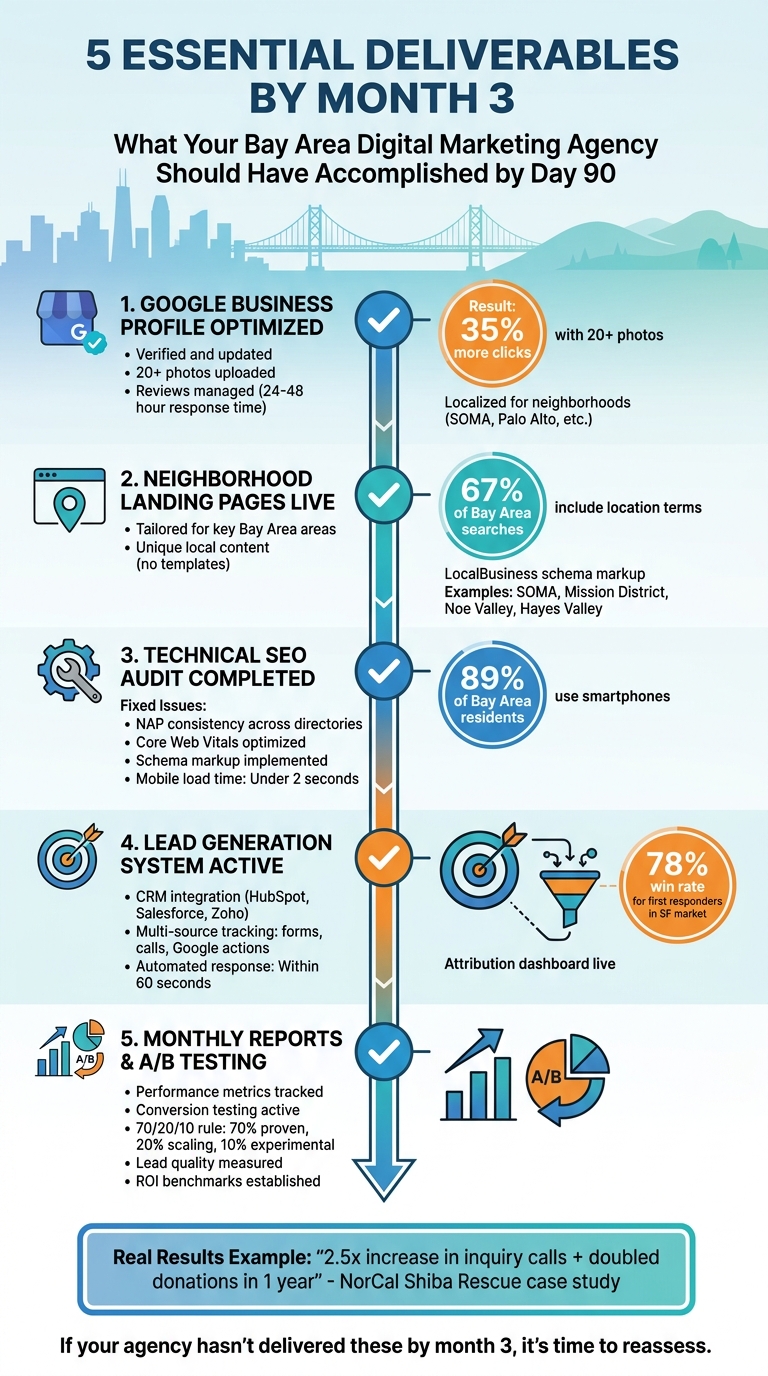
5 Essential Digital Marketing Deliverables by Month 3 in Bay Area
By the third month, your Google Business Profile should be fully verified and actively managed. Start with your legal business name - avoid keyword stuffing - and ensure your primary category aligns with your services, as it accounts for 32% of ranking weight [5]. Verify your physical address to build trust and visibility [4].
But verification is just the beginning. To make your profile stand out, focus on content that engages users. Upload at least 20 high-quality photos of your business, team, and location. Why? Profiles with 20+ photos see 35% more clicks [1]. Post updates one to two times a week, include clear calls-to-action, and respond to all reviews within 24–48 hours. Regular updates and authentic visuals keep your profile fresh and appealing [4].
These efforts should lead to noticeable results. By the third month, you should see more map views and search appearances. For instance, SEOD, a Bay Area agency, helped NorCal Shiba Rescue achieve a 2.5x increase in inquiry calls and doubled donations over a year through similar strategies [6]. Tracking metrics like these can help demonstrate growth.
Pay special attention to review activity, particularly reviews from the last 90 days, as Google now emphasizes recent feedback [4]. Implement a system to request and respond to reviews monthly. This keeps your profile active and reinforces Google's preference for fresh content.
Lastly, optimize for neighborhood-specific searches. With 67% of Bay Area searches including location terms [1], mentioning local areas like SOMA, the Mission District, or Palo Alto can significantly boost visibility. These localized tweaks complement your broader strategy of attracting more qualified traffic and improving local search rankings.
By the third month, your agency should have launched dedicated landing pages tailored to the specific neighborhoods where your clients live and work. These pages shouldn’t just swap out city names on a template - they need to highlight unique, local details for neighborhoods like SOMA, the Mission District, Noe Valley, or Hayes Valley.
The goal is to make each page feel relevant and useful to local users. Include neighborhood-specific details like parking options, the types of buildings you cater to, local regulations, and realistic service timelines. Why does this matter? Because 67% of Bay Area searches include location-specific terms beyond just "San Francisco" [1]. When someone searches for "emergency plumber SOMA" or "website design Hayes Valley", they’re ready to act. Your landing page must address their local needs directly.
"San Francisco neighborhood modifiers can be valuable, but only if you do it responsibly... If you cannot make a neighborhood page genuinely unique, focus on one strong San Francisco city page." - Ankord Media Team [3]
To enhance these pages, incorporate technical elements like LocalBusiness schema markup with accurate coordinates, embed a Google Map, and use a clean URL structure (e.g., yourdomain.com/sf/noe-valley/services/). Adding before-and-after project photos or snapshots of local work builds trust. You can further connect with the audience by offering localized content, such as Spanish in the Mission or Chinese in the Richmond District.
Be careful not to duplicate content across pages. Instead, make each one stand out by referencing local landmarks (e.g., "near Oracle Park"), using neighborhood-specific calls-to-action (e.g., "Schedule your consultation in Hayes Valley"), and keeping NAP (Name, Address, Phone) details consistent with your Google Business Profile. These tailored, locally focused landing pages are key to driving engagement and increasing visibility across the Bay Area.
Once your Google Business Profile and localized landing pages are optimized, the next step is ensuring your site's technical foundation is solid. This is crucial for improving local visibility.
By the end of the third month, your agency should provide a detailed audit report. This report should outline what technical issues were identified, what has been resolved, and how those changes are driving results like increased calls, direction requests, and website clicks. Essentially, it’s a breakdown of how technical fixes translate into tangible business outcomes.
A key focus of the audit is NAP consistency - ensuring your Name, Address, and Phone number are accurate across all directories where your business is listed. These directories might include platforms like Yelp, the Better Business Bureau, local chamber of commerce sites, and industry-specific directories. The report should highlight progress, such as duplicate listings being removed, incorrect phone numbers corrected, and missing citations added. This consistency strengthens local rankings and builds trust with search engines [2].
"Technical health is the backbone of every successful local SEO program." – sanfranciscoseo.ai [7]
Another critical area is optimizing Core Web Vitals - metrics like Largest Contentful Paint (LCP), First Input Delay (FID), and Cumulative Layout Shift (CLS). These improvements enhance page speed and mobile performance [8]. For example, compressing images into modern formats like WebP and using lazy-loading ensures faster load times. This is especially important in regions like the Bay Area, where 89% of residents use smartphones [1]. Ideally, your site should load in under two seconds on mobile.
The audit should also confirm the implementation and validation of LocalBusiness schema markup. This structured data helps Google understand your business, including your services, location, and operating hours. Proper schema markup increases your chances of appearing in local packs and knowledge panels. Additionally, the report should show that high-priority neighborhood pages are properly indexed, with duplicate content suppressed. This ensures search engines focus on the most relevant pages that drive leads.
Here’s a breakdown of the key audit categories, what needs fixing, and how to measure progress:
| Audit Category | What Should Be Fixed | Proof of Progress |
|---|---|---|
| Technical Health | Crawl errors, 404s, render-blocking resources | Before/after Core Web Vitals scores; redirect logs |
| NAP Consistency | Mismatched business info across directories | Citation hygiene report; duplicate listings removed |
| Schema Markup | Missing or broken LocalBusiness schema | Presence of rich snippets in search results |
| Mobile Performance | Slow load times, poor mobile usability | Site loads in under 2 seconds; mobile-friendly test pass |
| Indexation | Duplicate content, unindexed neighborhood pages | Google Search Console coverage report |
Once your site's technical setup is in place, it’s time to focus on turning your traffic into leads.
By the third month, your agency should have a fully operational lead capture and tracking system. This isn’t just about collecting leads - it’s about understanding where they come from, how they interact with your business, and which channels drive their conversions.
Make sure all lead data - whether from forms, phone calls, or profile actions - seamlessly integrates into your CRM (like HubSpot, Salesforce, Zoho, or GoHighLevel). This data should include details like the source, timestamp, and type of lead, updated in real-time. Leads should be captured from multiple sources, including:
"In San Francisco's competitive market, the business that responds first wins the lead 78% of the time." – Lesser Media [12]
Speed matters. Your agency should set up automated responses to acknowledge inquiries within 60 seconds, followed by a personalized follow-up from a team member within 24 hours [10][12]. Automated email workflows can play a big role here. These might include:
These workflows help keep your business fresh in the minds of potential clients while your team focuses on closing deals.
Don’t forget attribution tracking. Your agency should provide a dashboard that shows which marketing efforts are bringing in the most valuable leads. This insight allows you to allocate your marketing budget wisely and focus on the strategies that deliver the best results [9][10]. A system like this connects visibility improvements directly to actions that drive revenue.
By the third month, you should start receiving monthly performance reports that clearly connect your spending to tangible results. Forget the fluff - these reports need to focus on what matters: phone calls, form submissions, and revenue.
With optimized profiles and landing pages in place, the reports should quantify every improvement. Keep an eye on metrics like profile views, local rankings, organic traffic from the Bay Area, and lead sources. Don’t skip over Core Web Vitals either - page load speed is a big deal, especially on mobile. Aim for load times under 2 seconds [1]. For deeper insights, use neighborhood-level segmentation. For instance, traffic from areas like SoMa or Noe Valley may perform differently when it comes to conversions [2]. These metrics will act as the foundation for continuous improvement.
Testing plays a major role here too. Each month, run one A/B test - whether it’s for ad copy, landing pages, or calls-to-action (CTAs) - to fine-tune your approach and improve conversions [11]. Stick to the 70/20/10 rule: dedicate 70% of your efforts to strategies that are already working, 20% to scaling those successes, and 10% to experimenting with new ideas [13].
"The first few months are a learning phase, where strategic adjustments are made to align with your business goals and target audience insights." – Alexa Taylor, Digital Marketer, Watermark Agency [11]
Don’t just track leads; measure their quality, too. For example, if you generate 50 leads but only 5 are qualified, there’s likely a targeting issue that needs fixing [11]. By month three, you’ll also establish benchmarks for key metrics like click-through rate, cost per click, and cost per lead. These baselines are crucial for assessing long-term ROI [11].
With ongoing reports and regular testing, your system will stay adaptable to the ever-changing Bay Area market.
By month three, your Bay Area digital marketing agency should have delivered five essential outcomes: a fully optimized Google Business Profile, live landing pages targeting key neighborhoods, a completed technical SEO audit with fixes implemented, a functional lead generation system integrated with your CRM, and monthly performance reports. These aren't optional - they're the baseline deliverables you should expect.
With these elements in place, you should see measurable progress. Don't settle for vague activity reports; demand hard data tied directly to your business goals. Ask specific questions: How many qualified leads came in last month? What’s your cost per lead? Which Bay Area neighborhoods are driving the most conversions? If your agency can't provide clear answers backed by data, you're paying for busywork - not results.
"Marketing without operations is a leaky bucket. We run your ads and audit your cost structure, so the customers we bring in convert to profit, not just revenue." – Eric Lee, Founder, SEOD [6]
Real success is reflected in the numbers. For instance, one Bay Area client saw a 2.5x increase in inquiry calls and doubled their donations within a year - proof of the kind of growth you should expect [6]. Measurable outcomes like these are non-negotiable.
If, by the end of month three, you’re not seeing clear evidence of keyword improvements, greater local visibility, or better lead quality, it’s time to reevaluate your agency’s strategy - or consider a new partner. Your Bay Area business deserves results that translate into tangible growth and local impact, not empty promises. Holding your agency accountable ensures your marketing investment drives real, measurable success.
By the 90-day mark, it's fair to expect measurable results. Look for improvements like higher local SEO rankings, better visibility for your Google Business Profile, increased website traffic, and clear lead generation outcomes. These metrics should reflect real progress and highlight how the agency is boosting your online presence and helping you attract more customers.
The amount of neighborhood landing pages you'll need hinges on your target areas and the services you provide. Typically, creating dedicated pages for prominent neighborhoods can significantly improve your local SEO and draw in high-intent local traffic. Prioritize areas that are most relevant to your business and your audience to achieve the best visibility and outcomes.
To make sure leads are being tracked accurately, it's crucial that your agency has the right systems in place. This might include tools like tracking pixels, UTM parameters, or CRM integrations. Here's what to look for:
Conducting periodic reviews ensures tracking stays accurate and provides measurable outcomes.
Discover strategies to elevate your business.


