

Small businesses in the Bay Area running on tight budgets face steep competition, but smart, low-cost marketing strategies can deliver results without overspending.
Here’s the gist:
This guide explains how to make every dollar count with actionable steps, free tools, and affordable services tailored to businesses in the Bay Area.
In the Bay Area, marketing agencies often gear their services toward clients with larger budgets. Monthly retainers typically range from $3,000 to $5,000, while single projects usually require a minimum investment of $10,000 upfront [4]. For most small businesses, these costs make professional marketing support unattainable.
"San Francisco agencies tend to charge a premium compared to national averages due to the market's complexity and talent costs." - On Top List [4]
Paid advertising presents its own challenges. In California's competitive sectors, cost-per-click rates can soar between $15 and $75 [3]. For a business with a modest $1,000 monthly ad budget, a few clicks could exhaust their funds without delivering a single customer. Many Bay Area agencies prioritize venture-backed startups with deep pockets, leaving smaller businesses to navigate marketing on their own [4].
Fortunately, there are budget-friendly strategies that deliver strong results. Local SEO and Google Business Profile optimization are two powerful tools for businesses working with less than $1,000 per month. Consider these stats: nearly 50% of local searches lead to a store visit within 24 hours, and 76% of mobile searches result in same-day visits [5][2].
"Google Maps is the new storefront." - Russ Shumaker, Hearst Bay Area [5]
By optimizing your Google Business Profile, you can achieve instant visibility on Google Maps - without spending a dime. Consistently updating your business details across platforms like Apple Maps and Bing Places helps build trust with search engines, all while avoiding additional advertising costs. For businesses in neighborhoods like the Mission District, SoMa, or Oakland, hyperlocal targeting offers an affordable way to stand out.
With these tactics in place, you can explore free or low-cost tools to maximize your local visibility and attract more customers.
To set up your Google Business Profile, sign in to your Google Account and head over to business.google.com [6]. Enter your exact legal business name - avoid adding extra keywords like "Best SF Plumber" as this can lead to account suspension [6].
Choose a primary category that accurately describes your business, such as "Kitchen Remodeling Contractor" instead of something broader like "General Contractor." You can always add up to 10 secondary categories later. Make sure to use a local phone number rather than a toll-free one, and double-check that your business hours, including special holiday hours, are accurate.
Verification is the next step. You can verify your profile through a video (lasting 30 seconds to 5 minutes) that shows your business location and recognizable landmarks, or through a postcard sent to your address. Postcard verification usually takes between 5 and 14 days [6][7].
Once verified, complete every section of your profile. Use the 750-character business description to highlight the neighborhoods you serve, like "serving SOMA, Mission District, and Oakland." Upload high-quality photos of your storefront, interior, and team. Businesses with over 100 photos can see up to 520% more calls [9]. Make regular updates using the "Posts" feature, and preemptively fill out the Q&A section with answers to common customer questions, such as "Do you offer free estimates?"
After optimizing your profile, it’s time to track its performance using free tools.
Google’s built-in dashboard is a great starting point. Simply search for your business on Google, and you’ll find a Performance tab that tracks key metrics like profile views, calls, and website clicks. Insights also reveal whether customers found you via direct search or discovery and show the search terms they used.
For a deeper dive, there are several free tools worth exploring. Humble Help's Analytics Dashboard consolidates data to show how customers find you and which strategies are working. H2Fi's Free Audit Tool delivers instant insights, including profile views, customer actions, and competitor comparisons. Additionally, Milo AI Marketing Coach by Humble Help provides actionable recommendations to refine your profile and boost visibility.
These tools can help you identify what’s working. For instance, if most customers find you through discovery searches instead of directly searching your business name, it’s a sign that your local SEO efforts are paying off. Similarly, if adding new photos leads to a spike in calls, it confirms the importance of strong visuals. With 72% of people who perform a local search visiting a business within five miles [8], monitoring these metrics can help you focus on what gets results - all without increasing your budget.
Once you've optimized your Google Business Profile, it's time to broaden your reach by focusing on other platforms and improving your local search presence. With a monthly budget of $500, you can cover the essentials - citation management, review activity, and hyperlocal content. These strategies are the building blocks for expanding your visibility beyond Google.
The cornerstone of this effort is NAP consistency - your business's Name, Address, and Phone number must be identical across every directory. Even small discrepancies like "Street" vs. "St." or missing suite numbers can confuse search engines. Fixing these inconsistencies can boost your local pack rankings by 23–27% within 45–60 days [10]. To stay organized, create a master NAP document and use it as a reference for all listings.
Consistency is equally important when setting up profiles on other platforms. Beyond Google, adding your business to Apple Maps and Bing Places increases your visibility for users who rely on alternative search tools. With 89% of Bay Area residents owning smartphones [1], mobile map services are a key way to connect with local customers. Setting up these profiles takes just a few hours but can significantly improve your local ranking. After that, consider directories like Yelp, YellowPages, BBB, and Foursquare, as well as industry-specific platforms like Healthgrades (for medical professionals), Avvo (for legal services), or Houzz (for home services).
When it comes to reviews, consistency matters more than total volume. Keep the momentum going by sending direct Google Business Profile review links to happy customers right after a service is completed. Respond to all reviews - positive or negative - within 24–48 hours. This not only shows you're engaged but also signals to potential customers that you value feedback.
Here’s how you can allocate a $500/month budget effectively:
Apple Maps and Bing Places are essential for reaching customers who use platforms other than Google. In the Bay Area, where voice search usage is 40% higher than the national average [1], these platforms capture a significant share of local queries, especially from iPhone users asking Siri for recommendations.
To claim your Apple Maps listing, visit mapsconnect.apple.com and sign in with your Apple ID. Search for your business and claim it if it exists, or create a new listing if it doesn’t. Fill out all fields, including business name, category, phone, website, and hours. Upload high-quality photos of your storefront, interior, and products - Apple prioritizes visual content, so businesses with multiple images tend to rank higher.
For Bing Places, go to bingplaces.com and sign in with a Microsoft account. Enter your business details, verify ownership via phone or postcard, and complete your profile. Bing’s audience skews slightly older and includes desktop users, making it ideal for professional services like accounting, legal, or consulting. Both platforms allow you to define service areas, which is especially useful if you’re a mobile business or serve multiple neighborhoods.
Pro Tip: Use the exact same NAP formatting you’ve established for your Google Business Profile on Apple Maps and Bing Places. For example, if your Google listing shows "123 Market St., Suite 200", stick with that format everywhere - don’t use variations like "123 Market Street #200." Also, remember to update holiday hours, special events, or temporary closures across all platforms simultaneously.
If you prefer outsourcing, several budget-friendly services specialize in Google Business Profile management. Moz Local offers three pricing tiers:
For single-location businesses in the Bay Area, the Lite plan is often enough to handle citation distribution without exceeding your budget.
BrightLocal and Yext are other options, particularly for businesses needing bulk citation cleanup or managing multiple locations. These services typically range from $50 to $150 per month [10]. They scan the web for existing listings, flag inconsistencies, and push corrections to dozens of directories at once. If your business has been around for years and has never audited its citations, this one-time cleanup can lead to noticeable ranking improvements within 45–60 days.
For DIY optimization, free tools like Humble Help can be a great starting point. Their Analytics Dashboard consolidates your Google Business Profile data, showing which actions drive calls and bookings. Milo AI Marketing Coach offers personalized recommendations, such as adding more photos, responding to reviews faster, or targeting specific neighborhoods in posts. These tools are free and help you make data-driven decisions without guesswork.
Focusing on neighborhood-specific keywords in your Google Business Profile posts and website content can give you a competitive edge. Instead of broad terms like "web design San Francisco", try phrases like "web design for startups in Palo Alto" or "kitchen remodeling in SOMA." With 67% of Bay Area searches including location modifiers beyond just the primary city name [1], this approach helps you bypass tougher competition and connect with customers actively searching in your area. Aim to post updates 2–3 times weekly, focusing on events or special offers - these tend to perform better than generic updates and keep your profile active in Google’s algorithm.
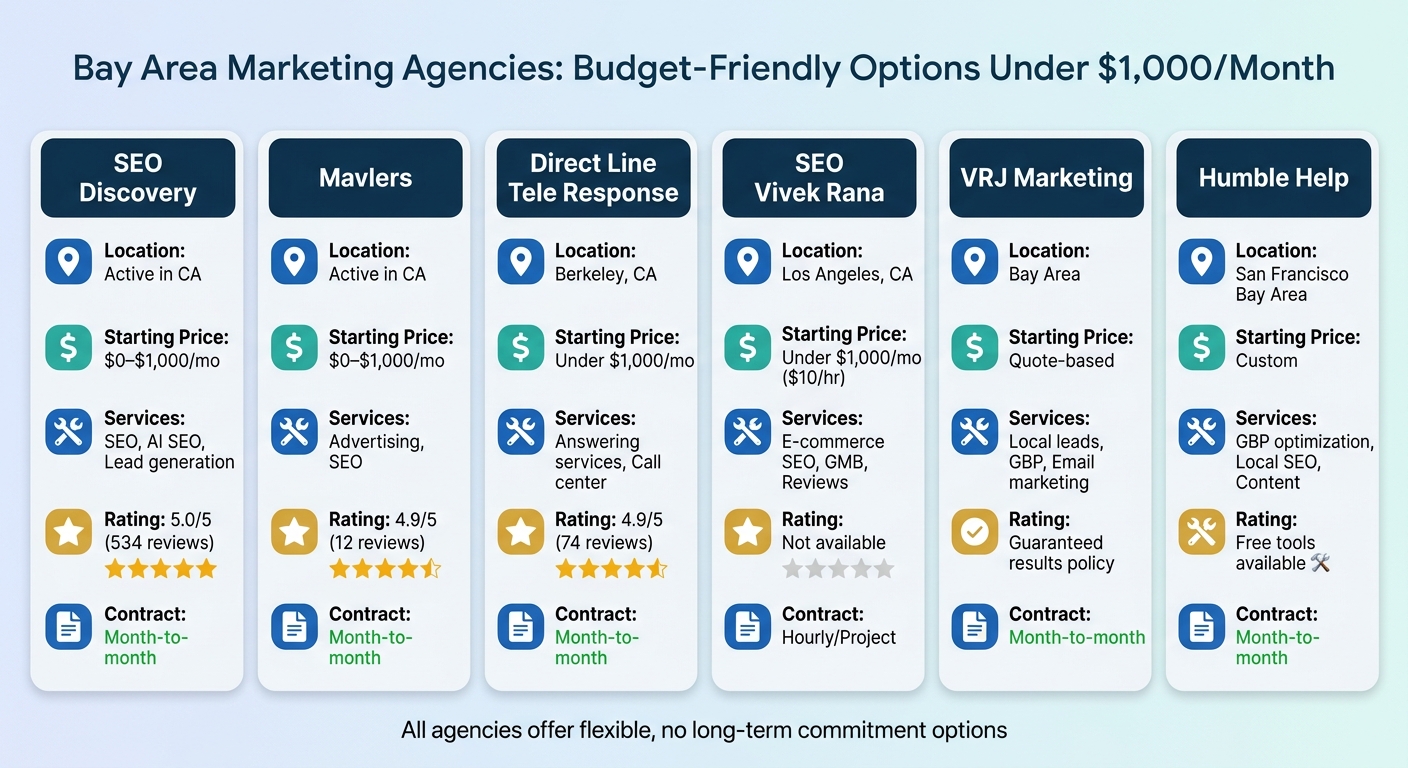
Bay Area Marketing Agencies Under $1000 Per Month Comparison
While many Bay Area marketing firms cater to larger budgets, there are agencies specifically designed to support small businesses working with tighter financial constraints. These agencies focus on delivering high-impact, cost-effective services like Google Business Profile (GBP) optimization and local citations. They keep things simple, offering month-to-month contracts and results-driven campaigns without overwhelming clients with complex dashboards.
Their strategy revolves around channels that directly drive customer engagement - like ensuring NAP (Name, Address, Phone) consistency, fine-tuning Google Business Profiles, and creating hyperlocal content to attract nearby customers.
| Agency | Location | Starting Price | Primary Services | Client Rating | Contract Type |
|---|---|---|---|---|---|
| SEO Discovery | Active in CA | $0–$1,000/mo | SEO, AI SEO, Lead generation | 5.0/5 (534 reviews)[12] | Month-to-month |
| Mavlers | Active in CA | $0–$1,000/mo | Advertising, SEO | 4.9/5 (12 reviews)[12] | Month-to-month |
| Direct Line Tele Response | Berkeley, CA | Under $1,000/mo | Answering services, Call center | 4.9/5 (74 reviews)[15] | Month-to-month |
| SEO Vivek Rana | Los Angeles, CA | Under $1,000/mo ($10/hr) | E-commerce SEO, GMB, Reviews | Not available | Hourly/Project |
| VRJ Marketing | Bay Area | Quote-based | Local leads, GBP, Email marketing | Guaranteed results policy[13] | Month-to-month |
| Humble Help | San Francisco Bay Area | Custom | GBP optimization, Local SEO, Content | Free tools available | Month-to-month |
Most of these agencies prioritize flexibility, avoiding long-term commitments. For instance, VRJ Marketing emphasizes their no-commitment approach, stating: "Start small and see if we're a good fit... no long-term commitments required" [13]. They even offer a refund guarantee if their efforts don’t produce results, giving small businesses peace of mind as they test the waters.
When evaluating these budget-friendly agencies, it’s important to weigh their strengths and limitations.
What’s great about them? They focus on what matters most, often delivering up to 80% of the value of comprehensive SEO strategies for small businesses with a single, streamlined approach [14]. They also avoid pushing unnecessary add-ons, which keeps costs manageable.
What’s the catch? These agencies typically have limited resources, which can mean slower response times and constraints on scaling. If you want to expand into areas like paid ads or social media management, you might need to upgrade your plan or consider a different agency. Plus, patience is key - local SEO efforts often take 3–6 months to show noticeable improvements in rankings [14].
For small businesses in the Bay Area, these agencies offer a practical way to gain visibility and drive results without breaking the bank. Their targeted services and flexible contracts make them a solid choice for maximizing ROI on a limited budget.
When working with a marketing budget of less than $1,000 per month, every dollar needs to count. Tracking ROI ensures that your efforts lead to measurable growth. A great tool for this is Google Business Profile, which offers free analytics to help you understand how customers find and interact with your business. Forget about expensive software - focus on metrics that reflect actual customer intent.
Ross Taylor, President of Alameda Internet Marketing, explains it best:
"The most important metrics are the number of calls, number of requests for directions, and how often your local listing is shown in Google search results" [16].
These actions indicate that someone is ready to make a purchase, not just browsing.
The key to tracking ROI is focusing on metrics that tie directly to conversions. Google recently updated its analytics from "Insights" to the Performance tab, which highlights "local intent data" - showing how often your business appears in search and what actions users take next [16]. Key metrics to monitor include:
These metrics reveal customer actions that matter most.
Pay attention to the difference between Discovery searches and Direct searches. Discovery searches happen when someone uses a general query like "best pizza near me" and finds your business. Direct searches occur when someone is specifically looking for your business. If your Discovery searches are increasing, it’s a good sign your local SEO is doing its job [17].
To track website visits, form submissions, or purchases, add UTM parameters to your website link (e.g., utm_source=gbp&utm_medium=organic&utm_campaign=local). This makes it easier to connect your Google Business Profile performance to revenue using Google Analytics [17][18].
One limitation of Google’s data is that it shows how many people tapped "Call" but doesn’t confirm if the calls connected. If you need to track call quality and duration, consider using a dedicated tracking number. However, for many small businesses, knowing the number of call attempts is often enough to evaluate performance [17].
A/B testing is a simple way to figure out what works best. Test one element at a time - like your business description, cover photo, or posting frequency - over a 2–4 week period. This allows search engines enough time to process the changes and gives you enough data to identify trends [19].
For example, you could test whether posting daily instead of weekly boosts engagement or if a "same-day service" message generates more calls than a "discount offer" post. Use the Post Performance section in your Google Business Profile dashboard to see which updates get the most clicks [18]. If you have multiple locations, you can test changes at one location while keeping another as a control [19].
Keep things organized with a simple spreadsheet. Log what you changed, the date you made the change, and how it impacted your key metrics. Joey Randazzo, Owner of Portland SEO Growth Partners, emphasizes:
"Most businesses care about clicks, calls, and direction requests. They don't care about how many times they've been 'viewed'" [17].
Focus on testing elements that directly impact revenue, not vanity metrics like profile views.
For businesses with tight budgets, free tools like Google Looker Studio can help you visualize trends, while Google Search Console shows which search terms are driving traffic to your website [19]. You don’t need to invest in paid software to understand what’s working - consistent tracking and small, incremental changes can make all the difference.
Marketing a Bay Area business on a budget of less than $1,000 per month demands a smart, focused approach. One of your most powerful tools is an optimized Google Business Profile, which costs nothing but can significantly boost visibility. Pairing this with accurate and consistent NAP (Name, Address, Phone) data across platforms like Apple Maps and Bing Places creates a strong foundation for your local presence. Success doesn’t come from chasing costly campaigns - it comes from consistently showing up, engaging with customers through reviews, and keeping your profile active with regular updates.
Here’s why this matters: 76% of consumers who search for a product or service on mobile visit a local business that same day [2]. Even more striking, nearly 50% of all searches with local intent lead to a store visit within 24 hours [5]. Your Google Business Profile isn’t just a passive listing; it’s a dynamic tool. For example, adding 20 or more photos can increase clicks by 35% compared to competitors who skip this step [1].
To sum it up:
"Local SEO is not a one-time project but an ongoing process. Search algorithms evolve, competitors adjust their strategies, and customer behavior patterns shift" [1].
The businesses that thrive are the ones that make local marketing a habit, steadily building momentum over time.
If your Google Business Profile isn’t showing up on Maps, the first step is to make sure your profile is both claimed and verified. Complete Google’s verification process to confirm ownership. After that, keep your profile updated with accurate information and add engaging content regularly. This can help boost your visibility in local search results and on Maps.
To increase calls from local search without relying on ads, start by fine-tuning your Google Business Profile (GBP). Make sure your phone number, address, and operating hours are correct and regularly updated. Incorporate local keywords into your profile and craft content tailored to your specific neighborhood. Consistency is key, so ensure your NAP (Name, Address, Phone) details are uniform across all listings. Additionally, optimizing for voice search can boost your visibility for local queries, making it easier for nearby customers to find and reach out to you.
Small businesses working with a budget of less than $1,000 per month can take on simpler tasks like optimizing their Google Business Profiles, keeping local directory listings accurate, and updating locally-focused content. For more complex tasks - such as technical SEO, conducting site audits, or running link-building campaigns - it’s smart to outsource to experts with the right skills. By handling straightforward tasks internally and leaving advanced strategies to professionals, you can make the most of your limited resources.
Discover strategies to elevate your business.


