

If your Bay Area business isn’t appearing on Google Maps despite having a Google Business Profile (GBP), it’s likely due to one of these common issues:
Visibility in competitive areas like the Bay Area can be challenging due to Google’s proximity filters and high business density. Regularly updating your profile, maintaining consistency across platforms, and monitoring for changes can help improve your ranking. If problems persist, tools like Local Falcon or contacting Google Support may be necessary.
Start by confirming your profile status. An unverified profile is often the main reason a Bay Area business doesn’t show up on Google Maps - and luckily, it’s one of the easiest issues to resolve.
Log in to your Google Account and search for your business name along with the city, or simply type "my business" into the search bar. This should bring up your profile dashboard. Check the top of the page for any banners or badges that indicate your profile’s status.
"An unverified Google Business Profile is a suggestion, not a listing." - OmnifySEO [6]
Here’s a quick breakdown of what different statuses mean for your profile's visibility:
| Profile Status | Indicator | Visibility |
|---|---|---|
| Unverified | "Verify now" or "Verification needed" badge | Hidden from Maps and Search [6][1] |
| Pending | "Pending" or "Under Review" status | Hidden during the 5-day review window [4][5] |
| Suspended | Red banner / "Suspended" notification | Invisible to potential customers [2][1] |
| Verified/Active | Confirmation email received; no "Verify" prompts | Visible on Google Search and Maps [4][5] |
If you see "Verify now", take action immediately. Google will guide you through the available verification methods, which might include receiving a postcard by mail (arriving within 14 days), a phone call or SMS, email, a video recording, or even a live video call with a Google representative [4]. If your website is already verified in Google Search Console, you might qualify for instant verification [4].
Important Tip: Don’t make changes to your business name, address, or primary category while waiting for the postcard. Doing so will invalidate the verification code and reset the process [4].
Once your profile is verified, check for any suspension issues to ensure it’s fully operational.
If your profile is suspended, you’ll see a red banner in your Google Business Profile (GBP) dashboard. While the profile remains visible to you, it becomes completely hidden from Maps and Search [2][1].
"A suspension does not always mean the business is fake. It usually means Google no longer trusts some part of the profile, the ownership situation, or the represented business information." - symaxx [7]
Common reasons for suspension include:
Service-area businesses, like contractors or mobile cleaners, often face suspensions for displaying a home address as a storefront. To avoid this, set a service area and hide your physical address [6]. Fixing these details is key to restoring your profile’s visibility.
Before submitting an appeal, make sure to correct any issues in your profile. Then, use the Google Business Profile appeals tool to identify the policy violation and submit a reinstatement request. Include supporting documents like a utility bill, business license, or tax certificate that matches the name and address on your profile [7]. Reinstatement usually takes 7 to 21 days [2]. Avoid submitting multiple appeals or creating a new profile, as both actions can delay the process and complicate things further [7].
Once your profile is verified, it's time to ensure every detail about your business is accurate and up-to-date. Even small mistakes can hurt your local ranking on Google Maps. By refining your business information, you can strengthen your profile and improve your visibility.
Google compares your Google Business Profile (GBP) with other platforms like Yelp, Facebook, and Yellow Pages [6]. If your business name, address, or phone number (NAP) varies across these sources, it can erode Google's trust in your listing and lower your ranking.
"Inconsistency signals unreliability." - OmnifySEO [6]
To avoid this, stick to one standardized format for your address and apply it consistently everywhere. For example, decide whether you'll use "Suite" or "Ste" and "Street" or "St", and use the same version across your GBP, website, and directories [6]. Even small differences can cause your pin to vanish from Maps [3].
Also, check for duplicate profiles linked to the same address. If Google finds multiple listings, it may suppress all of them, unsure which one is the main profile [3]. Search Google Maps for any variations of your business name to catch and resolve duplicates quickly.
An incomplete profile can weaken your presence on Google. Profiles with photos, for example, see 42% more direction requests and 35% more website clicks [10]. Keeping your information current signals reliability to both Google and potential customers.
| Profile Element | Action | Frequency |
|---|---|---|
| Business Hours | Update standard and holiday hours | As needed |
| Services | Add descriptions for every service | Quarterly audit |
| Attributes | Select all relevant tags | When features change |
| Photos | Upload new interior/exterior shots | 2–3 per month |
If you're running a mobile or service-based business - like an electrician, house cleaner, or dog trainer - your GBP setup will be slightly different. For businesses where customers don’t visit a physical location, remove your address from the profile and specify the cities or ZIP codes you serve [11][12].
Google allows up to 20 service areas per profile. Your furthest service point should be within about a two-hour drive from your base [11]. Avoid listing overly broad areas, like an entire state, as this can lead to profile suspension [2]. Instead, focus on specific locations, such as San Jose, Oakland, or Fremont, to help Google understand where you operate.
"If your business doesn't have permanent on-site signage, it's not eligible as a storefront and should be listed as a service-area business." - Google Business Profile Help [9]
After editing your service area, changes typically take up to 48 hours to reflect publicly on your profile [11]. Be patient and check back after a couple of days to confirm the updates.
To improve your local visibility, it’s essential to help Google clearly understand both your business focus and location. By refining your business data, categories, and keywords, you can strengthen your presence in local search results.
Your primary category plays a major role in determining how Google matches your business with relevant searches. Selecting a broad category like "Salon" instead of something more specific, such as "Nail salon", can reduce your relevance and visibility in search results[2].
One way to refine this choice is by researching your specific service in your Bay Area city. Look at the top three to five businesses that appear in the results and note their primary categories. Consider aligning your primary category with theirs if it accurately reflects your core service. You can also add up to nine secondary categories to highlight additional offerings. For example, a grocery store might include "Bakery" and "Deli" as secondary categories to showcase other services it provides. However, avoid overloading your profile by listing every possible service[2][1].
Keep in mind that changing your primary category may require re-verification by Google, which could delay updates for up to 14 days[2][1].
Your business description, limited to 750 characters, is a great opportunity to highlight your key services and the neighborhoods you serve. Hyperlocal phrases, like "Mission District plumbing" or "Castro coffee shop", can help you stand out in searches focused on specific Bay Area neighborhoods. Avoid generic terms that competitors are likely using, and instead, focus on unique service+location combinations that reflect your business[13].
"In the competitive Bay Area market, a poorly optimized GMB profile essentially makes your business invisible." - Bay Area Web Design Agency[13]
Hyperlocal search behavior is especially common in the Bay Area, where 67% of searches include modifiers beyond just "San Francisco"[13]. Incorporating neighborhood-specific terms - like SoMa, The Richmond, or North Beach - into your descriptions, posts, and even review responses can significantly improve your relevance for these high-intent searches.
Google validates your business information by cross-referencing it with other online directories. Ensuring your business is listed on platforms like Apple Maps, Bing Places, and Yelp is crucial in reinforcing your name, address, and phone number (NAP) details. These platforms are particularly influential in the Bay Area and can enhance your overall local presence.
"A single data inconsistency, such as a mismatched business name, address, or phone number (NAP), can erode trust and limit visibility just when nearby prospects are ready to act." - SanFranciscoSEO.ai[14]
To maintain consistency, create a master document with your NAP details and use it across all directories. Additionally, tools like Humble Help's free Analytics Dashboard can help you monitor changes in your visibility as you update your listings.
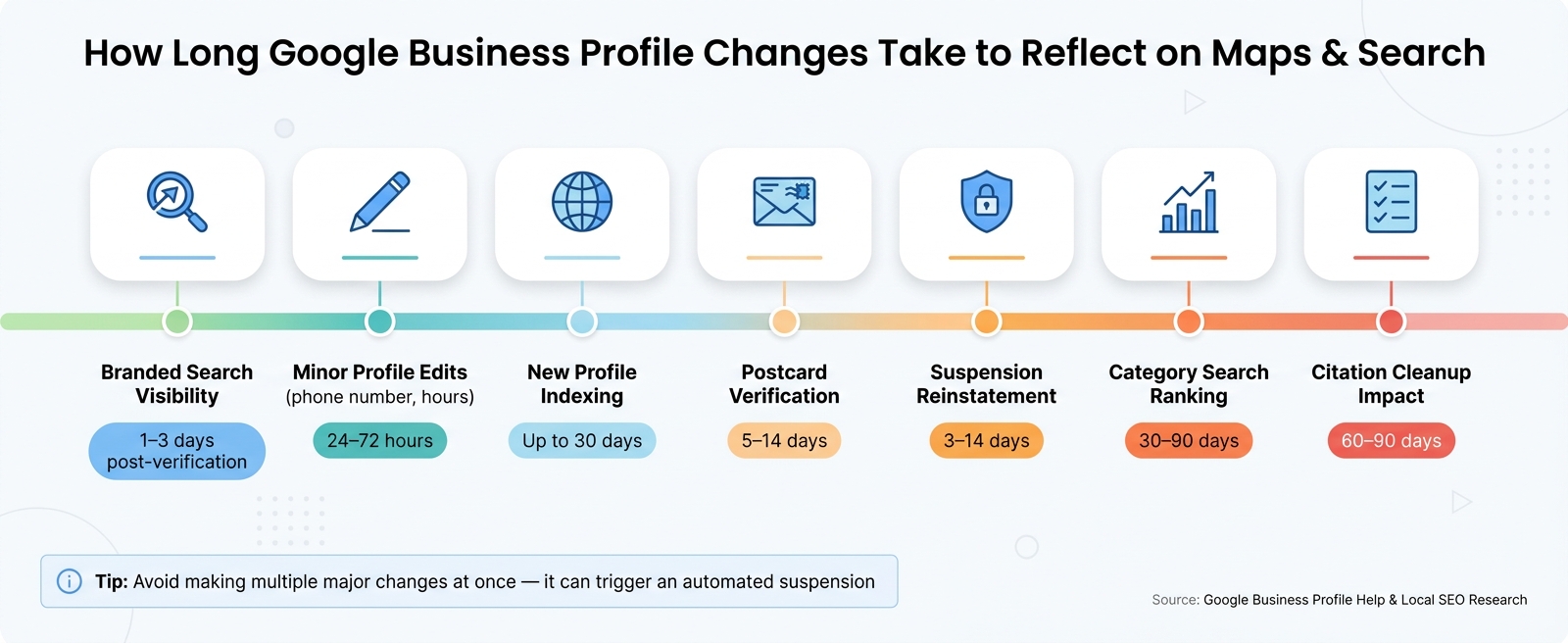
How Long Google Business Profile Changes Take to Show Up
Even when your profile is verified and optimized, it might not show up instantly. Google needs time to process updates and establish trust with your business.
Smaller updates - like changing your phone number or hours of operation - usually appear within 24–72 hours [8]. However, more substantial changes take longer. For example, postcard verification typically takes 5–14 days, and a completely new profile might not rank for competitive category searches (like "coffee shop near me") for 30–90 days, even after verification [16]. On the other hand, branded searches often show results within a few days, but stabilizing your ranking in competitive categories can take much longer.
Here’s a quick breakdown of typical timelines:
| Action or Event | Typical Time to Reflect |
|---|---|
| Minor profile edits | 24–72 hours [8] |
| Postcard verification | 5–14 days [8][16] |
| New profile indexing | Up to 30 days [8] |
| Branded search visibility | 1–3 days post-verification [16] |
| Category search ranking | 30–90 days [16] |
| Suspension reinstatement | 3–14 days [16] |
| Citation cleanup impact | 60–90 days [16] |
A key tip: avoid making back-to-back major changes, like altering your business name, address, and category all at once. This can resemble suspicious activity, potentially triggering an automated suspension [1].
Google Search Console (GSC) is an excellent free tool to monitor your profile's performance. It includes features like the URL Inspection tool, which lets you request indexing for new pages. This typically prompts Google to crawl the page within 1–2 days [16]. Additionally, the Search Results report provides insights into the keywords driving traffic to your site.
For a more detailed look at local rankings, geo-grid tools like Local Falcon or BrightLocal are invaluable. They show how your business ranks across various locations, offering a clearer picture than a single manual search. To track how much traffic your profile generates, you can add UTM parameters to your GBP website link, such as ?utm_source=google&utm_medium=organic&utm_campaign=gbp. This data can then be analyzed in GA4 [15].
If your business still doesn’t appear after several weeks, there could be technical issues with your website affecting your local signals. Start with a simple test: search site:yourdomain.com on Google. If no results show up, your site isn’t indexed [16]. Check your robots.txt file to ensure it doesn’t include Disallow: /, which blocks all search engines from crawling your site. Also, look for any noindex meta tags that might be preventing indexing [16].
"Ranking and visibility drops are a signal, not simply bad luck. A structured diagnostic process helps identify the true cause before taking action." - Elizabeth Rule, Local SEO Analyst, Sterling Sky [15]
If your rankings vary across locations, Google's proximity filter could be at play. Geo-grid tools can help identify this "Swiss cheese" effect, where your business ranks well in some areas but disappears in others [15].
If basic fixes haven't resolved your visibility issues, it's time to dive into some advanced troubleshooting methods.
Start with a quick test: open a private or incognito browser window. This removes personalized search history and account preferences, giving you a clearer view of how your business appears to others. Search for your exact business name. If it doesn’t show up, it could point to problems like an unverified or suspended profile.
After testing your business name, try searching for your primary service keyword, such as "Bay Area HVAC repair" or "Oakland wedding photographer." Check the results on both Google Search and Google Maps. Even in incognito mode, Google uses your device’s IP address to adjust results based on location. For example, results from an office in San Jose might differ from what a customer in Fremont sees. To get a broader understanding of your visibility across different locations, consider tools like Local Falcon, which create geo-grid maps of your rankings in various areas.
If visibility issues persist, duplicate business profiles might be the culprit.
Duplicate listings can hurt your visibility on Google Maps. According to Google:
"You can have only one Business Profile for each business. Multiple profiles for the same business may mislead your customers and are against our policies. If a profile is considered a duplicate, it won't show on Google Search or Maps." - Google Business Profile Help [17]
Duplicates often occur when a former employee creates a profile, when a business moves and a new profile is made instead of updating the old one, or when separate profiles are created for different services under the same business. To identify duplicates, search your business name and address on Google Maps.
If you find a duplicate listing you own, you can remove it without affecting your verified profile. For duplicates owned by someone else, use the "Request Access" feature. The current owner has three days to respond before you can claim it. To merge two active profiles, use the "Suggest an edit" option on Google Maps to flag the duplicate. Keep in mind, when profiles are merged, reviews are combined, but replies to those reviews may be lost.
If these steps don't solve the problem, you may need to escalate the issue.
Certain problems might require help directly from Google Support. Consider reaching out if:
Before contacting support, gather essential details like your Business Profile ID, your exact business name and address, and digital copies of your business license. Including photos of your storefront signage can also help. Use the "Get Help" tool on Google, selecting "Update your business info" and then "My business isn't showing on Maps" to ensure your request is routed correctly. Response times typically range from five business days to two weeks.
If issues persist, explore external tools and resources for additional support when options within Google’s dashboard fall short.
Now that we've covered verification, data accuracy, and category optimization, let’s recap the main reasons your business might not appear on Google Maps - and how to address them.
Several factors can prevent your business from appearing, such as an unverified or suspended profile, duplicate listings, incorrect categories, or inconsistent NAP (Name, Address, Phone) details. Local SEO studies reveal that 90% of visibility issues for contractors stem from just five common problems [2]. Even something as small as inconsistent address formatting can hurt your ranking.
To finalize your Google Business Profile (GBP) optimization, use the table below as a quick guide to diagnose and resolve common issues:
| Symptom | Most Likely Cause | Fix |
|---|---|---|
| Invisible Listing | Unverified/Suspended Profile | Check your GBP dashboard for alerts [1] |
| Shows by name but not for services | Wrong Primary Category | Align your category with your top three local competitors [6] |
| Listing disappears when zooming in | Proximity Filtering (Possum Update) | Use a more specific primary category [1] |
| Only visible in one ZIP code | Misconfigured Service Area | Add up to 20 cities or ZIP codes in your Service Area Business (SAB) settings [6][2] |
| Ranking dropped without warning | Malicious Edit or Algorithm Shift | Review "Suggested edits" in your dashboard and monitor changes [1][2] |
To maintain visibility, keep your profile active. Post weekly updates, upload new photos, and respond to reviews within 24 hours. Profiles with fewer than 10 photos or incomplete service descriptions are at higher risk of being suppressed [2]. Treat profile completeness as a necessity, not an extra step.
Start by searching for your business in incognito mode and reviewing your GBP dashboard for any alerts. If your listing doesn’t appear, focus on verifying your profile, ensuring NAP consistency, and fixing category issues - these steps solve most visibility problems.
For ongoing tracking, tools like Local Falcon and BrightLocal can help you see how your rankings perform across different Bay Area neighborhoods. If citation audits or cleaning up inconsistent listings feel overwhelming, services like Whitespark and Moz Local can provide the support you need [16].
To see if your Google Business Profile is active, log in to your dashboard and check for a verification badge next to your business name. If you see messages like “Verification needed,” “Pending,” or “Suspended,” it means your profile isn’t fully live yet. To fix this, complete the verification process - whether through a postcard, video, or other method - so your profile becomes visible on Google Maps and search results.
If your business only shows up on Google Maps when users are close by, it might be due to proximity-based ranking. To improve your visibility, make sure your profile is complete and accurate. Include up-to-date details, relevant categories, and well-chosen keywords. Strengthen your credibility by gathering positive reviews, uploading high-quality photos, and actively engaging with users. Also, double-check your map settings to ensure all your locations are enabled. Expanding your local signals can help your business appear in searches even when users are farther away.
Inconsistent business details across your website or online directories can seriously affect your visibility on Google Maps. If your business name, address, or phone number (NAP) doesn’t match across platforms, or if there are indexing issues, it can hinder your chances of appearing. To avoid this, double-check that your information is accurate and consistent everywhere it’s listed.
Discover strategies to elevate your business.


