


In 2026, a fully optimized Google Business Profile (GBP) is your business's most critical digital asset for local visibility. It powers AI-driven answers, Google Maps, and local search results. Here's what matters most:
To stay competitive, treat your GBP as a dynamic resource. Regular updates, accurate info, and active engagement ensure your business stands out in AI-powered search results.
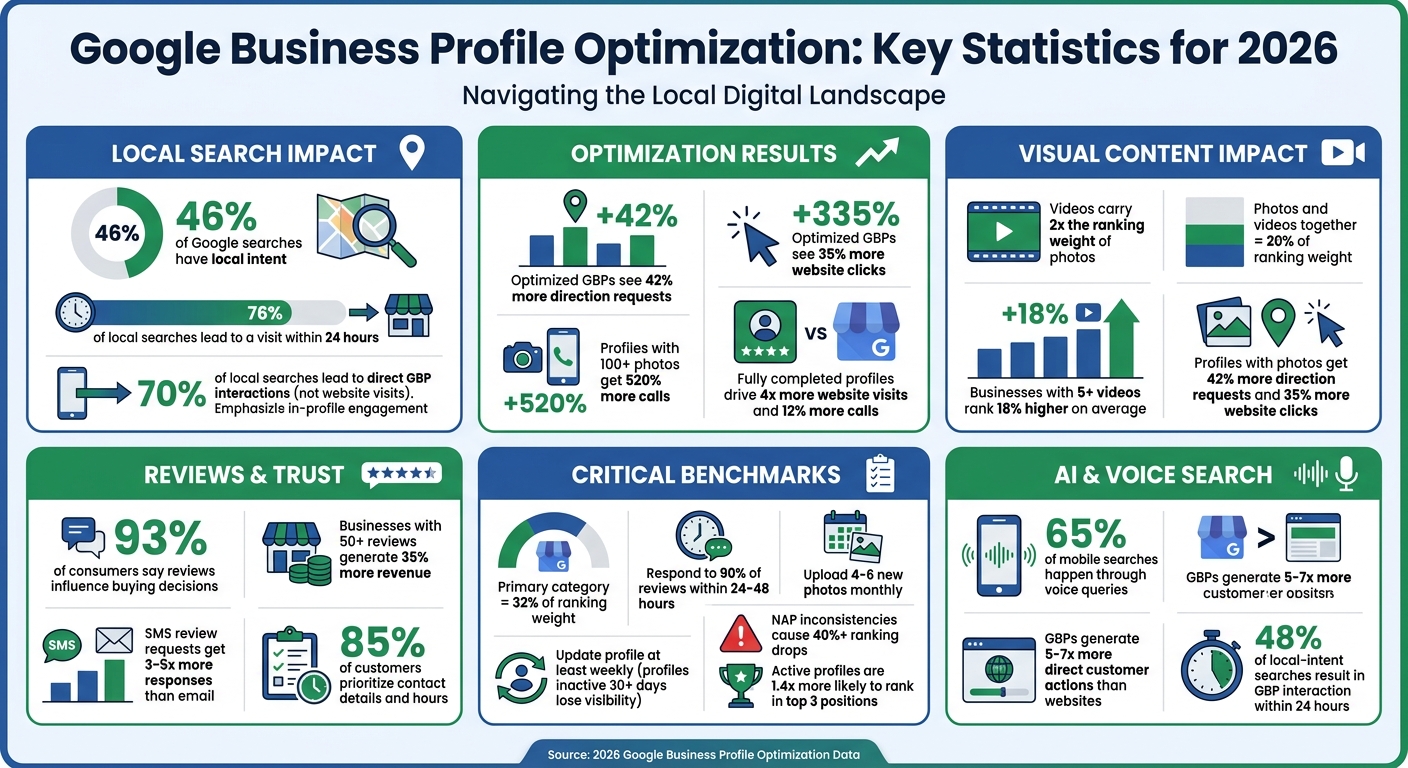
Google Business Profile Optimization Statistics and Impact 2026
Getting your business details right is the backbone of your Google Business Profile. A whopping 85% of customers prioritize information like contact details and operating hours when deciding where to engage [8]. This means your profile needs to be spot-on to establish trust from the get-go.
Google checks your NAP (Name, Address, and Phone number) across different platforms to confirm your business is legitimate [9]. Even small inconsistencies - like "Suite 200" on one listing and "Ste 200" on another - can erode Google's confidence in your business. These mismatches can lead to a decline of over 40% in local search rankings [6].
Google’s AI uses the information in your profile to answer user queries. If your business description is vague or your categories are unclear, the AI might not highlight your profile effectively. Google also uses automated calls to verify details like pricing, inventory, and operating hours [10]. Fully completed profiles drive 4x more website visits and 12% more calls compared to incomplete ones [8]. And if you let your profile sit idle for more than 30 days without updates, Google may flag it as "stale", which can hurt your visibility [10].
Your business name must match your real-world signage exactly. Adding words like "best" or "#1" can lead to profile suspensions [9].
"Your name has to match your real-world signage exactly. No exceptions." - Tanner McCarron, Dyad Marketing [9]
Stick to a local area code for your phone number, and ensure it connects directly to your business, not a toll-free line or call center [1].
If you're a service-area business without a physical storefront - like a plumber or HVAC contractor - be specific about the cities and ZIP codes you serve. Avoid broad claims like "everywhere", as this can cause your profile to rank poorly [8]. Listing specific neighborhoods or towns will improve your visibility.
Also, ensure your address is consistent across all directories. For instance, if your website says "123 Main Street, Suite 200", but another source lists "123 Main St., Ste 200", correct the discrepancy. Even minor differences can create confusion and lower your rankings [9].
Once your core details are accurate, it's time to fine-tune your profile's categories and description to reflect your services clearly.
Your primary category is a major factor in how your business ranks, accounting for about 32% of its relevance in local searches [9]. Choose the most specific category available. For example, "Pediatric Dentist" is more effective than just "Dentist", and "Pizza Restaurant" works better than "Restaurant."
"Your primary business category is the single most impactful optimization on your entire GBP. It defines which searches your profile is eligible to appear for." - PinPoint Promote [1]
You can add up to nine secondary categories to cover additional services. For instance, if you're a pizza place that also offers catering, include "Caterer" as a secondary category [1].
Make the most of the 750-character limit for your business description. Start with concrete details about your services and location. Instead of generic phrases like "We're a family-owned business committed to excellence", go for something like, "Full-service HVAC contractor serving Denver metro since 2015. We install and repair furnaces, air conditioners, and heat pumps for residential and commercial properties." A clear, detailed description not only helps customers but also feeds into AI-generated summaries.
Accurate business hours help build trust and show customers that your profile is active. Use the "Special Hours" feature to update your schedule for holidays [8]. For example, if you're closed on Thanksgiving or have reduced hours on New Year's Eve, make sure your profile reflects that. Customers who arrive to find your doors locked are unlikely to return.
Google monitors how often you update your profile. Keeping your hours current - especially during holidays - signals activity and prevents your profile from being flagged as stale [1]. It's better to update seasonal hours proactively rather than waiting for customer complaints. With over 70% of local searches leading directly to interactions with Google Business Profiles rather than website visits [6], your profile often serves as the first - and sometimes only - point of contact for potential customers.
These core details lay the groundwork for refining your categories and descriptions, ensuring your profile stands out effectively.
| Profile Element | Best Practice | Impact Level |
|---|---|---|
| Business Name | Exact match to legal name/signage; avoid keyword stuffing | High (Risk of Suspension) |
| Primary Category | Most specific descriptor of core business | Critical (32% Ranking Weight) |
| Phone Number | Use a local area code; ensure it connects directly to the business | High (Trust Signal) |
| Description | Use full 750 characters; lead with specific services and location | Medium (Relevance) |
| Business Hours | Include accurate holiday and special schedules | Medium (Trust/Activity) |
Visual content plays a major role in how Google Business Profiles perform in 2026. Businesses that feature photos see 42% more requests for directions and 35% more website clicks compared to those without them [11][7]. In fact, photos and videos together contribute around 20% of the ranking weight for Google Business Profiles [13].
Google's Vision AI analyzes images to better understand what your business offers. That means your photos should showcase real work, products, and team members - steer clear of generic stock photos, as they tend to lower user engagement [12].
"Google is becoming more visual. From image search, to photo and video carousels taking over the result pages, visuals are becoming more and more important for Google Search." - Claire Carlile [12]
In 2026, videos hold twice the ranking weight of photo posts [13]. Businesses with at least five videos on their profile rank 18% higher on average [13]. To make the most of video content, stick to these guidelines:
Since videos autoplay muted in search results, grab attention with compelling visuals in the first three seconds rather than relying on text overlays [7].
Uploading 4–6 new photos every month helps keep your profile fresh and signals activity to Google's algorithm [7]. Profiles that go more than 30 days without updates often experience a drop in visibility [10][7]. Aim to cover these categories with your photos:
For service-area businesses like contractors or cleaners, "action shots" are especially valuable for building trust and credibility [10][3].
To ensure your images look professional and align with Google's requirements, follow these guidelines:
Running your images through Google's Vision AI can help verify they're being categorized correctly. For instance, a dental office should ensure their photos are recognized as "dentist" rather than generic "medical equipment" [12].
Pro Tip: While geotagging photos manually by adding EXIF data might seem useful, Google strips this metadata during upload. Instead, focus on high-quality, authentic images.
| Media Type | Recommended Resolution | File Size Limit | Best Practice |
|---|---|---|---|
| Logo | 720 x 720 px (min 250 x 250) | 10 KB – 5 MB | 1:1 ratio; readable at small sizes |
| Cover Photo | 1,080 x 608 px | 10 KB – 5 MB | 16:9 ratio; branded and eye-catching |
| Business Photos | 720 x 720 px | 10 KB – 5 MB | JPG or PNG; avoid heavy filters |
| Videos | 720p or higher | Max 100 MB | 30–60 seconds; landscape or vertical |
Beyond photos and videos, Google Posts add another layer to your profile's engagement strategy. These posts don't directly impact rankings, but they improve click-through rates in the local panel [7]. Plus, Google's AI-generated summaries often pull details from your active posts to describe your business [7].
"Publishing weekly Posts, Events, and Offers lifts click-through in the local panel but does not directly move pack position. Treat Posts as conversion assets." - Digital Applied [7]
To stay consistent, aim to publish at least one post per week [7][14]. Here's how different post types work:
For better conversions, use specific Call to Action buttons like "Book" or "Order online", which tend to perform better than generic options like "Learn more" [7].
Each post should include a high-quality image (minimum 720 x 720 pixels) [14]. Keep descriptions between 150–300 characters for the best results, though the limit goes up to 1,500 characters [7]. To avoid a stale profile, rotate "Offer" posts monthly [7].
New for 2026, the Google Business Profile dashboard now lets you schedule promotions and events directly [6]. This makes it easier to plan ahead, especially for holidays or seasonal campaigns. With over 70% of local searches leading to direct interactions with Google Business Profiles rather than website visits [6], your posts often serve as the first impression for potential customers.
Google's AI models now rely heavily on reviews and Q&A to shape how your business is presented online. As of 2026, AI-generated overviews use customer reviews and feedback to address complex local searches like, "Who is the most trusted plumber in [neighborhood]?" [1][5]. Every review and answered question plays a role in how AI portrays your business to potential customers.
Review velocity (how often you receive reviews) and recency (how new those reviews are) now carry more weight than the total number of reviews [5][9]. The stats are compelling: businesses with over 50 Google reviews generate 35% more revenue than those with fewer [1], and 93% of consumers say online reviews influence their buying decisions [15].
To maximize reviews, ask customers immediately after a positive experience - whether it’s solving an issue or delivering a product [5][9]. SMS requests are particularly effective, generating 3–5 times more responses than email [15]. Automated text follow-ups sent 24–72 hours after a service make it easy for customers to leave feedback, especially when you include a direct link or QR code to the review form [15][9].
Responding to reviews is just as important as collecting them. Aim to reply to at least 90% of reviews within 24–48 hours [5][9]. For positive reviews, thank the customer by name and reference a specific detail from their feedback - that extra effort can enhance how Google's algorithm evaluates your business [5][16]. For negative reviews, respond promptly by addressing the issue, apologizing, and offering to resolve it offline [5][9].
"A negative Google review is a moment to demonstrate your commitment to customer satisfaction." - Jeff Schwerdt, Founder & CEO of Reviewly.ai [5]
Consistency is key when it comes to requesting reviews. Train your team to ask for feedback during peak satisfaction moments [5][9]. Include review links in email signatures, SMS follow-ups, receipts, and even signage in your store [15]. Use the "Share review form" feature in your Google Business Profile (GBP) dashboard to create a direct link, so customers don’t have to hunt for your profile [15].
Avoid practices like "gating" reviews (filtering out negative feedback before it’s posted), as Google may suspend your profile for this in 2026 [15]. Instead, focus on making the review process as seamless as possible.
When responding to reviews, steer clear of generic replies. Personalize your responses by using the customer’s name and referencing their specific experience. Tools like Reviewly.ai and ReviewGen.AI can help you maintain a consistent tone and quick response time, but always add a personal touch to the final message [5][15].
| Review Metric | Measurement Method | 2026 Recommended Benchmark |
|---|---|---|
| Review Velocity | New reviews per month | Target +10% month-to-month growth [5] |
| Recency | % of reviews in the last 90 days | Maintain ≥30% for freshness signals [5] |
| Average Rating | Mean star rating | Maintain ≥4.0 (4.5+ is ideal) [5][15] |
| Response Rate | % of reviews answered | Target ≥90% within 24–48 hours [5][9] |
Once your review management strategy is solid, turn your attention to building a strong Q&A section.
A well-managed Q&A section is the next step in shaping your business’s online narrative. This section now feeds into features like Google's "Ask Maps" and AI-generated overviews [17][2]. While Google's AI scans reviews, business data, and your website to auto-generate answers, you can take control by proactively "seeding" your Q&A.
Start by posting the 10–15 most common questions your customers ask, such as "Do you offer same-day service?" or "Are you licensed and insured?" Answer these directly from your business account to display the "Owner" tag and ensure accurate information is available [1][16].
"The GBP Q&A section is underused by most businesses and heavily weighted by Google for featured placement in AI Overviews." - Fuel Editorial Team [2]
Monitor your Q&A section regularly to review AI-generated answers. Approve accurate ones and correct or remove misleading responses to prevent misinformation [17]. Enable notifications to respond to new questions within 24 hours - this shows both customers and Google's algorithm that your business is responsive [1][3]. Use natural language and include specific keywords to help Google's natural language processing (NLP) better understand your business profile [2][16].
Once you've nailed down your business details and added engaging visuals, it's time to take things up a notch. Advanced attributes and structured data can supercharge your Google Business Profile (GBP) for AI-driven results. These tools help AI systems like Gemini, ChatGPT, and Perplexity deliver accurate conversational summaries and answer specific queries like "wheelchair accessible dentist near me" [7]. Aligning your website's LocalBusiness Schema with your GBP data builds trust, improves your map pack rankings, and increases AI citations [7].
By 2026, advanced attributes fall into four main categories: accessibility, identity, service details, and transparency. These attributes not only serve as filters in Google Maps but also directly feed into AI-generated summaries [5].
"Transparency attributes in 2026 - such as sustainability credentials, accessibility features, and service guarantees - provide explicit trust signals that AI Overviews and users use to evaluate businesses before clicking or converting." - Jeff Schwerdt, Founder & CEO, Reviewly.ai [5]
To avoid issues, only claim attributes that are consistently accurate. If customer reviews contradict a claimed attribute, Google's AI might automatically remove it from your profile [7]. Keeping your business profile complete and reviews up-to-date boosts your visibility in AI-generated responses.
Start by updating accessibility attributes in your GBP dashboard. Options like wheelchair-accessible entrances, restrooms, and parking not only enhance user experience but also make your business easier to find through voice search and Maps filtering [7]. Add identity attributes like "Women-led", "LGBTQ+ friendly", "Black-owned", and "Veteran-owned" to appeal to values-driven consumers [6][7].
For service details, include amenities such as Wi-Fi, outdoor seating, free parking, and reservations - these are popular filters for mobile users and contribute to AI-generated summaries [7]. Finally, ensure your payment options cover all major digital methods, as consumers increasingly favor businesses offering flexible payment choices [8].
| Attribute Category | Priority Features | Impact on 2026 Search |
|---|---|---|
| Accessibility | Wheelchair-accessible entrance, restroom, parking | Essential for voice search and Maps filtering |
| Identity | Women-led, LGBTQ+ friendly, Black-owned, Veteran-owned | Boosts click-through rates for conscious consumers |
| Service Details | Wi-Fi, outdoor seating, free parking, reservations | Feeds AI-generated place summaries |
| Transparency | Sustainability credentials, service guarantees | Builds trust for high-intent "near me" queries |
Beyond updating attributes, structured schema data on your website is a game-changer for local rankings. LocalBusiness Schema helps verify your business for AI systems [7]. Use JSON-LD schema to include essential properties like name, address, telephone, openingHours, geo, and aggregateRating [5]. Be sure your schema business name matches your GBP name exactly - any mismatch can hurt your rankings [7].
Take it a step further with nested schema types. Add Review, Product, and Service entries to provide structured data on your reputation and offerings. For instance, if someone searches "does anyone nearby sell X", Google Maps AI summaries can pull directly from your product entries [7]. You can also implement FAQPage Schema for common questions, which helps AI assistants and voice search provide quick answers [5][6]. Keep the questions and answers short, natural, and conversational [6].
"A well-executed Google Business Profile optimization 2026 strategy positions you for citation across Google's AI layer, Bing-powered ChatGPT local results, and Perplexity simultaneously." - Fuel Online Editorial Team [2]
Consistency is key. Align your LocalBusiness schema with your GBP data to send clear signals to AI systems [5]. If your AI visibility is under 15%, it often points to missing details like product descriptions or specific reviews [7]. Use tools like Google's Rich Results Test or the Schema.org validator to catch markup errors that could hurt your AI visibility [5]. And don't forget to use the IndexNow protocol to notify Bing whenever you update local pages or schema [7].
Setting up your Google Business Profile (GBP) is just the beginning. To stay ahead in local search rankings, you need to keep track of performance and ensure your profile remains active. In fact, as of 2026, keeping your profile fresh is a confirmed ranking factor - profiles left inactive for more than 30 days can see a noticeable drop in impressions [3][2].
Your GBP dashboard offers valuable data on how customers interact with your business. Key metrics to monitor include website clicks, direction requests, phone calls, and photo interactions - these now play a major role in determining your ranking [3]. Here's a compelling stat: businesses that add photos experience 45% more direction requests and 31% more website clicks [3].
Pay close attention to how your photos perform by tracking views and interactions weekly. This helps you identify which images resonate most with your audience. Additionally, keep an eye on AI visibility metrics. Conduct monthly audits by searching for your core services on platforms like Google AI Overviews, Gemini, ChatGPT (via Bing), and Perplexity to see if your business is being referenced [2]. AI tools can also help you analyze review sentiment and understand how AI systems summarize your business for users [3].
"Today, this engagement - how often users interact with your photos, click your Q&A, and linger on your profile - has become a primary ranking factor." - Agency Jet [3]
Another critical metric to track is your engagement score. Google uses this internal measure to evaluate how often you update your profile. Businesses with higher activity scores are 1.4 times more likely to rank in the top three local pack positions compared to inactive profiles [2]. By consistently monitoring and improving your engagement, you can see measurable results in as little as 30–60 days [2].
These insights will guide you in creating a proactive update schedule to keep your profile competitive.
When it comes to maintaining your profile, consistency beats everything else. Stick to a regular schedule to ensure your profile stays active and relevant.
| Frequency | Maintenance Task | Key Metric to Watch |
|---|---|---|
| Weekly | Post updates, upload photos, respond to reviews | User Engagement, Photo Views |
| Monthly | Review acquisition, AI audits, NAP check | AI Citations, Review Velocity |
| Quarterly | Category audit, Website SEO alignment | Local Pack Ranking, Website Clicks |
| Annual | Description refresh, photo cleanup, strategy audit | Year-over-Year Lead Growth |
Here's a key takeaway: nearly half (48%) of local-intent searches result in a GBP interaction within 24 hours [3]. Your profile isn’t something you can set up and forget. Think of it as a living platform that needs regular care to stay competitive in both traditional search results and AI-driven answers. By consistently tracking these metrics, you can reinforce the strategies outlined in earlier sections and keep your business thriving.
Your Google Business Profile (GBP) and website work hand-in-hand - Google considers them as part of the same signal [2]. When the information on these platforms aligns, it builds what Google calls "entity confidence", which strengthens your local rankings [7]. On the flip side, inconsistencies between the two can confuse Google’s AI and erode trust with potential customers who notice the discrepancies. Keeping them in sync ensures a clear and unified digital presence for your business.
Inconsistent NAP (Name, Address, Phone) details are a major culprit behind over 40% of local ranking drops [6]. Google’s AI pulls data from both your GBP and website to create business summaries for search results. As the SerpNap Team explains:
"If your GBP and website tell conflicting stories, the AI summary will reflect that confusion" [18].
This confusion can cost you leads. For example, if users see different hours or services on your GBP and website, they’re likely to leave immediately [10].
Here’s another reason to get this right: Google Business Profiles generate 5–7x more direct customer actions (like calls or directions) than most business websites [18]. When your GBP and website are aligned, you can amplify these benefits. Businesses that include "grounding content" - service pages linked to GBP details - are more likely to appear in Google’s AI Overviews [7], where 65% of mobile searches now happen through voice queries [6].
To maintain consistency, every service listed on your GBP should have a dedicated page on your website. PinPoint Promote emphasizes:
"A GBP with 12 service entries and a website with a single generic 'Services' page creates a misalignment that suppresses both GBP ranking and AI Overview visibility" [1].
Even small discrepancies in your business name can hurt your rankings. According to Fuel Online:
"A single character difference ('Co.' vs 'Co') creates an entity mismatch that suppresses both local pack rankings and AI citation frequency" [2].
To avoid this, ensure your business name matches exactly with the LocalBusiness schema on your website. For services, use the exact names from your GBP as H1 or H2 headers on relevant pages. For example, if your GBP lists "Emergency Plumbing Repair", your website should feature a dedicated page with that exact phrase in the header and opening paragraph.
Since Google retired the native GBP Q&A feature in late 2025, move frequently asked questions to an FAQ section on your website [10]. Google now pulls answers from website FAQs to respond to user queries directly in Search and Maps, making this content essential for visibility in AI-driven results.
| Alignment Element | GBP Requirement | Website Requirement |
|---|---|---|
| Business Identity | Exact legal name; no keyword stuffing | Identical name in LocalBusiness schema |
| Service Content | Individual entries for every specific service | Dedicated pages for each service |
| Contact Info | Local phone number and verified address | NAP visible site-wide (often in the footer) and in schema |
| Trust Signals | Proactive Q&A population | FAQ section mirroring common customer questions |
Aligning your GBP and website is only part of the equation - your website’s SEO plays a big role in boosting your local presence. Google uses your website’s overall SEO authority (backlinks, content quality, technical performance) to calculate your GBP’s "prominence" score, a key factor in local rankings [18].
Start with LocalBusiness schema markup on your homepage and contact page. Include details like name, address, phone number, opening hours, geo coordinates, and price range - ensuring everything matches your GBP [2][6]. This structured data helps Google verify your business and supports voice search, now responsible for 65% of mobile searches [6].
Make sure your robots.txt file allows AI crawlers from Google, OpenAI, and others to access your local service pages [2]. Use the IndexNow protocol to notify Bing (which powers ChatGPT local search) whenever you update local content [2]. This keeps AI-powered search tools updated with your latest information.
Add UTM tracking codes to the website link in your GBP dashboard (e.g., ?utm_source=google&utm_medium=organic&utm_campaign=gbp) to monitor conversions in Google Analytics 4 [6]. Embedding a Google Map on your contact or location pages can also strengthen proximity signals [4]. For businesses with multiple locations, create separate landing pages for each location instead of linking all GBPs to your homepage [18].
Lastly, double-check your primary category. The category you select on your GBP should align with the main service highlighted in your website’s H1 headers and meta descriptions [18][7].
When your GBP and website work together seamlessly, you avoid confusion and create a powerful digital presence that boosts visibility across both traditional and AI-driven search platforms.
A well-maintained Google Business Profile (GBP) in 2026 isn’t just a static listing - it’s a dynamic resource that thrives when managed across six core areas: complete business information, visual content, reviews and Q&A, advanced attributes, performance tracking, and website alignment. Together, these elements strengthen your business’s relevance, proximity, and prominence in local search results. As LocalMighty aptly states:
"Businesses that treat GBP as a living asset dominate Maps, AI answers, and local leads. Those who 'set it and forget it' disappear." [4]
The stakes for keeping your profile up-to-date have never been higher. In 2026, your GBP plays a direct role in AI-powered search results, including Gemini, ChatGPT, and zero-click searches. Neglecting your profile doesn’t just hurt your ranking - it risks making your business nearly invisible in AI-generated answers, even if it still appears in traditional Map Pack results [1]. Data shows that regularly updated profiles are 1.4x more likely to appear in the top three local positions compared to profiles left untouched [2]. This underscores how critical ongoing optimization is in today’s competitive digital space.
The good news? Staying competitive doesn’t require a massive time investment. Simple habits can make a big difference: upload three fresh photos, post weekly updates, respond to reviews within 24-48 hours, and review your categories every quarter [1] [2]. By consistently focusing on these areas, your business remains relevant in both traditional search rankings and the evolving world of AI-driven search results.
Keeping your Google Business Profile up-to-date in 2026 means making it a weekly priority. Add fresh content like promotions or seasonal offers, and regularly update the Q&A section with answers to common customer questions. Double-check that your business details - such as operating hours, services, and categories - are accurate and current. These consistent updates not only boost visibility and engagement but also help align your profile with Google’s ranking criteria, making it easier for your business to shine in local search results.
In 2026, keeping your Google Business Profile in top shape means showcasing a steady stream of high-quality photos and videos. Adding fresh visuals and updates, like weekly posts, can significantly enhance both visibility and engagement. While there’s no strict rule about the number of updates, regularly sharing relevant and current content is crucial for improving your profile’s performance.
To align your website with your Google Business Profile (GBP) for AI-driven results in 2026, start by optimizing your GBP and ensuring it matches your website. Keep your NAP (Name, Address, Phone) information consistent across both platforms. Add structured data to your website to help Google better understand your content. Regularly update your GBP with new posts, photos, and reviews to keep it active. These efforts make it easier for Google's AI to retrieve accurate information, improving your visibility in AI-powered search results.
Discover strategies to elevate your business.


