

Managing customer relationships without a CRM wastes time and costs money. Businesses using CRM systems in 2025 reported a 29% increase in sales revenue and 41% more revenue per salesperson. If you're tracking over 50 contacts or spending hours on manual tasks, it's time to switch to a CRM.
Here's why:
Affordable options, including free plans, make CRMs accessible to small businesses. Tools like HubSpot or Humble Help CRM help you save time, close more deals, and improve customer service. Start small, focus on essentials, and see measurable results in months.
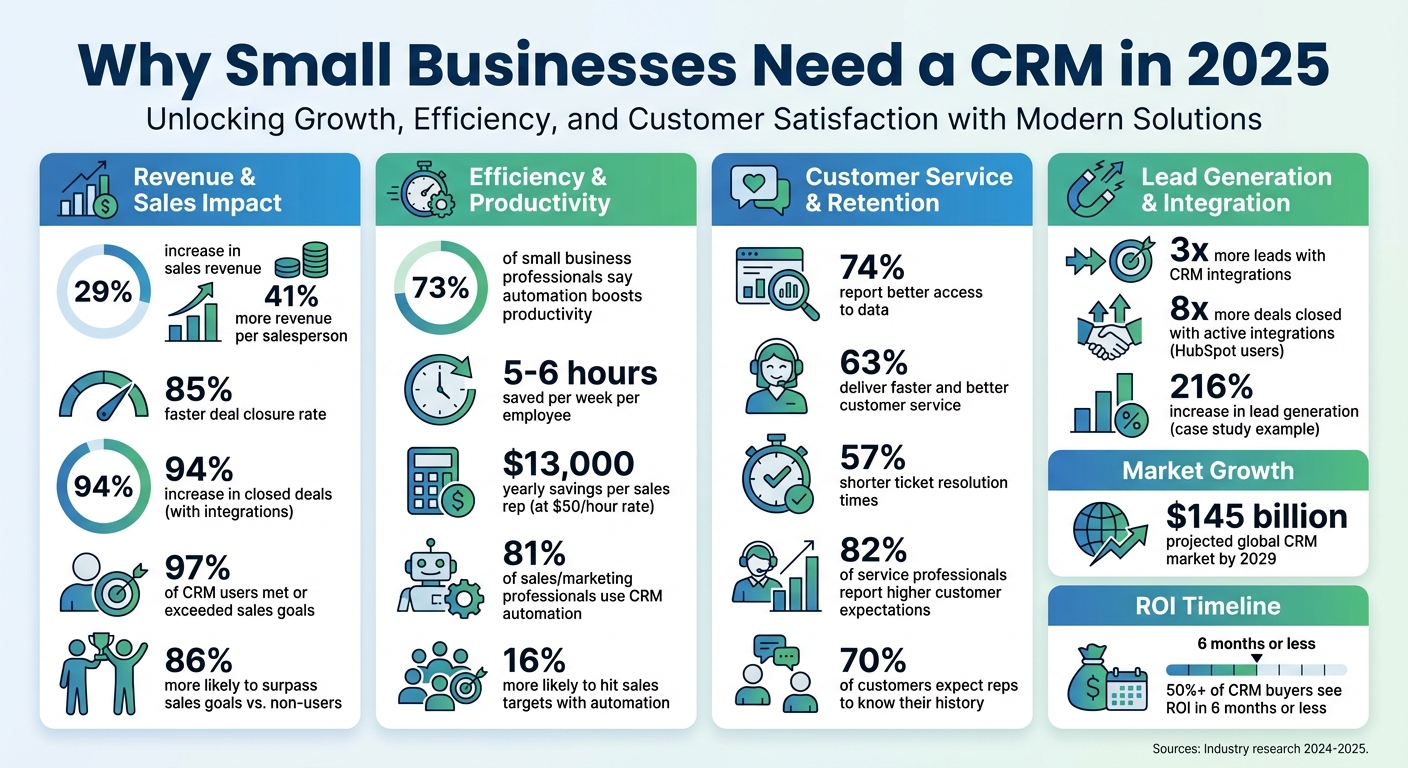
CRM Benefits for Small Businesses: Key Statistics and ROI in 2025
A CRM, or Customer Relationship Management system, is software designed to centralize all your customer information, interactions, and history into one easy-to-access dashboard [6][7]. Instead of juggling scattered spreadsheets, sticky notes, and endless email threads, a CRM brings everything together in real time, giving your entire team a shared view of customer activity.
The CRM market is booming, with projections estimating it will surpass $145 billion globally by 2029 [1]. Companies using CRM systems report impressive results: 74% see better access to data, and 73% of small business professionals say automating repetitive tasks has significantly boosted their productivity [8]. As Matthew Ruxton, Manager at Ignite Reading, shared:
"Unifying our data in HubSpot transformed how we operate. What used to take multiple systems and spreadsheets is now a single, shared view - empowering every team to move faster, act smarter, and deliver better outcomes." [1]
Modern CRM systems are packed with tools designed to make work simpler and more efficient. Here’s a closer look at what they offer:
These features are game-changers for businesses. In fact, 81% of sales and marketing professionals use CRM systems with automation capabilities [4], and 63% of small business leaders say their CRM helps them provide faster and better customer service [6]. By integrating these tools into daily operations, CRMs enhance how businesses interact with customers across departments.
CRMs aren’t just for large corporations - they’re vital for small businesses too. Acting as the central hub, a CRM connects sales, marketing, and customer service teams. For example, when a customer reaches out to support or sales, team members can instantly access their purchase history, past conversations, preferences, and activity insights. This 360-degree view eliminates the need for customers to repeat themselves and ensures seamless, personalized service.
Whitney Summers, Associate and Senior Marketing Manager at DTJ Design, explained the impact of their CRM:
"We needed a system that would help us see opportunities sooner and nurture them consistently. HubSpot gave us that - and more." [1]
For small businesses, a CRM scales effortlessly, whether you’re managing 50 contacts or more than 10,000 [2]. It ensures every department has the most up-to-date customer insights, making it easier to deliver exceptional service and grow efficiently.
A CRM simplifies how small businesses manage customer relationships by centralizing data, automating repetitive tasks, and connecting various tools for real-time insights. Let’s break down how these systems make daily operations smoother and more efficient.
Think of a CRM as your go-to hub for all customer-related information. It pulls together data from sales, marketing, and customer service into one easy-to-navigate dashboard. Every interaction - whether it’s an email, phone call, or purchase - is logged automatically. This creates a comprehensive, searchable profile for each customer, including their contact details, order history, and any unresolved issues.
Because modern CRMs operate online, your team can access and update customer data from anywhere, on any device, at any time. This eliminates the headaches of version mismatches and ensures everyone is working with the same up-to-date information. It’s no wonder 64% of small business owners consider automation critical to their operations [6]. CRMs take over tedious tasks like assigning leads, sending follow-up emails, and entering data, freeing up time for more strategic work.
LJ Finney, CEO and Co-Founder of IN-18, a small golf business, shared how HubSpot’s Starter Platform transformed their operations in 2024:
"The HubSpot Starter Platform has been instrumental in helping us establish ourselves as a reputable brand. It... allowed me to centralize most of the resources that I need from who's buying what, who's interested in what, and simplifying the overall client and relationship management process." [2]
CRMs don’t just centralize data - they also play nicely with the tools you already use. For example, they sync with Gmail or Outlook, allowing you to send and track emails directly from a contact’s profile. Marketing platforms like Mailchimp can share campaign performance metrics, while financial tools like QuickBooks or Xero display invoice statuses and payment histories alongside customer records.
Here’s the problem: while small businesses use nearly 900 apps on average, only 29% of them are integrated [3][9]. This disconnect creates data silos, making it harder to see the big picture. But businesses that integrate their CRM with other tools see big results: 3x more leads and a 94% increase in closed deals [1][2]. HubSpot users with active integrations report closing 8x more deals than those without [1].
CRMs also simplify lead capture. With browser extensions, you can grab prospect details from LinkedIn or other websites and add them to your database with a single click. Integrations with platforms like Zoom, Slack, or Microsoft Teams ensure meeting recordings and team conversations are automatically linked to the relevant customer records, keeping everything organized and accessible.
One of the standout features of CRMs is their ability to deliver real-time insights. Instead of spending hours piecing together data in spreadsheets, CRMs provide one-click dashboards and forecasts that update automatically. These tools track everything from pipeline progress to engagement metrics, giving you a clear picture of how your business is performing.
This kind of visibility is a game-changer. You can quickly identify which marketing campaigns are driving results, which sales reps might need extra help, or which customers are at risk of leaving. 63% of small business leaders say their CRM enables them to deliver faster and better customer service [6]. By seeing the entire customer journey at a glance, you can address issues before they escalate.
The difference between managing data in spreadsheets versus a CRM is night and day. Spreadsheets require constant manual updates and can’t track customer engagement. In contrast, CRMs automatically capture data, sync it across your team, and provide real-time insights into metrics like email opens and website activity [2]. This shift from reactive data management to proactive decision-making is why CRMs have become essential tools for small businesses in 2025.
CRMs in 2025 are reshaping how businesses operate, bringing measurable improvements to efficiency, sales, and customer service.
CRMs are taking over tedious tasks like data entry, follow-up reminders, email logging, and lead assignments. This automation frees up precious hours for teams to focus on more meaningful work. In fact, 81% of sales and marketing professionals now use CRMs with automation features [4], and the results speak for themselves.
For example, if a sales rep saves 5 hours a week using automation, that translates to about $13,000 in yearly savings at a $50/hour rate [1]. Multiply that across an entire team, and the financial impact becomes undeniable. But it’s not just about saving money - those extra hours can be redirected to activities that drive growth, like building stronger relationships, closing deals, and addressing customer needs.
Modern CRMs go beyond basic automation. They use AI to draft emails, summarize conversations, predict high-conversion leads, and handle repetitive tasks 24/7. This allows teams to focus on strategy instead of busywork. Unsurprisingly, automation users are 16% more likely to hit their sales targets [12], which directly boosts revenue.
CRMs don’t just save time - they also make sales processes more effective. With tools like visual sales pipelines and automated lead scoring, teams can prioritize high-potential prospects with ease. This focus leads to a 29% increase in sales revenue and an 85% faster deal closure rate [1][3].
One of the standout benefits of CRMs is their ability to integrate with other business tools. Companies that do this see 3x more leads and close 94% more deals [1][2]. Moreover, 86% of businesses using a CRM are more likely to surpass their sales goals compared to those without one [5]. When your team can visualize the entire sales pipeline and focus on the hottest opportunities, closing deals becomes a streamlined and predictable process instead of a chaotic effort.
CRMs also help pinpoint bottlenecks. For instance, if deals consistently stall at the proposal stage, the system highlights the issue, so you know exactly where to focus your attention.
When it comes to keeping customers happy, CRMs are indispensable. By centralizing every interaction - whether it’s a past purchase, a support ticket, or an email exchange - teams can ensure no detail slips through the cracks. This builds trust and loyalty, especially in today’s environment where 82% of service professionals report that customer expectations are higher than ever [3]. Additionally, 70% of customers now expect representatives to know their purchase and issue history without being told [11].
With all customer data in one place, teams can provide personalized service that makes a real difference. This approach shortens ticket resolution times by 57% [2] and significantly improves retention. Whether it’s anticipating customer needs, offering tailored recommendations, or resolving issues quickly, a CRM turns one-time buyers into loyal advocates who are more likely to recommend your business.
Matthew Ruxton, Manager at Ignite Reading, summed it up perfectly:
"Unifying our data in HubSpot transformed how we operate. What used to take multiple systems and spreadsheets is now a single, shared view - empowering every team to move faster, act smarter, and deliver better outcomes." [1]
Small businesses today have more reasons than ever to embrace CRM tools. What used to be high-priced software exclusive to large corporations has become accessible and budget-friendly. These tools now enable small teams to work smarter, operating as though they have the resources of much larger organizations. Not adopting a CRM at this point could cost businesses more in missed opportunities and inefficiencies.
Gone are the days when CRMs were just digital filing cabinets for customer data. Modern CRMs, powered by AI, act as proactive assistants that analyze trends, predict outcomes, and even take action for you. These systems can draft emails, summarize conversations, score leads, and automatically reach out to prospects [13][14]. Businesses that integrate AI into their sales processes have seen a 30% revenue increase, while AI-driven customer support has sped up case resolution by 29% [13].
For small businesses, this technology is a game-changer. Tasks like analyzing customer sentiment or personalizing outreach - once labor-intensive - are now automated. In fact, nearly half (46%) of small businesses are already using AI to better understand their customers [10].
"The integration of AI into CRM systems is not a trend - it's a paradigm shift." - Marketing Donut [14]
AI takes over repetitive tasks such as data entry, follow-up scheduling, and email creation, allowing teams to focus on building relationships and closing deals. Unsurprisingly, 64% of small and mid-sized business owners consider automation capabilities "extremely important" [6].
Cost used to be a major hurdle for small businesses considering CRM software. That’s no longer the case. Cloud-based platforms now offer free or low-cost plans with essential features like contact management, deal tracking, and basic automation. For example:
These platforms grow with your business. You can start with basic tools and gradually add advanced features like AI, automation, and detailed reporting as your needs expand - without having to switch systems or migrate data [2][5].
Take LJ Finney from IN-18, for instance. They used HubSpot’s Starter Platform to consolidate disconnected payment systems, helping establish their brand as trustworthy and professional [2]. Similarly, the Franchise Brokers Association leveraged AI-powered CRM features to boost lead generation by 216%, increase content production by 250%, and grow revenue by 63% [17]. These examples show how even small teams can achieve big results with the right tools.
Modern CRMs provide small businesses with a unified platform to manage customer interactions - from website visits to support tickets and purchase history - all in one place [2][15][18]. This allows even lean teams to deliver the kind of personalized, professional service that larger competitors offer, but without the need for a big staff.
The numbers speak for themselves: 97% of companies using a CRM met or exceeded their sales goals last year, compared to just 3% of those without one [17]. Businesses using integrated CRM tools also generate three times as many leads and close 94% more deals [1][2]. By automating routine tasks, identifying high-value leads, and responding to customers faster, small businesses can not only keep up with larger competitors but often outperform them.
CRMs are no longer a luxury - they’re a necessity for small businesses looking to thrive. With AI taking care of the busy work, affordable pricing making these tools accessible, and advanced features leveling the playing field, there’s never been a better time to adopt a CRM and set your business up for success.
If you're a startup working with a tight budget, Humble Help Business CRM might be exactly what you need. Designed specifically for small businesses, it focuses on the basics - lead tracking, deal management, and follow-up reminders - without the hefty price tag or unnecessary complexity of enterprise-level software.
This free CRM simplifies your workflow, offering essential tools that can grow alongside your business.
Humble Help Business CRM equips you with the core tools to manage customer relationships effectively - all for free. It lets you track leads, manage deals, take notes, and schedule follow-ups in one convenient platform. With no user limits, hidden fees, or upgrade pressures, it's a perfect alternative to messy spreadsheets and sticky notes.
The interface is intuitive and easy to learn, so you can get started in minutes. From logging interactions to setting reminders and monitoring deal progress, everything is accessible through a single dashboard. For small businesses aiming to stay organized and responsive, it offers just the right amount of functionality without overwhelming you with features you don’t need.
Free CRMs like Humble Help provide a great starting point, but they do come with limitations compared to paid options. Here's a side-by-side look at how Humble Help stacks up against popular paid CRMs:
| Feature | Humble Help Business CRM | Paid CRMs (e.g., Salesforce, Nimble) |
|---|---|---|
| Cost | $0 | $15–$100+ per user/month |
| Core Features | Lead tracking, deal management, notes, follow-ups | Advanced automation, AI tools, deep analytics |
| User Limits | None | Optimized for growing teams |
| Support | Self-service options | 24/7 priority phone, email, or chat support |
| Integrations | Limited | Extensive (e.g., Gmail, Outlook, QuickBooks) |
| Customization | Minimal | Customizable workflows and reporting |
| Best For | Startups and small teams | Businesses needing advanced functionality |
While paid CRMs like Salesforce Essentials (around $25 per user/month) or Nimble (about $29.90 per user/month) come packed with advanced features - such as AI-driven insights, automated email sequences, and custom dashboards - they may not be necessary for businesses just starting out. If you're not ready to commit to a monthly subscription or don't require those advanced tools yet, Humble Help Business CRM offers a solid, no-cost option to help you manage your customer relationships efficiently.
When diving into CRM implementation, it's best to start small and build gradually. Avoid the temptation to activate every feature right away. Why? Because about 75% of CRM projects fail when teams either overcomplicate the process or choose systems that don’t fit their needs [5].
The most effective small businesses take it step by step. Start by cleaning your customer data - remove duplicates, standardize names, and fill in missing details. This is vital since 88% of sales professionals say accurate data is key [5]. Consider this phased plan:
Following this structured approach can lead to a 41% revenue boost per salesperson [5]. These foundational steps ensure your CRM rollout goes smoothly.
The first step? Choose a system your team will actually use. Test it with your least tech-savvy team member during the free trial. If they find it hard to navigate, it’s likely the rest of your team will too, which can derail adoption [5].
Once you’ve picked the right CRM, appoint an internal "champion" - someone comfortable with technology who can act as the go-to person for troubleshooting and training. This person should familiarize themselves with the system first, then help onboard the rest of the team. Make CRM use mandatory from day one, but offer plenty of support to ease the transition [2].
"The difference between success and failure often comes down to choosing the right approach for your team's capabilities." - Nutshell [5]
Start with the essentials. Link tools like Gmail or Outlook and your calendar first. Leave more advanced integrations for later, once the team feels confident. Many small businesses stumble by overloading integrations early on without the expertise to manage them, which is a common reason for CRM failures [5].
After implementation, tracking your CRM's impact is critical. In the first 30 days, monitor daily logins and data accuracy to ensure active participation [5].
Between months three and six, shift your focus to metrics that show real business results. Look at how quickly leads are followed up, the accuracy of sales forecasts, and the time it takes to close deals. With consistent CRM use, businesses often see a 94% increase in closed deals after six months [1].
Long-term success comes down to key outcomes like increased revenue per salesperson, better customer retention, and fewer hours spent on admin tasks. To calculate ROI, consider how much time your team saves on admin work (multiplied by their hourly rate) and add the revenue gains from improved follow-up [5]. Over half of CRM buyers report seeing a return on investment in six months or less [19].
To maintain momentum, hold weekly check-ins during the first month. Use these sessions to address any issues, celebrate quick wins, and fine-tune workflows. These small adjustments can make a big difference in keeping your team engaged and your CRM effective [5].
A CRM is more than just a piece of software - it’s the backbone that reshapes how small businesses operate. By bringing all customer data into one place, automating tedious tasks, and delivering real-time insights, a CRM can save you 5–6 hours every week[20]. That’s time you can reinvest in what truly drives your business: building relationships and closing deals.
The evidence speaks for itself: businesses using CRMs consistently report higher sales revenue, greater revenue per salesperson, and a stronger chance of surpassing their goals.
In 2025, adopting a CRM has never been easier. Tools like Humble Help Business CRM offer advanced features at no cost, while AI-driven automation takes over tasks that used to eat up your workday. Whether you’re a solo entrepreneur or leading a growing team, the right CRM grows with you, turning customer management into a streamlined process that fuels success.
So, here’s the question: How much longer can your business thrive without a CRM?
A CRM system empowers small businesses to maintain strong customer relationships by offering a clear picture of every interaction - from the first visit to ongoing support after a purchase. This comprehensive view helps teams predict customer needs, plan personalized follow-ups, and send automated reminders for things like renewals or service updates. By shifting from reactive responses to proactive outreach, businesses can build trust and foster loyalty, encouraging repeat business.
With automation baked in, a CRM takes the burden off teams by handling tasks like tracking calls, emails, and support tickets, ensuring no customer request slips through the cracks. It can also trigger timely actions such as thank-you notes, loyalty perks, or satisfaction surveys, which not only enhance the customer experience but also help identify potential issues early. On top of that, tools like purchase history insights and dashboards make it simple to craft tailored offers and run focused re-engagement campaigns - all while saving valuable time and effort.
Free CRMs, like those from HubSpot or Salesforce, offer essential features such as storing contacts, basic pipeline tracking, and limited automation. They’re a solid choice for small businesses just getting started. However, they often come with limitations - like caps on the number of users or records, fewer integrations, and access to only standard reports. Support is usually community-based, which may not meet every need.
Paid CRMs, on the other hand, step up the game with features like unlimited users, data, and highly customizable workflows. They often include AI-powered insights, seamless integrations with tools for marketing, customer support, and finance, as well as detailed analytics. Plus, you get priority technical support. For businesses that are expanding or have more complex requirements, a paid CRM offers the flexibility and tools to keep things running smoothly and stay competitive.
AI-powered CRMs are transforming how sales teams operate by automating key processes. They can score leads, predict which deals are most likely to close, and recommend the next best steps for engaging prospects. By analyzing past interactions, purchasing behaviors, and engagement patterns, these systems highlight high-value opportunities, saving time and boosting productivity. Tools like automated follow-up reminders and workflow triggers make day-to-day tasks more seamless, allowing sales reps to focus on what matters most - closing deals.
In customer service, AI tools such as chatbots, sentiment analysis, and intelligent ticket routing enable teams to respond more quickly and effectively. These systems can flag urgent issues, suggest tailored responses, and even handle straightforward inquiries on their own. By equipping agents with a complete view of customer interactions, AI-powered CRMs not only speed up resolution times but also enhance customer satisfaction, ultimately helping businesses foster stronger, more meaningful relationships.
Discover strategies to elevate your business.


