

Want more foot traffic this weekend? Video promos could be your secret weapon.
Here’s why:
The key? Short, engaging videos tailored to weekend shoppers. Here are 8 simple ideas:
Post these on your Google Business Profile - videos here show up in Google Search and Maps. Share on Instagram, TikTok, and Facebook for even more reach. Start with one or two ideas this weekend to see the difference in foot traffic.
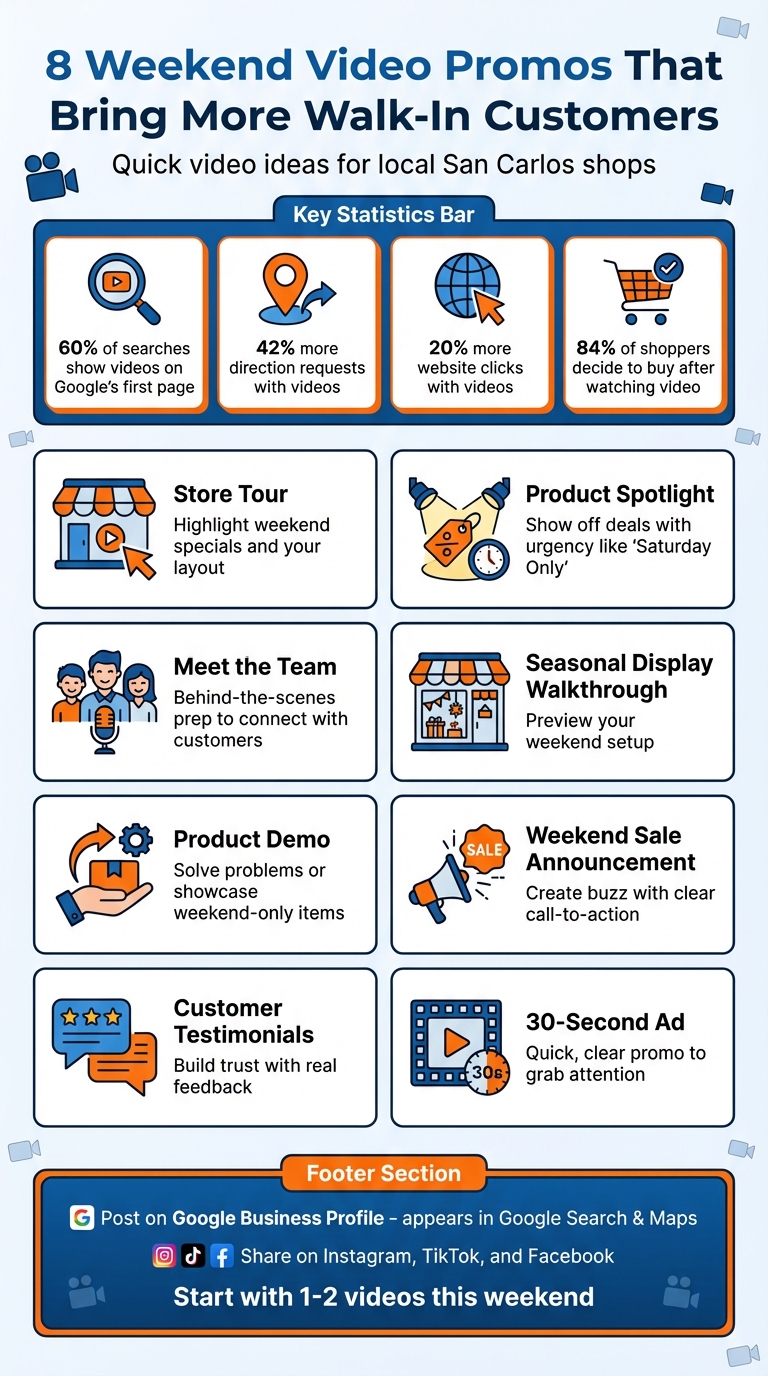
8 Weekend Video Promo Ideas to Increase Foot Traffic to Local Shops
A short video showcasing your store’s layout, interior, and weekend deals can help new customers feel at ease and excited to visit. It’s a simple way to make a strong first impression and build trust with potential visitors. [1]
Google Business Profile is a great platform for these videos. They show up directly in Google Search and Maps when people look for nearby stores. Plus, you can reuse the same video on Instagram, TikTok, and Facebook for broader reach. [1][2][3][4] Google might even pull videos from your social media accounts to display on your mobile Business Profile automatically. [7]
Take advantage of the "Offer" or "Event" post type on your Google Business Profile to highlight your weekend specials. This feature lets you set specific dates, creating a sense of urgency and making it clear when the promotion is active. [5][7] Posting just before the weekend helps keep your deals top of mind. For instance, if you’re hosting a prize wheel promotion (available online for about $60), make that the star of your video. [8]
Did you know that 32% of people who perform a local search end up visiting a physical store and making a purchase? [9] Including a "Get Directions" button in your post makes it even easier for customers to find you. Businesses that consistently share promotional content on their profiles see 70% more clicks to their websites. [5]
Creating these videos doesn’t have to be complicated. Use your smartphone or an affordable gimbal for smooth, professional-looking footage. [1][3] Keep the video short - under 30 seconds - and ensure it’s at least 1280x720 resolution with a file size below 75 MB. [1] Free tools like Canva or Adobe Express can help you add music or text overlays. [3] Including real staff members talking about your weekend specials can also make a big impact, as 72% of people prefer videos when learning about products. [2]
Up next, we’ll dive into how highlighting specific products can drive even more weekend traffic.
Shining a light on one standout product with a weekend-only discount can create urgency and drive more visits to your business. For instance, offering "30% Off All Kitchen Equipment This Weekend Only" or using a specific coupon code like WEEKEND20 not only grabs attention but also helps track redemptions.
Google Business Profile's Offer post type is perfectly suited for promotions like this. It allows you to set clear start and end dates, include terms and conditions, and even add a "Get Offer" button to encourage immediate action. To maximize reach, share the video across Instagram Reels, TikTok, and Facebook. Research shows that 90% of people discover new brands on platforms like YouTube, making video content especially impactful[2].
Timing is everything. Posting your product spotlight on Thursday or Friday ensures you catch people as they plan their weekend activities. Use phrases like "Saturday Only" or "First 10 Customers" to add a sense of urgency. Studies reveal that 35% of customers are ready to make a purchase immediately after watching a product demonstration[9].
Local searches are powerful - 76% of people who search for a business on their smartphone visit that business within 24 hours[10]. Pair your product spotlight video with a "Get Directions" button on your Google Business Profile to make it easier for customers to find you. A great example is Boba Guys, who used Facebook Local Awareness Ads to reach 10,000 people per ad, achieving a customer acquisition cost of just $1 per new customer[9].
You don’t need high-end equipment to create an effective video. A smartphone works just fine for capturing authentic footage of your team demonstrating the product or solving a common problem. Keep the video short - under 30 seconds - and use free tools like Canva or Adobe Express to add text overlays, ensuring the message is clear even without sound. Just make sure your video meets Google Business Profile requirements: at least 720p resolution and under 75 MB file size[1].
Next, consider how behind-the-scenes videos can further connect your team with your audience.
Letting customers see the real faces behind your San Carlos shop can create a strong personal connection. A behind-the-scenes video of your team's weekend preparations can set you apart from competitors who lack that personal touch. For example, in 2024, a roofing company added short videos of their team at work to their Google Business Profile. The result? A 25% jump in website visits and a 30% increase in inbound calls almost instantly[12].
Google Business Profile is a perfect home for these videos. They show up directly in local search results and on Google Maps, right when potential customers are searching for businesses like yours in San Carlos. Profiles with videos get 270% more clicks than those without[13]. To maximize reach, you can also share the same video on Instagram Reels, Facebook, and TikTok to boost engagement with your community.
"Your employees are a more authentic (and more affordable!) alternative to hiring actors" - Susie Marino from LocaliQ[11]
Capture your team on Thursday or Friday mornings as they prepare for the weekend rush. Show them unpacking special inventory, setting up seasonal displays, or chatting about weekend-only deals. This kind of content builds excitement and shows customers that your shop is buzzing with activity. Plus, studies show that viewers remember 95% of a message when they see it in a video, compared to just 10% when reading it as text[12]. A quick behind-the-scenes look can make your weekend promotions much more memorable and impactful.
You don’t need fancy equipment - just use your phone to record 15 to 20 seconds of authentic, unscripted footage during a busy moment. Keep the final video under 30 seconds to meet Google Business Profile’s guidelines, and don’t forget to add subtitles for clarity. A simple caption like "Getting ready for Saturday's big sale!" along with a call-to-action such as "Visit us this weekend!" is all it takes to make your video effective.
A display walkthrough goes beyond immersive store tours by offering a detailed preview of your weekend or seasonal setup. Creating a video walkthrough lets customers see exactly what’s inside your shop before they visit. This approach eliminates uncertainty and builds excitement, setting the stage for more engaging content down the line.
Google Business Profile is a fantastic platform for these videos since they show up directly in Google Search and Maps when local customers are searching for businesses like yours. To ensure compatibility, keep your video under 30 seconds, with a resolution of 1280x720 and a file size below 75 MB [1]. For weekend-only displays, use the "Event" post type so the video stays visible only until the event ends [6]. Beyond Google, platforms like Instagram, TikTok, and Facebook are excellent for reaching local audiences [14].
Posting your walkthrough on Thursday or Friday is ideal for building weekend buzz. Highlight seasonal decorations, special product arrangements, or unique photo opportunities within your store. Studies show that 75% of people browsing food photos on social media decide where to eat based on those images [14] - a concept that works just as well for retail displays. Additionally, since 76% of consumers who perform a local search visit a related business within 24 hours [14], sharing your video a few days before the weekend can influence their plans.
A walkthrough video serves as a virtual invitation, giving customers a clear idea of your shop’s layout and offerings [1]. Businesses that frequently update their Google Business Profile with promotional content see 70% more clicks to their website compared to those that don’t [5]. Plus, 32% of customers who discover a business on Google end up visiting the store and making a purchase [9]. A simple video can be a powerful tool to drive foot traffic.
Creating a walkthrough video is straightforward. Use your smartphone and record in natural light [1]. Walk slowly through your store, showcasing real products and any special displays for the weekend. Add a short caption like, "Check out our new spring display this weekend!" and include a call-to-action such as, "Visit us Saturday and Sunday!" Authentic, unpolished footage often resonates well with customers, making your shop feel approachable and inviting.
Next, we’ll dive into how a product demo can help turn online interest into in-store visits.
Product demos are a powerful way to turn online interest into in-person visits. By showing how your product works or solves a problem, you can connect with potential customers in a way that feels immediate and relatable. In fact, 72% of consumers prefer learning about products or services through videos [2].
If you're using Google Business Profile (GBP), you can upload videos up to 30 seconds long, with a minimum resolution of 1280x720 and a maximum file size of 75 MB [1]. The "Product" post type is perfect for showcasing your bestsellers or new arrivals, complete with pricing and a direct link [4]. For longer, more detailed videos, platforms like Instagram Reels, TikTok, and Facebook offer greater creative flexibility [3]. The advantage of GBP videos? They show up directly in Google Search and Maps, reaching local customers actively searching for businesses like yours [7].
Timing your posts can make all the difference. Share your demo on Thursday or Friday to give customers time to plan their weekend visit. For instance, a bakery could feature a video on decorating cupcakes with weekend-only frosting flavors, while a hardware store might demonstrate a quick DIY fix using tools on sale that weekend. Structure your video to tackle a problem, highlight the solution, and emphasize the benefit - then add a sense of urgency [5]. For weekend deals, the "Offer" post type on GBP is especially useful, as it includes a "View Offer" button and allows you to add coupon codes with expiration dates [7]. This approach not only builds excitement but also ties seamlessly into your weekend promotions.
Regularly posting on your Google Business Profile can make a huge impact. Businesses that do so see 42% more direction requests compared to those that don't [4]. Even more compelling, 35% of customers plan to buy immediately after seeing a product demo, and 56% plan to return and make a purchase later [9]. A well-executed video can eliminate doubts, build trust, and motivate customers to visit your store.
You don’t need fancy equipment to get started - a smartphone and good lighting are enough. Have a team member demonstrate the product while you record. Use free tools like Canva or Veed to add text overlays and captions, as many people watch videos without sound [3][6]. Keep your GBP videos under 30 seconds and end with a clear call-to-action like "Visit us this weekend!" or "Stop by Saturday for a free demo!" [1].
"The 30-second limit may seem restricting, but it forces you to think more creatively about the kind of short-form or advertorial content that will be most appropriate for your business." - Phil Nottingham, Wistia [1]
Up next, see how announcing a weekend sale can take your foot traffic to the next level.
A weekend sale or event can spark immediate interest and action. Announcing a Friday Night Flash Sale or a Sunday Scavenger Hunt through video gives San Carlos shoppers a clear reason to visit your store instead of the competition. The trick is to make your announcement both attention-grabbing and easy to act on.
Start with your Google Business Profile for these announcements. Videos posted here show up in Google Search and Maps, making them highly visible to local shoppers [7][1]. Use the "Offer" post type to include a "View Offer" button with coupon codes and expiration dates [7]. For events like workshops or grand openings, the "Event" post type lets you add start and end times, creating a natural sense of urgency [7]. For broader reach, platforms like Facebook and Instagram are ideal, especially with Local Awareness Ads.
Timing matters. Post your announcement on Thursday or Friday to align with weekend planning [5][8]. For example, a local bookstore saw a 200% sales boost during their town's annual arts festival by using Google Business Profile posts to promote "Festival Reader Discounts" - a strategy that resonated perfectly with festival visitors [5]. Focus your video on one big offer, like "Up to 40% off Saturday only", rather than listing every sale item [8]. Keep your message concise - 150–300 characters is the sweet spot for engagement [4].
Posting promotional content regularly on Google Business Profile can make a real difference. Businesses that do this see 70% more clicks to their websites compared to those that don’t [5]. Even better, 32% of customers visit stores and make purchases after a local search [9]. Including clear redemption instructions in your posts can boost redemption rates by 40% [5]. This isn’t just about being visible - it’s about reaching shoppers who are ready to buy right now.
Creating these posts is easier than you might think. Use your smartphone to film a team member standing in front of your weekend display, showcasing featured products or sale signs. Keep the video under 30 seconds, ensuring it meets Google Business Profile’s requirements (maximum 75 MB, minimum 720p resolution) [1]. End with a strong call-to-action like: "Join us Saturday from 10 AM–2 PM for our flash sale!" Add action buttons such as "Get Directions" or "Get Offer" to make it simple for customers to follow through [6][5]. Tools like Canva can help you add text overlays to highlight discounts or event details [3].
"Businesses that actively monitor and respond to their post metrics see 45% better promotional performance compared to those who post without tracking results." - Gombos Atila Robert, Jasmine Directory [5]
Next, consider using customer testimonials to further encourage in-store visits.
A satisfied customer's video testimonial can create an instant sense of trust and encourage weekend visits to your San Carlos shop faster than any written review. A testimonial video captures the nuances that text simply cannot - facial expressions, genuine emotions, and the enthusiasm that reassures potential customers about choosing your business [16].
The best place to showcase testimonial videos is your Google Business Profile (GBP). Keep your clips short (under 30 seconds) to maintain attention spans, then upload them to the "Photos" section or include them in "Update" and "Offer" posts [1][12]. Profiles with videos on GBP see 270% more engagement compared to those without [13]. For broader exposure, platforms like Instagram Reels, TikTok, and Facebook are excellent for grabbing attention with short-form videos [15][3]. The difference lies in the audience: GBP targets users actively searching for local businesses, while social platforms build awareness over time.
Video testimonials are effective because they spark emotional connections that star ratings alone can't achieve. Research shows that people retain 95% of a message when delivered through video, compared to just 10% through text [12]. Additionally, 76% of local searchers visit a business within 24 hours [13]. For example, in 2024, a roofing company added short customer testimonial videos to their GBP and experienced a 25% boost in website visits and a 30% increase in inbound calls almost immediately [12].
Creating testimonial videos doesn’t have to be complicated. High-end equipment isn’t necessary - authenticity matters more than production quality. Set up in a well-lit, quiet spot in your shop and ask customers specific, engaging questions like, "What brought you here this weekend?" or "How did you enjoy our Saturday special?" Avoid generic prompts [16]. Keep videos under 30 seconds to fit GBP requirements (minimum 720p resolution, max file size 75 MB) [1][12]. Adding captions is crucial since 85% of Facebook videos are watched without sound [12][13]. Wrap up each video with a clear call-to-action, such as: "Stop by this Saturday for the same great experience!"
"A video testimonial is a roaring bonfire. It's bright, warm and magnetic. You can see the faces, hear the voices and feel the authentic energy." - Top Rated Local [16]
These testimonials can also serve as the starting point for your next promotional video, turning interest into foot traffic.
Let’s talk about a quick and effective way to grab attention: a 30-second promotional ad. Think of it as your digital handshake with weekend shoppers. This format fits perfectly with Google Business Profile (GBP) video requirements, making it a smart choice for connecting with people actively searching for local businesses in San Carlos [1].
Posting your video on GBP ensures it appears directly on Google Search and Maps, putting your message in front of customers at the exact moment they’re deciding where to go. Businesses that post regularly on GBP see 42% more direction requests and 35% more website clicks. Plus, you can stretch your reach by repurposing the same video for Instagram Reels, TikTok, and Facebook [4].
Facebook’s Local Awareness Ads are another great option. For example, bubble tea bar Boba Guys used them to reach 10,000 people nearby, spending just $1 per new customer [9]. Combining this strategy with earlier video promo ideas can amplify your weekend appeal.
When it comes to driving weekend traffic, urgency is key. GBP’s "Offer" or "Event" post types let you set clear start and end dates for your deals, creating that essential time-sensitive push. Posting your ad on Thursday or Friday gives customers time to plan their weekend visits. Highlight specific deals like “Save 30% This Weekend Only” or “Buy One Get One Free,” and include simple redemption instructions - these tactics can increase redemption rates by up to 40% [5].
Here’s why this works: 32% of people who perform a local search visit a store and make a purchase [9]. Businesses that actively use promotional posts on GBP get 70% more website clicks than those that don’t [5]. Take IKEA Belgium, for instance - they used location-focused video campaigns and saw a 361% year-over-year revenue boost [17]. Adding a strong call-to-action like “Get Directions” or “Call Now” can make all the difference.
You don’t need a big budget to make this happen. Free tools like Canva, Veed, or Adobe’s online editor can help you create polished, professional-looking videos [3]. Just make sure your video meets GBP’s technical requirements: minimum 1280×720 resolution, maximum 75MB file size, and 30 seconds or less [1]. Keep your text short and sweet (150–300 characters) so it looks great on mobile [4].
For the best results, use authentic footage of your store, products, or staff. Local shoppers respond better to genuine content than generic stock videos [4].
"The 30-second limit may seem restricting, but it forces you to think more creatively about the kind of short-form or advertorial content that will be most appropriate for your business." - Wistia [1]
Ready to dive into the details of creating and optimizing these videos? Let’s keep going.
Optimization isn’t just about creating engaging content - it’s also about ensuring your videos are uploaded and presented correctly. To upload videos to your Google Business Profile, follow these steps: Log in to your Google Business account, click on "Photos", and then select "Add videos" to upload your file. Alternatively, you can search for your business on Google or Maps, go to "Photos", and click "Add photos" to upload your video. Make sure the video meets Google’s size and resolution requirements. Once uploaded, Google typically reviews and approves videos within 24–48 hours [18].
To make your videos stand out, post them as an Update, Offer, or Event. For example, if you’re promoting a weekend sale, use the Offer post type and include clear start and end dates to create a sense of urgency [7].
When creating videos, keep key content centered, as Google crops videos to a 1:1 ratio. Filming in well-lit spaces - preferably with natural light - helps maintain high video quality. Since videos autoplay in search results, make the first few seconds visually striking to grab attention. Avoid adding phone numbers in the post description; instead, use the "Call Now" button to ensure your post complies with Google’s guidelines [7].
To measure your video’s impact, check your Profile Insights. Focus on metrics like direction requests and click-through rates, especially within the first 48–72 hours, as this is when 50–70% of activity typically occurs. Adding UTM parameters to website links can also improve your ability to track conversions [20]. These insights can help refine your future video strategies.
"Google rewards fresh content being routinely added to your Google Business Profile. Videos make a great addition to your listing's content that mix things up from the typically static text and photos."
- Ben Seidel, CEO, Igniting Business [19]
Aim to post 1–3 times a week, alternating between product showcases, special offers, and educational content. If managing your posting schedule feels overwhelming, tools like Milo AI Marketing Coach can provide step-by-step guidance to keep you on track.
Video promos are effective because they grab attention much faster than text or static images. Posting videos to your Google Business Profile and social media helps you connect with potential customers when they’re actively searching for places to visit - especially on weekends, a prime time for outings in San Carlos. Recent data shows that businesses using video marketing grow revenue almost 50% faster, with 87% reporting a higher ROI [2].
The eight promo ideas shared earlier are a great starting point, but the real value lies in experimenting to see what resonates most with your audience. For instance, you could feature a store tour one weekend and a customer testimonial the next. Use tools like Google Business Profile Insights to monitor which videos generate the most direction requests or phone calls. To track conversions more precisely, include unique coupon codes in your videos, such as "SANCARLOS10", and measure how many customers visit because of your promo [3][5].
Kick things off with one or two videos this weekend and expand from there. Businesses that post regularly on their profiles see 42% more direction requests and 35% more website clicks compared to those that don’t [4]. The shops that thrive on weekends are the ones that stay visible, engage consistently, and appear in local searches right when customers are ready to visit.
Your weekend video should kick off with a bold and engaging promotion to grab attention right away. For instance, start with something like: "Spin the prize wheel and score up to 40% off your purchase!" This approach hooks viewers instantly and motivates them to stop by your store.
To monitor walk-ins driven by a video promo, start by setting up store visit conversions in Google Ads. This will help you measure physical visits that occur after viewers engage with your ad. Additionally, leverage Google Business Profile insights to track user actions, such as clicks on your profile or requests for directions, which can be linked to your video campaign.
For deeper analysis, include UTM tags on video links. These tags enable you to track traffic sources and behavior in Google Analytics, giving you a clearer picture of how your video drives online engagement. Finally, combine this digital data with in-store metrics like foot traffic counters or POS system reports. Together, these tools provide a comprehensive understanding of your video's impact on walk-in traffic.
When it comes to attracting local customers, you don’t necessarily need to rely on paid ads. Free resources like Google Business Profile posts and promotions can do a great job of drawing attention to your business. That said, if your goal is to expand your reach or achieve quicker results, paid advertising can give your visibility a significant boost.
Discover strategies to elevate your business.


