

If your business isn’t showing up in the top spots on Google Maps, you’re missing out on local customers. 76% of people who search for nearby services visit a business within 24 hours, and 80% of local searches lead to a conversion. The good news? You don’t need to be a tech expert to improve your ranking.
Here’s what you need to do:
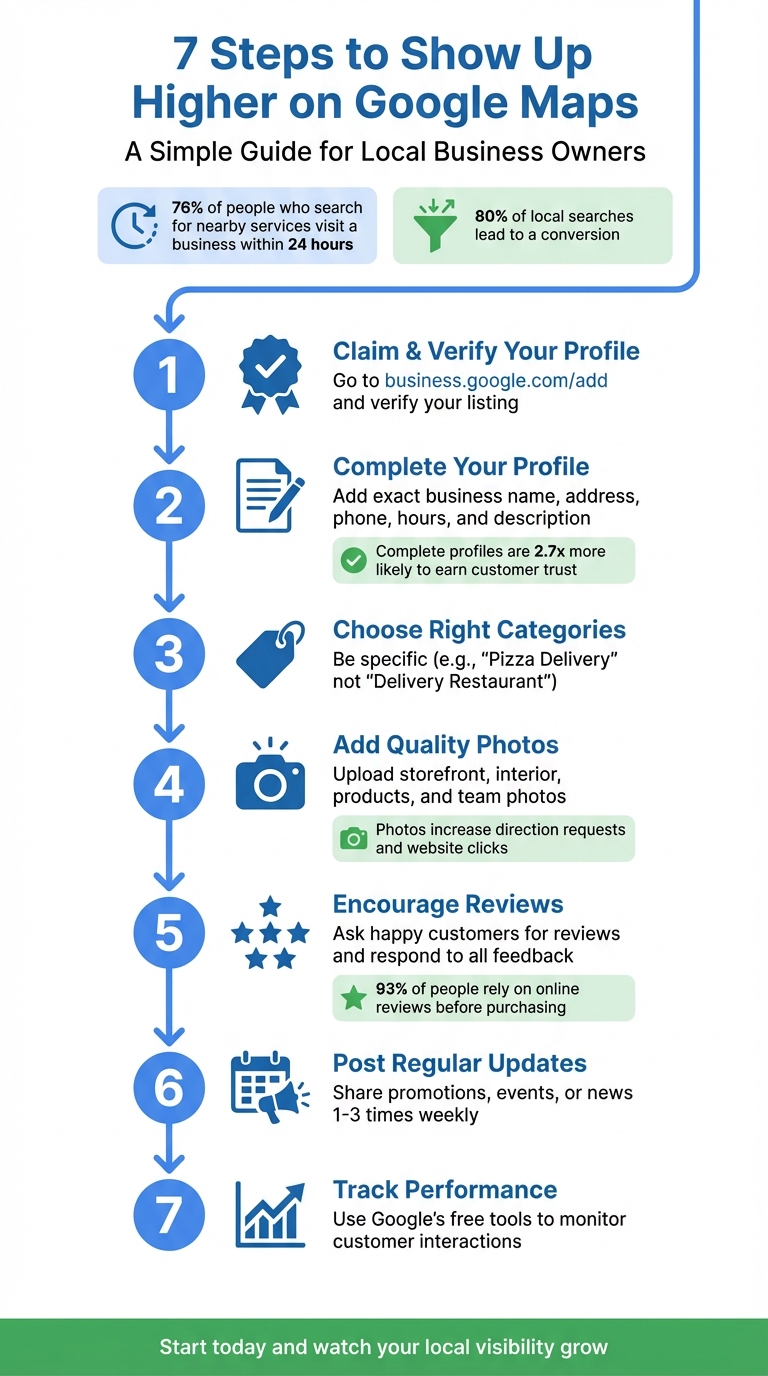
7-Step Guide to Rank Higher on Google Maps in 2026
Think of your Google Business Profile as your digital storefront. It’s where potential customers form their first impressions. In fact, businesses with a complete profile are 2.7 times more likely to earn customer trust. Not only that, but a fully filled-out profile increases the chances of customers visiting your business by 70% and making a purchase by 50% [9]. The best part? Setting up and managing your profile is completely free [5][11].
To get started, head to business.google.com/add to claim or create your profile [5][10]. Keep in mind that your profile won’t appear in searches until it’s verified [6].
Google will assign a verification method based on your business. This could include options like phone/SMS, email, video recording, live video calls, or receiving a postcard at your business address [7]. If you’re sent a postcard, expect it to arrive within 14 days, and note that Google may take up to 5 business days to review your submission [7]. While waiting for your verification code, don’t make changes to your business name, address, or category - doing so will invalidate the code and restart the process [7].
If someone else has already verified your profile, you’ll need to request ownership through Google [5][6]. To simplify management, use a Google Account linked to your business email domain when signing up [6][7].
Accuracy is key when completing your profile. Use your exact business name (matching your real-world signage), a local phone number, and your precise physical address. Avoid adding taglines, store codes, or promotional phrases to your business name [8]. For the phone number, opt for one that connects directly to your business, not a call center [8]. If you operate as a service-area business (like a contractor or plumber), you can hide your home address and instead set a service area - typically within a two-hour drive [6][8].
Make sure to include your regular business hours and account for seasonal or holiday variations. Adding your opening date can also help showcase how long you’ve been in operation [9][8]. Craft a business description that highlights your mission and history, but steer clear of promotional language, prices, or external links [9][8].
Your primary business category plays a big role in how you rank in local searches [2]. A good rule of thumb? Choose categories that complete the sentence, “This business IS a…” rather than “This business HAS a…” [8].
Pick the most specific category available. For example, if you select "Golf Resort", Google will automatically recognize that your business is also a "Hotel" and "Golf Course", so there’s no need to add those separately [8]. You can include up to nine secondary categories, but it’s best to stick to just two or three that accurately describe your core offerings [8][12].
| Scenario | Correct Category | Incorrect Category |
|---|---|---|
| Pizza shop with takeout/delivery | Pizza Delivery / Pizza Takeout | Delivery Restaurant |
| Motel with swimming pool | Motel | Hotel / Swimming Pool |
| Fast food place with desserts | Fast Food Restaurant | Dessert Restaurant |
Once you’ve nailed down your categories, take your profile to the next level by adding eye-catching photos, listing your services, and specifying relevant business attributes.
Make your profile stand out by including engaging photos, detailed services, and essential business information. Photos play a major role in shaping customer behavior. According to Google, businesses with photos are more likely to get requests for directions and clicks to their websites compared to those without them [13]. A strong visual presence helps customers imagine themselves visiting your business before they’ve even arrived. Pairing eye-catching visuals with clear business details can significantly increase customer engagement.
Start by uploading your logo, a cover photo, and at least three pictures for each category: exterior, interior, products, and team. For exterior shots, capture your storefront from different angles. Interior photos should showcase both the cleanliness of your space and the vibe created by customer activity. If you’re in a service-based industry, include action shots, like a stylist cutting hair or a mechanic at work. Before-and-after photos are also a great way to highlight your expertise [13].
Stick to authentic, clear images. Photos should be in JPG or PNG format, between 10 KB and 5 MB in size, and at least 720 x 720 pixels. Avoid using heavy filters or AI-generated images - Google prefers well-lit, realistic photos that are in focus. As Miriam Ellis, Local SEO Subject Matter Expert at Moz, puts it:
"The first 'E' in Google's E-E-A-T stands for 'experience' and hinges on whether individuals have first-hand experience of your business. Images can help prove this" [13].
Custom photos featuring your staff in uniform or company vehicles with your logo can further establish credibility and build trust. Once your visuals are optimized, move on to clearly outlining your services.
After enhancing your visuals, take the next step by listing your services and products. Use the Menu and Services editor to provide clear descriptions and pricing for what you offer [14]. Service-based businesses can choose from Google’s pre-defined options - like "Repair toilet" for plumbers - or create custom entries if their services aren’t listed [9]. Retailers can showcase their inventory using the Product Editor or by linking a Point of Sale system with the Local Inventory app [8][9]. Just make sure all listed items comply with Shopping Ads Policies [8].
If you offer remote services, such as virtual appointments or online classes, highlight these using "Online" attributes. This ensures you show up in searches for those specific options [9].
Include attributes like wheelchair accessibility, outdoor seating, or free Wi-Fi to make your business appear in filtered searches [9][15]. For example, attributes like "restaurants with outdoor seating near me" can help you attract customers looking for specific amenities. Additionally, you can add identity-based attributes, such as women-owned, Black-owned, or veteran-owned, to connect with customers who prioritize supporting these types of businesses [15]. Be honest when selecting attributes to avoid disappointing customers and risking negative reviews.
Once your profile is optimized, the next step is to focus on customer reviews and regular updates. These elements play a big role in improving your Google Maps ranking. Think about it: 93% of people rely on online reviews before making a purchase, and Google is home to 73% of all online business reviews [16]. Keeping your profile active not only helps your ranking in local SEO but also shows customers that you're engaged and listening to their feedback [3]. Let's dive into some practical ways to manage and encourage reviews.
Customer feedback is essential. To make it easy for customers to leave reviews, go to your Google Business Profile, click "Read Reviews", and select "Get more reviews" to generate a shareable link. You can send this link via text or email [16][17]. Want to make it even simpler? Use a free QR code generator to create a code that links directly to your review page. You can print this on receipts, business cards, or thank-you notes [16]. Timing matters - ask for reviews shortly after a customer has had a positive experience with your business [16].
When asking for reviews, keep it casual and quick. For example:
"We’re thrilled you’re happy with the service! If you don’t mind, could you share your experience on Google? It only takes a minute and helps others find us too" [16].
One important note: never offer incentives like discounts or gifts in exchange for reviews. Doing so violates Google’s policies and can hurt your credibility [17][9].
Equally important is responding to every review, whether it's glowing or critical. Did you know that 97% of people read how businesses reply to reviews? Companies that respond are seen as 1.7 times more trustworthy [18][19]. For negative reviews, apologize publicly, address the issue, and invite the customer to continue the conversation privately through a phone number or email. For positive reviews, thank the customer, mention what they appreciated, and encourage them to return. As Google advises:
"When you reply to customer reviews, it shows that you value their feedback" [3].
Aim to respond within 24 hours - 40% of consumers expect a reply that quickly [19]. Staying on top of reviews and updates shows customers you’re engaged and invested in their experience.
Another way to keep your profile active is by using Google Posts to share updates, promotions, and events. Aim to post 1–3 times a week, as posts lose visibility after seven days [20][22]. Most engagement happens within the first 48–72 hours, so having a consistent posting schedule is key [20]. Each post should include a clear call-to-action button like "Book", "Order Online", or "Learn More" to encourage interaction and track results [20][21].
To stay consistent without feeling overwhelmed, set aside 30–60 minutes each week to batch-create content for the upcoming days. Share things like product highlights, seasonal promotions, discounts, or tips that answer common customer questions. Avoid including phone numbers in the post description; instead, use Google’s "Call Now" button to avoid rejection issues [21]. Regular updates signal activity, which can help boost your ranking [20][22].
With your profile polished and reviews in place, the next step is figuring out how well your efforts are paying off. Don’t worry - you don’t need to be a data expert or invest in expensive software. Google offers free performance tracking directly through your Business Profile, along with other simple tools to help you see what’s working and where you can improve. Let’s break down how to make sense of this data and use it effectively.
Your Google Business Profile includes a free performance report that tracks how people interact with your listing. To access it, just search for your business name on Google or open the Google Maps app. This report provides key metrics, such as how many people viewed your profile, clicked on your website, requested directions, or called your business. Google ensures each visitor is only counted once per day [23].
Take a close look at the "Searches" section, which reveals the keywords customers are using to find your business. This data is updated monthly and can guide you in fine-tuning your keywords. For example, if certain keywords show up frequently, consider weaving them into your business description or service offerings. You can also adjust the date range to compare performance over time and identify trends [23].
As Google Business Profile Help explains:
"Performance data gives you insight into how people discover your Business Profile. It highlights how customers use Search and Maps to find your profile, and what actions they take once they do." [23]
For deeper insights, you can add UTM parameters to track which profile links are driving traffic to your website [24]. These details can help you refine your profile and online content for better results.
Beyond Google’s built-in tools, you can try Milo AI Marketing Coach, a free resource that provides tailored, step-by-step advice on how to enhance your profile. Milo AI analyzes your profile and identifies specific areas for improvement, making it easier to know what to tackle next. Pair it with an Analytics Dashboard to get a clear overview of your performance trends.
These tools are perfect for busy business owners who want actionable insights without the guesswork. Together, they complement the strategies you’ve already implemented, helping you make smarter, data-driven decisions about your digital marketing.
Boosting your Google Maps ranking doesn’t have to be complicated. It’s all about sticking to consistent, straightforward actions: claim and verify your profile, fill out every section completely, upload fresh photos regularly, engage with reviews, and keep an eye on your performance data.
As Landon Murie, CEO of Goodjuju Marketing, emphasizes:
"Consistent, simple GBP updates signal trust and relevance to Google faster than most SEO tactics" [1].
The businesses that dominate the Map Pack aren’t necessarily the ones with flashy websites - they’re the ones that stay active and keep their profiles fresh and up-to-date.
Here’s a powerful stat to keep in mind: 76% of people who search for something “near me” visit a related business within just one day [4]. That means even small tweaks to your Google Business Profile can lead directly to more visitors and calls. Start with a couple of easy updates and build from there.
Make it a habit to check your data regularly. Set a monthly reminder to review your profile, respond to reviews, and share updates. These small, steady efforts show Google that your business is engaged, reliable, and worth promoting to local searchers. Start today and watch your local visibility grow.
Verifying your Google Business Profile is a crucial step to establish your business's credibility with Google. It not only confirms that your business is genuine but also grants you complete control over your listing. This means you can keep essential details like your business name, operating hours, contact information, website, and photos up to date. Having accurate and detailed information ensures your profile stands out to local customers searching for services like yours.
Once verified, you can access features like review management, posts, and the Q&A section, all of which help build trust and encourage customer interaction. These elements, combined with an actively managed profile, significantly enhance your visibility on Google Maps. Without verification, your business might not even show up, making this step vital for improving your rankings and attracting more local traffic.
To make your Google Business Profile stand out, upload clear, high-quality photos that highlight what sets your business apart. These images should give potential customers a real sense of what you offer, whether it's your storefront, interior design, products, services, team, or unique touches like special amenities or decor.
Here are a few tips to get started:
Thoughtfully chosen photos can make your profile more appealing on Google Maps, helping attract new customers and giving them a clear picture of what your business is all about.
To keep your business visible and relevant on Google Maps, it's essential to update your Google Business Profile frequently. This might involve sharing updates, uploading fresh photos, or tweaking details like your hours of operation or available services. Regular updates not only ensure your profile stays accurate but also signal to Google that your business is active and reliable.
A simple guideline to follow is to make minor updates at least once a month - or whenever there’s a notable change in your business. Staying active helps you remain competitive and boosts your chances of ranking higher in local search results.
Discover strategies to elevate your business.


