


Customer Relationship Management (CRM) systems are no longer optional for businesses aiming to grow. They centralize customer interactions, automate tedious tasks, and improve sales outcomes. Here’s why a CRM is essential:
If you’re managing more than 10 leads or losing track of follow-ups, it’s time to adopt a CRM. Options like HubSpot, Zoho, and Pipedrive offer affordable solutions tailored for small businesses. Start small, track key metrics like lead conversion rates and response times, and watch your business grow.
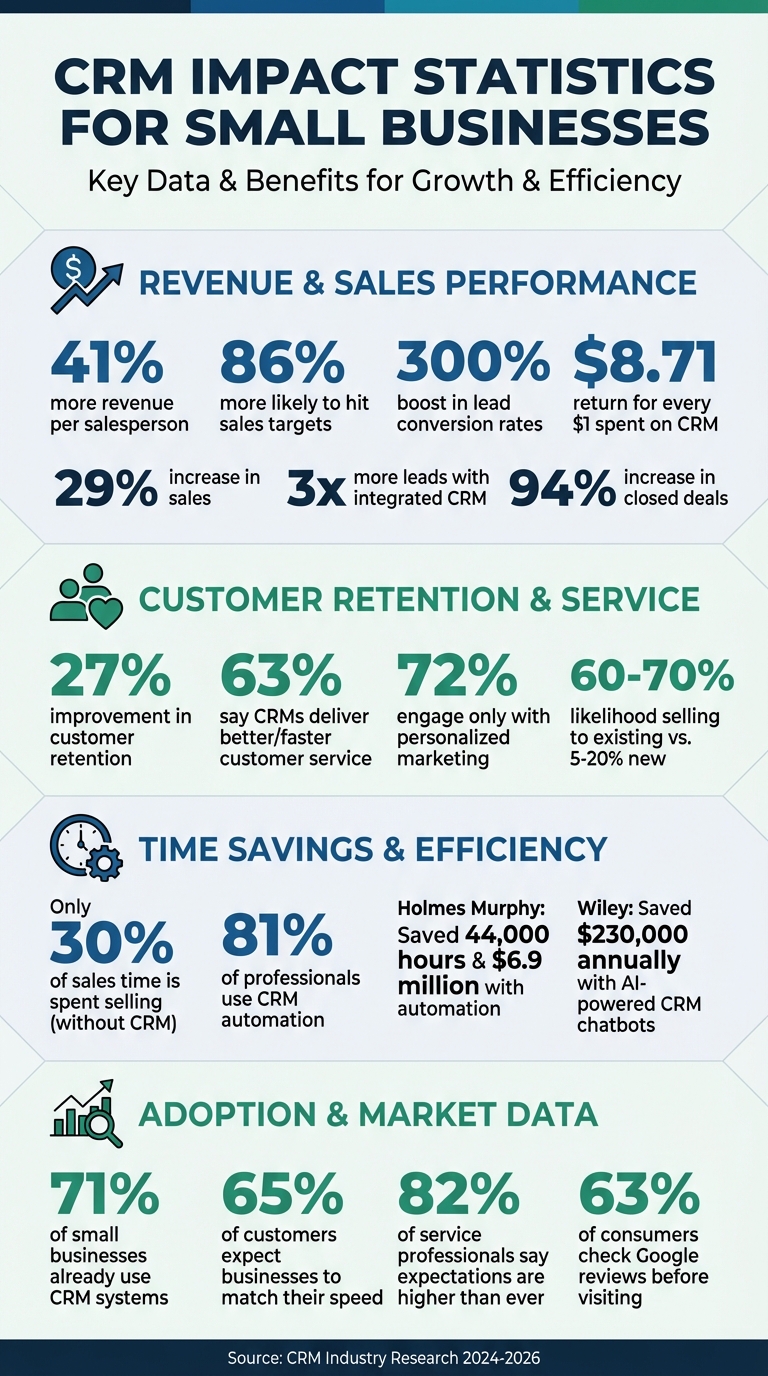
CRM Impact Statistics: Revenue, Conversion & Retention Benefits
When customer details are scattered across different tools and platforms, your team can feel like they’re working in the dark. A CRM changes that by creating a centralized hub where all customer information - like contact details, billing records, purchase history, and every interaction - is stored in one easy-to-access dashboard [4].
Modern CRMs take this a step further by automatically collecting data from emails, web forms, and call logs. This ensures that updates happen in real-time and are instantly available across all devices [1]. Integrating third-party tools, such as your e-commerce platform or Point-of-Sale system, allows purchase histories to flow seamlessly into customer profiles [2]. The best part? When one team member updates a record, the entire team sees the change immediately [1].
Here’s the impact: 63% of business leaders say CRMs help them deliver better or faster customer service [4]. Companies using integrated CRM systems report three times more leads and a 94% increase in closed deals [1]. For example, in January 2026, Brother's Leather Supply in Michigan experienced 40% month-over-month growth after moving from spreadsheets to Nutshell CRM [9]. By centralizing their data and automating follow-ups, they pinpointed effective sales strategies and ensured no opportunities slipped through the cracks.
This single source of truth lays the foundation for creating truly personalized customer experiences.
Personalization makes all the difference when it comes to customer engagement. Imagine this: when a customer calls, your team can instantly pull up their entire history - purchases, support tickets, even website activity - allowing for highly targeted and meaningful conversations [2].
The numbers back this up. 72% of consumers only engage with marketing messages tailored to their specific interests [12], and 82% of service professionals say customer expectations are higher than ever [10]. CRMs make personalization easier by letting you segment your audience into specific groups based on behavior and preferences. This means your messages resonate more effectively [8].
Matthew Ruxton, Manager at Ignite Reading, shared how this approach transformed their operations:
"Unifying our data in HubSpot transformed how we operate. What used to take multiple systems and spreadsheets is now a single, shared view - empowering every team to move faster, act smarter, and deliver better outcomes." [11]
Businesses using CRMs report 27% higher customer retention rates and 29% more sales [2][11]. When you truly understand your customers, you build loyalty - and that loyalty drives revenue.
Running a small business means wearing many hats - managing customers, handling operations, and chasing leads. But here's the reality: only 30% of sales time is spent actually selling [14]. That's where a CRM steps in, taking over repetitive tasks so you and your team can focus on what really matters: driving sales and growing your business.
In today’s fast-paced world, customers expect quick responses. In fact, 65% of them want businesses to match their speed [15]. CRMs make this possible with automated workflows that react to customer actions. For example, if someone fills out a contact form, the system can immediately send a welcome email and set up a follow-up task for your sales team. Similarly, if a visitor downloads a pricing guide, the CRM can kick off an automated sequence, sending them tailored content to keep them engaged [13].
Take Holmes Murphy, an insurance brokerage, as an example. They used CRM automation to pinpoint the best times to send emails and set up automatic alerts for accounts at risk of leaving. They even streamlined their renewal process. The payoff? They saved about 44,000 hours and $6.9 million [14]. For small businesses, this kind of automation ensures no lead slips through the cracks - even when you're busy handling other priorities.
But follow-ups aren’t the only time-saver CRMs offer. They also tackle the grind of routine data tasks.
Manual data entry and assigning tasks can eat up hours of your day. CRMs take this off your plate by automatically capturing visitor details from web forms, logging emails from Gmail or Outlook, and syncing calendar meetings in real time [1][15]. When a new lead comes in, the system can immediately assign it to the right team member - based on location, product interest, or even workload [15].
Wiley, a book publisher, used AI-powered chatbots within their CRM to handle the seasonal rush of back-to-school service requests. This move allowed them to onboard temporary agents twice as fast and save $230,000 annually [14]. It’s no surprise that 81% of sales and marketing professionals already use CRM software with automation features [5]. And businesses that adopt these systems report a 41% boost in revenue per salesperson [6]. When your CRM takes care of the tedious tasks, your team can spend more time where it counts: building relationships and closing deals.
For local businesses, having a well-maintained Google Business Profile is like displaying your digital storefront to the world. By linking your CRM to your Google Business Profile, you can seamlessly manage customer interactions, respond faster, and streamline how you handle reviews and inquiries. This connection enhances your CRM's capabilities, helping you engage more effectively with your local audience.
Integrating your CRM with Google Business Profile brings all customer interactions into one centralized hub. Reviews, questions, and messages from Google are automatically pulled into your CRM's dashboard, giving you a complete view of every customer interaction [19]. Imagine being able to see a customer's review history right alongside their purchase records and past conversations - it’s a game-changer for personalized responses [4].
To set this up, you’ll need Owner or Manager access to your Google Business Profile [19][21]. Once connected through the integrations section of your CRM, you’ll find all your Google interactions conveniently displayed in your main dashboard. For businesses juggling multiple communication channels, this integration eliminates the hassle of switching between platforms.
Speed plays a huge role in managing reviews and inquiries. With CRM integration, you can receive instant alerts - via phone or Slack - whenever a new Google review appears [16]. This allows you to respond within hours instead of days, which is crucial for building trust. Considering that about 63% of consumers check Google reviews before visiting a business [23], your timely and thoughtful responses can make a big difference in their decision-making process.
"Respond to every single review, whether it's positive or negative. When you respond, try to naturally weave in keywords related to your business and location." – Marshal Davis, President, Ascendly Marketing [24]
Some CRMs even offer AI-generated draft responses that you can tweak and personalize before sending [16][4]. This saves time while ensuring your responses feel genuine. Plus, staying on top of reviews isn’t just about reputation - review signals account for over 32% of visibility in the Google Map Pack [20]. Managing reviews effectively can directly influence how often your business shows up in local searches.
If your business operates in multiple locations, managing each Google Business Profile separately can quickly become overwhelming. A CRM simplifies this by allowing you to oversee all locations from one unified dashboard [20][22]. For example, you can update holiday hours across all your stores with just a few clicks [18].
For businesses with 10 or more locations, bulk verification via spreadsheet upload is an efficient way to manage profiles [22][17]. Maintaining consistent NAP (Name, Address, Phone) details across all locations is also crucial to avoid penalties from search engines. With this system, you can delegate access to local managers for their specific branches while retaining overall control. Meanwhile, all customer messages from every location are funneled into one organized inbox, ensuring nothing slips through the cracks.
Finding the right CRM for your small business means choosing a tool that aligns with your team's workflow, budget, and current systems. With CRM automation and integration becoming essential for improving efficiency, selecting the right one can make a big difference. Start by comparing costs and features to identify the best fit.
CRM pricing varies widely, typically ranging from $9 to $87 per user per month. Fortunately, some providers, like HubSpot and Freshsales, offer free plans that are ideal for small teams or businesses just starting out [3].
To make an informed choice, consider the 40/30/20/10 Rule:
Ease of use is critical. A simple way to test this is by asking your least tech-savvy team member to navigate a trial version [6]. If they find it too complicated, it might not be the right fit.
Focus on the basics first: contact management, pipeline tracking, and task automation. Look for CRMs that integrate with tools you already use, like Google Workspace, Microsoft 365, QuickBooks, or Mailchimp. Mobile access is another feature to prioritize for teams on the go.
If you're on a budget, start with a free or low-cost plan that can scale as your business grows. Before importing your data, take time to clean it up - standardize names and remove duplicates to avoid future headaches.
Based on these criteria, here’s a breakdown of some of the best CRM options for small businesses.
Here’s a quick comparison of platforms designed specifically with small businesses in mind:
| CRM Platform | Starting Price | Best For | Key Strength |
|---|---|---|---|
| HubSpot CRM | Free (paid plans from $20/month) | Teams wanting robust free features | Free for 1 million contacts and unlimited users |
| Bigin by Zoho | $9/user/month | Budget-conscious teams | Easy to learn and highly affordable |
| Less Annoying CRM | $15/user/month | Solopreneurs and micro-teams | Minimalist interface with flat-rate pricing |
| Pipedrive | $14/user/month | Sales-focused teams | Visual, drag-and-drop pipeline |
| Copper CRM | Varies | Google Workspace power users | Integrates directly with Gmail |
| EngageBay | $14.99/user/month | All-in-one marketing needs | Combines CRM with marketing automation and live chat |
| Freshsales | $9–$15/user/month | Teams looking for AI assistance | Free tier available for up to 3 users with an AI assistant |
Here’s what other small business owners have to say about their CRM choices:
"The HubSpot Starter Platform has been instrumental in helping us establish ourselves as a reputable brand. It gives us a level of professionalism that we would not have had otherwise, and it's allowed me to centralize most of the resources that I need."
– LJ Finney, CEO & Co-Founder, IN-18
For simplicity, Pipedrive is another favorite:
"I use Pipedrive and it works for us because of its simplicity... It's cheap and affordable if you don't need all the bells and whistles."
– Kenny Tjay, Owner, Indiemarch Film
If your business relies heavily on Google Workspace, Copper CRM might be the perfect match. For those with plans to grow, Salesforce Starter (around $25/user/month) offers a clear path to more advanced tools, though it requires a slightly higher upfront investment.
Another option worth considering is Humble Help's free Business CRM, designed specifically for small and local businesses. It provides an easy way to track leads, manage deals, and stay organized without any cost barriers.
Take advantage of free trials - usually lasting 14 to 30 days - to test different platforms. A phased approach works best: start with basic contact management, add deal tracking later, and only introduce automation when your team feels confident using the system.
Once you've got your CRM up and running, the next step is figuring out if it's actually delivering results. The great news? You don’t need to wade through a sea of metrics. Instead, focus on a few critical numbers that show whether your CRM is saving time, boosting sales, and keeping customers satisfied.
Here’s a straightforward formula to calculate your ROI:
[(Total Revenue Gain or Cost Savings – CRM Costs) / CRM Costs] × 100 [28].
Let’s break it down with an example: if your CRM costs $500 per month and helps you close $5,000 in additional sales while saving 20 hours of admin work (valued at $600), your monthly ROI comes out to about 1,020%. On average, businesses see $8.71 in return for every $1 spent on CRM [28]. After calculating ROI, dive into key metrics that show how your CRM is performing.
Sales performance metrics are a great place to start. These numbers reveal how well your team is turning leads into paying customers. Keep an eye on the lead conversion rate (how many inquiries turn into sales), the close rate (deals won compared to deals pursued), and the sales cycle length (how long it takes to close a deal) [25][26]. Many businesses experience noticeable revenue growth after adopting a CRM.
Customer retention metrics tell you if you're holding onto the customers you worked so hard to acquire. Track churn rate, Customer Lifetime Value (CLV), and renewal rates (for subscription-based businesses) [25][28]. Why does this matter? Acquiring a new customer costs 5 to 25 times more than keeping an existing one, and increasing customer retention by just 5% can boost profits by 25% to 95% [26].
Operational efficiency metrics measure whether your CRM is cutting down on tedious tasks. Look at lead response time (how quickly you follow up), time saved on manual work (like data entry), and revenue per sales rep [25][28]. Even small productivity improvements can significantly impact your overall ROI [26].
| Metric Category | Key Numbers to Watch | Why It Matters |
|---|---|---|
| Sales | Lead Conversion Rate, Close Rate, Pipeline Velocity | Shows how well you're turning interest into revenue. |
| Customer | Churn Rate, Retention Rate, CLV | Tracks whether you're keeping valuable customers. |
| Efficiency | Lead Response Time, Time Saved via Automation | Highlights how the CRM reduces busywork and speeds up sales. |
Next, let’s look at how to identify quick wins to validate your CRM investment.
In the first 30 days, check for early signs that your CRM is paying off. Look at metrics like daily logins, completed customer profiles, and reduced reliance on spreadsheets [6][1]. If your team is still clinging to "side spreadsheets", that’s a red flag requiring immediate action [1].
Early wins often appear quickly. For example, Amit Kakar from Avalon Pharmacy used his CRM to send personalized birthday messages and refill reminders, which skyrocketed his positive reviews from 15 to 500 and boosted revenue by 17% [27]. Similarly, Shanterria Earley of Travel Divas automated flight itinerary management for thousands of travelers, growing her business from a solo operation to a 16-person team with $17 million in annual revenue [27]. These fast results can be game-changing for small businesses aiming to scale.
To calculate early ROI, multiply the hours saved on admin tasks by the hourly rate, then add any extra sales from better follow-ups [6]. For instance, if a three-person team saves 5 hours per week on data entry (at $25/hour), that’s $375 per week - or roughly $1,625 per month - in saved labor costs, which could easily exceed your CRM subscription fee.
Finally, set SMART goals to track your progress. For example, aim to boost lead conversion by 15% within six months or cut manual data entry by 40% [28]. Businesses using integrated CRM tools often see 3x more leads and close 94% more deals [1], making these goals both realistic and impactful.
A CRM isn’t just another tool; it’s the backbone of your business operations. It brings all your data together, eliminates manual tasks like follow-ups, and helps you pinpoint what’s driving your revenue. Businesses that adopt CRM systems often see measurable growth in revenue and better progress toward their goals.
And here’s the best part - you don’t need a huge budget or advanced tech skills to get started. Affordable options like HubSpot, Zoho, and Salesforce offer free plans that cover the basics, such as managing contacts and tracking deals. These tools make it easier - and cheaper - to keep your customers happy. If you’re managing more than 10 active leads or spending over two hours a week on manual data entry, it’s time to consider a CRM [1].
Beyond managing leads, a CRM helps you build stronger relationships with your existing customers. Did you know the likelihood of selling to an existing customer is 60% to 70%, compared to just 5% to 20% for a new prospect [7]? A CRM tracks every interaction, making it easier to turn one-time buyers into repeat customers. With 71% of small businesses already using CRM systems [6], the real question is: how soon can you get started?
Choosing the right CRM for your small business starts with assessing what your business truly needs and how much you’re willing to spend. Pinpoint the features that matter most - whether that’s lead tracking, automated follow-ups, or syncing with tools like Google Business Profile. Prioritize platforms that are simple to navigate and capable of scaling as your business grows.
Be clear about your budget. Many CRMs offer free or low-cost plans designed specifically for small teams, so you don’t need to break the bank. Take advantage of free trials to test how well a platform fits into your workflow. And don’t overlook the importance of strong customer support and seamless integration with your current tools - these can make a big difference in ensuring a hassle-free setup and smooth day-to-day operations.
Integrating a CRM with your existing tools pulls all your essential data - contacts, leads, emails, calendar events, and customer interactions - into one centralized system. This means no more juggling between platforms or dealing with duplicate data entry. Instead, you get a clear, comprehensive view of your customer relationships, making it easier to manage your sales pipeline and make informed decisions.
A connected CRM also takes care of routine tasks for you. Things like sending follow-up emails, scoring leads, or automatically logging new leads from your marketing tools happen seamlessly in the background. This not only saves time but ensures that no opportunities slip through the cracks, freeing your team to focus on what truly matters: building relationships and closing deals.
The payoff? A smoother sales process, happier customers, and a more productive team - all while keeping expenses in check.
To figure out the ROI of a CRM system, you can use this formula: ROI = [(Revenue increase + Cost savings – CRM costs) ÷ CRM costs] × 100%. When calculating, make sure to include all CRM costs like subscription fees, implementation, data migration, and team training. Revenue increases typically come from more sales, while cost savings result from cutting down on manual tasks and boosting efficiency.
Here are some key metrics to keep an eye on:
To track progress, compare these metrics before and after implementing the CRM. Many businesses aim for a 200% ROI within the first year. If your numbers fall short, it might be due to low user adoption or incomplete data entry - addressing these issues can make a big difference in performance.
Discover strategies to elevate your business.


